Repository navigation
Controls
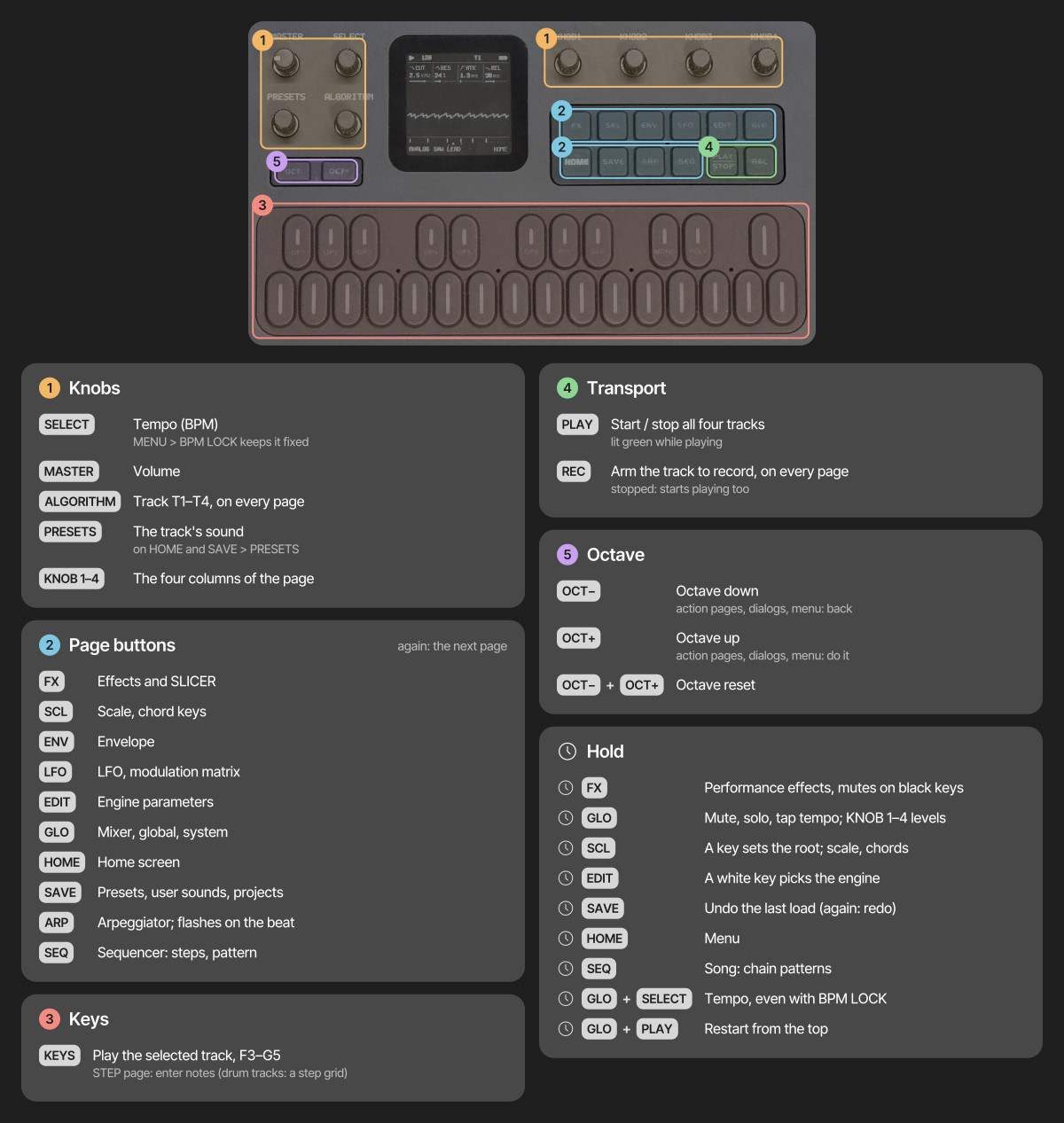
- Tap a page button for its page, again for the next; HOME returns home. Page buttons act when let go
- Hold FX, GLO, SCL, EDIT, REC or SEQ for its quick layer; hold SAVE to undo, HOME for the menu; hold LFO and turn a knob for a MOMENTARY change
- Double-tap a layer's button to keep its layer open without holding; tap it again to close
- On SEQ > STEP, hold a step and turn KNOB 1–4 to lock those parameters on that step (PRESETS: its NUDGE)
- On action pages and in dialogs, OCT+ does it and OCT− goes back; in the menu, OCT+ / OCT− change the value and HOME closes it
- Save a sound: stop, tap SAVE, pick a slot with KNOB 1, then OCT+ and OCT+ again (name it with the keys)
The pages by button:
| Button | Taps go round | Held |
|---|---|---|
| HOME | HOME, MIXER, CLOCK (BPM, swing, clock source) | the menu |
| SEQ | STEP (the piano roll, or the drum grid), DETAIL, AUTOMATION | SEQ TOOLS, on every page |
| GLO | SONG | the GLO layer (mutes, solos, levels, TAP tempo, D4: MIDI LEARN, E4: FILL) |
| SAVE | USER, PRESETS, PHRASES (the pattern loader), PROJECT, TOOLS | UNDO |
| LFO | LFO, LFO 2, LFO DEST, MOD | MOMENTARY (with a knob) |
| EDIT | EDIT 1, EDIT 2, VOICE, VOICE 2, VOICE 3 (FM6 adds OPERATOR, OP ENV, OPERATOR 2; DRUM LANES; SLICE SLICES; ANALOG FILTER) | the EDIT layer (the engines; on DRUM the black keys mute lanes) |
| FX, SCL, ENV, ARP | their pages (FX: INSERT and INSERT 2 after the SLICER) | FX and SCL: their layers |
| REC | arms the track | the REC layer (CLEAR, CLICK, COUNT-IN, CLICK LEVEL) |