YoComposite
A YoComposite is an abstract data structure composed of several YoVariables, for more information on YoVariables YoVariable wiki, which can represent a more complex type of data such as a 2D or 3D point.
A YoComposite is attributed a name and a pattern, following the example of a 3D point composite, the name would be Point3D and the pattern would be: x, y, and z. Using the pattern, SCS 2 can then search throughout all the control variables to retrieve any set of YoVariables that represents a Point3D, allowing then direct interaction with a point rather than its coordinates.
By default, SCS 2 defines a small set of predefined YoComposites that are:
- YoTuple2D representing any 2D points and vectors. It uses the following pattern: x, and y.
- YoTuple3D representing any 3D points and vectors. It uses the following pattern: x, y, z.
- YoQuaternion representing any unit-length quaternion. It uses the following pattern: qx, qy, qz, and qs.
- YoYawPitchRoll representing any orientation described as the yaw, pitch- and roll angles. It uses the following pattern: yaw, pitch, and roll.
The use of YoComposites instead of YoVariables when searching control variables greatly reduces the size of the search result.
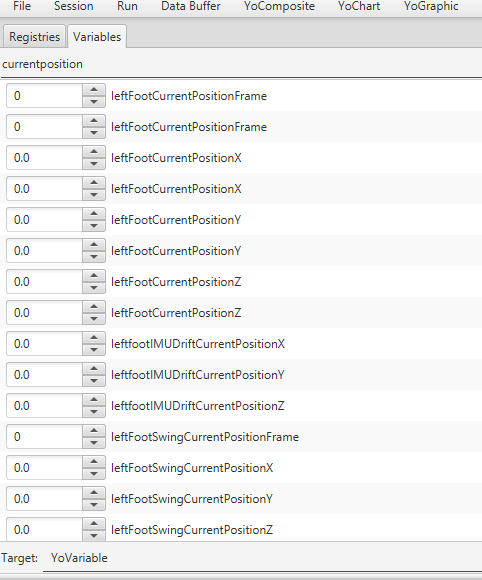
Search example when searching for YoVariables:
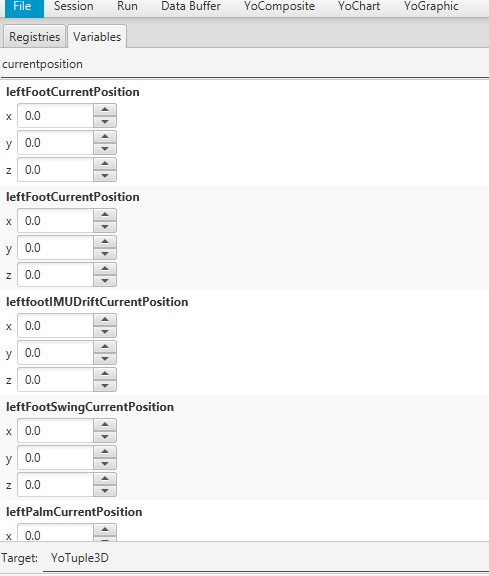
Same keywords but searching for YoTuple3Ds:
SCS 2 comes an editor for creating new YoComposites accessible from the menu:


Let's create a new YoComposite for the spine joints of Atlas. Start by clicking Add...:


