Releases: jamditis/audiobud
Release list
AudioBud v0.4.0

AudioBud 0.4.0 is the first code-signed Windows release. The setup executable, MSI, packaged application, and NSIS uninstaller are signed and timestamped through Microsoft Artifact Signing. The release job verified every signature before attaching the installers.
Highlights
- Signed Windows downloads. Release builds use passwordless GitHub OIDC authentication, a protected signing environment, and Microsoft Artifact Signing. The workflow verifies the outer installers and the application files inside both packages before upload (#129-#133).
- Local correction learning. AudioBud can recognize an immediate undo-and-retype correction and turn it into a deterministic learned replacement while rejecting edits that do not look like transcription corrections (#125, #134).
- Refined app and website. Navigation, controls, responsive layouts, accessibility details, and screenshots received a focused polish pass (#127).
- Verified publisher pages. The public site now includes privacy and terms pages on the verified
audiobud.amditis.techpublisher domain (#128). - Clock-time fix. Spoken times keep their opening punctuation when a meridiem resolves an otherwise ambiguous phrase (#113).
Install on Windows x64
Most people want AudioBud_0.4.0_x64-setup.exe. The .msi is available for managed deployment.
Both files are signed by Joseph Amditis and include trusted timestamps. SmartScreen can still show a reputation warning for a new signed release; signing verifies the publisher and detects modified files, but it does not guarantee an immediate reputation score.
Automatic update checks remain disabled until AudioBud has its own signed updater feed. Downloads and manual installs work normally.
What's changed
- #113 — Preserve opening punctuation in spoken clock times
- #125 and #134 — Capture and harden learned replacements
- #127 — Polish the app and public website
- #128 — Publish privacy, terms, and publisher-domain files
- #129 through #133 — Add and prove the signed Windows release pipeline
- #135 — Prepare the 0.4.0 release
Full changelog: v0.3.4...v0.4.0
AudioBud v0.3.4
A dictation-quality release. Spoken numbers now come through as digits and symbols instead of spelled out, you can switch the output mode from the tray without opening settings, and raw transcript mode gained the groundwork to interpret spoken punctuation.
Highlights
- Spoken numbers as digits. "twenty five dollars" becomes "$25", "ten percent" becomes "10%", "three point five" becomes "3.5". Offline and deterministic, runs for every engine with no API key, and errs toward leaving ambiguous text alone. On by default, with a toggle in Advanced settings (#111).
- Output-mode switch in the tray. Flip between Formatted and Raw transcript straight from the system tray; the tray and settings window stay in sync (#111).
- Raw mode reads spoken punctuation. "question mark" becomes "?", "new line" breaks the text, paired commands like "open paren" attach with correct spacing — and raw mode runs the number formatter too, so it becomes usable with no model in the loop. Off by default; the settings toggle to turn it on ships next (#66, #116).
Install (Windows x64)
Two installers are attached. Most people want AudioBud_0.3.4_x64-setup.exe (the NSIS installer); the .msi is there for managed/enterprise deployment. macOS and Linux code remains inherited and untested.
These builds are not yet code-signed, so Windows SmartScreen may warn on first run ("more info" → "run anyway"). Signing arrives in the next milestone.
What's Changed
- docs(roadmap): mark v0.3.3 as shipped by @jamditis in #110
- feat: format spoken numbers as digits and add tray output-mode switcher by @jamditis in #111
- Let raw transcript mode interpret spoken punctuation by @jamditis in #116
- chore(release): 0.3.4 — spoken number formatting and tray output switch by @jamditis in #118
Full Changelog: v0.3.3...v0.3.4
Contributors

Assets 4
AudioBud v0.3.3
AudioBud 0.3.3 is a naming release. Three releases after the fork, the app still introduced itself as Handy in three places, and 0.3.2 shipped before the fix was ready. If you have 0.3.2 installed, the tray tooltip you hover still reads "Handy v0.3.2" — this release is what corrects it.
The app calls itself AudioBud
The system tray tooltip read "Handy v0.3.2". It now names the product.
The fix is pinned to productName in tauri.conf.json rather than to a literal string, so the tooltip is checked against the app's own name on every build and cannot drift away from it again. That is the part worth having: the tooltip was wrong for three releases because nothing tied it to anything (#106).
audiobud --help had the same problem, announcing itself as "handy" and describing "Handy - Speech to Text" (#106).
Post-processing requests identify AudioBud
If you use a post-processing provider, every request AudioBud sent carried Referer, User-Agent, and X-Title headers naming Handy 1.0 and pointing at the upstream repository. Providers surface those headers in their dashboards and rankings, so this app's traffic was being credited to the project it forked from.
The headers now name AudioBud, link to this repository, and report the real build version rather than a frozen 1.0 (#106).
Install
Grab AudioBud_0.3.3_x64-setup.exe (installer) or AudioBud_0.3.3_x64_en-US.msi from the assets below. Windows x64 only. The build is not code-signed yet, so SmartScreen warns on first launch — choose More info → Run anyway. Full notes are in the changelog.
Known issues
- Parakeet, the default engine, sometimes repeats a letter inside an acronym — "NJ PBS" can transcribe as "NJPBBBBBBS". The number of repeats varies, so a word-replacement entry cannot catch it (#107).
- Parakeet also sometimes emits a word's first letter as a separate token before the word, so "file" comes out as "f file". Both of these are decoder faults rather than recognition faults, and both need a decode-time fix (#108).
- Whisper models can still fail to load from a folder whose path is not valid UTF-8. Parakeet is unaffected; the fault is in a library AudioBud depends on (#80).
- A few counts read awkwardly in some non-English languages — "seen 3 times" and the import warnings do not bend the word to the number in Russian, Ukrainian, or Arabic. Nothing falls back to English; the wording disagrees with the number (#100).
What's Changed
- ci: pin bun to an exact version so a REST outage cannot fail the build by @jamditis in #103
- docs(roadmap): mark v0.3.2 as shipped by @jamditis in #104
- fix: stop the app introducing itself as Handy by @jamditis in #106
- chore(release): bump version to 0.3.3 by @jamditis in #109
Full Changelog: v0.3.2...v0.3.3
Contributors
Assets 4
AudioBud v0.3.2
AudioBud 0.3.2 is a translation release. AudioBud ships 19 languages besides English, and about a fifth of the interface showed English in every one of them. If you dictate in English, the one thing you will notice is a counter that no longer reads "1 learned words".
The other 19 languages are complete
Roughly a fifth of the app fell back to English in every non-English language — the settings pages, the dictionary, and the overlay. Those strings were added after the translations were inherited and never caught up. All 2,033 of them are filled in.
The check that compares each language against English now fails the build instead of only warning, so a new English string can no longer ship without its translations (#88).
AudioBud calls itself AudioBud
In all 19 non-English languages, the app called itself Handy — in text it showed you about your own dictation. The name is now correct in each of them, including where the language attaches word endings to it, as Turkish does (#95).
The learned-words counter agrees with its count
The counter read "1 learned words" in English. It now matches the number in every language, including the ones that need more than a singular and a plural — Russian, Polish, Ukrainian, Czech, Arabic, and Hebrew (#96).
The MSI carries the license notices
The MSI package now installs the third-party license notices alongside the app, matching what the setup wizard already installed (#70).
Install
Grab AudioBud_0.3.2_x64-setup.exe (installer) or AudioBud_0.3.2_x64_en-US.msi from the assets below. Windows x64 only. The build is not code-signed yet, so SmartScreen warns on first launch — choose More info → Run anyway. Full notes are in the changelog.
Known issues
- Whisper models can still fail to load from a folder whose path is not valid UTF-8. The default engine, Parakeet, is unaffected; the fault is in a library AudioBud depends on (#80).
- A few counts still read awkwardly in some non-English languages — "seen 3 times" and the import warnings do not bend the word to the number in Russian, Ukrainian, or Arabic. Nothing falls back to English; the wording disagrees with the number (#100).
What's changed
- docs: stop hardcoding the release version on the site and README by @jamditis in #92
- fix: ship the third-party license notices in the MSI (#70) by @jamditis in #93
- fix(i18n): call the app AudioBud in the 19 inherited locales by @jamditis in #95
- fix(i18n): complete all 19 locales and make the CI parity check blocking by @jamditis in #98
- fix(i18n): make the learned-words counter agree with its count by @jamditis in #99
- chore(release): bump version to 0.3.2 by @jamditis in #101
Full Changelog: v0.3.1...v0.3.2
Contributors
Assets 4
AudioBud v0.3.1
AudioBud 0.3.1 is a stability patch for the default setup. Four bugs in this release could lose your work or stop dictation outright.
Dictation works on non-English Windows accounts
If your Windows user folder contained a non-English character, AudioBud never started transcribing at all — the default engine failed to load its voice-detection model, so a fresh install just quietly did nothing. It now works normally on those accounts (#56).
Your history and clipboard survive
Changing a history setting no longer deletes recordings you had not saved. Cleanup waits until a new entry is saved, rather than firing the moment you touch the limit or the retention window (#55).
Pasting a transcript no longer destroys what was already on your clipboard. AudioBud puts back what you had — copied files, images, and formatted text, not just plain text — after it pastes (#57).
A stuck engine can't hang the window
A transcription engine that stopped responding used to take the app with it. Transcription now runs under a watchdog that gives up, tells you it timed out, and hands you back a working window (#58).
Install
Grab AudioBud_0.3.1_x64-setup.exe (installer) or AudioBud_0.3.1_x64_en-US.msi from the assets below. Windows x64 only. The build is not code-signed yet, so SmartScreen warns on first launch — choose More info → Run anyway. Full notes are in the changelog.
Known issues
- The non-English path fix covers Parakeet, the default engine. Whisper models can still fail to load from a folder whose path is not valid UTF-8 — the fault is in a library AudioBud depends on (#80).
- About a fifth of the interface still shows English in the other 19 languages AudioBud ships. The translations cover the app as it was at the fork point; text added since then falls back to English (#88).
- The MSI package does not carry the third-party license notices yet; the setup installer does (#70).
What's changed
- docs(roadmap): mark v0.3.0 as shipped by @jamditis in #64
- Bundle DirectML.dll in the NSIS installer for parity with the MSI (#44) by @jamditis in #68
- Add third-party license notices for the bundled Windows runtime DLLs by @jamditis in #69
- Add a preflight system-requirements decision core (#51) by @jamditis in #71
- Add the preflight facts adapter for #51 by @jamditis in #73
- Add the voice-command grammar core for cursor control (#7) by @jamditis in #74
- chore: clear clippy warnings in audio_toolkit, portable, and clamshell (partial #78) by @jamditis in #82
- fix: watchdog the transcribe call so a wedged engine can't hang the UI by @jamditis in #84
- fix: stop history settings changes from destroying unsaved recordings by @jamditis in #86
- fix: preserve non-text clipboard contents across the paste round-trip by @jamditis in #85
- fix: keep the VAD model path as a Path through the engine handoff by @jamditis in #87
- chore(release): bump version to 0.3.1 by @jamditis in #89
Full Changelog: v0.3.0...v0.3.1
Contributors
Assets 4
AudioBud v0.3.0
AudioBud 0.3.0 adds opt-in, on-device personalization on top of the 0.2.0 Windows release.
Personalization (opt-in, on-device)
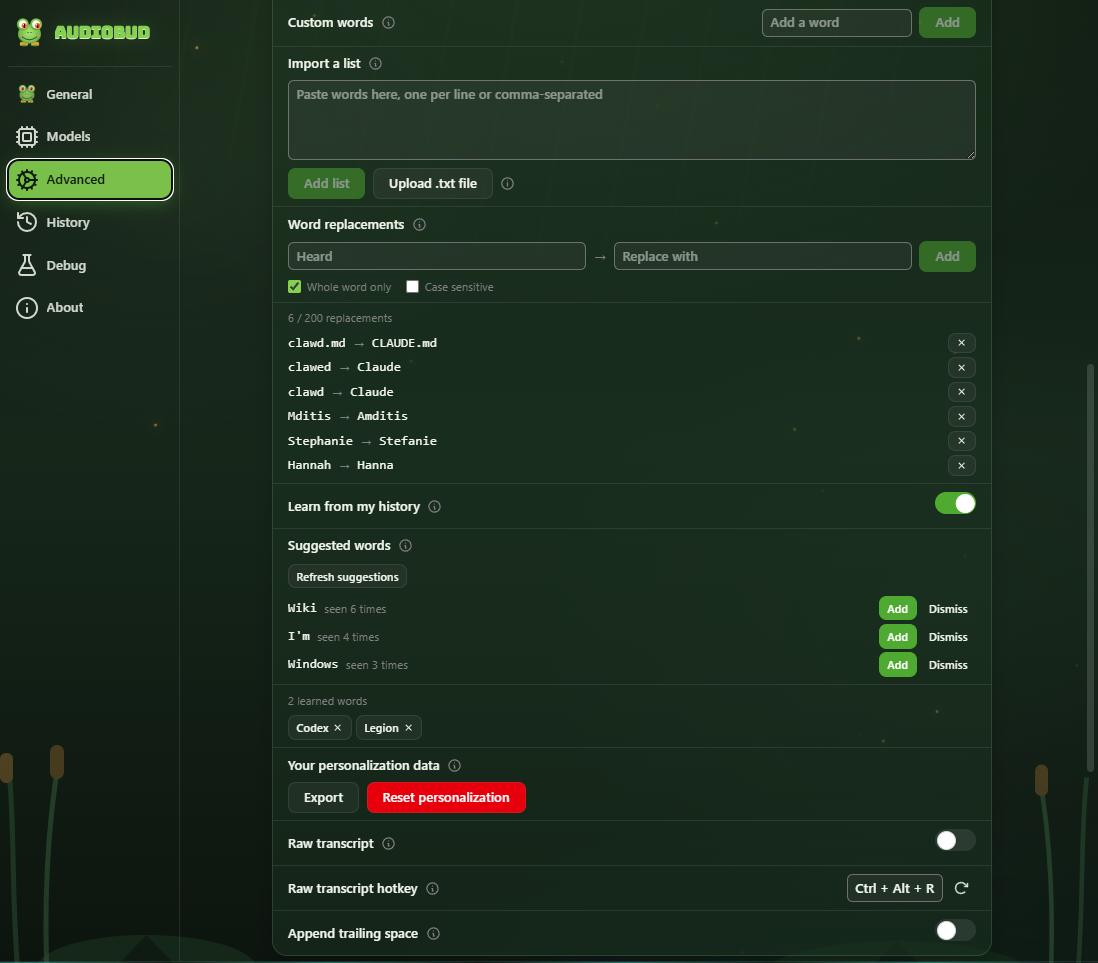
Turn on Learn from my history on the Advanced tab and AudioBud mines your own past transcriptions for the words you use most, offers them as suggestions, and applies the ones you accept to later dictations. Everything stays on your machine, and the feature is off until you enable it. You can view, export, or reset everything it has learned at any time — even while the feature is turned off.
Install
Grab AudioBud_0.3.0_x64-setup.exe (installer) or AudioBud_0.3.0_x64_en-US.msi from the assets below. Windows x64 only. The build is not code-signed yet, so SmartScreen warns on first launch — choose More info → Run anyway. Full notes are in the changelog.
What's changed
- feat(personalization): opt-in, on-device learnable dictionary (#16 Tier 1) by @jamditis in #52
- Roadmap: milestones, public roadmap page, and changelog hygiene by @jamditis in #60
- Harden personalization: Rust-side export dialog (#54) and data access while off (#53) by @jamditis in #61
- chore(release): bump version to 0.3.0 by @jamditis in #62
Full Changelog: v0.2.0...v0.3.0
Contributors
Assets 4
AudioBud v0.2.0
AudioBud is local-first dictation for Windows. Press a hotkey, speak, and your words paste into whatever text field already has focus. Transcription runs on your machine and audio is never uploaded.
What's new in v0.2.0
This release focuses on the install experience, the recording overlay, and the custom dictionary.
Installer and first launch
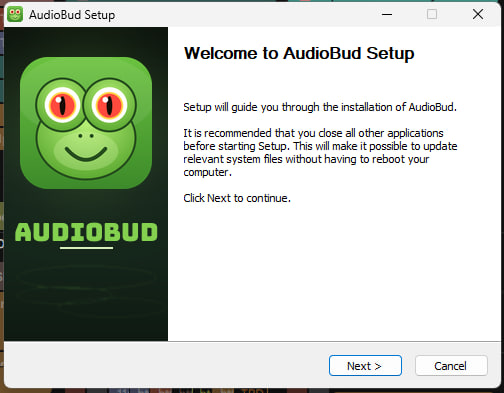
- A frog-themed install wizard that matches AudioBud's identity (#13)
- Portable install mode: run from a self-contained folder with no registry changes (#3)
- Launches on a clean machine: the installers now bundle the VC++ runtime and the Vulkan loader, so AudioBud starts without any prerequisites (#36)
Recording overlay and tray
- Reposition the floating overlay anywhere on screen (#9)
- More overlay and tray controls, including quick-toggles for push-to-talk, mute, and trailing space (#12)
- An optional "RAW" indicator on the overlay when raw mode is active (#24)
Custom dictionary and text cleanup
- A clearer dictionary with pronunciation and correction controls (#10)
- Precision improvements and fine-tuning for custom words and replacements (#18, #47)
Stability
- Fixed a startup crash from the updater plugin; updater registration is now gated on a configured feed (#32, #33)
Models
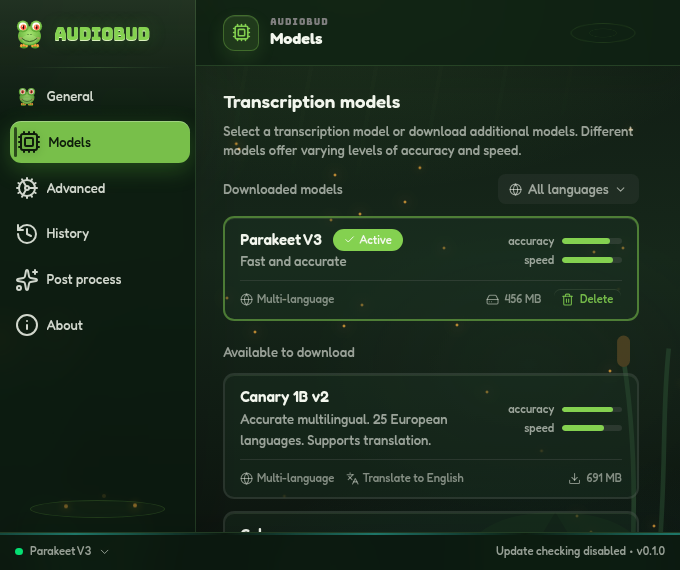
Parakeet V3 is the default: fast multilingual transcription, DirectML-accelerated. Whisper (small, medium, turbo, large) is available for broad language coverage and translation, alongside Moonshine, SenseVoice, GigaAM, Canary, and Cohere. Every engine downloads from the Models screen and runs offline.
Install
- Download AudioBud_0.2.0_x64-setup.exe below and run it.
- Windows SmartScreen warns on first launch because the installer is not code-signed yet. Choose More info, then Run anyway.
- Want no install? Run the same setup and pick Portable in the wizard. For managed deployments, use the .msi instead.
Requires Windows 10 or 11 (x64).
Known limitations
- The installer is not code-signed yet, so SmartScreen warns on first launch.
- Windows x64 only for now. The macOS and Linux code is inherited from Handy but not yet validated in this fork.
- No in-app auto-update yet.
Full changelog
AudioBud is a detached fork of Handy by CJ Pais. MIT licensed.
AudioBud 0.1.0 (milestone A)

AudioBud's first working local prototype, forked from Handy 0.8.3. Press a hotkey, speak, and your words land in whatever text field has focus. Transcription runs on your own machine; no audio leaves it.
Install (Windows)
Download the .exe installer below and run it. The build is not code-signed yet, so Windows SmartScreen shows a warning on first launch: choose More info, then Run anyway. Code signing arrives in milestone B.
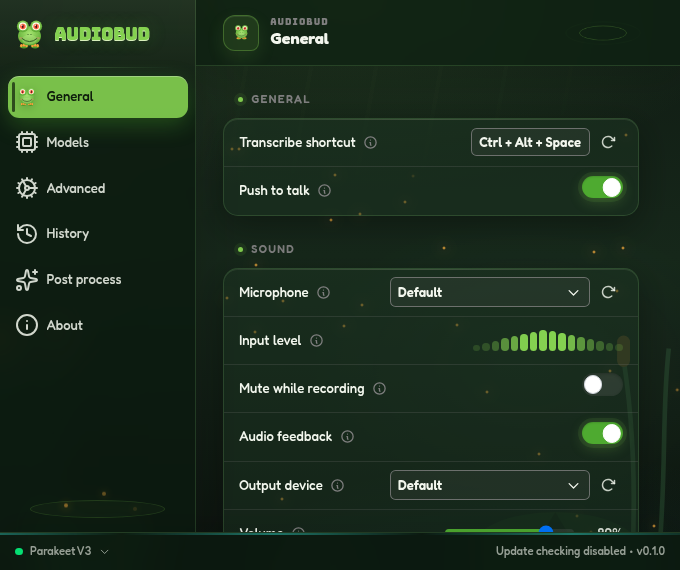
On first run, AudioBud opens onboarding, where you pick a model and download it. Grant microphone permission when prompted. The default hotkey is Ctrl+Alt+Space; the default engine on Windows is Parakeet V3.
Prefer to build it yourself? See build from source.
What's in it
- Local transcription with Silero VAD silence trimming. A choice of engines: Parakeet (ONNX/DirectML, the Windows default) and Whisper (whisper.cpp/Vulkan), plus Moonshine, SenseVoice, GigaAM, Canary, and Cohere, each downloadable from inside the app.
- Push-to-talk or toggle, a configurable global hotkey, and an optional auto-submit key.
- Optional LLM post-processing through a provider of your choice (off by default; your API key stays on your machine).
- Custom-words
.txtimport, transcription history with retention controls, a live input meter and output test, GPU/accelerator selection, and tray, autostart, and command-line flags. - A frog and swamp visual identity, with a frog whose throat scales to your live microphone level.
Known limitations
- Only Windows (x64) is validated. The macOS and Linux code is inherited from Handy and has not been tested here.
- The installer is not code-signed yet (SmartScreen warning, above).
- Automatic update checks are disabled; they return once the updater is repointed to AudioBud's own signed feed in milestone B.
Full notes in the changelog.
AudioBud is a detached fork of Handy by CJ Pais, MIT licensed.