
Every Grok session — one living command center.
An unofficial, local-first dashboard for Grok Build: watch active agents, control sessions over ACP, inspect Git changes, and move through your complete local history without leaving the browser.






Watch the 24-second product tour · See what’s new in v0.8.1 · Quickstart · What it does · Architecture · Security
Note
Grok UI is an independent community project. It is not affiliated with or endorsed by xAI.
|
◉ A runtime that tells the truth Active agents come from Grok’s real process registry. Turns, phases, reasoning, responses, tools, context, and cost updates flow into the dashboard over one live event stream. |
⌘ Native session control Create, resume, prompt, approve, and cancel Grok sessions through the Agent Client Protocol. Permission choices are rendered exactly as Grok provides them—never guessed or auto-approved. |
|
◇ One Session Console per agent Open any recorded CLI session or managed lane in a clearly labeled Session Console to chat with the agent, review its activity, inspect changes, manage permissions, and send follow-ups. Managed sessions survive dashboard restarts. |
↗ Git changes as they happen The selected repository is watched live. Staged, unstaged, and untracked files update automatically, with bounded diffs and no manual refresh required. |
|
⌁ Cross-session workflow command field Grok Build v0.2.112+ workflow updates become one live run field: phase progression, per-agent token usage, models, duration, budget use, failures, results, and safe Pause, Resume, or Stop controls. Searchable, paginated rosters stay usable as a workflow scales. Failed runs expose recovery only when Grok reports that the current process can resume them. |
|
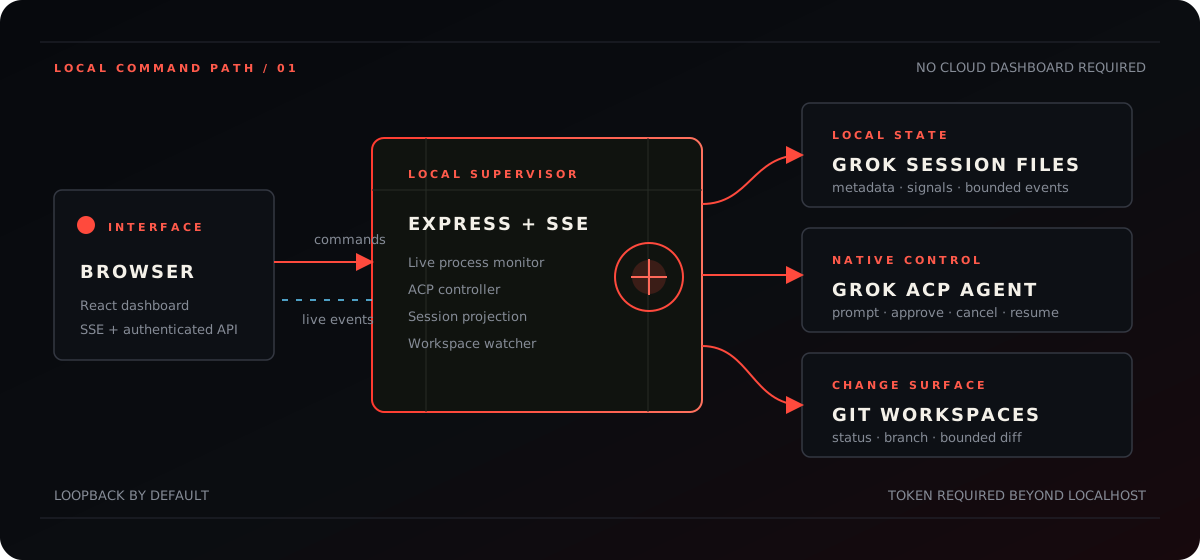
Grok UI runs as one local Express supervisor. The browser receives runtime, control, dashboard, and workspace events over SSE; commands return through authenticated API routes. Grok credentials never enter the browser.
- Node.js 22 or newer
- A working
grokinstallation - Grok Build account access
The packaged release checks its environment, starts the local server, and opens the dashboard:
npx --yes grok-uiRun diagnostics without starting the dashboard:
npx --yes grok-ui doctorgit clone https://github.com/joeynyc/Grok-UI.git
cd Grok-UI
npm ci
npm run doctor
npm startnpm start creates the production build automatically when it is missing.
For file-watching development, use npm run dev.
The first launch opens a live setup diagnostic that distinguishes a missing CLI, an unauthenticated account, and a profile that simply has not created its first session yet. Machine-specific paths are never included in those checks.
| Option | Purpose |
|---|---|
doctor |
Check Node, Grok CLI, authentication, and local state |
--port <number> |
Override port 4310 |
--host <address> |
Override the loopback bind address |
--grok-home <path> |
Use a specific Grok state directory |
--state-dir <path> |
Use a specific private Grok UI state directory |
--no-open |
Start without opening a browser |
--version |
Print the installed Grok UI version |
Start grok in any workspace and the session appears as soon as its live
process registers. The runtime view projects:
- agent state: working, waiting, idle, or needs input
- current phase and active tool
- structured user, assistant, reasoning, plan, and tool events
- turns, tool calls, context usage, and reported cost
- process identity and workspace
Process liveness is rechecked continuously, so “live now” means an open Grok process—not a recently modified history file.
Grok UI supervises grok agent --no-leader stdio and communicates through
the official Agent Client Protocol.
It supports new sessions, session/load, prompts, permission requests,
confirmed cancellation, and independently running managed lanes. Stop also
cancels pending permissions, preserves final tool updates, surfaces a retry when
Grok does not confirm, and leaves the lane ready to resume. Rename and archive
actions are local Grok UI overlays; Grok’s own session files are never rewritten.
The Runs view listens for Grok’s structured workflow_updated notifications on
UI-managed ACP sessions and aggregates them across the command field. Each run
can show:
- current status, objective, phase progression, and latest event
- per-agent state, phase, model, duration, and token usage
- active, used, reserved, and total agent allocation
- derived run-wide token totals with explicit incomplete-usage states
- pause context and final result summary
- Pause, Resume, and Stop controls when the run state supports them
Controls use Grok’s documented /workflow pause|resume|stop <display-name>
commands and accept only validated display handles. Persisted snapshots remain
visible after a dashboard restart, but their controls are disabled because Grok
only resumes failed or paused workflows inside the process that owns them.
Grok UI intentionally does not scrape the terminal dashboard or imply visibility into historical CLI-only workflow runs. A run appears after a UI-managed session emits its first workflow update.
Two complete visual systems ship with the dashboard:
- Operator — carbon black, signal lime, and a precision HUD grid
- Event Horizon — deep-space red, cold starlight, and glass command surfaces
Theme selection stays in local browser storage and never changes session data.
- The server binds to the loopback interface by default.
- Non-loopback binding requires
GROK_UI_TOKEN. - Grok credentials never pass through the browser.
- Persistent Privacy Mode replaces visible session names, paths, identifiers, event content, and file names with stable presentation-safe aliases.
- Privacy Mode protects recordings and screen shares; it is not an access-control boundary. Authorized browser clients can still receive the underlying local data.
- Authentication cookies are
HttpOnlyandSameSite=Strict. - API responses are non-cacheable and include restrictive security headers.
- Raw system prompts and durable-memory bodies are not indexed.
- File, diff, and event reads are bounded.
- Diff access is restricted to workspaces associated with known sessions.
- Grok UI contains no analytics or product telemetry.
- Repository screenshots and diagrams use sanitized demo data only.
For remote use, set a long random token, place TLS or a private tunnel in front of the server, and bind only to the interface you intend to expose:
HOST='<bind-address>' \
GROK_UI_TOKEN='<long-random-token>' \
npm start
See SECURITY.md for the full deployment and reporting guidance.
| Variable | Default | Purpose |
|---|---|---|
HOST |
loopback | API bind interface |
PORT |
4310 |
API port |
GROK_HOME |
~/.grok |
Grok state directory |
GROK_BIN |
grok |
Grok executable used by the ACP controller |
GROK_UI_TOKEN |
empty | Required for non-loopback binding |
GROK_UI_STATE_DIR |
~/.grok-ui |
Private annotations and managed-session state |
npm run dev       # Run API and Vite with file watching
npm run doctor    # Check Node, Grok CLI, authentication, and local state
npm run setup     # Run preflight checks and create a production build
npm run check     # Type-check client and server
npm test          # Run unit and integration tests
npm run test:e2e  # Run production browser onboarding and control tests
npm run build     # Produce client and server builds
npm run verify    # Check, test, and build
npm run release:check # Audit the exact package contents
npm run test:package  # Install and launch the packed artifact in isolation
npm start         # Build when needed, then serve the production app
npm run serve # Serve an existing production build without rebuildingserver/
grok-controller.ts ACP lifecycle, prompts, approvals, cancellation
workflow-state.ts workflow notification projection and safe controls
live-monitor.ts active process and runtime event projection
grok-store.ts historical metadata aggregation
session-reader.ts bounded conversation and tool timeline
session-state.ts durable managed lanes and local annotations
workspace-inspector.ts live Git status and bounded diff inspection
security.ts local and remote access gate
src/
views/ControlView.tsx command deck and approval queue
views/WorkflowsView.tsx cross-session workflow command field
views/ChangesView.tsx live repository change workbench
views/SessionWorkbench.tsx
session timeline and operations
App.tsx dashboard shell and event-stream client
The longer design and trust-boundary notes live in docs/architecture.md.
Grok UI is a release-candidate community project. Its monitor, control, workbench, and Git inspection paths are functional and covered by automated tests. The distributable package is also installed and launched in isolation on macOS and Linux CI before release. Grok Build and ACP evolve quickly, so compatibility fixes may be needed for future releases.
MIT — see LICENSE.