Command Syntax
FXCommands supports several ways to structure commands, from simple single commands to multi-step delayed sequences.
Enter any command exactly as you would type it in the FiveM/RedM console (F8).
e wave
me waves hello
The command is sent directly to the game client - no prefix or special formatting needed.
Tip: If a command doesn't work through FXCommands, try it in the in-game console first (
F8). If it doesn't work there either, the issue is with the command itself, not the plugin.
Use a single semicolon to run multiple commands in one button press with no delay between them.
e sit;me relaxes on the ground
This sends the entire string to FiveM, which processes both commands sequentially in a single console submission.
Rules:
- Do not add spaces around the
; - All chained commands execute almost simultaneously
- This is a native FiveM/RedM feature - the plugin simply passes the string through
Add pauses between commands using delay syntax. Unlike chained commands, delayed commands are split and sent separately by the plugin with a timed wait in between.
A double semicolon inserts a 500ms delay.
me sits down;;me stands back up
Sends me sits down, waits 500ms, then sends me stands back up.
Specify an exact delay in milliseconds.
me sits;{500ms};me stands up
e think;me thinking;{2000ms};e c
The second example: triggers the think emote, sends a /me, waits 2 seconds, then cancels the emote.
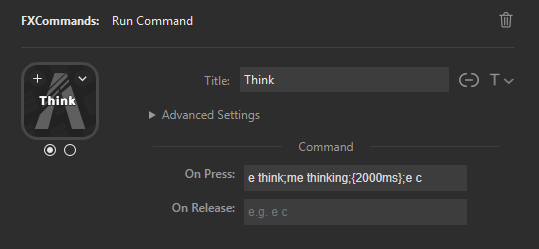
You can mix single ; chains with delays in the same command:
e sit;me relaxes;{3000ms};e c;me gets up
This sends e sit;me relaxes (chained, no delay), waits 3 seconds, then sends e c;me gets up (chained).
| Syntax | Meaning | Example |
|---|---|---|
command |
Single command | e wave |
cmd1;cmd2 |
Chain (no delay) | e sit;me relaxes |
cmd1;;cmd2 |
500ms delay | me sits;;me stands |
cmd1;{NNNms};cmd2 |
Custom delay | e think;{2000ms};e c |
Stages let a single button cycle through different commands with each press.
- Set Number of States (1-5) in the button's Advanced Options
- Configure commands for each stage (each has its own On Press / On Release)
- Each press executes the current stage's command, then advances to the next
- After the last stage, it wraps back to Stage 0
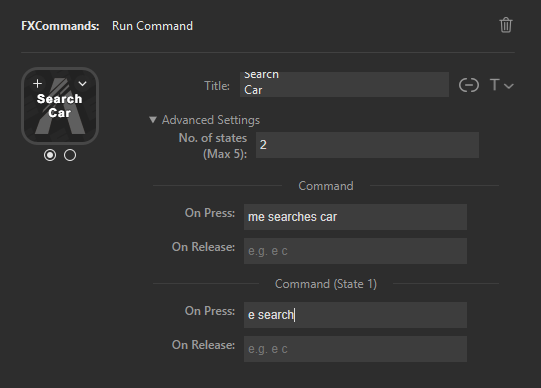
- The stage advances on key release (not key press)
- The button icon updates to reflect the current stage
- Stage state persists - the button remembers which stage it's on

Each stage's command field supports the full syntax - chains, delays, or both:
Stage 0: e sit;me sits down
Stage 1: e c;{500ms};me stretches
| Mistake | Problem | Fix |
|---|---|---|
{500} |
Missing ms suffix |
{500ms} |
cmd1 ; cmd2 |
Spaces around ;
|
cmd1;cmd2 |
;; at the start |
Leading delay with no command before it | Start with a command |
Using ;; instead of ;
|
Unintended 500ms delay | Use single ; for chaining |
- Examples - Real-world button configurations
- Getting Started - First button setup
- Troubleshooting Guide - Fixing command issues