Examples
Ready-to-use button configurations for common FiveM/RedM scenarios. Copy the command strings directly into your button settings.
Note: Some commands depend on your server's framework and installed resources. Test commands in the in-game console (
F8) first to confirm they work on your server.
| Field | Command |
|---|---|
| On Press | e wave |
| Field | Command |
|---|---|
| On Press | me waves hello to everyone |
| Field | Command |
|---|---|
| On Press | e sit;me relaxes on the ground |
Both commands fire together - the emote plays and the /me text appears simultaneously.
| Field | Command |
|---|---|
| On Press | e clipboard;me checks their notes |
| Field | Command |
|---|---|
| On Press | e think;me thinking carefully;{2000ms};e c |
Plays the think emote, shows /me text, waits 2 seconds, then cancels the emote automatically.
| Field | Command |
|---|---|
| On Press | me reaches into bag;;me pulls out a radio |
Sends the first /me, waits 500ms, then sends the second.
| Field | Command |
|---|---|
| On Press | me looks around nervously;{1500ms};me starts running;{1000ms};e run |
Three actions spaced out over 2.5 seconds total.
Set Number of States to 2.
| Stage | On Press |
|---|---|
| 0 | e sit |
| 1 | e c |
Press once to sit, press again to cancel (stand up).

Set Number of States to 2.
| Stage | On Press |
|---|---|
| 0 | e radio |
| 1 | e c |
Set Number of States to 2.
| Stage | On Press |
|---|---|
| 0 | e handsup |
| 1 | e c |
Set Number of States to 3.
| Stage | On Press |
|---|---|
| 0 | me opens the hood |
| 1 | e mechanic;me inspects the engine |
| 2 | e c;me closes the hood |
Three presses to walk through the full inspection.
Set Number of States to 4.
| Stage | On Press |
|---|---|
| 0 | me begins patrol |
| 1 | e clipboard;me checks the area |
| 2 | e radio;me reports all clear |
| 3 | e c;me resumes patrol |
| Field | Command |
|---|---|
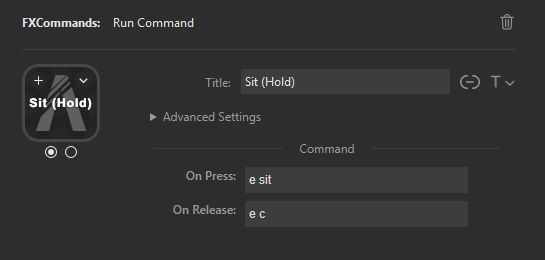
| On Press | e sit |
| On Release | e c |
Hold the button to sit, release to stand. No stages needed - uses a single state with both fields.
| Field | Command |
|---|---|
| On Press | e aim |
| On Release | e c |
Set Number of States to 2.
| Stage | On Press |
|---|---|
| 0 | e sit;me sits down;{2000ms};me gets comfortable |
| 1 | e c;me stands back up |
Stage 0 uses a delayed sequence, Stage 1 uses a simple chain.
| Field | Command |
|---|---|
| On Press | e guitar;me starts playing a song |
| On Release | e c;me puts the guitar away |
- Start simple - get a single command working before adding chains or delays
-
Test in console - always verify commands work in-game (
F8) before configuring buttons - Use stages for toggles - 2 stages is the most common setup (on/off)
- Use delays for RP - spaced-out /me messages read more naturally than instant ones
- Label your buttons - set a custom title in Stream Deck so you remember what each button does
- Command Syntax - Full syntax reference
- Getting Started - First button setup
- Troubleshooting Guide - Fix common issues