Examples
Disclaimer: The examples are maintained by the community and are not thoroughly tested
- Opening files
- Changing directory
- Searching file contents
- Command history
- Processes
- Git
- Tags
- tmux
- homebrew
- v
- cd
- z
- Shell bookmarks
- Google Chrome (OS X/linux)
- Browsing
- Locate
- mpd
- Readline
- RVM
- Vagrant
- Wrapper
- LastPass CLI
- fzf-marker
# fe [FUZZY PATTERN] - Open the selected file with the default editor
#   - Bypass fuzzy finder if there's only one match (--select-1)
#   - Exit if there's no match (--exit-0)
fe() {
  local files
  IFS=$'\n' files=($(fzf-tmux --query="$1" --multi --select-1 --exit-0))
  [[ -n "$files" ]] && ${EDITOR:-vim} "${files[@]}"
}

# Modified version where you can press
#   - CTRL-O to open with `open` command,
#   - CTRL-E or Enter key to open with the $EDITOR
fo() {
  local out file key
  IFS=$'\n' out=($(fzf-tmux --query="$1" --exit-0 --expect=ctrl-o,ctrl-e))
  key=$(head -1 <<< "$out")
  file=$(head -2 <<< "$out" | tail -1)
  if [ -n "$file" ]; then
    [ "$key" = ctrl-o ] && open "$file" || ${EDITOR:-vim} "$file"
  fi
}
# vf - fuzzy open with vim from anywhere
# ex: vf word1 word2 ... (even part of a file name)
# zsh autoload function
vf() {
local files
files=(${(f)"$(locate -Ai -0 $@ | grep -z -vE '~$' | fzf --read0 -0 -1 -m)"})
if [[ -n $files ]]
then
vim -- $files
print -l $files[1]
fi
}# fuzzy grep open via ag
vg() {
local file
file="$(ag --nobreak --noheading $@ | fzf -0 -1 | awk -F: '{print $1 " +" $2}')"
if [[ -n $file ]]
then
vim $file
fi
}# fd - cd to selected directory
fd() {
local dir
dir=$(find ${1:-.} -path '*/\.*' -prune \
-o -type d -print 2> /dev/null | fzf +m) &&
cd "$dir"
}# Another fd - cd into the selected directory
# This one differs from the above, by only showing the sub directories and not
# showing the directories within those.
fd() {
DIR=`find * -maxdepth 0 -type d -print 2> /dev/null | fzf-tmux` \
&& cd "$DIR"
}# fda - including hidden directories
fda() {
local dir
dir=$(find ${1:-.} -type d 2> /dev/null | fzf +m) && cd "$dir"
}# fdr - cd to selected parent directory
fdr() {
local declare dirs=()
get_parent_dirs() {
if [[ -d "${1}" ]]; then dirs+=("$1"); else return; fi
if [[ "${1}" == '/' ]]; then
for _dir in "${dirs[@]}"; do echo $_dir; done
else
get_parent_dirs $(dirname "$1")
fi
}
local DIR=$(get_parent_dirs $(realpath "${1:-$PWD}") | fzf-tmux --tac)
cd "$DIR"
}# cf - fuzzy cd from anywhere
# ex: cf word1 word2 ... (even part of a file name)
# zsh autoload function
cf() {
local file
file="$(locate -Ai -0 $@ | grep -z -vE '~$' | fzf --read0 -0 -1)"
if [[ -n $file ]]
then
if [[ -d $file ]]
then
cd -- $file
else
cd -- ${file:h}
fi
fi
}Suggested by @harelba and @dimonomid:
# cdf - cd into the directory of the selected file
cdf() {
   local file
   local dir
   file=$(fzf +m -q "$1") && dir=$(dirname "$file") && cd "$dir"
}
# Another CTRL-T script to select a directory and paste it into line
__fzf_select_dir ()
{
builtin typeset READLINE_LINE_NEW="$(
command find -L . \( -path '*/\.*' -o -fstype dev -o -fstype proc \) \
-prune \
-o -type f -print \
-o -type d -print \
-o -type l -print 2>/dev/null \
| command sed 1d \
| command cut -b3- \
| env fzf -m
)"
if
[[ -n $READLINE_LINE_NEW ]]
then
builtin bind '"\er": redraw-current-line'
builtin bind '"\e^": magic-space'
READLINE_LINE=${READLINE_LINE:+${READLINE_LINE:0:READLINE_POINT}}${READLINE_LINE_NEW}${READLINE_LINE:+${READLINE_LINE:READLINE_POINT}}
READLINE_POINT=$(( READLINE_POINT + ${#READLINE_LINE_NEW} ))
else
builtin bind '"\er":'
builtin bind '"\e^":'
fi
}
builtin bind -x '"\C-x1": __fzf_select_dir'
builtin bind '"\C-t": "\C-x1\e^\er"'Fuzzy cd for fish shell: https://gist.github.com/rumpelsepp/b1b416f52d6790de1aee
grep --line-buffered --color=never -r "" * | fzf

# with ag - respects .agignore and .gitignore
ag --nobreak --nonumbers --noheading . | fzf# fh - repeat history
fh() {
eval $( ([ -n "$ZSH_NAME" ] && fc -l 1 || history) | fzf +s --tac | sed 's/ *[0-9]* *//')
}# fh - repeat history
fh() {
print -z $( ([ -n "$ZSH_NAME" ] && fc -l 1 || history) | fzf +s --tac | sed 's/ *[0-9]* *//')
}Replacing eval with print -z will push the arguments onto the editing buffer stack, allowing you to edit the command before running it. It also means the command you run will appear in your history rather than just fh. Unfortunately this only works for zsh. See below for solutions working with Bash.
These have been tested in bash.
# fh - repeat history
runcmd (){ perl -e 'ioctl STDOUT, 0x5412, $_ for split //, <>' ; }

fh() {
  ([ -n "$ZSH_NAME" ] && fc -l 1 || history) | fzf +s --tac | sed -re 's/^\s*[0-9]+\s*//' | runcmd
}

# fhe - repeat history edit
writecmd (){ perl -e 'ioctl STDOUT, 0x5412, $_ for split //, do{ chomp($_ = <>); $_ }' ; }

fhe() {
  ([ -n "$ZSH_NAME" ] && fc -l 1 || history) | fzf +s --tac | sed -re 's/^\s*[0-9]+\s*//' | writecmd
}
# Another CTRL-R script to insert the selected command from history into the command line/region
__fzf_history ()
{
builtin history -a;
builtin history -c;
builtin history -r;
builtin typeset \
READLINE_LINE_NEW="$(
HISTTIMEFORMAT= builtin history |
command fzf +s --tac +m -n2..,.. --tiebreak=index --toggle-sort=ctrl-r |
command sed '
/^ *[0-9]/ {
s/ *\([0-9]*\) .*/!\1/;
b end;
};
d;
: end
'
)";
if
[[ -n $READLINE_LINE_NEW ]]
then
builtin bind '"\er": redraw-current-line'
builtin bind '"\e^": magic-space'
READLINE_LINE=${READLINE_LINE:+${READLINE_LINE:0:READLINE_POINT}}${READLINE_LINE_NEW}${READLINE_LINE:+${READLINE_LINE:READLINE_POINT}}
READLINE_POINT=$(( READLINE_POINT + ${#READLINE_LINE_NEW} ))
else
builtin bind '"\er":'
builtin bind '"\e^":'
fi
}
builtin set -o histexpand;
builtin bind -x '"\C-x1": __fzf_history';
builtin bind '"\C-r": "\C-x1\e^\er"'# re-wrote the script above
bind '"\C-r": "\C-x1\e^\er"'
bind -x '"\C-x1": __fzf_history';
__fzf_history ()
{
__ehc $(history | fzf --tac --tiebreak=index | perl -ne 'm/^\s*([0-9]+)/ and print "!$1"')
}
__ehc()
{
if
[[ -n $1 ]]
then
bind '"\er": redraw-current-line'
bind '"\e^": magic-space'
READLINE_LINE=${READLINE_LINE:+${READLINE_LINE:0:READLINE_POINT}}${1}${READLINE_LINE:+${READLINE_LINE:READLINE_POINT}}
READLINE_POINT=$(( READLINE_POINT + ${#1} ))
else
bind '"\er":'
bind '"\e^":'
fi
}# fkill - kill process
fkill() {
local pid
pid=$(ps -ef | sed 1d | fzf -m | awk '{print $2}')
if [ "x$pid" != "x" ]
then
echo $pid | xargs kill -${1:-9}
fi
}# fbr - checkout git branch
fbr() {
local branches branch
branches=$(git branch -vv) &&
branch=$(echo "$branches" | fzf +m) &&
git checkout $(echo "$branch" | awk '{print $1}' | sed "s/.* //")
}
# fbr - checkout git branch (including remote branches)
fbr() {
local branches branch
branches=$(git branch --all | grep -v HEAD) &&
branch=$(echo "$branches" |
fzf-tmux -d $(( 2 + $(wc -l <<< "$branches") )) +m) &&
git checkout $(echo "$branch" | sed "s/.* //" | sed "s#remotes/[^/]*/##")
}
# fbr - checkout git branch (including remote branches), sorted by most recent commit, limit 30 last branches
fbr() {
local branches branch
branches=$(git for-each-ref --count=30 --sort=-committerdate refs/heads/ --format="%(refname:short)") &&
branch=$(echo "$branches" |
fzf-tmux -d $(( 2 + $(wc -l <<< "$branches") )) +m) &&
git checkout $(echo "$branch" | sed "s/.* //" | sed "s#remotes/[^/]*/##")
}
# fco - checkout git branch/tag
fco() {
local tags branches target
tags=$(
git tag | awk '{print "\x1b[31;1mtag\x1b[m\t" $1}') || return
branches=$(
git branch --all | grep -v HEAD |
sed "s/.* //" | sed "s#remotes/[^/]*/##" |
sort -u | awk '{print "\x1b[34;1mbranch\x1b[m\t" $1}') || return
target=$(
(echo "$tags"; echo "$branches") |
fzf-tmux -l30 -- --no-hscroll --ansi +m -d "\t" -n 2) || return
git checkout $(echo "$target" | awk '{print $2}')
}# fcoc - checkout git commit
fcoc() {
local commits commit
commits=$(git log --pretty=oneline --abbrev-commit --reverse) &&
commit=$(echo "$commits" | fzf --tac +s +m -e) &&
git checkout $(echo "$commit" | sed "s/ .*//")
}# fshow - git commit browser
fshow() {
git log --graph --color=always \
--format="%C(auto)%h%d %s %C(black)%C(bold)%cr" "$@" |
fzf --ansi --no-sort --reverse --tiebreak=index --bind=ctrl-s:toggle-sort \
--bind "ctrl-m:execute:
(grep -o '[a-f0-9]\{7\}' | head -1 |
xargs -I % sh -c 'git show --color=always % | less -R') << 'FZF-EOF'
{}
FZF-EOF"
}# fcs - get git commit sha
# example usage: git rebase -i `fcs`
fcs() {
local commits commit
commits=$(git log --color=always --pretty=oneline --abbrev-commit --reverse) &&
commit=$(echo "$commits" | fzf --tac +s +m -e --ansi --reverse) &&
echo -n $(echo "$commit" | sed "s/ .*//")
}# fstash - easier way to deal with stashes
# type fstash to get a list of your stashes
# enter shows you the contents of the stash
# ctrl-d shows a diff of the stash against your current HEAD
# ctrl-b checks the stash out as a branch, for easier merging
fstash() {
local out q k sha
while out=$(
git stash list --pretty="%C(yellow)%h %>(14)%Cgreen%cr %C(blue)%gs" |
fzf --ansi --no-sort --query="$q" --print-query \
--expect=ctrl-d,ctrl-b);
do
mapfile -t out <<< "$out"
q="${out[0]}"
k="${out[1]}"
sha="${out[-1]}"
sha="${sha%% *}"
[[ -z "$sha" ]] && continue
if [[ "$k" == 'ctrl-d' ]]; then
git diff $sha
elif [[ "$k" == 'ctrl-b' ]]; then
git stash branch "stash-$sha" $sha
break;
else
git stash show -p $sha
fi
done
}Create a gitignore file from gitignore.io:
https://gist.github.com/phha/cb4f4bb07519dc494609792fb918e167
# ftags - search ctags
ftags() {
  local line
  [ -e tags ] &&
  line=$(
    awk 'BEGIN { FS="\t" } !/^!/ {print toupper($4)"\t"$1"\t"$2"\t"$3}' tags |
    cut -c1-80 | fzf --nth=1,2
  ) && ${EDITOR:-vim} $(cut -f3 <<< "$line") -c "set nocst" \
                                      -c "silent tag $(cut -f2 <<< "$line")"
}# tm - create new tmux session, or switch to existing one. Works from within tmux too. (@bag-man)
# `tm` will allow you to select your tmux session via fzf.
# `tm irc` will attach to the irc session (if it exists), else it will create it.
tm() {
[[ -n "$TMUX" ]] && change="switch-client" || change="attach-session"
if [ $1 ]; then
tmux $change -t "$1" 2>/dev/null || (tmux new-session -d -s $1 && tmux $change -t "$1"); return
fi
session=$(tmux list-sessions -F "#{session_name}" 2>/dev/null | fzf --exit-0) && tmux $change -t "$session" || echo "No sessions found."
}# fs [FUZZY PATTERN] - Select selected tmux session
# - Bypass fuzzy finder if there's only one match (--select-1)
# - Exit if there's no match (--exit-0)
fs() {
local session
session=$(tmux list-sessions -F "#{session_name}" | \
fzf --query="$1" --select-1 --exit-0) &&
tmux switch-client -t "$session"
}# ftpane - switch pane (@george-b)
ftpane() {
local panes current_window current_pane target target_window target_pane
panes=$(tmux list-panes -s -F '#I:#P - #{pane_current_path} #{pane_current_command}')
current_pane=$(tmux display-message -p '#I:#P')
current_window=$(tmux display-message -p '#I')
target=$(echo "$panes" | grep -v "$current_pane" | fzf +m --reverse) || return
target_window=$(echo $target | awk 'BEGIN{FS=":|-"} {print$1}')
target_pane=$(echo $target | awk 'BEGIN{FS=":|-"} {print$2}' | cut -c 1)
if [[ $current_window -eq $target_window ]]; then
tmux select-pane -t ${target_window}.${target_pane}
else
tmux select-pane -t ${target_window}.${target_pane} &&
tmux select-window -t $target_window
fi
}
# In tmux.conf
# bind-key 0 run "tmux split-window -l 12 'bash -ci ftpane'"To search for windows and show which is currently active, add ftwind somewhere in your path. Then add eg bind-key f run -b ftwind to your tmux.conf.
# Install (one or multiple) selected application(s)
# using "brew search" as source input
# mnemonic [B]rew [I]nstall [P]lugin
bip() {
  local inst=$(brew search | fzf -m)

  if [[ $inst ]]; then
    for prog in $(echo $inst);
    do;
      brew install $prog
    done;
  fi
}
# Update (one or multiple) selected application(s)
# mnemonic [B]rew [U]pdate [P]lugin
bup() {
local upd=$(brew leaves | fzf -m)
if [[ $upd ]]; then
for prog in $(echo $upd);
do;
brew upgrade $prog
done;
fi
}# Delete (one or multiple) selected application(s)
# mnemonic [B]rew [C]lean [P]lugin (e.g. uninstall)
bcp() {
local uninst=$(brew leaves | fzf -m)
if [[ $uninst ]]; then
for prog in $(echo $uninst);
do;
brew uninstall $prog
done;
fi
}Inspired by v. Opens files in ~/.viminfo
# v - open files in ~/.viminfo
v() {
  local files
  files=$(grep '^>' ~/.viminfo | cut -c3- |
          while read line; do
            [ -f "${line/\~/$HOME}" ] && echo "$line"
          done | fzf-tmux -d -m -q "$*" -1) && vim ${files//\~/$HOME}
}
With fasd.
Suggested by @epiloque
v() {
  local file
  file="$(fasd -Rfl "$1" | fzf -1 -0 --no-sort +m)" && vi "${file}" || return 1
}
Suggested by @mazinbokhari
# fasd & fzf change directory - open best matched file using `fasd` if given argument, filter output of `fasd` using `fzf` else
v() {
    [ $# -gt 0 ] && fasd -f -e ${EDITOR} "$*" && return
    local file
    file="$(fasd -Rfl "$1" | fzf -1 -0 --no-sort +m)" && vi "${file}" || return 1
}
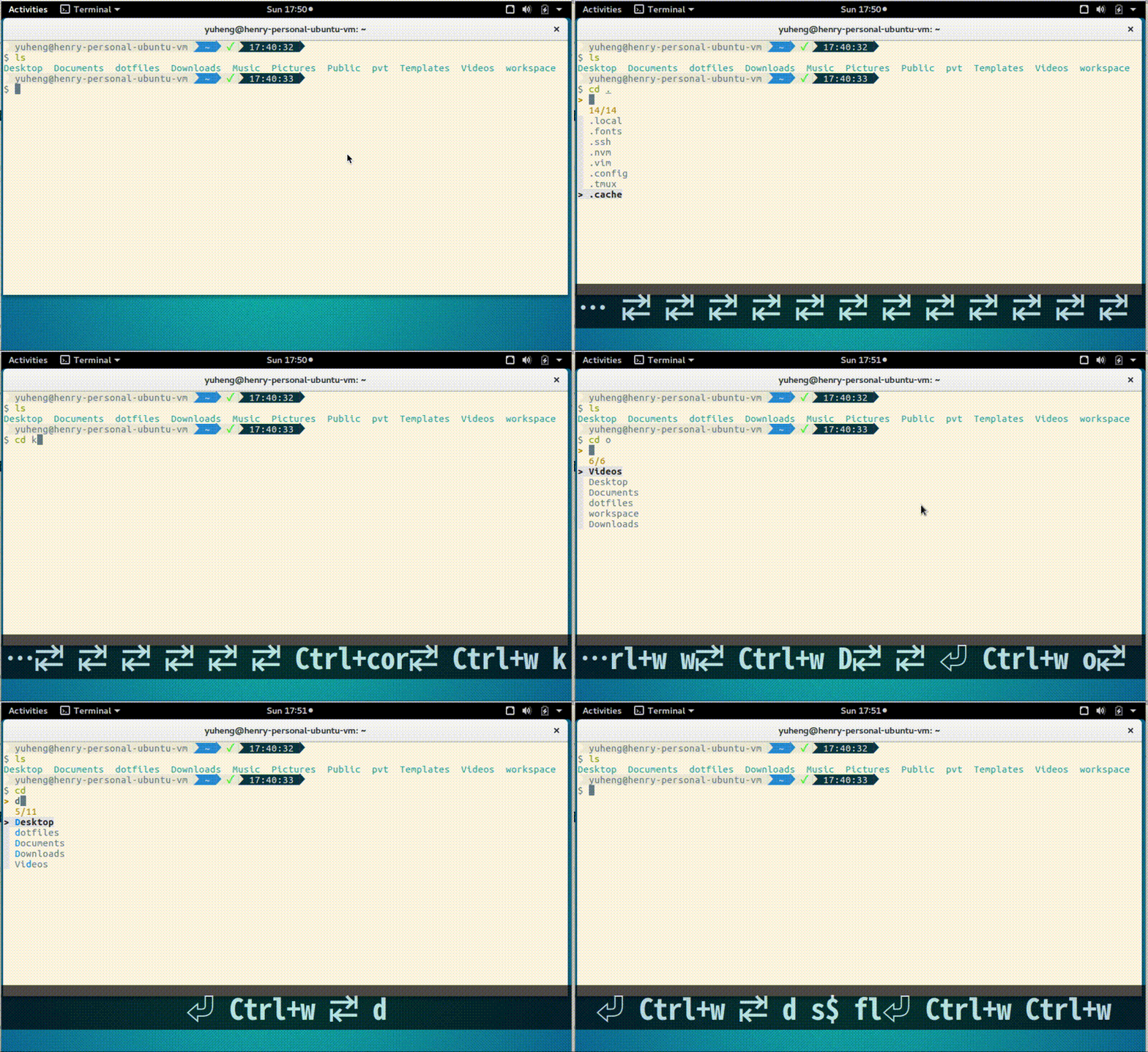
Integration with zsh-interactive-cd.
Fish like interactive tab completion for cd in zsh.
Integration with z.
like normal z when used with arguments but displays an fzf prompt when used without.
unalias z 2> /dev/null
z() {
  [ $# -gt 0 ] && _z "$*" && return
  cd "$(_z -l 2>&1 | fzf --height 40% --reverse --inline-info +s --tac --query "$*" | sed 's/^[0-9,.]* *//')"
}
Here is another version that also supports relaunching z with the arguments for the previous command as the default input by using zz
unalias z
z() {
  if [[ -z "$*" ]]; then
    cd "$(_z -l 2>&1 | fzf +s --tac | sed 's/^[0-9,.]* *//')"
  else
    _last_z_args="$@"
    _z "$@"
  fi
}

zz() {
  cd "$(_z -l 2>&1 | sed 's/^[0-9,.]* *//' | fzf -q "$_last_z_args")"
}
Since z is not very optimal located on a qwerty keyboard I have these aliased as j and jj
alias j=z
alias jj=zz
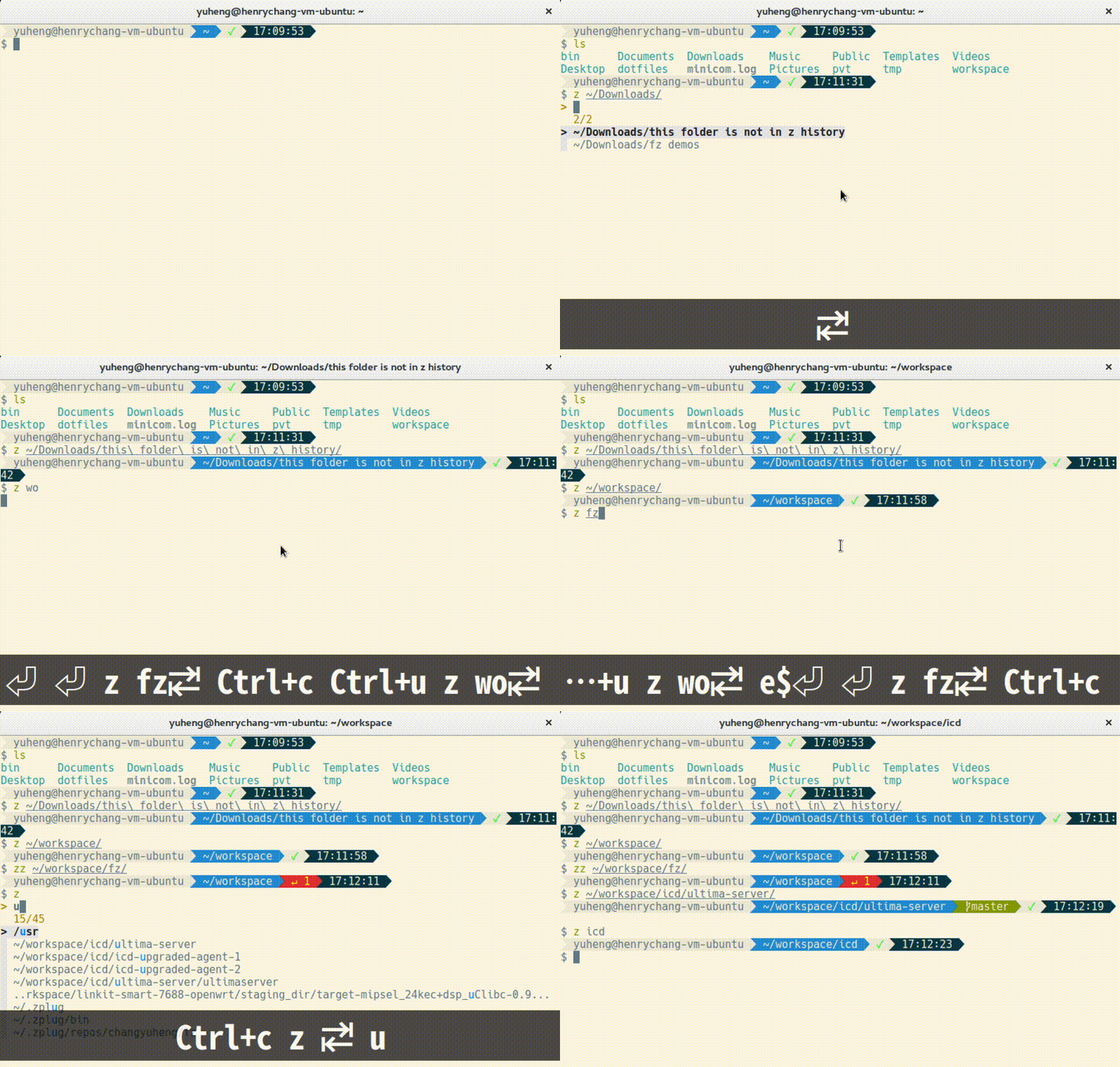
With fz.
It's yet another z integration. In this version, fuzzy search is enabled with tab completion.
With fasd.
Suggested by @l4u and @epiloque
z() {
  local dir
  dir="$(fasd -Rdl "$1" | fzf -1 -0 --no-sort +m)" && cd "${dir}" || return 1
}
Suggested by @mazinbokhari
# fasd & fzf change directory - jump using `fasd` if given argument, filter output of `fasd` using `fzf` else
z() {
    [ $# -gt 0 ] && fasd_cd -d "$*" && return
    local dir
    dir="$(fasd -Rdl "$1" | fzf -1 -0 --no-sort +m)" && cd "${dir}" || return 1
}
Yet another useful application for fzf: shell bookmarks. It looks as follows:

See complete article for details: Fuzzy bookmarks for your shell
# c - browse chrome history
c() {
  local cols sep google_history open
  cols=$(( COLUMNS / 3 ))
  sep='{::}'

  if [ "$(uname)" = "Darwin" ]; then
    google_history="$HOME/Library/Application Support/Google/Chrome/Default/History"
    open=open
  else
    google_history="$HOME/.config/google-chrome/Default/History"
    open=xdg-open
  fi
  cp -f "$google_history" /tmp/h
  sqlite3 -separator $sep /tmp/h \
    "select substr(title, 1, $cols), url
     from urls order by last_visit_time desc" |
  awk -F $sep '{printf "%-'$cols's  \x1b[36m%s\x1b[m\n", $1, $2}' |
  fzf --ansi --multi | sed 's#.*\(https*://\)#\1#' | xargs $open > /dev/null 2> /dev/null
}https://gist.github.com/junegunn/15859538658e449b886f (for OS X)
# fzf-fs
# https://github.com/D630/fzf-fs
% [.] fzf-fs [<ARG>]
# Simple replacement for urlview in X
# https://github.com/D630/bin/blob/master/furlview.sh
% furlview.sh ( - | FILE ... )Alt-i to paste item from locate / output (zsh only):
# ALT-I - Paste the selected entry from locate output into the command line
fzf-locate-widget() {
  local selected
  if selected=$(locate / | fzf -q "$LBUFFER"); then
    LBUFFER=$selected
  fi
  zle redisplay
}
zle     -N    fzf-locate-widget
bindkey '\ei' fzf-locate-widgetYou must have mpc installed on your computer in order to use this function.
fmpc() {
  local song_position
  song_position=$(mpc -f "%position%) %artist% - %title%" playlist | \
    fzf-tmux --query="$1" --reverse --select-1 --exit-0 | \
    sed -n 's/^\([0-9]\+\)).*/\1/p') || return 1
  [ -n "$song_position" ] && mpc -q play $song_position
}# CTRL-X-1 - Invoke Readline functions by name
__fzf_readline ()
{
builtin eval "
builtin bind ' \
\"\C-x3\": $(
builtin bind -l | command fzf +s +m --toggle-sort=ctrl-r
) \
'
"
}
builtin bind -x '"\C-x2": __fzf_readline';
builtin bind '"\C-x1": "\C-x2\C-x3"'# RVM integration
frb() {
local rb
rb=$((echo system; rvm list | grep ruby | cut -c 4-) |
awk '{print $1}' |
fzf-tmux -l 30 +m --reverse) && rvm use $rb
}You must have jq installed on your computer in order to use this function.
vs(){
  #List all vagrant boxes available in the system including its status, and try to access the selected one via ssh
  cd $(cat ~/.vagrant.d/data/machine-index/index | jq '.machines[] | {name, vagrantfile_path, state}' | jq '.name + "," + .state  + "," + .vagrantfile_path'| sed 's/^"\(.*\)"$/\1/'| column -s, -t | sort -rk 2 | fzf | awk '{print $3}'); vagrant ssh
}# fzf-wrapper
# https://github.com/D630/fzf-wrapper
% . fzf-wrapper
% [<ENV>...] __fzf_wrapper [<ARG>...]Search through your LastPass vault with LastPass CLI and copy password to clipboard.
$ lpass show -c --password $(lpass ls | fzf | awk '{print $(NF)}' | sed 's/\]//g')The terminal command Tweak https://github.com/pindexis/marker.git

# marker templete select
_fzf_marker_main_widget() {
  if echo "$BUFFER" | grep -q -P "{{"; then
    _fzf_marker_placeholder
  else
    local selected
    if selected=$(cat ${FZF_MARKER_CONF_DIR:-~/.config/marker}/*.txt |
      sed -e "s/\(^[a-zA-Z0-9_-]\+\)\s/${FZF_MARKER_COMMAND_COLOR:-\x1b[38;5;255m}\1\x1b[0m /" \
          -e "s/\s*\(#\+\)\(.*\)/${FZF_MARKER_COMMENT_COLOR:-\x1b[38;5;8m}  \1\2\x1b[0m/" |
      fzf --bind 'tab:down,btab:up' --height=80% --ansi -q "$LBUFFER"); then
      LBUFFER=$(echo $selected | sed 's/\s*#.*//')
    fi
    zle redisplay
  fi
}

_fzf_marker_placeholder() {
  local strp pos placeholder
  strp=$(echo $BUFFER | grep -Z -P -b -o "\{\{[\w]+\}\}")
  strp=$(echo "$strp" | head -1)
  pos=$(echo $strp | cut -d ":" -f1)
  placeholder=$(echo $strp | cut -d ":" -f2)
  if [[ -n "$1" ]]; then
    BUFFER=$(echo $BUFFER | sed -e "s/{{//" -e "s/}}//")
    CURSOR=$(($pos + ${#placeholder} - 4))
  else
    BUFFER=$(echo $BUFFER | sed "s/$placeholder//")
    CURSOR=pos
  fi
}

_fzf_marker_placeholder_widget() { _fzf_marker_placeholder "defval" }

zle -N _fzf_marker_main_widget
zle -N _fzf_marker_placeholder_widget
bindkey "${FZF_MARKER_MAIN_KEY:-\C-@}" _fzf_marker_main_widget
bindkey "${FZF_MARKER_PLACEHOLDER_KEY:-\C-v}" _fzf_marker_placeholder_widget