Repository navigation
Supported games
The USA, European and Japanese releases are all supported. Any other GBA game also runs (set show_all = 1 to list them); it just plays on one screen, with the second screen dark.
| Game | Codes (USA / Europe / Japan) | Second screen | Map button |
|---|---|---|---|
| Castlevania: Aria of Sorrow |
A2CE A2CP A2CJ
|
map | Select |
| Castlevania: Harmony of Dissonance |
ACHE ACHP ACHJ
|
map | Select |
| Castlevania: Circle of the Moon |
AAME AAMP AAMJ
|
map, with the completion rate | Select |
| Metroid: Zero Mission |
BMXE BMXP BMXJ
|
map | Start |
| Metroid Fusion |
AMTE AMTP AMTJ
|
map | Start |
| The Legend of Zelda: A Link to the Past & Four Swords |
AZLE AZLP AZLJ
|
world and dungeon maps | L |
| Tony Hawk's Pro Skater 2 (SK8 in Japan) |
ATHE (USA and Europe) ATHF ATHD ATHJ
|
the goal sheet for the current run | — |
| Mario Kart: Super Circuit (Mario Kart Advance in Japan) |
AMKE AMKP AMKJ
|
the race HUD, results and podium | — |
The codes are what <CODE> means in logo and overlay file names (see Playing and Map screen surrounds and overlays).
GBA DS runs a second, silent copy of the game next to the one you're playing. About every 1.5 seconds (Map Refresh in the pause menu), and right after each room transition, it copies your game's state into the silent copy, presses the map button there, waits for the map screen, and records a short loop of frames so blinking markers still blink. Before showing a map it checks two things: a memory flag that's only set while the map screen is open, and fixed pixels of the map screen itself. Title screens, cutscenes, menus and fades are rejected, and the last good map stays up. Your game is never paused or touched.
You see the game's own map, with everything it shows (explored rooms, save and warp rooms, completion, area names), at sharp 4× scale on the RG DS Plus.
- The map is shown with a border taken from the game's own menus (see Map screen surrounds and overlays).
- Circle of the Moon's map screen has no completion rate, so GBA DS copies the percentage shown after "RATE" on the game's pause screen onto the map: in the top-right corner, which stays clear of rooms even on a fully explored castle (the bottom-right corner is the fallback).
- The Japanese Aria of Sorrow and Harmony of Dissonance keep their data at different addresses; GBA DS knows both.
-
Mini-map: with the full map always up, the small 3×3 mini-map in the top-right corner of the game screen is hidden. It's left out when the picture is drawn, so the game itself is unchanged;
map = 0brings it back along with the normal one-screen view. -
Map screens show the pause screen's map in its frame, tidied up (
map_crop, on by default):- the button labels and area name are erased, and the scroll arrows and play-time clock left out;
- Fusion's "A OBJECTIVE" prompt and its row of ticked item icons are left out, and the map grid behind them rebuilt;
- Zero Mission's corner minimap gives way to the map underneath, with its "SELECT / CHANGE AREAS" prompt covered by a piece of the bezel;
- the coloured plates are recoloured to the frame's greys so they don't stand out.
-
map_crop = 0shows the pause screens exactly as the games draw them. The European versions' label erasing was checked in English and German.
- The cartridge also holds Four Swords, which needs linked GBAs. The game list shows only A Link to the Past, and maps are only captured while it's being played.
- L brings up the world map outdoors: GBA DS shows the zoomed-out whole-world view, which doesn't scroll with Link. In a dungeon, once you have its map, it shows the dungeon map.
- Where L does nothing (houses, caves, dungeons without their map), the last map stays up, dimmed.
- After Save and Quit, the second screen goes back to the logo.
- The second screen shows the goal sheet for the current run (Free Skate, Single Session and the career checklist), without the sprites the game draws over it. It stays up through the run, pauses and loading, and goes back to the logo at the menus.
- An optional four-button layout, like the console games, is under Controls on the second screen: see Playing.
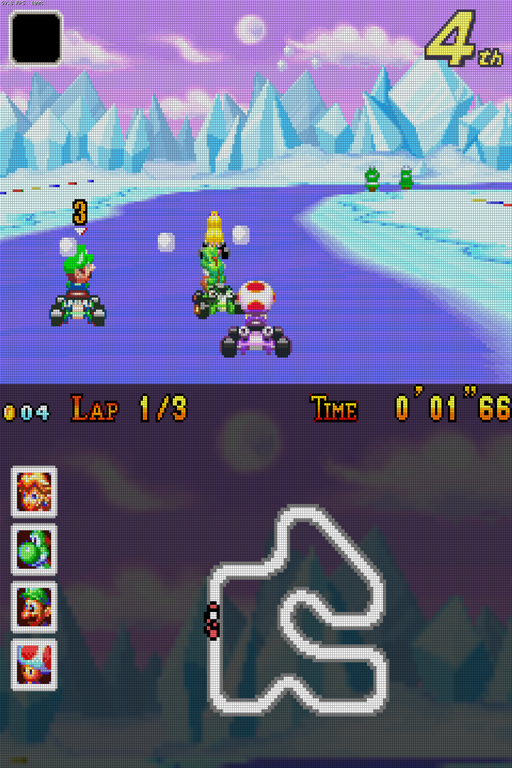
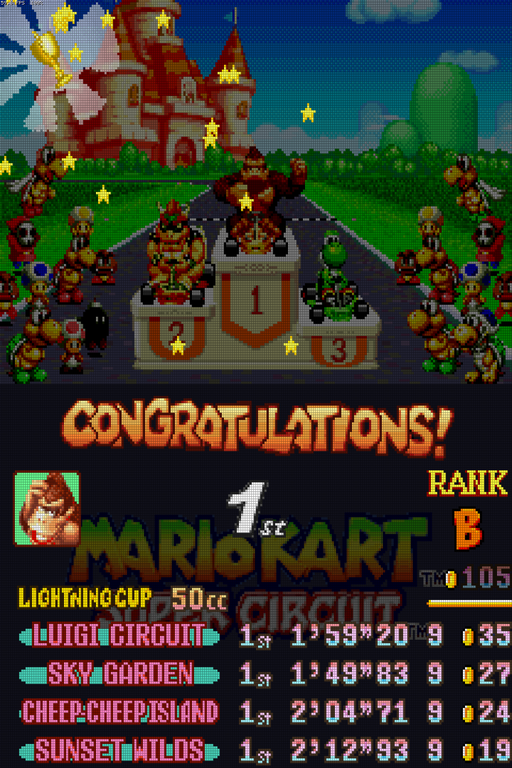
The HUD is moved off the game screen rather than copied: GBA DS draws each frame twice, once without the HUD for the game screen and once with only the HUD for the second screen, so nothing behind the HUD is lost.
-
Racing:
- The game screen shows the track and the karts, with the item box (and your item) in its top-left corner and your place in its top-right corner. The "turn ahead" signs stay where the game puts them.
- The second screen has the coins, lap and time along the top, the top-four faces centred down the left, and the course map with every racer's dot, twice as big (1.5× if a course's map wouldn't fit comfortably), in the middle.
- Behind it all is a dimmed picture of the course's own sky and scenery, captured as each race starts.
- After the finish, the lap times and the results table are shown on the second screen.
- After a cup, the podium's CONGRATULATIONS!, the cup name, your portrait, place, rank and cup table move to the second screen over the game's dimmed logo; the podium, crowd and trophy stay on the game screen.
- The game's pause menu stays on the game screen, with the last HUD below it. In the menus, the second screen shows the logo.
- With one screen (
layout = single), the HUD stays where the game draws it.