Repository navigation
Home
Tala is a free, open-source desktop app for Nextcloud Talk: chat, audio calls and video calls. The name is Old Norse for "to speak".
Tala runs on Linux and is at an early stage. It's an independent project, not affiliated with or endorsed by Nextcloud GmbH.
If Tala is useful to you, a tip on Ko-fi, one-time or monthly, helps keep it going (Support Tala in the app's menu).
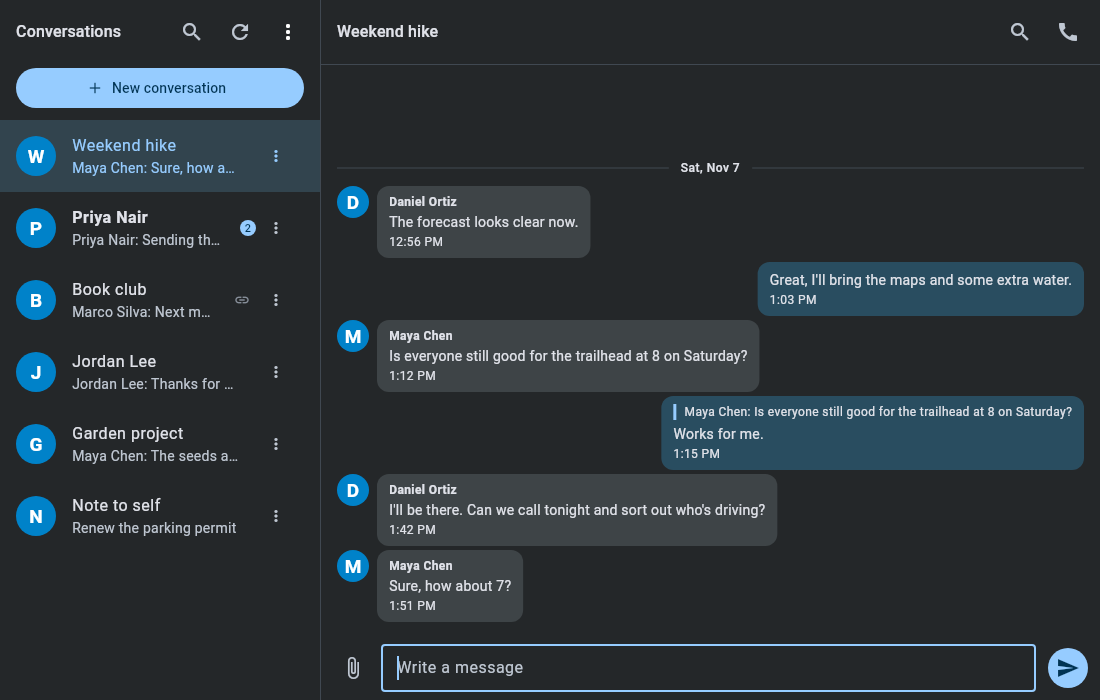
The people and conversations in this wiki's pictures are made up.
- Chat: replies, reactions, mentions, Markdown, message search, editing, deleting, file uploads and image previews.
- Audio and video calls, with incoming call ringing.
- Group conversations: create them, manage who's in them and choose moderators.
- Invite people with no account, by link or email. See Getting started.
- Desktop notifications with a chime, and an unread count on the dock icon.
- Runs in the tray and can start at login, so messages and calls still reach you.
- Archive conversations, and optionally hide the archive from the list.
- Conversations and invitations from other Nextcloud servers (federation).
- Light, dark and system themes with six accent colors.
- A Nextcloud server with Talk.
- For large calls, a server with Talk's High Performance Backend. See Calls.
- A desktop keyring, such as GNOME Keyring, to hold your sign-in.