Repository navigation
Help deleting_objects
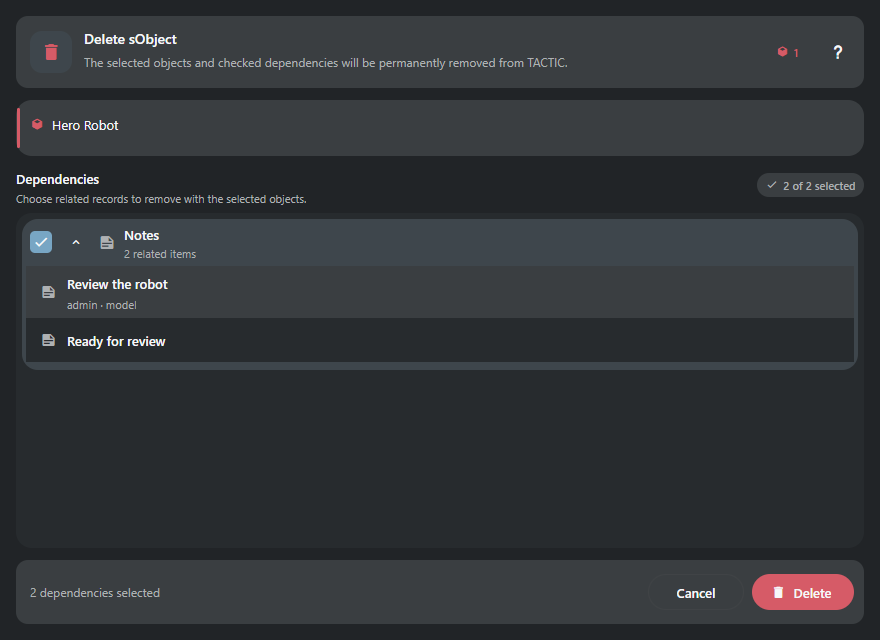
Delete SObject discovers every server dependency before anything is removed and preserves the dependency defaults defined by TACTIC relationships.
The window separates selected objects, dependency review, errors, progress, and the final action. Dependency groups use native Search Type titles, semantic icons, selection counts, and checkboxes.
Expand a group to review readable item titles and useful metadata; technical search keys stay hidden. Expanded dependency lists keep rounded group edges.
Status log records show the status transition followed by process, user, and timestamp instead of technical log codes.
- Unchecked dependency types are preserved.
- The selected root objects are always deleted.
- Deletion is permanent, runs outside the UI thread, and refreshes the originating results or Snapshot Browser when complete.
Expand each dependency group to inspect actual records, not just totals. Change the checked groups, then Delete. A read error offers Retry without submitting anything. A lost deletion reply disables another Delete: close, refresh and inspect the remaining objects before making another deletion request.
Examples use test data and show the panel content. The surrounding window or dock keeps its normal behavior.