Repository navigation
Nodara Edition

- Compatibility
- Screen pages
- Disclaimer
- Bill of materials
- Quick start
- Settings
- Bluetooth LE
- Display care
Nodara Edition is a variant of SoftRF DIY GA proximity awareness device been implemented in a small, lightweight product form factor.
The Nodara is a synergy of two leading edge technologies in one miniature unit:
- SoftRF advanced radio, GNSS and air traffic processing core with data stream output, and
- SkyView air traffic visualization engine for an e-Paper display.
It is supposed to require minimal skills from a user to begin with and gives an opportunity to evaluate if the SoftRF technology is appropriate for your needs.
The Nodara Edition is based on third-party's hardware - Radioddity® Nodara product, which is available for direct purchase from manufacturer at more or less reasonable price (70+ USD).
The Radioddity® Nodara is an example of cutting edge technology. It contains:
- Nordic nRF52840 Low Power MCU ;
- Semtech SX1262 Long Range Low Power RF Transceiver ;
- Quectel L76K Low Power GNSS (GPS/GLONASS/BD) Receiver module ;
- GooDisplay® 2.13" SPI e-Paper display ;
- Puya Semiconductor P25Q32 4 Mbytes QSPI flash memory storage
| Type | Protocol | FLARM | OGN tracker | PilotAware | Skytraxx | SoftRF |
|---|---|---|---|---|---|---|
| Radio | FLARM AIR V7 |
|
|
|
||
OGNTP |
|
|
||||
P3I |
|
|
||||
FANET+ |
|
|
||||
SRD 860 |
|
|
||||
| Data | FLARM NMEA |
|
|
|
|
|
| Garmin GDL90 |
|
|
||||
Dump1090 |
|


1 - it is necessary for a reader to feel the difference between statement "compatible"
and statement "fully compatible".
SoftRF implements only a reasonable minimum of the protocols specs.
No "bells and whistles" so far.
There are four different screens available:
You can use button A to switch between these screens.
The screens are better explained on this page.
 |
 |
|---|---|
 |
 |
SoftRF firmware for Nodara Edition is distributed in the hope that it will be useful, but WITHOUT ANY WARRANTY; without even the implied warranty of MERCHANTABILITY or FITNESS FOR A PARTICULAR PURPOSE.
In general a lot of Chinese DIY electronics manufacturers are known to behave this way:
- sometimes they may not apply necessary Q.C. before releasing of a product from factory ;
- they may arbitrary change schematics and electronic components from one batch to the next one.
Author of SoftRF firmware:
- will reject any hardware related claims associated with Radioddity® Nodara product. Ask for support from seller or manufacturer ;
- reserves the right to suspend or terminate support of Radioddity® Nodara in the firmware at any time.
For the time being ( Nov'26 ) there were no critical hardware issues reported for current version of the Nodara product. However things my change over the time...
If you have issues with bringing up your new Radioddity® Nodara or just not happy with the product - be prepared to execute your Purchase Protection plan.
| Number | Part | Qty | Picture | Source |
|---|---|---|---|---|
| 1 | Radioddity® Nodara 2 |
1 | 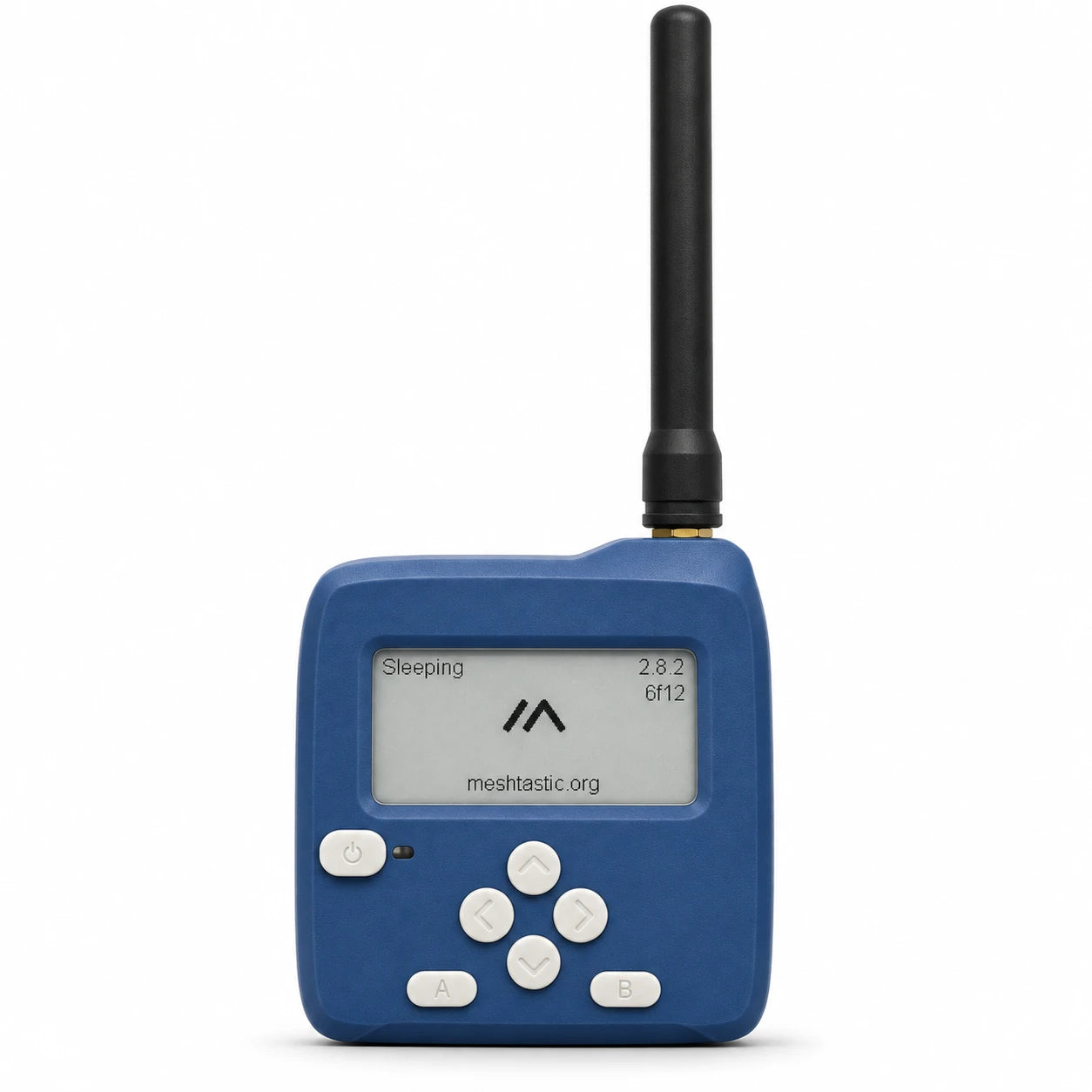 |
Radioddity Store |
2 - 868 MHz variant is applicable for these world regions: EU, RU, NZ, SA, IN ;
915 MHz - US, CA, AU, KR, IL.
- follow these instructions to install the firmware ;
- use instructions for Badge Edition to start operating with your delivered Nodara device.

Procedure of settings change is explained on this page.
Basic (radio) settings description is located here.
e-Paper UI settings description is located there.
Important
EASA ADS-L radio protocols selection is not applicable with current version of SoftRF Tool app for Android - use
- SoftRF Configurator app or
- Online Tool method instead.
If you are an application developer and you think about to add the Nodara configuration menu into your software, please, use:
- C/C++ header file and
- example of usage (in SkyWatch)
Factory default data output setting is to deliver GNSS and air traffic information over Bluetooth LE in NMEA plain-text format.

This data is sufficient for an app (such as XCSoar) to facilitate a Radar view:
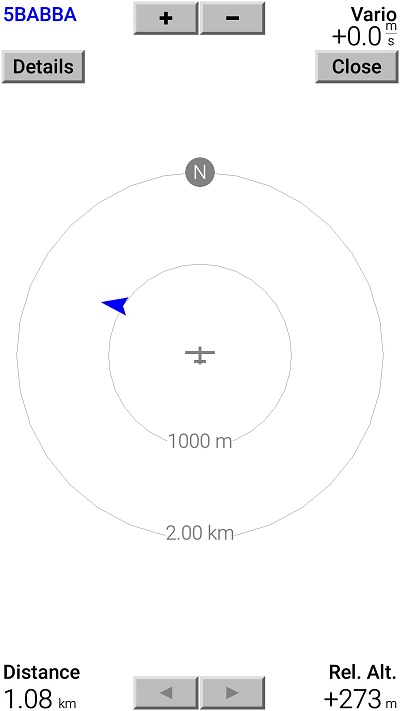
These Bluetooth LE services are available:
- UART (both HM-10 and Nordic ones)
- Battery
- Bluefruit device information
- OTA firmware update

This is a list of mobile applications that are known good to operate with the Nodara Edition over Bluetooth LE:
-
SoftRF Tool

-
SoftRF Configurator

- XCSoar
- LK8000
- Bluefruit Connect
- nRF Connect for Mobile
- Serial Bluetooth Terminal
- FlySkyHy
- XCTrack
- Enroute Flight Navigation
- VFRnav
-
SkyTraffic Radar
For more information, please, read this Bluetooth LE page.
For e-Paper display care recommendations, please, read this page.
SoftRF
-
Standalone

- UAV
-
LoRa module
-
Concorde
-
Retro MkII
-
Prime MkIV
-
Prime MkIII
-
Badge
-
Card MkIII
-
Card MkII
-
Card
-
Stylus
-
Nodara
- Airventure
-
Nano
- Prime MkII
-
Dongle
- Ham
- Handheld
- Solaris
- Lyra
- Labubu
- Eco
- Gizmo
- ES
- Octave
- Duo
- Uni
- Cozy
- Midi
- Mini
- Lego
- Balkan
-
Academy
- Raspberry
- Bracelet
- Retro
SkyView
Flight Recorder
Adapters
Firmware
Tools
Protocols