Building Your Own Tool
Everything domain-specific lives in one file: src/domain.js. Swap it, rebuild, done. This
page is the detailed version of AGENTS.md — read that file if you're an AI assistant doing the
swap; read this page if you want to understand the shape yourself.
You are not building an app from scratch. You are swapping one file and rebuilding. Everything
else — the table, the edit form, the sidebar filters, CSV export, the AI's instructions and the
validation of what it proposes back — is generic and reads its shape from a single SCHEMA object.
| Export | Purpose |
|---|---|
SCHEMA |
Field definitions plus presentation hints (see below) |
uid() |
Generates a record id. Use a readable prefix (A- for action items, R- for risks, …) |
emptyRecord() |
A blank record with sensible defaults, used when the user clicks "New …" |
seed() |
Realistic demo records so the file isn't empty on first open — around a dozen for a single record type; multi-entity domains seed every entity |
isDone(r) |
Record no longer counts towards the open total in the overview tile |
isOverdue(r) |
Record is flagged in red in the table. Return false if the concept doesn't apply to your domain |
formatDate(s) |
ISO date string (YYYY-MM-DD) to a display string |
export const SCHEMA = {
  idField: 'id',
  singular: 'risk',            // used in buttons: "New risk"
  plural: 'risks',             // used in the overview tile
  titleField: 'name',          // leading column, rendered with emphasis
  subField: 'category',        // second line under the title, or null
  list: ['name', 'owner', 'review', 'likelihood', 'impact'],   // table columns, in order
  facets: ['likelihood', 'category'],   // enum fields that become sidebar filters
  totalField: 'impact',                 // number summed in the overview, or null
  dueDate: null,                        // date field tracked by the dashboard widget, or null
  metrics: [],                          // metric tiles for the dashboard, see below
  fields: [
    { key: 'name', label: 'Risk', type: 'text', required: true },
    { key: 'category', label: 'Category', type: 'enum', values: ['Operational', 'Legal', 'IT'] },
    { key: 'review', label: 'Review date', short: 'Review', type: 'date' },
    { key: 'impact', label: 'Impact score', short: 'Score', type: 'number' },
    { key: 'mitigation', label: 'Mitigation', type: 'text', long: true },
  ],
}
Notes on the less obvious fields:
-
shortis the table column header used when the fulllabelwould be too wide (e.g.label: 'Effort in days',short: 'D'). -
long: truerenders a<textarea>in the edit drawer instead of a single-line input. -
Field types are enforced when the AI proposes changes. An
enumvalue outsidevaluesis rejected and reported in the proposal review, not silently coerced — so keepvaluesaccurate; it's also what gets sent to the model as the allowed set. -
facetsmust beenum-type fields; they become the sidebar filter groups with live counts. A field listed here stays a quick filter and does not get a second entry in the typed filter section — see Searching and Filtering. -
totalFieldmust be anumber-type (orcomputed) field; it drives the "Open effort in days"-style tile in the overview and is excluded from the total onceisDone(r)is true. -
dueDatenames adate(orcomputed) field and puts it on the dashboard's due-date widget — noDASHBOARDexport needed. See Dashboards and Printing for the grouping rules. -
metricsdeclares the dashboard's metric tiles — a closed catalog ofcount,sum(field)andavg(field), computed at render and never stored. A declaration alone unlocks the dashboard view; see Dashboards and Printing for the catalog and the rejection behavior.
Anything derived from other fields should be a computed field rather than a number the user
maintains by hand and forgets to update:
{ key: 'score', label: 'Risk score', type: 'computed', compute: (r) => r.likelihood * r.impact }compute(record) runs once per record per render pass and the result is memoised on the record
for the lifetime of the page. The value is never written into the record — that's the whole
point: a stored derivation is wrong the moment one of its inputs changes, and nothing tells you.
The test suite asserts that a saved file contains no trace of a computed field's key.
Everywhere else it behaves like a normal field:
| Works | Doesn't |
|---|---|
| table column, with numeric alignment |
facets (those must be enum) |
| sorting (numerically, if it returns numbers) | editing in the form — shown read-only |
| searching — every field is searched | being set by the AI — described as read-only, rejected by name |
totalField, CSV export, AI context |
CSV import — not offered as a mapping target |
A compute that throws yields an empty cell (rendered as a dash) rather than breaking the
table — the function comes from domain.js and is as trusted as isDone/isOverdue, but a typo
shouldn't take the app down. The console sees exactly one warning per unique combination of entity,
field, record id and error message; the same combination does not warn twice.
A computed field whose compute returns a number stands in for a real number field in the closed
sum(field) / avg(field) metric catalog, exactly the way totalField already accepts one.
Typical uses in consulting tools: a risk score (likelihood × impact), days remaining until a
deadline, percentage complete, budget variance. The shipped demo has one — Days left, counting
down to the due date and going negative once it lapses.
A field type check looks at one value at a time. It cannot see that an item in progress needs an
owner, or that the planned end must not be before the start — those need two fields at once, and
they live in rules on the schema:
rules: [
  {
    when: (r) => r.status === 'done',       // optional; without it the rule always applies
    require: ['cost'],                      // shorthand: these fields must be filled
    check: (r) => Number(r.cost) > 0,       // optional predicate; true means fine
    fields: ['cost'],                       // which fields to flag; defaults to `require`
    message: 'A closed item needs its actual cost.',
  },
]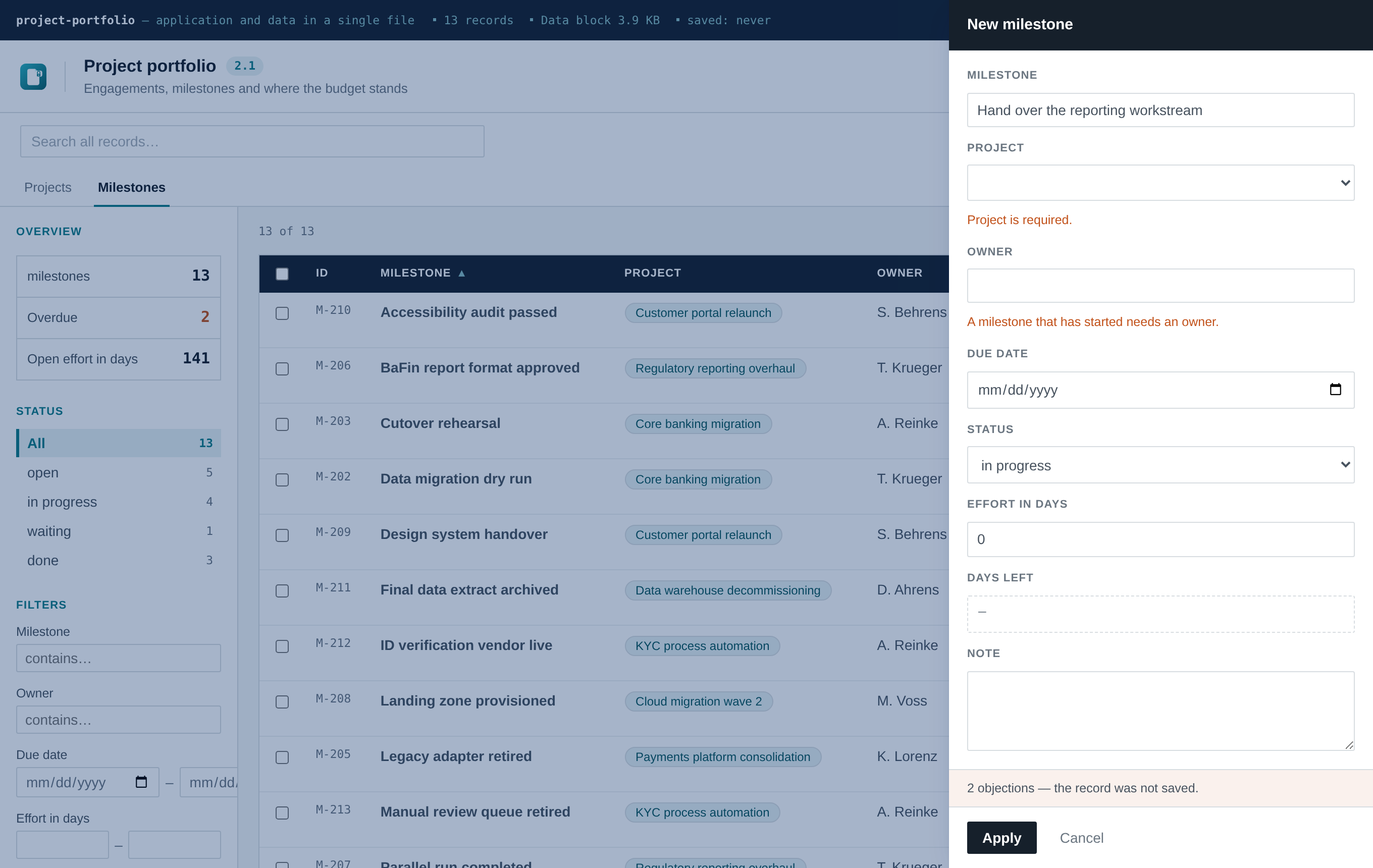
The point is that it runs in exactly one place. The edit form, the CSV import and anything the
AI proposes all go through the same check, so a rule written once holds on all three paths instead
of being retrofitted in three. In the form the objection appears under the offending field and the
save is refused; an offending import row is skipped and named in the result list; the model is
handed the message as a constraint up front and gets it back as the reason if it ignores it.
Four details that matter in practice:
-
required: trueon a field is enforced, and produces the only message that comes from the interface translation rather than from you. -
A numeric
0counts as filled. Only empty string,nullandundefinedare missing — a cost of zero is usually a real answer, not a gap. -
messageis your text, in your language, exactly like the field labels. - The save button stays enabled and reveals every objection when clicked. A greyed-out button with no explanation is the worse dead end, and a fresh form is not red before anyone has typed.
Write rules for what a reviewer would otherwise catch by eye. Do not restate type checks — enum,
date and number are already enforced, and duplicating them only creates two places to be wrong.
examples/ holds eight full domains; six of them are published as
live demos. The other two — risk-register and
suppliers-certificates — ship as examples without a demo: the first is the plainest starting
point, the second exists to show the reference mechanics alone and doubles as the build fixture for
the multi-entity test. Copying the closest one over
src/domain.js and rebuilding is usually faster than writing a schema from a blank file — and it
shows you the whole app change at once: different columns, filters, enum values, seed data.
| File | Shape worth stealing |
|---|---|
risk-register.domain.js |
The plainest single-entity domain. Start here if nothing else fits. |
portfolio.domain.js |
Two record types, a reference, money, a dashboard. |
suppliers-certificates.domain.js |
Two record types, minimal — the reference mechanics alone. |
ppwr-packaging.domain.js |
Computed fields that aggregate a child entity; rules that force a source for every estimate. |
gdpr-processing.domain.js |
Almost no numbers — enums and free text. Built for mode: 'intake'. |
equipment-testing.domain.js |
Everything derived from dates: due date from interval, days left, the red flag. |
renovation-quotes.domain.js |
Money across two entities; the awarded sum is read from the accepted quote, never typed. |
school-trip.domain.js |
States rather than numbers, and a domain that argues for encryption. |
Adding one of your own: write the domain into examples/, add an entry to scripts/demos.mjs
(colours, start page, a sentence on the problem it takes on), then npm run build:demo. It lands
under docs/demos/<slug>/ and in the overview page, and test/demos.mjs starts checking it.
Most tools need only one record type — stick with the single SCHEMA export above. Reach for this
only once there are genuinely two or more kinds of records that reference each other: suppliers and
their certificates, projects and their tasks, customers and their orders.
Export ENTITIES instead of SCHEMA — one entry per record type, each shaped like the
single-entity exports above but nested under a key:
export const ENTITIES = {
  suppliers: {
    schema: { idField: 'id', singular: 'supplier', plural: 'suppliers', titleField: 'name', /* … */ },
    uid: () => 'S-' + /* … */,
    emptyRecord: () => ({ /* … */ }),
    seed: () => [ /* … */ ],
    isDone: () => false,
    isOverdue: () => false,
  },
  certificates: {
    schema: {
      idField: 'id', singular: 'certificate', plural: 'certificates', titleField: 'title',
      fields: [
        { key: 'title', label: 'Title', type: 'text', required: true },
        { key: 'supplierId', label: 'Supplier', type: 'reference', entity: 'suppliers', required: true },
        // …
      ],
    },
    uid: () => 'C-' + /* … */,
    emptyRecord: () => ({ /* … */ }),
    seed: () => [ /* … */ ],
    isDone: () => false,
    isOverdue: (r) => r.expiry && r.expiry < today,
  },
}
export const formatDate = (s) => /* … */   // one shared export, same as the single-entity shape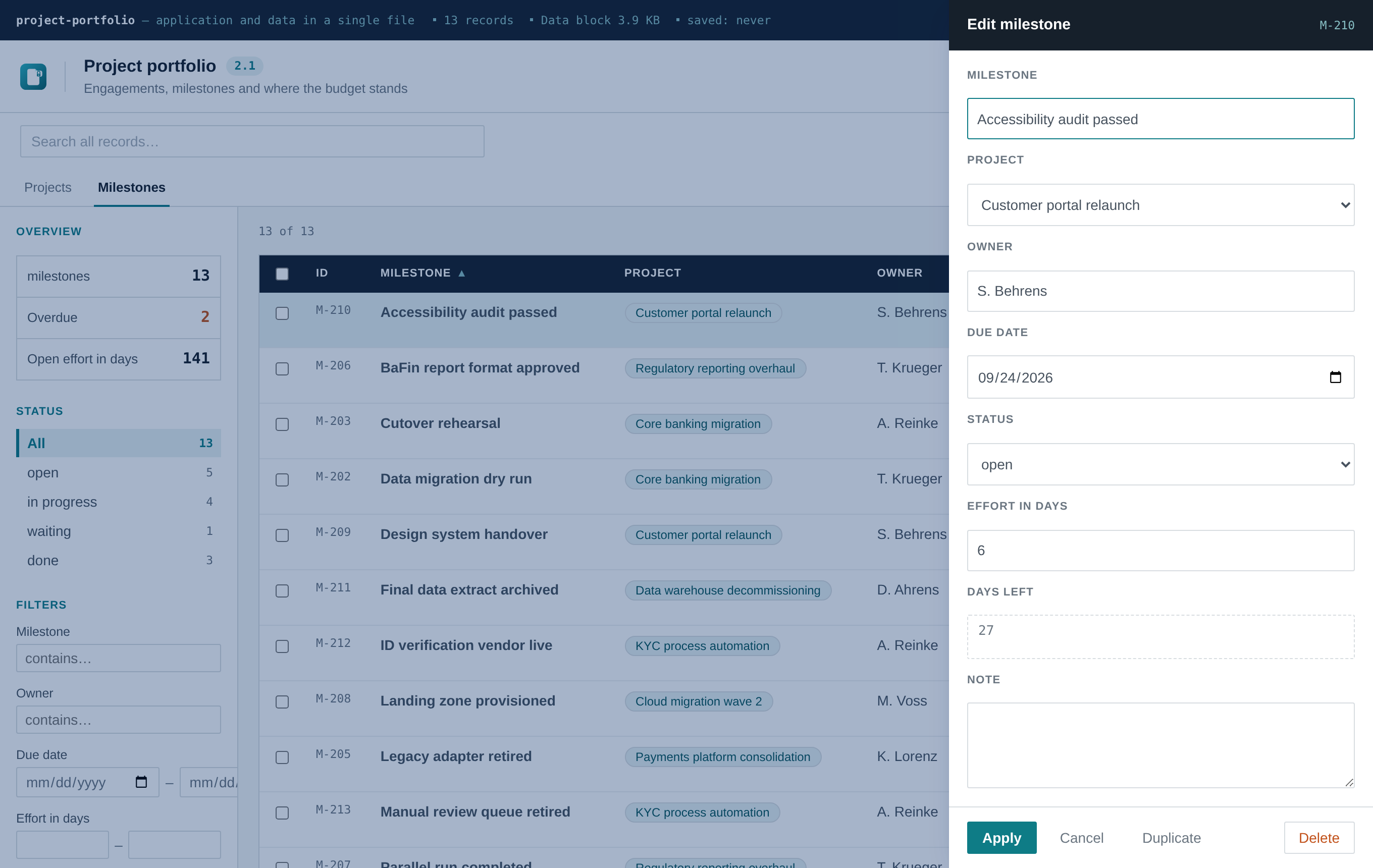
A field with type: 'reference' and entity: '<key>' points at another entity:
-
In the edit form, it renders as a dropdown of the target entity's records, showing each
option's
titleField(a supplier's name, not its id) while storing the id. - In the table, it renders as a clickable chip resolving to the referenced record's title. Clicking it switches to that entity's tab and opens the record — a lightweight way to move between related records without a dedicated detail-page concept.
- Deleting a record that's still referenced is blocked. The error names exactly which records reference it, so you can either reassign or delete those first.
-
The AI assistant is reference-aware. Its instructions describe every entity and how they
connect, and when it proposes an action touching a reference field, it can name the target either
by id or by the target record's title text —
matchReference()insrc/lib/actions.jsresolves either, the same tolerant matching already used for enum values.
A row of tabs appears above the list (hidden entirely for single-entity tools, so nothing changes visually for the common case). Switching tabs resets that entity's facets, field filters and sort — they're per-schema, and carrying them over between entities with different fields wouldn't mean anything. The global search stays up: it runs across every entity, and the hit counts on the tabs live on it. Both are covered in detail in Searching and Filtering.
CSV export, JSON export/import, encryption, branding, and the
interface language toggle all already understand this shape — nothing about
them needs adjusting for a multi-entity domain.js. CSV export resolves reference fields to the
target's title rather than exporting a raw id, since a spreadsheet of internal ids isn't useful to
anyone.
examples/suppliers-certificates.domain.js is a full, working two-entity domain — five suppliers,
nine certificates, one relationship. Copy it over src/domain.js and rebuild to see the entity
tabs, the reference dropdown and the clickable chips in action. test/multi-entity.mjs is the
automated version of the same walkthrough — see Testing.
type: 'attachment' stores an uploaded file in the record itself — base64 in the payload, travelling
with the file like everything else.
{ key: 'evidence', label: 'Evidence', short: 'File', type: 'attachment' }The budget is part of the feature, not a safety rail bolted on afterwards. Attachments break the one promise this whole shape rests on — a file you can send by email. Without a hard limit the third scan turns a 200 KB tool into a 30 MB attachment no gateway will pass, and nobody finds out until it bounces.
- A meter in the dark bar shows used-of-limit, amber past 85 %.
-
attachmentBudgetMbinDEFAULT_SETTINGS(5 MB by default, Settings → Data) is enforced when the record is applied, with the numbers in the message. One file is capped at 4 MB regardless.
Three things attachments deliberately do not do:
| Never reach the AI | The model sees the file name. One embedded PDF as base64 would exceed the whole context window, and the raw bytes are no use to it. |
| Never land in the CSV | The export carries the name, not the content. |
| Never get rendered | The stored MIME type is only handed to the download. Name and type are both reduced to a conservative pattern on upload, and downloads go through a blob with download rather than navigation — the file gets passed around. |
coerceField rejects an attachment write by name, so neither the AI nor a CSV import can put one
in. A file comes through the file dialog or not at all.
Use them where the tool is about evidence — audit findings, certificates, invoices. Adding one "just in case" is an invitation to make the file unsendable.
The list and the edit form assume the person knows the tool. Someone who receives the file in order
to report one thing should not have to sort out a table, a sidebar and seventeen fields first. A
WIZARD export gives them a sequence of short steps instead — and like the dashboard, the view does
not exist without the export.
export const WIZARD = {
  title: 'Report an action item',
  intro: 'Four short steps. Nothing is written until the last one.',
  steps: [
    { id: 'what', label: 'What', fields: ['title', 'area', 'note'] },
    { id: 'who', label: 'Who and when', fields: ['owner', 'due', 'status'] },
    { id: 'bulk', label: 'Several at once', type: 'csv',
      when: (drafts) => Boolean(drafts.records.title) },
    { id: 'check', label: 'Check', type: 'review' },
  ],
  done: { message: 'Thank you — that is recorded.', allowAnother: true },
}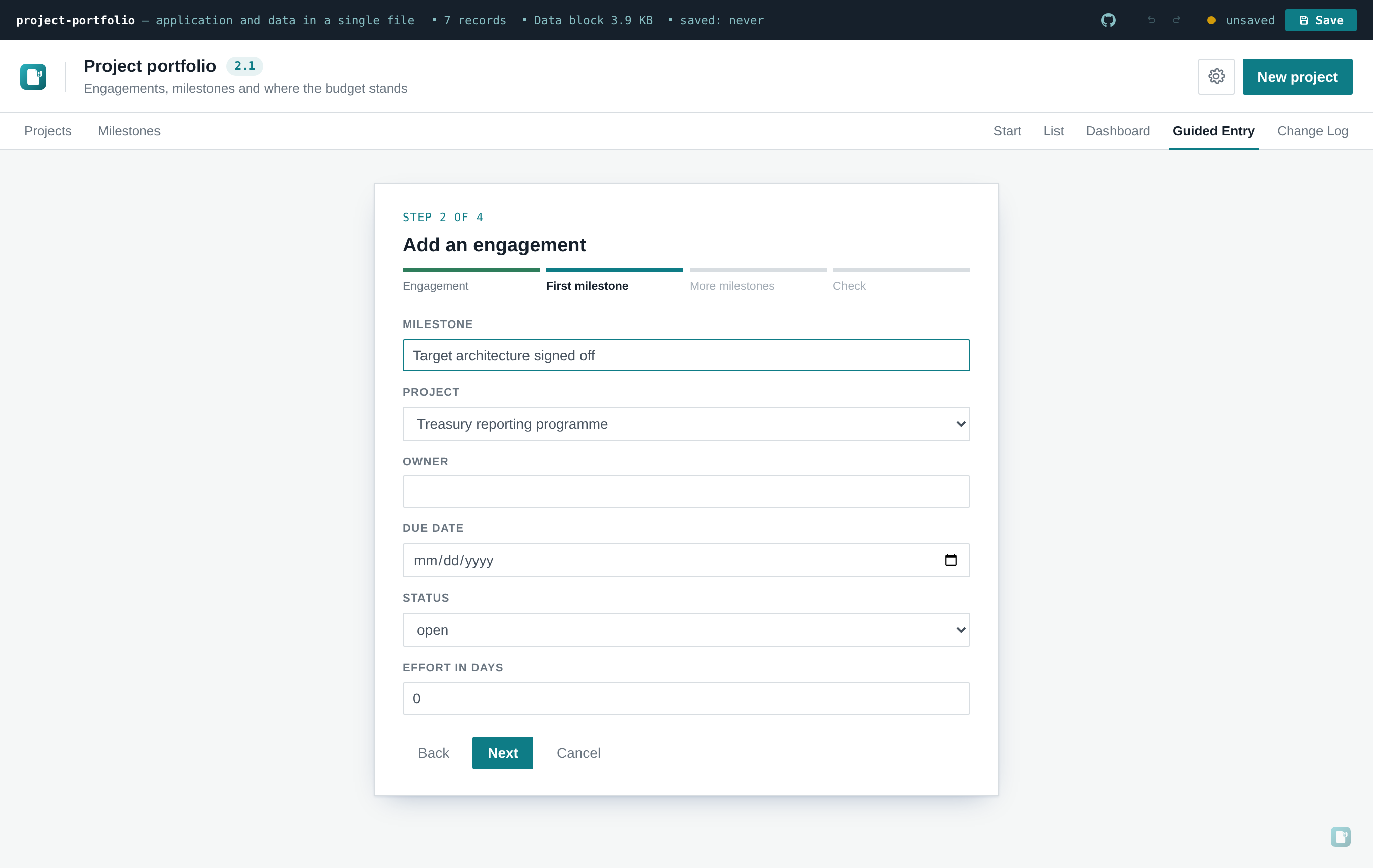
Four step types, which is all it takes generically:
| Type | What it does |
|---|---|
fields |
A subset of the schema fields, rendered by the same machinery as the edit form — including the validation rules. A step only reports objections about fields it actually shows. |
csv |
The existing import as a step, for bulk entry. |
review |
A summary generated from the schema. Nothing to configure. |
| (closing screen) | Built from done. allowAnother: false ends the run for good. |
when(drafts) hides a step that does not apply. drafts is keyed by entity, so with one record
type it is drafts.records.
Two decisions are worth knowing, because they are what make this more than a long form:
- The CSV step feeds the same run. Rows are held and created together with the draft at the very end. Walk away in step three and nothing was written — which is the whole reason a wizard is safer to hand to a stranger than an edit form.
-
Drafts get their ids at the start of the run, and the reference dropdowns are given the drafts
alongside the saved records. That is what lets a step carrying
entity: 'certificates'point at the supplier drafted two steps earlier. One run creates both, correctly linked.
mode: 'intake' in DEFAULT_SETTINGS, or Settings → Application → Opens as, opens the file
straight into the wizard and hides the list, the entity tabs and the "New …" button. The same file
becomes a form you send out: the recipient fills it in, saves, mails it back.
Set it when their job is to report, not to browse. Leave it on workbench when they also need to
see and edit what is already there. Without a WIZARD export the switch does nothing.
Pairs naturally with the settings lock
and with examplePrompts: false — together they turn the template into something you can hand to
someone who has never seen it.
A DASHBOARD export adds a second view with stat, bar and donut tiles, drawn without a charting
library and coloured from the tool's own accent. Optional — leave it out and the view does not
exist. Both views print to a usable PDF. See
Dashboards and Printing.
If you're an AI assistant (or a human) doing this for someone else, don't guess — ask, in one round:
- What is being tracked? One record — what is it called, singular and plural?
-
Which fields? Name, type (
text,enum,date,number), and for enums the allowed values. - Which field is the headline in the list, and which fields belong in the table at all?
- Any "overdue" or "done" logic? A date that can lapse, a status that closes an item.
- Should the AI assistant be part of it? It ships switched off; the user can enable it later.
If the request already gave enough detail, skip the questions and state the assumptions made instead.
src/app.jsx is the only other file most tools should ever need to touch — and only for something
the schema genuinely can't express: an extra sidebar section, a computed column, a different empty
state. Everything else is already generic; resist the urge to touch it for anything schema can do.
Two things worth knowing if you do:
- Default title, subtitle, file name, colours and product name live in
DEFAULT_SETTINGS,DEFAULT_COLORSandDEFAULT_BRANDnear the top ofsrc/app.jsx. Set them to match the tool you're building — the user can change all of them later in Settings. - The interface language dictionary (
src/i18n.js) is a separate, unrelated layer — see Interface Languages. It translates app chrome, never your schema's field labels or enum values, which stay exactly as you wrote them.
openToolbox is a records-with-fields tool: a list, a form, filters. If the request is a calculator, a canvas, a diagram editor or a multi-step wizard, say so plainly rather than forcing an unrelated shape into the table. Two honest options: a stripped-down variant that keeps the file persistence, encryption and AI plumbing but replaces the list view, or a different starting point entirely.
npm install
npm run build          # produces dist/index.html — one file, self-contained
npm test                # optional: headless smoke test, needs a Chromium download
Deliver dist/index.html, renamed to something meaningful. Worth telling whoever receives it:
- double-click to open, no server needed
-
Ctrl/Cmd+Sor the Save button writes a new HTML file containing the data - nothing is auto-saved; the amber dot in the top bar means unsaved changes
- many mail gateways strip
.htmlattachments — send it zipped - swap the header link for something of theirs (Settings → Application → Links in the header) — it ships pointing at the openToolbox repository, which is rarely what a recipient needs; see Branding
- if they only enter data, lock the settings page first: Settings → Security → Protect settings asks for a word and disables every control there, so a stray click on a colour or an endpoint can't ride along into the next save. It guards against slips, not against people — see Security and Encryption.
These exist because they're exactly the mistakes that quietly break a single-file build, so an assistant (or you, six months later) doesn't have to rediscover them the hard way:
- Never add a runtime dependency on the network. No CDN links, no web fonts, no external images. The file must work with the network cable pulled.
-
Never use
localStorageorIndexedDBfor the data. Both are unreliable underfile://— the embedded payload is the storage mechanism, on purpose. -
Keep the build single-file. Don't add a second entry point;
vite-plugin-singlefilesupports exactly one. -
Don't set
removeViteModuleLoader: trueinvite.config.js. It silently empties the inlined script and produces a ~9 KB file that renders nothing — see Limits and Troubleshooting. - Don't weaken the SVG sanitiser or the AI-action validation. Both exist because the output file gets passed around to people who didn't build it.