Building Your Own Tool
Everything domain-specific lives in one file: src/domain.js. Swap it, rebuild, done. This
page is the detailed version of AGENTS.md — read that file if you're an AI assistant doing the
swap; read this page if you want to understand the shape yourself.
You are not building an app from scratch. You are swapping one file and rebuilding. Everything
else — the table, the edit form, the sidebar filters, CSV export, the AI's instructions and the
validation of what it proposes back — is generic and reads its shape from a single SCHEMA object.
| Export | Purpose |
|---|---|
SCHEMA |
Field definitions plus presentation hints (see below) |
uid() |
Generates a record id. Use a readable prefix (A- for action items, R- for risks, …) |
emptyRecord() |
A blank record with sensible defaults, used when the user clicks "New …" |
seed() |
8–12 realistic demo records so the file isn't empty on first open |
isDone(r) |
Record no longer counts towards the open total in the overview tile |
isOverdue(r) |
Record is flagged in red in the table. Return false if the concept doesn't apply to your domain |
formatDate(s) |
ISO date string (YYYY-MM-DD) to a display string |
export const SCHEMA = {
  idField: 'id',
  singular: 'risk',            // used in buttons: "New risk"
  plural: 'risks',             // used in the overview tile
  titleField: 'name',          // leading column, rendered with emphasis
  subField: 'category',        // second line under the title, or null
  list: ['name', 'owner', 'review', 'likelihood', 'impact'],   // table columns, in order
  facets: ['likelihood', 'category'],   // enum fields that become sidebar filters
  search: ['id', 'name', 'owner'],      // fields the search box looks at
  totalField: 'impact',                 // number summed in the overview, or null
  fields: [
    { key: 'name', label: 'Risk', type: 'text', required: true },
    { key: 'category', label: 'Category', type: 'enum', values: ['Operational', 'Legal', 'IT'] },
    { key: 'review', label: 'Review date', short: 'Review', type: 'date' },
    { key: 'impact', label: 'Impact score', short: 'Score', type: 'number' },
    { key: 'mitigation', label: 'Mitigation', type: 'text', long: true },
  ],
}
Notes on the less obvious fields:
-
shortis the table column header used when the fulllabelwould be too wide (e.g.label: 'Effort in days',short: 'D'). -
long: truerenders a<textarea>in the edit drawer instead of a single-line input. -
Field types are enforced when the AI proposes changes. An
enumvalue outsidevaluesis rejected and reported in the proposal review, not silently coerced — so keepvaluesaccurate; it's also what gets sent to the model as the allowed set. -
facetsmust beenum-type fields; they become the sidebar filter groups with live counts. -
totalFieldmust be anumber-type (orcomputed) field; it drives the "Open effort in days"-style tile in the overview and is excluded from the total onceisDone(r)is true.
Anything derived from other fields should be a computed field rather than a number the user
maintains by hand and forgets to update:
{ key: 'score', label: 'Risk score', type: 'computed', compute: (r) => r.likelihood * r.impact }compute(record) runs on every render. The value is never written into the record — that's the
whole point: a stored derivation is wrong the moment one of its inputs changes, and nothing tells
you. The test suite asserts that a saved file contains no trace of a computed field's key.
Everywhere else it behaves like a normal field:
| Works | Doesn't |
|---|---|
| table column, with numeric alignment |
facets (those must be enum) |
| sorting (numerically, if it returns numbers) | editing in the form — shown read-only |
search |
being set by the AI — described as read-only, rejected by name |
totalField, CSV export, AI context |
CSV import — not offered as a mapping target |
A compute that throws yields an empty cell rather than breaking the table — the function comes
from domain.js and is as trusted as isDone/isOverdue, but a typo shouldn't take the app down.
Typical uses in consulting tools: a risk score (likelihood × impact), days remaining until a
deadline, percentage complete, budget variance. The shipped demo has one — Days left, counting
down to the due date and going negative once it lapses.
examples/risk-register.domain.js in the repo is a full, working alternative domain (a risk
register instead of action items) — copy it over src/domain.js and rebuild to watch the entire
app change: different columns, different filters, different enum values, different seed data.
Most tools need only one record type — stick with the single SCHEMA export above. Reach for this
only once there are genuinely two or more kinds of records that reference each other: suppliers and
their certificates, projects and their tasks, customers and their orders.
Export ENTITIES instead of SCHEMA — one entry per record type, each shaped like the
single-entity exports above but nested under a key:
export const ENTITIES = {
  suppliers: {
    schema: { idField: 'id', singular: 'supplier', plural: 'suppliers', titleField: 'name', /* … */ },
    uid: () => 'S-' + /* … */,
    emptyRecord: () => ({ /* … */ }),
    seed: () => [ /* … */ ],
    isDone: () => false,
    isOverdue: () => false,
  },
  certificates: {
    schema: {
      idField: 'id', singular: 'certificate', plural: 'certificates', titleField: 'title',
      fields: [
        { key: 'title', label: 'Title', type: 'text', required: true },
        { key: 'supplierId', label: 'Supplier', type: 'reference', entity: 'suppliers', required: true },
        // …
      ],
    },
    uid: () => 'C-' + /* … */,
    emptyRecord: () => ({ /* … */ }),
    seed: () => [ /* … */ ],
    isDone: () => false,
    isOverdue: (r) => r.expiry && r.expiry < today,
  },
}
export const formatDate = (s) => /* … */   // one shared export, same as the single-entity shape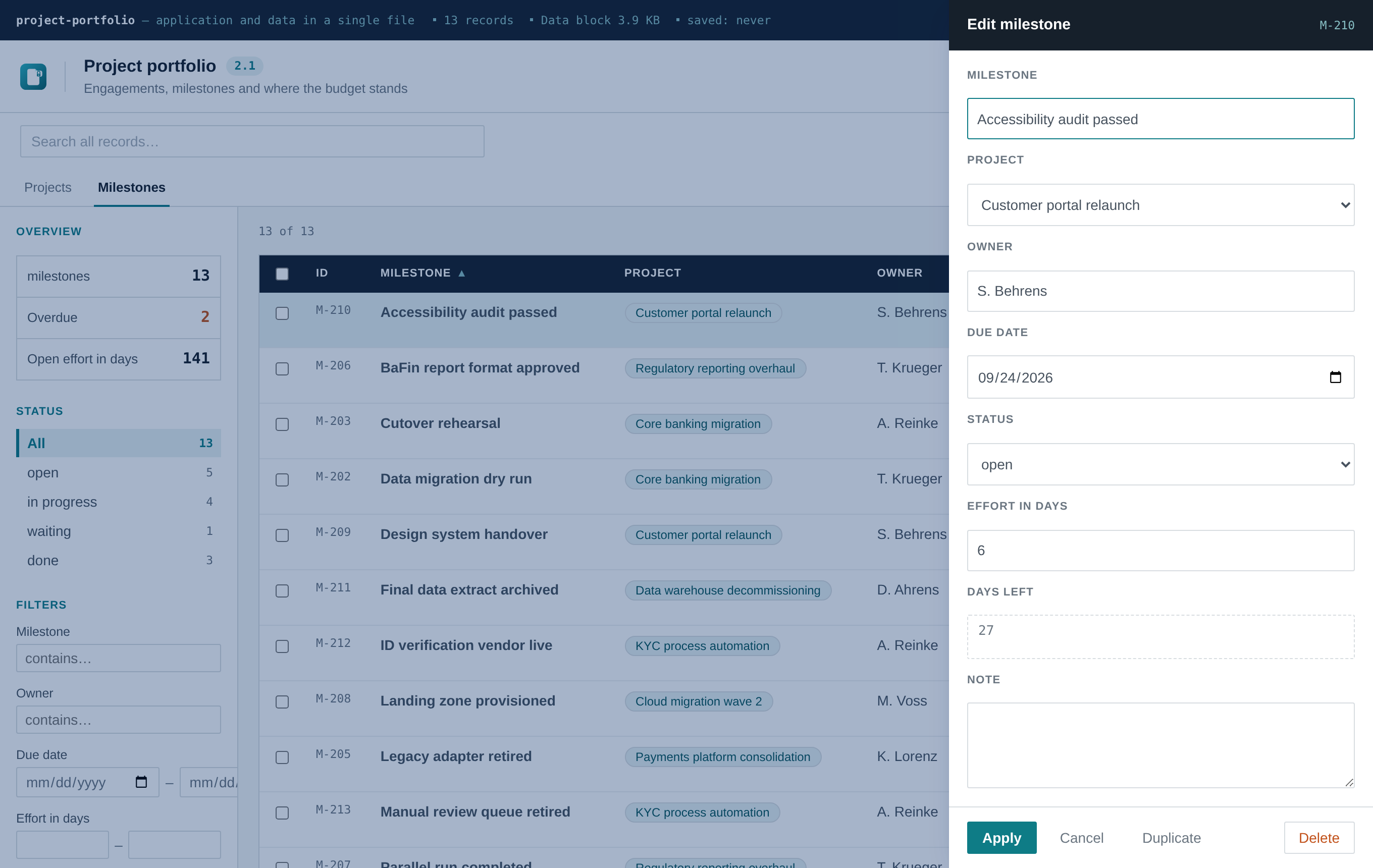
A field with type: 'reference' and entity: '<key>' points at another entity:
-
In the edit form, it renders as a dropdown of the target entity's records, showing each
option's
titleField(a supplier's name, not its id) while storing the id. - In the table, it renders as a clickable chip resolving to the referenced record's title. Clicking it switches to that entity's tab and opens the record — a lightweight way to move between related records without a dedicated detail-page concept.
- Deleting a record that's still referenced is blocked. The error names exactly which records reference it, so you can either reassign or delete those first.
-
The AI assistant is reference-aware. Its instructions describe every entity and how they
connect, and when it proposes an action touching a reference field, it can name the target either
by id or by the target record's title text —
matchReference()insrc/lib/actions.jsresolves either, the same tolerant matching already used for enum values.
A row of tabs appears above the list (hidden entirely for single-entity tools, so nothing changes visually for the common case). Switching tabs resets the search box, filters and sort — they're per-schema, and carrying them over between entities with different fields wouldn't mean anything.
CSV export, JSON export/import, encryption, branding, and the
interface language toggle all already understand this shape — nothing about
them needs adjusting for a multi-entity domain.js. CSV export resolves reference fields to the
target's title rather than exporting a raw id, since a spreadsheet of internal ids isn't useful to
anyone.
examples/suppliers-certificates.domain.js is a full, working two-entity domain — five suppliers,
nine certificates, one relationship. Copy it over src/domain.js and rebuild to see the entity
tabs, the reference dropdown and the clickable chips in action. test/multi-entity.mjs is the
automated version of the same walkthrough — see Testing.
A DASHBOARD export adds a second view with stat, bar and donut tiles, drawn without a charting
library and coloured from the tool's own accent. Optional — leave it out and the view does not
exist. Both views print to a usable PDF. See
Dashboards and Printing.
If you're an AI assistant (or a human) doing this for someone else, don't guess — ask, in one round:
- What is being tracked? One record — what is it called, singular and plural?
-
Which fields? Name, type (
text,enum,date,number), and for enums the allowed values. - Which field is the headline in the list, and which fields belong in the table at all?
- Any "overdue" or "done" logic? A date that can lapse, a status that closes an item.
- Should the AI assistant be part of it? It ships switched off; the user can enable it later.
If the request already gave enough detail, skip the questions and state the assumptions made instead.
src/app.jsx is the only other file most tools should ever need to touch — and only for something
the schema genuinely can't express: an extra sidebar section, a computed column, a different empty
state. Everything else is already generic; resist the urge to touch it for anything schema can do.
Two things worth knowing if you do:
- Default title, subtitle, file name, colours and product name live in
DEFAULT_SETTINGS,DEFAULT_COLORSandDEFAULT_BRANDnear the top ofsrc/app.jsx. Set them to match the tool you're building — the user can change all of them later in Settings. - The interface language dictionary (
src/i18n.js) is a separate, unrelated layer — see Interface Languages. It translates app chrome, never your schema's field labels or enum values, which stay exactly as you wrote them.
openToolbox is a records-with-fields tool: a list, a form, filters. If the request is a calculator, a canvas, a diagram editor or a multi-step wizard, say so plainly rather than forcing an unrelated shape into the table. Two honest options: a stripped-down variant that keeps the file persistence, encryption and AI plumbing but replaces the list view, or a different starting point entirely.
npm install
npm run build          # produces dist/index.html — one file, self-contained
npm test                # optional: headless smoke test, needs a Chromium download
Deliver dist/index.html, renamed to something meaningful. Worth telling whoever receives it:
- double-click to open, no server needed
-
Ctrl/Cmd+Sor the Save button writes a new HTML file containing the data - nothing is auto-saved; the amber dot in the top bar means unsaved changes
- many mail gateways strip
.htmlattachments — send it zipped
These exist because they're exactly the mistakes that quietly break a single-file build, so an assistant (or you, six months later) doesn't have to rediscover them the hard way:
- Never add a runtime dependency on the network. No CDN links, no web fonts, no external images. The file must work with the network cable pulled.
-
Never use
localStorageorIndexedDBfor the data. Both are unreliable underfile://— the embedded payload is the storage mechanism, on purpose. -
Keep the build single-file. Don't add a second entry point;
vite-plugin-singlefilesupports exactly one. -
Don't set
removeViteModuleLoader: trueinvite.config.js. It silently empties the inlined script and produces a ~9 KB file that renders nothing — see Limits and Troubleshooting. - Don't weaken the SVG sanitiser or the AI-action validation. Both exist because the output file gets passed around to people who didn't build it.