Getting Data In
A tool with no data in it is a demo. This page covers the three ways real records get into a file.
Sidebar → Import CSV, or Settings → Data → Import CSV.
This is the normal path for consultants: the data already exists as an Excel or system export, and nobody should retype it.
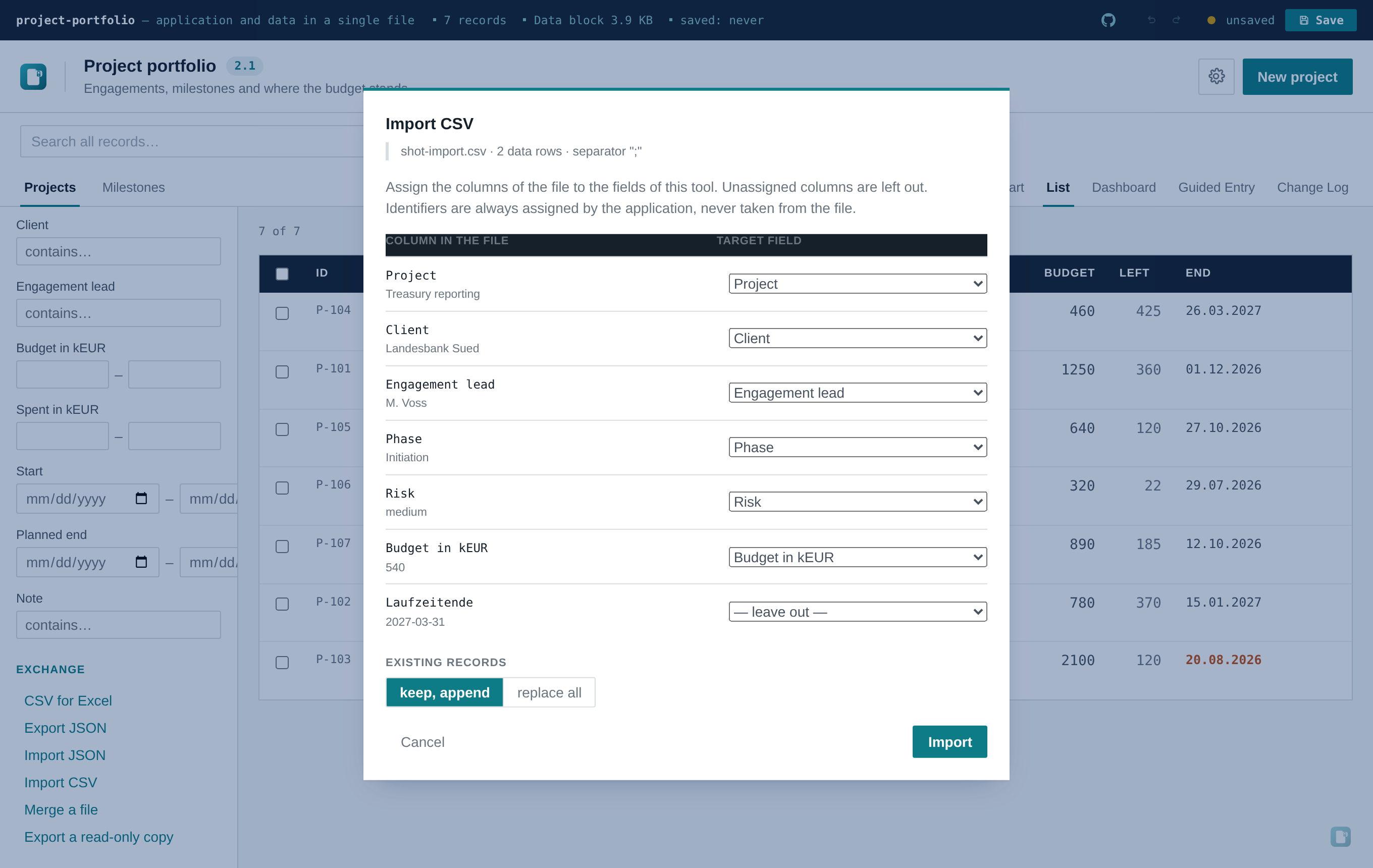
-
Pick a file. Separator (
;,,or tab), quoting and a leading BOM are detected from the file itself — a German Excel export (;-separated, BOM,"Meier, Anna"quoted) works with no preparation step, and so does a comma-separated one from an English system. - Assign the columns. Every column found in the file is listed with the first data row underneath it as a sample, next to a dropdown of the current entity's fields. Columns whose heading matches a field's label or key — ignoring case, spaces and punctuation — are already preselected. Anything else you assign by hand; anything left on — leave out — is ignored.
- Choose append or replace. Keep, append adds to what's there. Replace all swaps out the active entity's records entirely — the usual choice when you're loading the real data over the shipped demo records.
- Read the result. How many records came in, and every objection with its line number.
Every cell runs through the same type check as an AI-proposed change — one implementation
(coerceField() in src/lib/entities.js), used by both paths, so the CSV importer and the AI
assistant can never disagree about what a valid value is:
| Field type | Accepted |
|---|---|
text |
anything |
enum |
one of values, matched tolerantly (case and surrounding spaces ignored) |
number |
anything Number() parses |
date |
YYYY-MM-DD |
reference |
the target record's id or its title text |
Three deliberate behaviours worth knowing, all following the same principle as the AI proposal review — reject and name it, never swallow it silently:
- A bad cell doesn't lose the row. An unknown status leaves that one field at its default; the rest of the row is imported and the objection is named with its line number.
- A row without a title is skipped entirely, rather than imported as a nameless record you'd have to hunt down later.
-
Identifiers are always assigned by the application, never read from the file — the same rule
that applies to records the AI creates. An
idcolumn in your CSV is simply not on the list of assignable fields.
If you're building the tool and you've seen a sample of the user's
spreadsheet: name the fields the way their columns are named, and use their wording as the enum
values. The mapping is then correct on the first try and no cell gets rejected. A mismatch costs
one dropdown click per column — not a failed import — so this is an optimisation, not a
requirement.
Sidebar → Import JSON. A flat array replaces the active entity's records; an object keyed by
entity replaces several at once. This is exactly the shape Export JSON writes, so a file
round-trips — useful for moving a data set between two tools built from the same schema, or for
restoring a backup.
Unlike the CSV path there is no mapping step and no per-cell type check: JSON import assumes the data already has the right shape, because it normally came out of this same tool.
With the assistant switched on and write access allowed, attaching a document and
asking for records to be created works too — the model proposes create operations, you review
the list, and the same validation applies. Useful for unstructured sources (a meeting protocol, a
mail thread) where there's no clean table to export. For an actual spreadsheet, CSV import is the
better tool: no token cost, no model in the loop, no round of review.
XLSX directly. Reading it needs a parser library big enough to be felt in a file that has to stay small and travel by mail. Excel exports CSV in two clicks, and that path is fully supported — including the German-locale defaults that usually break naive CSV readers.