Home

Ship a working tool as a single HTML file. No server, no install, no network.
The main way this repo gets used: you don't write code against it — you point an AI agent at it
and describe the tool you want. Claude Cowork, Claude Code, or any coding agent that can read a
repo and run npm commands all work the same way here, because the whole workflow is designed
around one file, AGENTS.md, that tells the agent exactly what to ask and what to change.
This page shows that workflow with real examples. Everything else in this wiki — architecture, the AI assistant feature, security details, how to develop openToolbox itself — is reference material for after you've built something, linked at the bottom.
Six live demos — the same framework as six different tools. Each is one HTML file: download it, double-click it, no server either way.
They exist because a generic tool explains itself badly. "Records with fields" describes everything and convinces nobody. Somebody who recognises their own situation in one of these has already made the transfer.
| Demo | The problem it takes on | Shape |
|---|---|---|
| Project portfolio | Engagements, milestones, budget variance | 2 record types, money |
| Verpackungsregister | EU packaging regulation from Aug 2026 — the data sits with your suppliers, not with you | 2 record types, attachments |
| Verarbeitungsverzeichnis | GDPR Art. 30 — everyone knows the duty, twelve people hold the answers | intake mode, enum-heavy |
| Prüfbuch Betriebsmittel | Recurring equipment tests, and the date nobody can find after an accident | dates and intervals |
| Sanierung | Three quotes per trade, and where the budget actually stands | 2 record types, money |
| Klassenfahrt | 28 forms out, 19 back, and the sheet nobody may see | states not numbers |
All data in them is invented. They illustrate the structure of such tools — they are not legal advice and not proof of anyone's compliance.
The source of each is one file under
examples/. Copying the closest one
over src/domain.js is usually faster than writing a schema from a blank file.
The screenshots below are from the project portfolio.
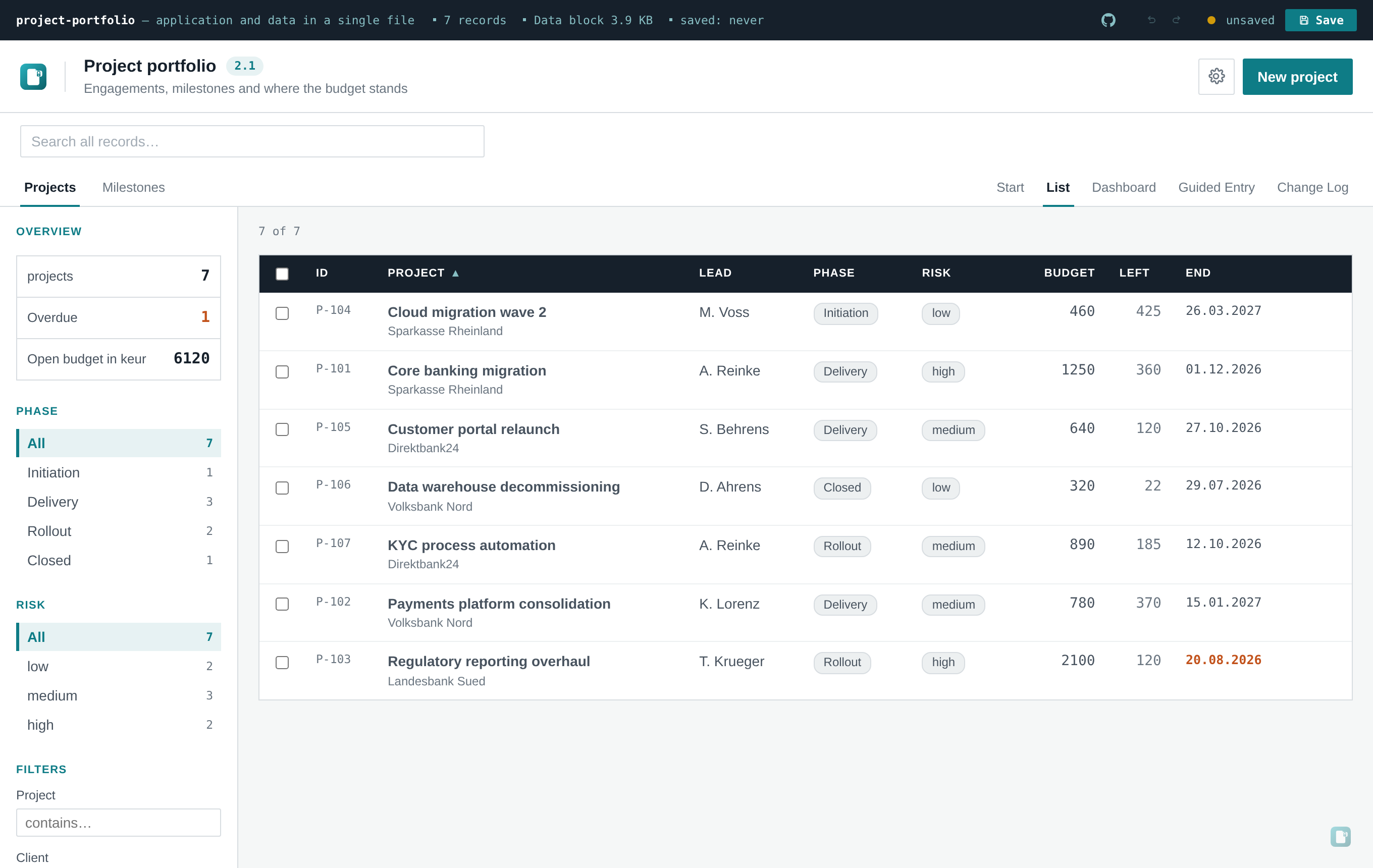
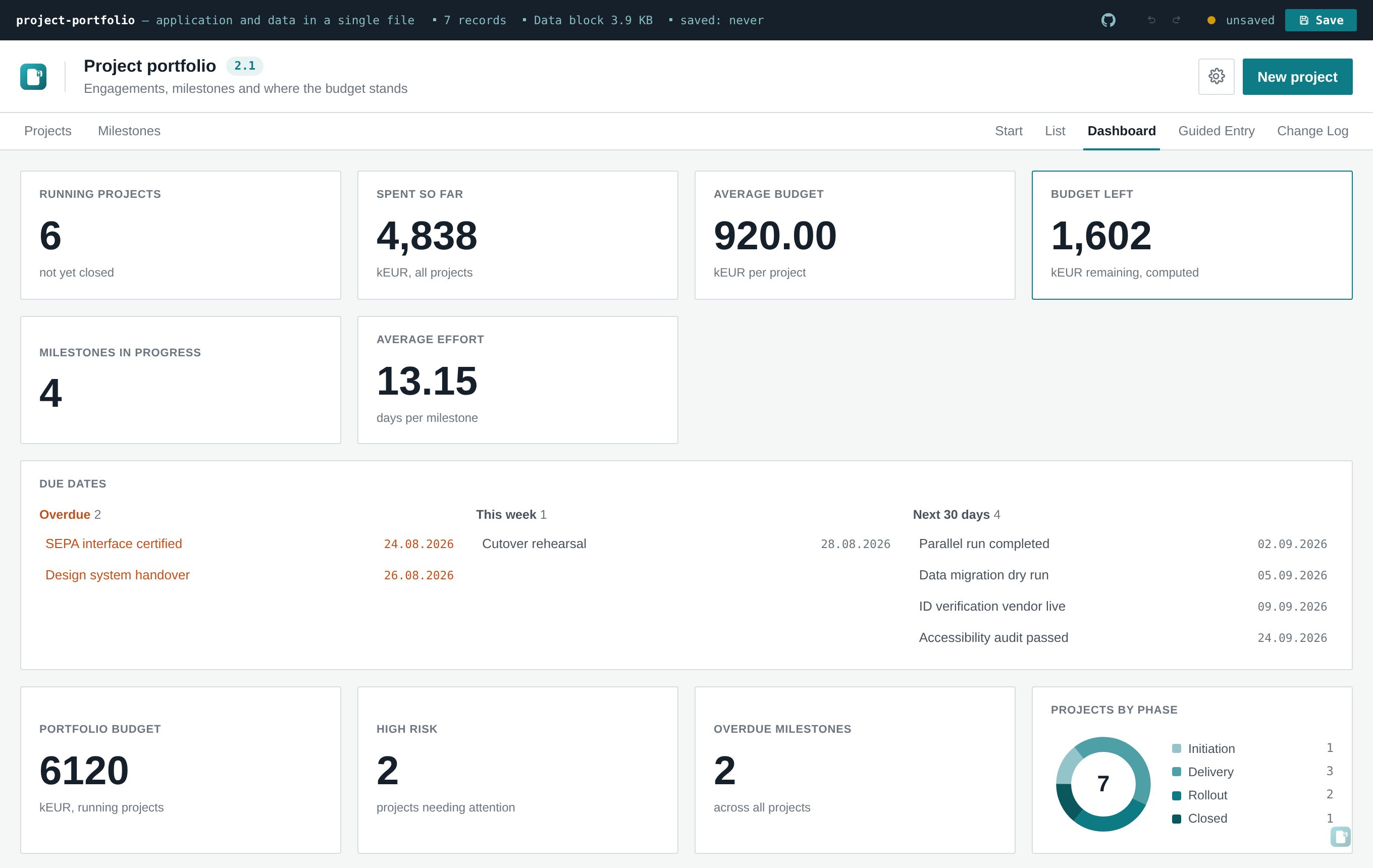
Everything above comes out of one file, src/domain.js — the table columns, the filters that count,
the calculated columns, the dashboard tiles, and the instructions the AI assistant gets.
The prompt below works as it stands — paste the repository URL and the agent takes it from there.
But AGENTS.md only starts helping once the agent is inside the repository, and "find the repo
first" is the step people actually stumble over.
The skill in plugin/ removes it.
Installed once, you describe the tool you want in any directory and the agent fetches the template
itself, runs the interview, builds and hands over.
Claude Code:
claude plugin marketplace add m-dohmen/openToolbox
claude plugin install opentoolbox@opentoolbox
Codex reads the very same SKILL.md — it has no marketplace, so copy the directory:
git clone --depth 1 https://github.com/m-dohmen/openToolbox /tmp/opentoolbox
mkdir -p ~/.codex/skills
cp -R /tmp/opentoolbox/plugin/skills/opentoolbox-tool ~/.codex/skills/
Codex's slash commands are a fixed set and cannot be extended, so the skill is reached through
/skills or fires on its own when what you describe matches it.
Nothing here is required. The skill is a shortcut; every example on this page works without it.
Say what you want tracked. The agent asks a handful of clarifying questions, writes one file (
src/domain.js), builds, and hands you a finished HTML file.
You never touch src/app.jsx, the build config, or any of the plumbing. One file goes in, one
file comes out.
You, to the agent:
Build me a tool for tracking vendor certificates, based on openToolbox (https://github.com/m-dohmen/openToolbox).
The agent reads AGENTS.md, doesn't have enough detail yet, and asks — in one round, per
AGENTS.md's instructions:
- What's one record called — singular and plural?
- Which fields, and what type each (text / enum / date / number)? For any enum, what values?
- Which field is the headline in the list? Which fields belong in the table itself vs. only the detail view?
- Any "overdue" or "done" logic — a date that can lapse, a status that closes an item?
- Should the AI assistant be switched on for this one? (Ships off either way; you can flip it on later in Settings.)
You answer, in plain language:
A record is a "certificate", plural "certificates". Fields: vendor name, certificate type (ISO 27001, SOC 2, PCI-DSS, other), expiry date, owner (who's tracking it), and a free-text note. Vendor name is the headline. Table should show vendor, type, expiry, owner. It's overdue once expiry has passed. No AI assistant for this one.
The agent writes src/domain.js — roughly:
export const SCHEMA = {
  idField: 'id',
  singular: 'certificate',
  plural: 'certificates',
  titleField: 'vendor',
  list: ['vendor', 'type', 'expiry', 'owner'],
  facets: ['type'],
  totalField: null,
  fields: [
    { key: 'vendor', label: 'Vendor', type: 'text', required: true },
    { key: 'type', label: 'Certificate type', type: 'enum',
      values: ['ISO 27001', 'SOC 2', 'PCI-DSS', 'Other'] },
    { key: 'expiry', label: 'Expiry date', type: 'date' },
    { key: 'owner', label: 'Owner', type: 'text' },
    { key: 'note', label: 'Note', type: 'text', long: true },
  ],
}
export const isOverdue = (r) => r.expiry && r.expiry < new Date().toISOString().slice(0, 10)
export const isDone = () => false   // no "done" concept for this tool
// … uid(), emptyRecord(), seed() with realistic demo certificates, formatDate()
…runs npm install && npm run build, and delivers dist/index.html — renamed to something like
vendor-certificates.html — ready to double-click open.
If your first message already answers all five questions, the agent skips straight to building —
AGENTS.md explicitly tells it to state its assumptions instead of asking when the prompt already
has enough in it:
Build me an equipment maintenance log based on openToolbox. One record is a "maintenance ticket" — machine name, technician, service date, status (open/scheduled/done), and a cost in euros. Machine name is the headline, table shows machine, technician, date, status, cost. A ticket is overdue if the service date has passed and it's not done. Turn the AI assistant on so whoever uses this can ask "what's overdue" without digging through the table — but keep write access off, read-only is enough.
Nothing to clarify here — the agent states back its assumptions in one line ("assuming 'cost' is a
plain number, no currency formatting beyond the field label") and goes straight to src/domain.js,
setting ai.enabled: true and ai.allowWrite: false in the default settings.
Not everything is a list-with-filters. If you ask for something openToolbox genuinely isn't built for, a well-briefed agent says so instead of forcing it:
Build me a project-cost calculator based on openToolbox — enter hours and a day rate per role, it totals the budget.
A calculator isn't records-with-fields, so per AGENTS.md, the honest answer is: "That's a
calculator, not a list — openToolbox's schema-driven table/form doesn't fit it well. I can either
(a) keep the file persistence, encryption and AI plumbing and replace the list view with a
calculator layout, or (b) suggest a different starting point. Which do you want?" — rather than
awkwardly bending a table-and-filters UI into something it was never meant to be.
-
One file to read, one file to write.
AGENTS.mdis short on purpose and is the only context the agent strictly needs;src/domain.jsis the only file it should normally touch. -
The schema drives everything else. Table columns, the edit form, sidebar filters, CSV
export, what the AI assistant is told about your data, and the validation of anything it
proposes back — all generated from one
SCHEMAobject, not hand-wired per tool. - The failure modes are already documented, so the agent doesn't rediscover them: don't add a network dependency, don't use browser storage, don't touch the Vite config in ways that silently produce a broken 9 KB file. See Building Your Own Tool for the full list and the reasoning behind each one.
-
It ends with a real deliverable — one
dist/index.html, self-contained, that opens by double-click with no server and no install. - Your actual data doesn't go through the agent. The finished file imports CSV itself, with a column-mapping step — so the agent builds the shape, and you load the real records afterwards. See Getting Data In.
One thing to know before you pass a built file to a client: it counts its own opens, sending the kind of tool it is (never your data or file name) to an endpoint that is a visible, editable setting — preset to the template author's, changeable to yours, or clearable. Details and how to ship it off by default: the usage counter.
-
Building Your Own Tool — the full
SCHEMAshape, reference-style - Getting Data In — CSV import with column mapping, and the alternatives
- Searching and Filtering
- Sorting — what compares against what, empty values, session scope
- Duplicating Records — copies of saved records, suffix, undo and change log
-
Kanban Board — opt-in
view.boardper entity, drag&drop with mouse/touch/keyboard, writes through the same path as the form - Dashboards and Printing — tiles over the data, and the PDF that ends up in the appendix
- Example Prompts, Versions and the Change Log — how the file explains itself
- Getting Started — clone/build/run it yourself, try the core loop by hand
- AI Assistant — how the optional chat/proposal feature works, if you turn it on
- Interface Languages — the English/German toggle, adding a third language
- Branding — colours, logo, the two links in the shipped UI
- Security and Encryption — what the optional encryption does and doesn't protect
- Architecture — how the file-as-database persistence actually works, for the curious
The pages above are about using the repo to build a tool. If instead you want to change the template itself — fix a bug, add a feature to the framework, touch the build pipeline — that's a different, much smaller audience:
- Testing — what the smoke test covers
- Limits and Troubleshooting — known failure modes
- Contributing — ground rules for changes to the framework
- CHANGELOG.md — release-by-release history of what changed in openToolbox itself (the in-file change log is a different thing, see the Prompts, Versions, Change Log page)
Apache License 2.0. Dependencies: Preact (MIT), Vite (MIT), Playwright for tests only (Apache 2.0). The built file loads nothing at runtime.