A Zellij sidebar that shows what every AI agent in your session is doing: working, waiting for you, done, or failed. Click a row to jump to that tab.







Quick start · What you get · How it works · Configuration · How is this different? · Docs
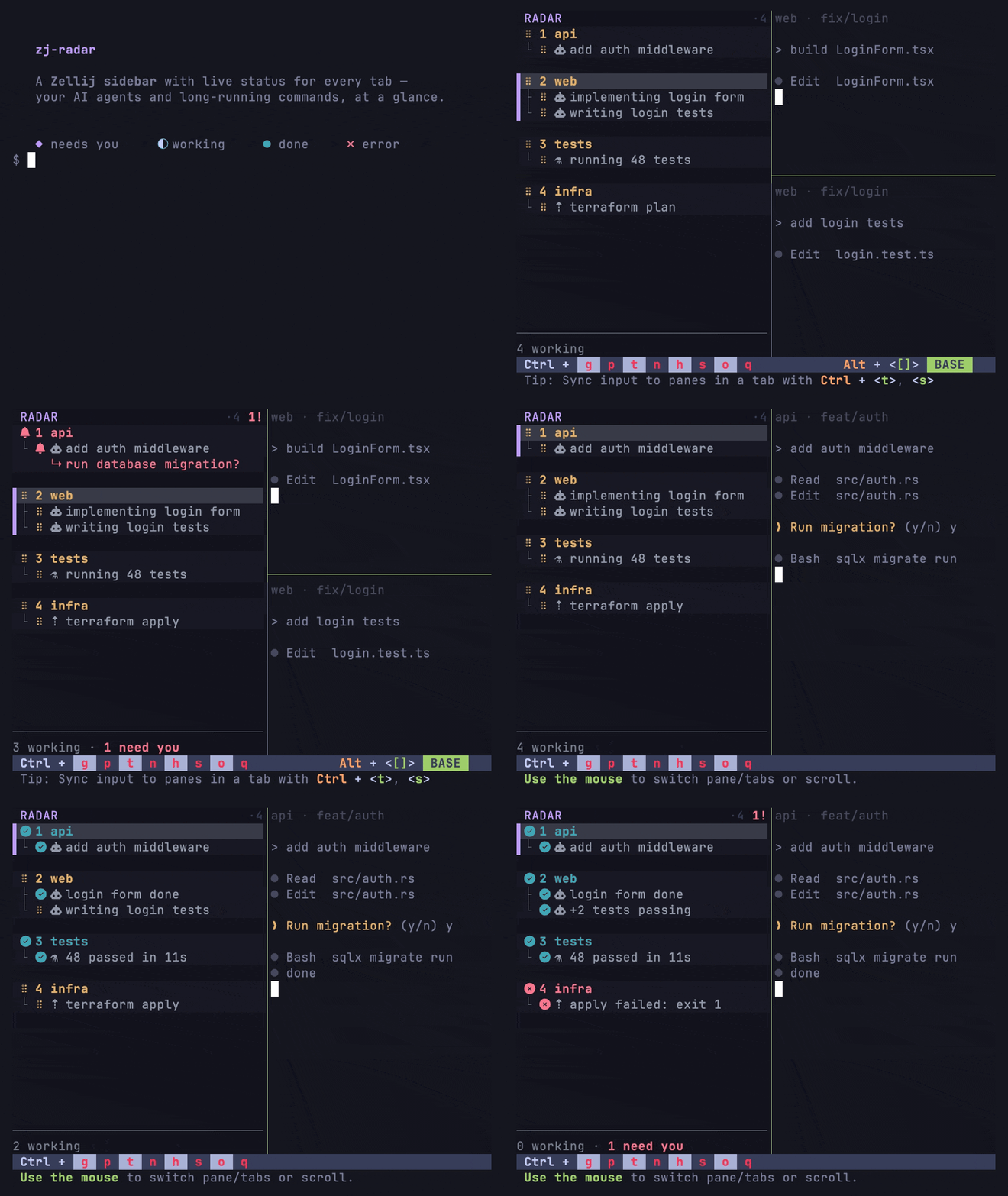
◆ needs you · ⠋ working · ● done · ✗ error · ○ idle
Agents like Claude Code work for minutes, then block on a permission prompt or finish quietly. With many tabs open you lose track of which one needs you. zj-radar puts that in a pinned left column inside the Zellij session you already run. It does not launch, wrap, or own your agents.
Requires Zellij 0.44.3 or newer (zellij --version).
# 1. Install the zj-radar CLI (prebuilt for Linux and Apple Silicon macOS;
#    Intel macOS builds from source — see docs/install.md)
curl --proto '=https' --tlsv1.2 -LsSf \
  https://github.com/marktoda/zj-radar/releases/latest/download/install.sh | sh

# 2. Install the sidebar: the wasm, a `radar` alias, the rail in your default
#    layout, and Zellij's permission grant. Three y/N prompts, one per step.
zj-radar setup zellij --download

# 3. Start (or restart) Zellij.
zellij
Then wire up your agents. Without a producer the rail lists your tabs but shows no agent status.
zj-radar setup claude    # Claude Code plugin, via its marketplace
zj-radar setup codex     # Codex hooks; then run `/hooks` inside Codex to trust them
zj-radar setup opencode  # Opencode bridge plugin; then restart opencode
Want to look before you commit? zj-radar run starts a throwaway session with
the rail wired in and leaves your config alone. Later, zj-radar update moves
the CLI and the sidebar to the latest release together. Source builds, Nix,
manual setup, and the full removal list are in
docs/install.md.
- Per-tab and per-pane status for Claude Code, Codex, and Opencode, plus any script that can send JSON.
- Jump to the tab that needs you: click its row, or bind
attention-next(keybinds). - Your Zellij stays yours: no new terminal, no tmux wrapper, no orchestrator.
- Shell commands show up too. Builds and tests spin with an elapsed tag, dev
servers hold a steady
▸, editors and pagers stay quiet. - Desktop notifications when a background agent finishes or needs you.
- Running several Zellij sessions? Each rail lists the others with live counts and click-to-switch.
What every glyph and line means:
docs/using.md.
Agent hooks broadcast a small versioned JSON payload (zj_radar.status.v1)
over zellij pipe. The sidebar consumes it, rolls panes up into tabs, and
renders. It pins itself into your tab templates the same way Zellij's own
status bar does, so it appears in every tab and survives layout swaps.
The plugin is push-driven. It never polls panes and makes no blocking host
calls on any per-event path; the one exception is a single cwd lookup when a
pane is created, used to name the tab. Polling is what melted the predecessor
plugin: see
docs/smart-tabs-postmortem.md.
Options go on the radar alias in ~/.config/zellij/config.kdl. These are the
defaults; set a key only to change it:
plugins {
    radar location="file:~/.config/zellij/plugins/zj_radar.wasm" {
        density "cards"         // cards · comfortable · compact
        naming "managed"        // off · managed · force
        notify true             // desktop notifications (macOS + Linux)
        notify_done true        // per-status toggles (done · error · pending)
        notify_error true
        notify_pending true
        notify_when_focused false  // suppress when the pane is focused
        interactive_commands ""    // extra editors/pagers/TUIs to keep quiet
    }
}
Change options live without editing anything:
zellij pipe --name zj_radar.config.v1 -- '{"density":"compact","header":false}'The full option table, runtime pipes, and keybinds are in
docs/configuration.md.
| Tool | Best for | How zj-radar differs |
|---|---|---|
| Claude Squad | Running multiple agents in isolated git worktrees from one TUI. | zj-radar does not launch or own agents; it shows status inside the Zellij session you already use. |
| cmux | A macOS terminal with vertical tabs, notifications, browser panes, and agent-aware UI. | zj-radar is a Zellij plugin, not a new terminal app. |
| zjstatus | Replacing / customizing the Zellij status bar. | zj-radar is an agent-status rail; it leaves your existing status bar alone. |
| Plain Zellij tabs | Manual multiplexing. | zj-radar adds agent state, elapsed time, messages, and jump-to-attention behavior. |
| Doc | What's in it |
|---|---|
docs/install.md |
Install paths (CLI, source, Nix, manual), layouts, permissions, --check, full removal. |
docs/using.md |
Reading the rail: glyphs, tree rows, tags, footer, mouse gestures, cross-session badge, notifications. |
docs/configuration.md |
Option table, the config.v1 and cmd.v1 pipes, keybinds. |
docs/producers.md |
Claude Code, Codex, Opencode, notify generic, and the wire format for your own producer. |
docs/troubleshooting.md |
Symptom → fix: blank rail, no status, stuck rows, layout quirks, terminal rendering. |
docs/activity-model.md |
Why builds spin, servers don't, and editors stay quiet. |
docs/design.md |
Architecture and mechanisms. |
docs/rail-reference.md |
The executable render spec; the plugin's reference tests parse it. |
CONTEXT.md |
Domain glossary for contributors. |
CONTRIBUTING.md |
Build, test layers, lint, dev loop, PR rules. |
The changelog is the GitHub Releases page.
cargo test    # host tests, no wasm needed
just dev      # build and launch a sandboxed dev session
CONTRIBUTING.md
covers the test layers, the no-rustfmt rule, and PR expectations. The hero
GIF is reproducible from
demo/.
MIT — see LICENSE.