
Universal complex-script text rendering for Matplotlib and Seaborn, powered by Qt/HarfBuzz shaping.





Matplotlib's text engine cannot shape complex scripts — Bengali conjuncts break apart, Arabic letters don't join, Tamil and Thai vowels land in the wrong place, and often all you get is tofu boxes (▯▯▯). universal_render routes text through Qt's shaping engine (HarfBuzz) and embeds the correctly shaped result into your figures, with automatic script detection and per-script font fallback — no font configuration needed.
Left: Matplotlib's own text engine. Right: the same text through universal_render — 22 scripts, same machine, zero configuration.
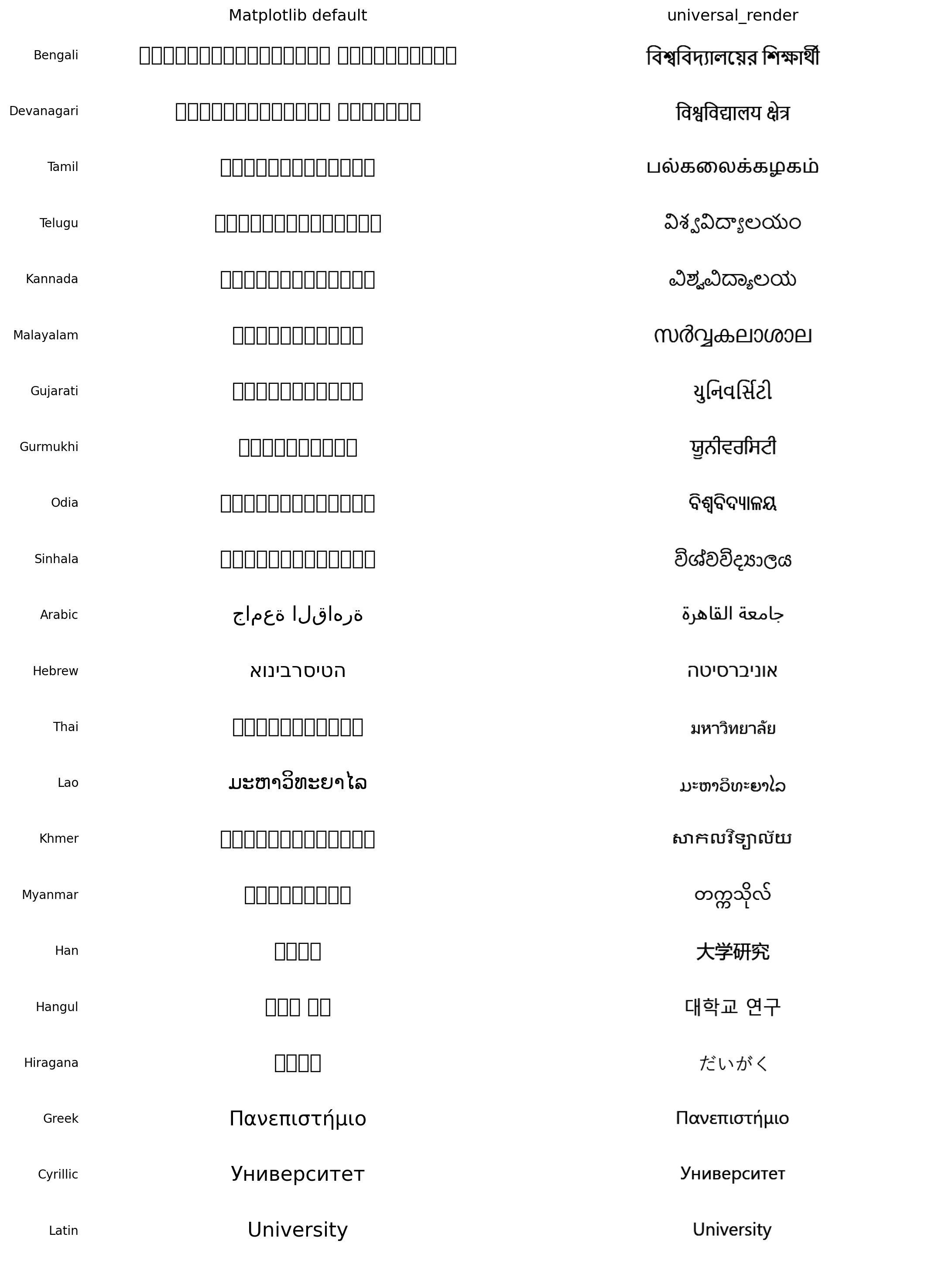
And it isn't just tofu: even with the correct font installed, Matplotlib (and, on Windows, mplcairo and Pillow — their official wheels ship without Raqm/HarfBuzz) silently renders complex scripts unshaped: Arabic unjoined, Bengali conjuncts split, with zero warnings. See evaluation/ for the measured comparison.
- Automatic Unicode script detection (
detect_script,segment_runs) - Per-script font fallback with glyph-coverage validation (
auto_font_fallback) - Correct shaping for Indic (Bengali, Hindi, Tamil, Telugu, …), RTL (Arabic, Hebrew), Southeast Asian (Thai, Khmer, Lao, Myanmar), CJK, and more — 22 scripts verified by the built-in
self_test() - Mixed-script text: Bengali + English + numbers in one string
- Native numerals for 16 scripts (
to_native_numerals(2026, "Bengali")→২০২৬) - Drop-in replacements for titles, axis labels, tick labels, legends, annotations, and heatmap cell text
- Matplotlib-style text options:
weight="bold",italic=True,alpha=0.5,rotation=45(any angle, including rotated tick labels), multiline"\n"strings, titleloc="left"/"center"/"right", and a proper figuresuptitle - DPI-safe layout: titles, labels, and ticks stay correctly placed at any
savefig(dpi=..., bbox_inches="tight") - Works headless (Colab/Kaggle/CI) via Qt offscreen mode
- Drop-in
bangla_rendercompatibility:import universal_render.compat as br
import matplotlib.pyplot as plt
import universal_render as ur

fig, ax = plt.subplots()
ax.plot([1, 2, 3], [3, 1, 4])

ur.set_multilingual_title(ax, "বাংলা শিরোনাম")        # Bengali — font auto-selected
ur.set_multilingual_xlabel(ax, "أشهر السنة")           # Arabic — shaped + RTL
ur.set_multilingual_ylabel(ax, "மாத விற்பனை")          # Tamil

ur.set_multilingual_xticks(ax, [1, 2, 3], ["एक", "दो", "तीन"])  # Hindi
ur.apply_multilingual_layout(fig, auto=True)

plt.savefig("plot.png", dpi=300)
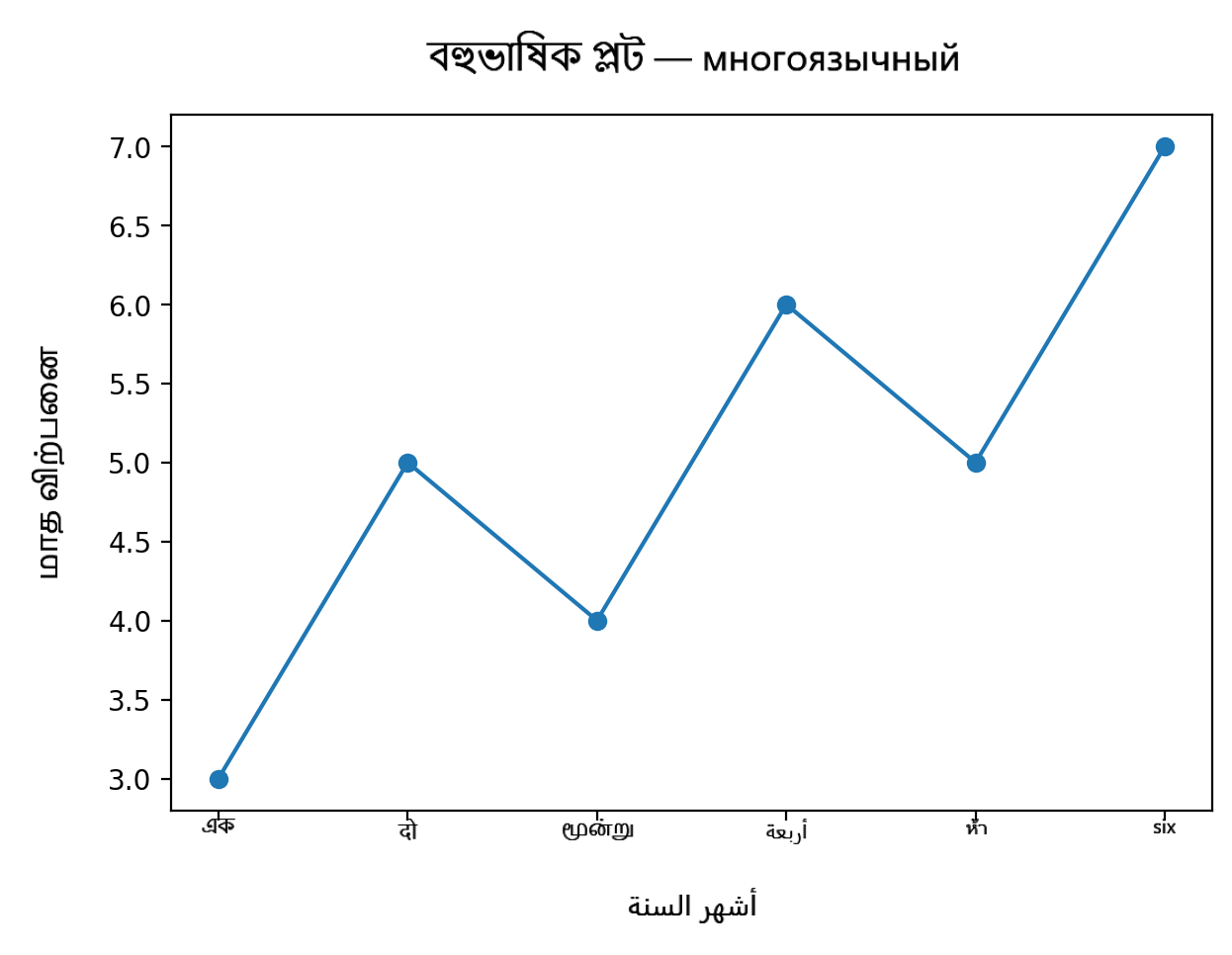
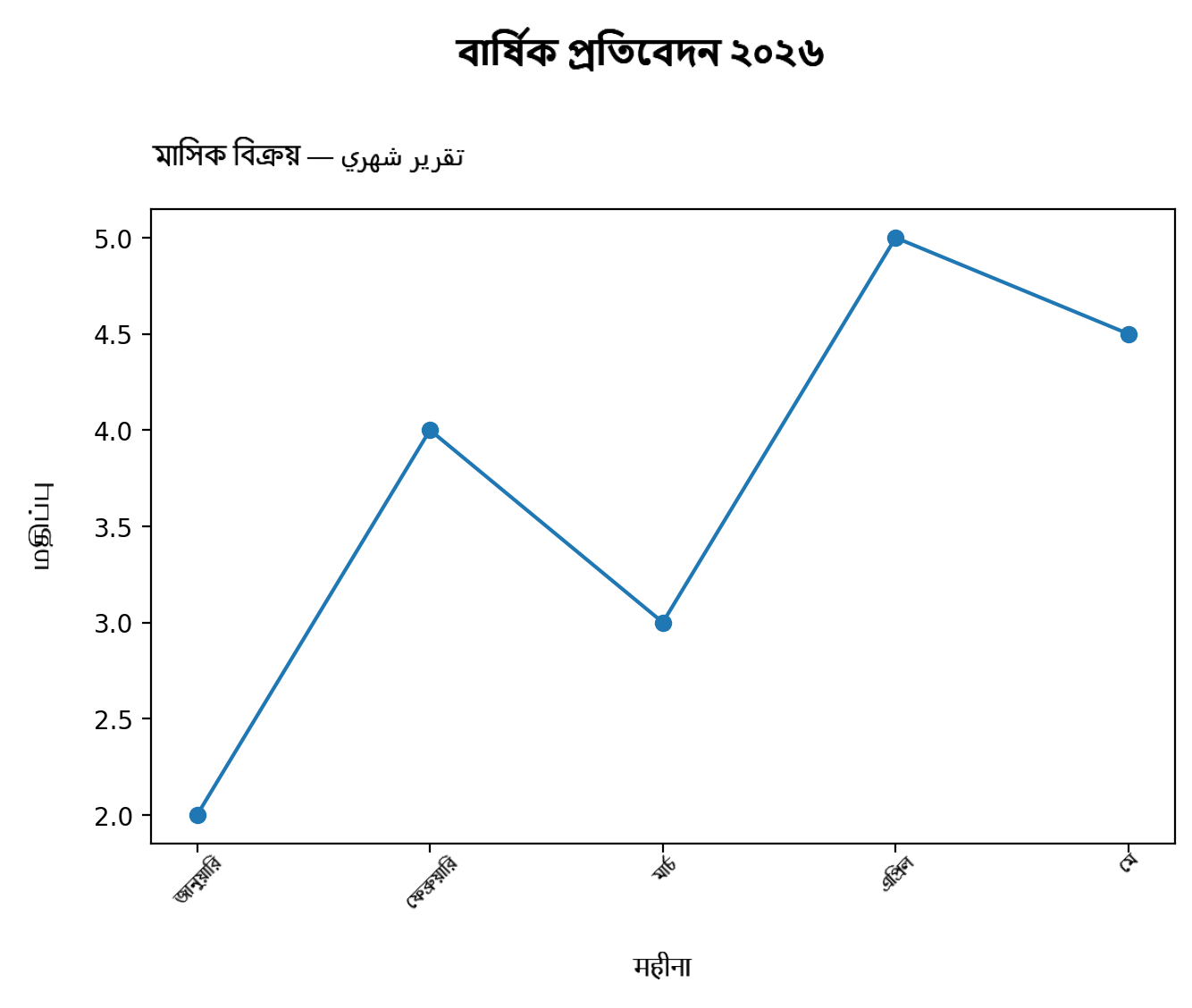
# Label a whole plot at once — each string picks its own script's font
ur.localize_axes(
    ax,
    title="বিক্রয় প্রতিবেদন ২০২৬",
    xlabel="महीना", ylabel="மதிப்பு",
    xticklabels=["জানু", "फ़र", "மார்", "April"],
    legend_labels=["পূর্বাভাস"],
)

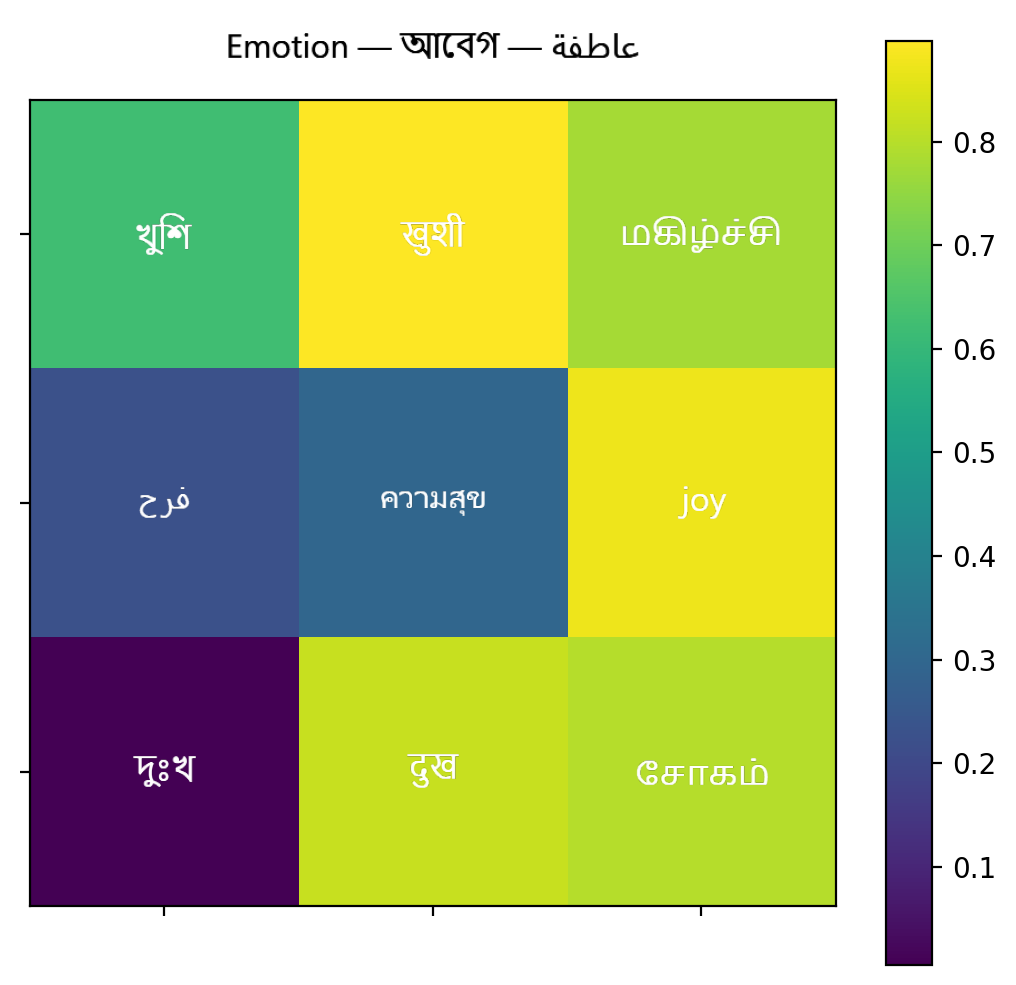
# Annotated heatmap with native Bengali digits and auto text contrast
ur.multilingual_heatmap(
    ax, data, value_format=".2f", value_script="Bengali",
    row_labels=["ঢাকা", "চট্টগ্রাম", "খুলনা"],
    col_labels=["جودة", "คุณภาพ", "Quality"],
    title="গুণমান ম্যাট্রিক্স",
)

# Verify this machine renders all 22 supported scripts
ur.self_test()
| Area | Functions |
|---|---|
| High-level (one call) | localize_axes, multilingual_heatmap, multilingual_bar_labels, language_to_script, set_language_font, font_for_language, localized_numerals, supported_languages |
| Script detection | detect_script, segment_runs, is_rtl_text, is_mixed_script, describe_text, to_native_numerals, script_direction |
| Fonts | auto_font_fallback, find_font_for_script, set_script_font, register_font, validate_font, font_covers_text, coverage_report |
| Rendering | render_text, render_text_array, render_mixed_text, render_paragraph, measure_text, set_render_defaults, render cache controls |
| Matplotlib | set_multilingual_title/xlabel/ylabel/suptitle, set_multilingual_xticks/yticks/numeric_ticks, set_multilingual_legend, multilingual_text, annotate_multilingual, add_multilingual_cell_text, multilingual_paragraph, apply_multilingual_layout |
| Diagnostics / evaluation | self_test (per-script render check), benchmark_render (cold/warm latency), save_comparison_figure (before/after figure) |
| bangla-render compat | import universal_render.compat as br — every set_bangla_* name works unchanged |
| Family | Scripts (verified by self_test()) |
Direction |
|---|---|---|
| Indic / Brahmic | Bengali, Devanagari (Hindi/Marathi/Nepali), Tamil, Telugu, Kannada, Malayalam, Gujarati, Gurmukhi (Punjabi), Odia, Sinhala | LTR |
| Right-to-left | Arabic (Arabic/Urdu/Persian), Hebrew | RTL |
| Southeast Asian | Thai, Lao, Khmer, Myanmar | LTR |
| East Asian | Han (Chinese), Hangul (Korean), Hiragana (Japanese) | LTR |
| European | Latin, Greek, Cyrillic | LTR |
Script detection additionally covers Katakana, Tibetan, Georgian, Armenian, and Ethiopic. One script serves many languages — language_to_script() maps ~60 language names.
evaluation/compare_backends.py renders the same text with the same font file through every backend, so the shaping engine is the only variable. Findings on Windows (Python 3.11):
| Backend | Bengali | Arabic | Notes |
|---|---|---|---|
universal_render |
✅ correct | ✅ correct | reference (Qt/HarfBuzz) |
| Matplotlib, default font | ▯▯▯ tofu (104 warnings) | unjoined | at least it warns |
| Matplotlib, correct font | broken conjuncts, 0 warnings | unjoined, 0 warnings | silent failure |
| mplcairo 0.6.1 (pip wheel) | broken conjuncts, 0 warnings | unjoined, 0 warnings | wheel ships without Raqm |
| Pillow (pip wheel) | — | — | PIL.features.check("raqm") → False |
pip install universal-renderOr try it without installing anything — the demo notebook runs on Colab or Kaggle with one click (on Kaggle, enable Internet in the notebook settings).
Fonts: on Windows, everything works out of the box (Nirmala UI, Segoe UI, Leelawadee UI…). On Linux/Colab, install Noto fonts (fonts-noto / fonts-noto-cjk) — the fallback tables pick them up automatically. Verify any environment with:
import universal_render as ur
ur.self_test() # prints a per-script pass/fail tablepy tests/test_universal_render.py # or: pytest tests/- Text is embedded as high-resolution raster images; SVG/PDF exports contain images rather than selectable vector glyphs.
- Arbitrary-angle rotated tick labels are center-anchored under their tick (Matplotlib anchors the label end).
- Scripts requiring vertical layout (e.g. traditional Mongolian) are not supported.
If you use universal-render in academic work, please cite the bangla-render paper (SoftwareX) for now — a dedicated paper for the universal framework is in preparation.
MIT © 2026 Mrinal Basak Shuvo