Repository navigation
Segments
Segment to zapisany, wielokrotnego użytku zestaw warunków opisujących grupę klientów — np. "VIP-i, którzy wydali ponad 1000 zł" albo "klienci, którzy nie kupowali od 60 dni". Zamiast odtwarzać te same warunki w każdej kampanii, tworzysz segment raz i podpinasz go przez warunek "W segmencie".

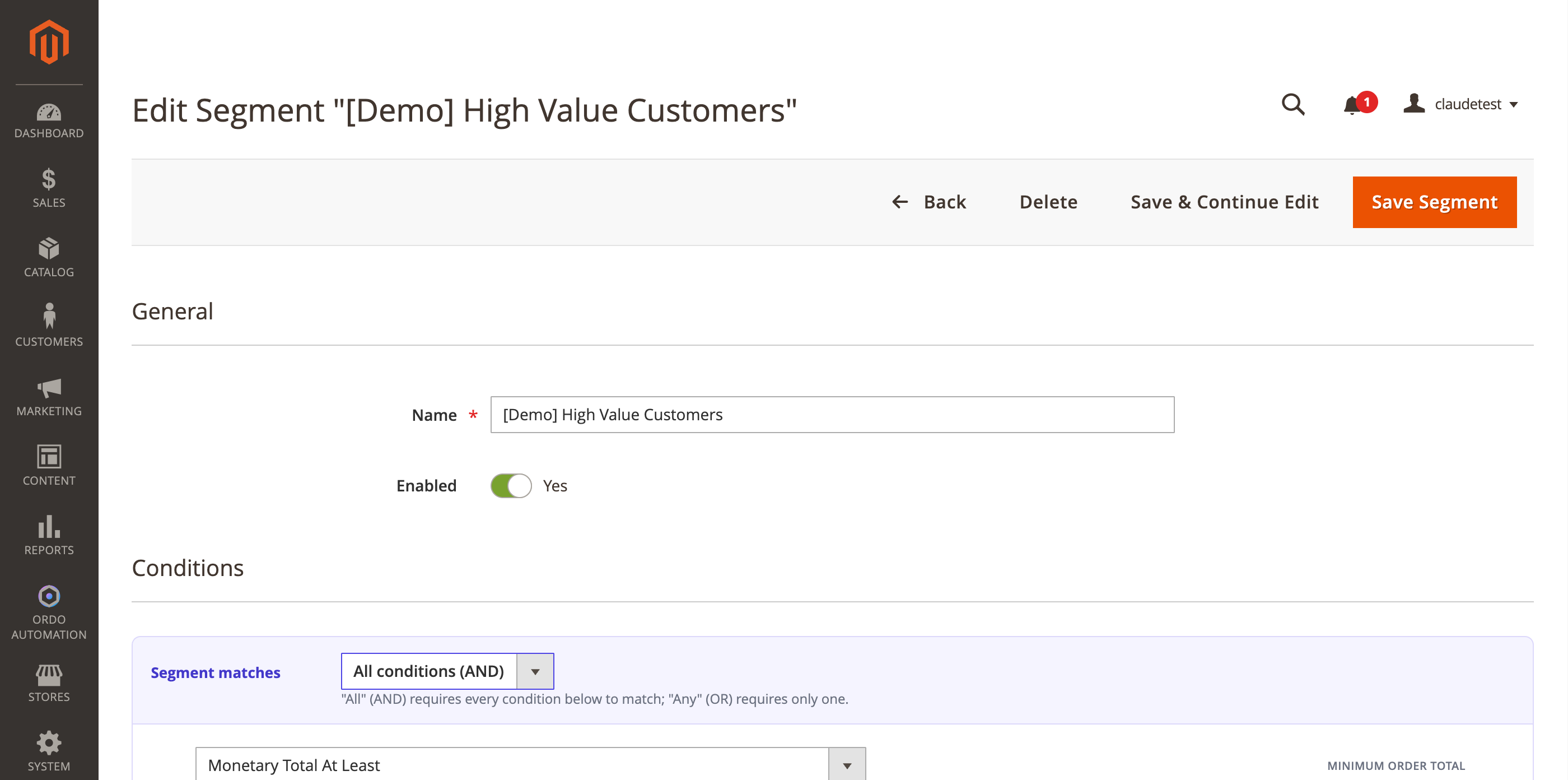
W formularzu ustawiasz nazwę, czy segment jest aktywny, i logikę dopasowania: wszystkie warunki muszą być spełnione albo wystarczy jeden. Warunki są takie same jak w kampaniach (tag, minimalna suma zamówień, wynik punktowy, dni od ostatniego zamówienia, przynależność do innego segmentu, zakupiony produkt/kategoria i więcej) — możesz też zagnieżdżać grupy warunków jedna w drugiej dla bardziej złożonej logiki.
Na stronie edycji segmentu, poniżej warunków, możesz od razu wykonać coś na wszystkich obecnych członkach segmentu: dodać im tag albo dodać punkty — bez konieczności tworzenia osobnej kampanii.
Osobne narzędzie, w którym wybierasz dwa segmenty i sprawdzasz, ilu klientów należy jednocześnie do obu — przydatne, żeby nie wysyłać tej samej promocji dwa razy do tych samych osób z różnych kampanii.
A segment is a saved, reusable set of conditions describing a group of customers — e.g. "VIPs who spent over $1000" or "customers who haven't ordered in 60 days." Instead of rebuilding the same conditions in every campaign, you build the segment once and reference it via the "In Segment" condition.
In the form you set the name, whether the segment is active, and the matching logic: all conditions must match or any one is enough. Conditions are the same ones available in campaigns (tag, minimum order total, score, days since last order, membership in another segment, purchased product/category, and more) — you can also nest groups of conditions inside each other for more complex logic.
On the segment edit page, below the conditions, you can act on every current member right away: add them a tag or add points — no need to build a separate campaign just for that.
A separate tool where you pick two segments and see how many customers belong to both at once — useful for avoiding sending the same promotion twice to the same people from different campaigns.