Sub Action Rotate Source
Sets the rotation tranformation angle of a source to the specified angle NOTE Rotation occours around the alignment position defined in OBS itself. By default this is the top left corner of the source not the center
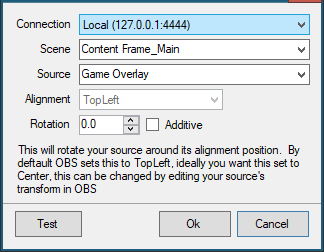
Connection
Any OBS connections you have configured in the OBS tab will be listed to choose from
Scene
If the selected OBS connection is currently connected, a dropdown list of available scenes will populate for selection, otherwise the scene name can be entered manually.
NOTE Scene names are case sensitive
Source
If the selected OBS connection is currently connected, a dropdown list of available sources will populate for selection, otherwise the source name can be entered manually.
NOTE Source names are case sensitive
Alignment
Reports the currently configured alignment position.
Rotation
By default this is an Absolute angle with 0 being normal rotation, valid range -360 -> +360, however as tranform is instant values outside -180 -> +180 will be visually the same. Negative values rotate the source counter-clockwise.
Additive option will make the rotation relative to its current transform rather than overwriting