Sub Action Set Random Group Source Visible
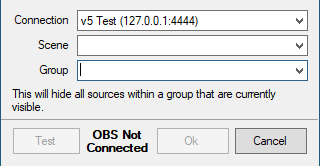
This will set the source visibilty for a single random source in a defined group to Active
Connection
Any OBS connections you have configured in the OBS tab will be listed to choose from
Scene
If the selected OBS connection is currently connected, a dropdown list of available scenes will populate for selection, otherwise the scene name can be entered manually.
Group
If the selected OBS connection is currently connected, a dropdown list of available groups will populate for selection, otherwise the scene name can be entered manually.