WebSocket Server
Connect to CPH with a websocket client, whether its from JS, or some other language, and react to events that happen within CPH in real time, and/or even from custom events you can emit from within the Execute C# Code
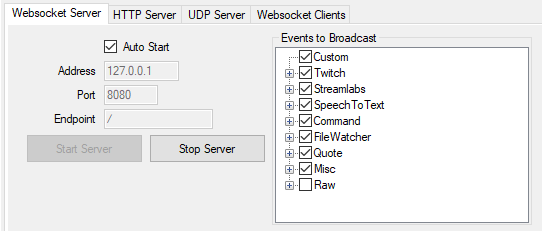
By going to the Websockets tab, and then the Server tab, you can change what IP, Port and the endpoint the server will listen on, as well as toggle it to auto start on application launch.
As of Version 0.52 the client connecting needs to subscribe to the events it wishes to receive.
Note This is a work in progress document, and will be updated over time
See the Websocket Server - Requests for more details
See the Websocket Server - Events for more details
- TwitchFollow
- TwitchCheer
- TwitchSub
- TwitchReSub
- TwitchGiftSub
- TwitchGiftBomb
- TwitchRaid
- TwitchHypeTrainStart
- TwitchHypeTrainUpdate
- TwitchHypeTrainLevelUp
- TwitchHypeTrainEnd
- TwitchRewardRedemption
- TwitchRewardCreated
- TwitchRewardUpdated
- TwitchRewardDeleted
- TwitchCommunityGoalContribution
- TwitchCommunityGoalEnded
- TwitchStreamUpdate
- TwitchWhisper
- TwitchFirstWord
- TwitchSubCounterRollover
- TwitchBroadcastUpdate
- TwitchStreamUpdateGameOnConnect
- CommandMessage
- CommandWhisper
- SpeechToTextDictation
- SpeechToTextCommand
- FileWatcherChanged
- FileWatcherCreated
- FileWatcherDeleted
- QuoteAdded
- QuoteShow
- TimedAction
- PyramidSuccess
- Custom
- RawAction
- RawSubAction