02. Airbyte Access Deployment Security And Data Flow
Airbyte is an open source data integration platform that simplifies the process of extracting data from different data sources and loading to various data warehouses. It is the EL in the ELT process.
-
Airbyte Cloud - This is a fully managed cloud service that is hosted by Airbyte. It is a good option for users who want to get started quickly without having to worry about the infrastructure. It is also a good option for users who do not have the technical expertise to manage the infrastructure. Being hosted by the airbyte team, it has cost implications. It gives users access to higher level features such as RBAC, SSO, Workspaces, Premium support, etc.
-
Airbyte Open Source - This is a self hosted option that allows users to deploy Airbyte on their own infrastructure. It is a good option for users who want to have full control of the infrastructure and have the technical expertise to manage the infrastructure. It can be deployed locally and on cloud with either Docker or Helm on Kubernetes. It is free to use and has no cost implications. It does not give users access to higher level features such as RBAC, SSO, Workspaces, Premium support, etc.
-
Airbyte Enterprise - This is a self hosted option that allows users to deploy Airbyte on their own infrastructure. It is a good option for users who want to have full control of the infrastructure and have the technical expertise to manage the infrastructure. It can only be deployed with Helm on Kubernetes. It is not free to use and has cost implications (licensing). It also gives users access to higher level features such as RBAC, SSO, Workspaces, Premium support, etc.
-
We currently use Airbyte Cloud for our production deployment and Airbyte Open Source for our staging deployment. We also have on premise deployments of airbyte OSS for the ECHIS project in Uganda and a staging instance for the boresha afya project in Tanzania.
-
We do not have any Airbyte Enterprise deployments.
-
Airbyte Cloud and Airbyte Enterprise offer RBAC and SS0. Users are restricted to the workspaces they have access to but can have access to multiple workspaces at a time if needed. Users can sign in with their Google, Github or Okta accounts.
-
Airbyte Open Source only offers basic authentication with a single user/pass combo.
-
Credentials are stored in bitwarden.
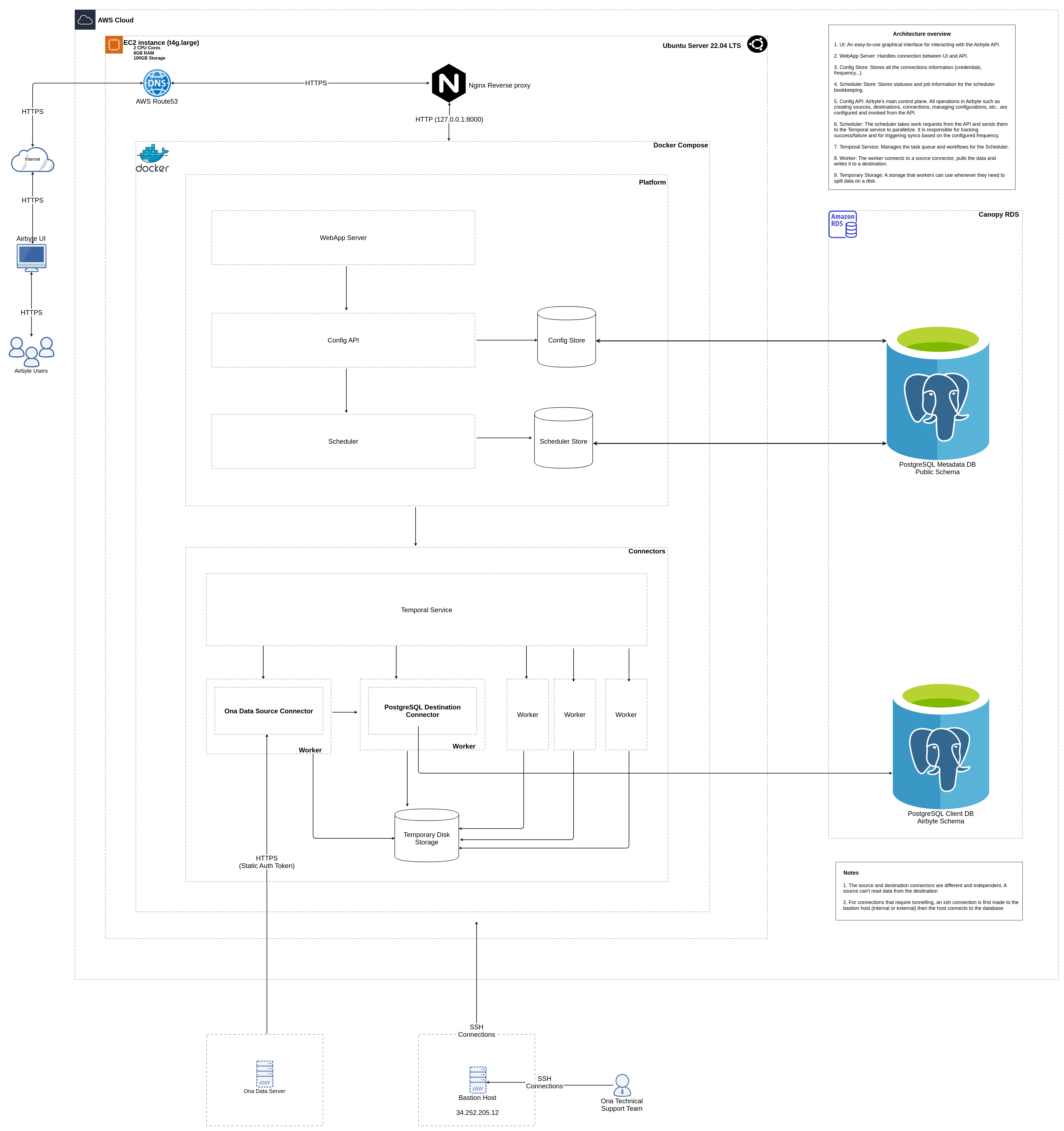
-
Records extracted from the source connector are not stored within the airbyte platform. They are streamed directly to the destination connector.
-
The metadata db is only used to store connector credentials (sources and destinations), scheduling, connection state, and jobs. It does not store any transit data.
-
Connectors (sources and destinations) define the connection/authentication scheme between themselves and the source or destination system/platform.
-
Airbyte postgres connectors (both source and destination) define the authentication scheme (username, password, host, port, database), security protocol (SSL), and tunneling (SSH) for connecting to a postgres database.
-
By default they connect to the public schema but you can list out the specific schemas you want them to connect to.
-
Airbyte Cloud uses SSL by default. You are not permitted to disable SSL while using postgres connectors with Airbyte Cloud.
-
They support advanced Custom JDBC Connection Strings e.g connectTimeout. connectTimeout defaults to 60 seconds and setting it to 0 seconds will set the timeout to the longest time available.
-
Airbyte cloud recommends allowing inbound traffic from Airbyte IPs in your firewall whether connecting directly or via SSH Tunnel. It does not, however, give a solid reason why this is necessary especially when using SSH Tunnel.
-
All Airbyte Cloud connectors (APIs, files, databases) pull data through encrypted channels (SSL, SSH tunnel, HTTPS), and the data transfer between our clients' infrastructure and Airbyte infrastructure is fully encrypted.
-
Unsecure connections (without SSL) fail if not using tunneling. This is because Airbyte Cloud does not allow unsecure connections.
-
SSH access is via either a password or a private key. The private key is stored in bitwarden and provided to the connector via a secret. Key supports both RSA and Ed25519.
-
The ssh key does not support passphrase
-
When provided, the private key is stored encrypted in the deployments metadata db. This means on airbyte cloud's metadata db for airbyte cloud and on the user's metadata db for airbyte open source.
- Airbyte Cloud is currently deployed on GCP with all servers located in the United States. It uses isolated pods to ensure your data is kept separate from other customers’ data.
-
Secure Database Connection
-
What are the requirements to integrate the solution with the target data source(s)?
- Security credentials e.g. username and password with optional security toggling (SSL, SSH etc).
-
What are the controls put in place to ensure the connection between the solution and data source(s) is secure?
- Default SSL/TLS encryption. Optional toggling of advanced SSL modes (verify ca - to always require encryption and verify that the source has a valid SSL certificate, verify full - to always require encryption and verify the identity of the source).
-
Is the connection to the solution’s console secure and encrypted? What are the security and encryption standards used?
- Yes. SSL/TLS.
-
How are secrets to the data source(s) managed by the solution? What are the controls put in place to prevent unauthorized access to the secrets?
-
Client side secrets are stored in bitwarden.
-
Airbyte Cloud fetches credentials using HTTPS and stores them in Google Cloud’s Secret Manager
-
Secrets on the airbyte UI are not visible (obfuscated) or modifiable only completely replaceable.
-
When persisting connector configurations to disk or the database, it stores a version of the configuration that points to the secret in Google Secret Manager instead of the secret itself to limit the parts of the system interacting with secrets.
-
-
Does the solution enable/support credential rotation of the data source?
- Yes. Credentials can be rotated via the UI. This is however not automated.
-
-
Data Protection
-
What type of data is stored on the cloud solution?
-
Technical logs (for troubleshooting)
-
Configuration Metadata (e.g table and column names, state etc)
-
Credentials (for connecting to data sources)
-
-
How does the solution handle confidential e.g. PII data obtained from the sources?
-
Option to change data residency from default US to EU (data will be protected by GDPR).
-
No special handling of PII data. User is responsible for ensuring that the data is handled in a secure manner.
-
N/B: Airbyte Cloud does not store any data from the sources. It only stores metadata and credentials.
-
-
Does the solution require privileged access to the database? What kind of privileges/permissions does the solution require?
-
Can connect to database through an ssh tunnel via a bastion host. No need for privileged access.
-
Requires read access to the database for sources and write access for destinations.
-
-
How is the data in the cloud protected from external access i.e. maintainer of the cloud solution? What level of access does the maintainer require to provide support?
-
Data is encrypted at rest and in transit.
-
Use isolated pods to ensure data is kept separate from other customers’ data
-
Only certain Airbyte staff can access Airbyte infrastructure and technical logs for deployments, upgrades, configuration changes, and troubleshooting
-
-
-
Identity and access management
-
What are the authentication methods that the solution supports?
-
Basic authentication (username and password)
-
SSO (Google, Github, Okta)
-
-
How does the solution manage user privileges/permissions? Does the solution support user roles and is there a mechanism to determine privileged users from non-privileged ones?
-
Supports user management. Users are restricted to the workspaces they have access to but can have access to multiple workspaces at a time if needed.
-
Doesn’t support role-based access control (RBAC) yet.
-
-
How does the solution handle project scope such that a user has access to the project he/she is working on?
- Supports user management. Users are restricted to the workspaces they have access to but can have access to multiple workspaces at a time if needed.
-
Does the solution conform to best-practice around Password management for basic authentication?
-
Minimum password length of 8 characters.
- Yes. Passwords must be at least 12 characters long.
-
Require at least three of these categories: uppercase, lowercase, numeric and special characters.
- No.
-
Password expiry period of 45 days.
- No.
-
-
Does the solution support MFA as an additional security control on authentication?
- No.
-
-
Architecture
-
Can the solution support data sources that have limited access e.g. private/internal database?
- Yes. Can connect to database through an ssh tunnel via a bastion host. Or allow inbound traffic from Airbyte IPs in your firewall/vpcs.
-
For public data sources, what controls are used to protect/restrict access to the data sources?
- Secure connection (SSL/TLS)
-
-
Disaster Recovery
-
Does the maintainer have a disaster recovery process and/or procedure in the event of an undesirable outcome?
- Not disclosed.
-
What features does the solution have on managing disaster recovery at an application level e.g. backups etc?
- Not disclosed.
-
-
Monitoring and logging
-
Does the solution support audit logs as a monitoring mechanism?.
- Yes. Airbyte Cloud supports audit logs. Downloadable from airbyte cloud UI.
-
-
Security Documentation
-
Does the maintainer have publicly shared their security policies? If not can this be shared on request?
- Yes. Shared here
-