5. UI
In the next table of contents, there is an explication of the workflow of the menus along the game.
| Name | Photo | explanation |
|---|---|---|
| TITLE SCREEN | 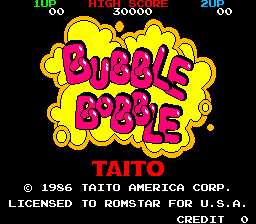 |
The first thing the player will see when turning on the game/arcade |
| INSERT COIN |  |
If the player does not hit any button in 8 seconds, this screen will appear |
| VISUAL TUTORIAL |  |
This video tutorial will appear if the player hasn't still put any coin inside the arcade |
| BEFORE GAME |  |
This screen will trigger when the player inserts more than one coin |
| BEAFORE GAMEE 2 |  |
This screen will trigger when the player inserts only one coin |
| INTRO |  |
This video will appear after the players press the start button after inserting any amount of coins |
| GAME |  |
Heare we see when the game starts, at the bottom right we can see the option to add another player if there are not enough coins, it will say ·"insert coin" except "push 2p". |
| GAME TRANSITION |  |
In every level transition the camera moves down to reveal the next level al brings all the UI with it, it also changes the Round number |
| SCORE |  |
This scene will trigger when the player/players die, and it will show them how far they got |
| GAME OVER |  |
Right after that the game over screen will appear and send the player back to the BEFORE GAME |
| BAD AND HAPPY ENDINGS | Link to video | On the bad ending the player completed the game in a single player so one of the girls isn't rescued. In the happy ending, the game is beaten in 2-player mode, so both of the girls are rescued. After the bad ending the player is thrown back to level85, to try multiplayer, and on the Happy ending, the player is redirected to the SCORE screen. |
| Name | Explanation | Link to the image |
|---|---|---|
| LETTERS | Almost in every scale we can see at least a single word on screen, but in general we see: the status of players one and two, the high score, some in-game explanations, the intro and ends... |  |
| LOGOS | We can see the bubble bobble logo/title and the TAITO logo too |
 
|
| POINTS | The points we see when the player eats a fruit or grabs something of valor |  |
The player status and the high scores are always visible, except for the lore introduction. Also, the player two status, if the game is played in single-player, will not be shown on the SCORE, GAME OVER, and BAD ENDING screens.