Comments
Manual › Newsroom · also on phprs.eu
Comments below articles are part of the Comments and ratings extension, which is turned on after installation. An administrator turns it off and on under Administration → Extensions. Moderation takes place in Readers → Comments; an editor and an administrator have access.
Comments are shown below an article when all three conditions are met:
- the Comments and ratings extension is turned on,
- the option Comments below articles is on in Settings → General,
- the article has Allow comments ticked in the More settings → Options panel (it is ticked for a new article).
So for a sensitive topic it is enough to turn comments off for a single article.
Settings → General → New comment:
| Option | How it behaves |
|---|---|
| publish immediately (suspicious ones wait for approval) | a comment is visible at once; a comment with two or more links waits for approval |
| publish only after newsroom approval | every comment waits for approval |
After sending, the reader sees either a thank-you or a message that the comment will be shown after approval by the editorial team.
By default anyone can comment. They fill in a Name, an optional E-mail (it is not published) and a text of at most 5,000 characters.
With the Readers and locked content extension turned on, the option Only signed-in readers may comment is added in Settings → Readers and payments. A reader who is not signed in then sees a prompt to sign in instead of the form. A signed-in reader comments under the name from their account, and their comments carry the mark ✓ (registered reader).
The form is protected by built-in antispam. It does not use CAPTCHA or cookies for verification and does not call any external service:
- the form carries a signed timestamp – it cannot be sent sooner than after a few seconds or later than after a few hours,
- a hidden field that a person does not see and a robot fills in; such a comment is discarded and the robot does not learn that it failed,
- at most 5 comments per 10 minutes get through from one address,
- a comment with several links waits for approval even in the immediate publishing mode.
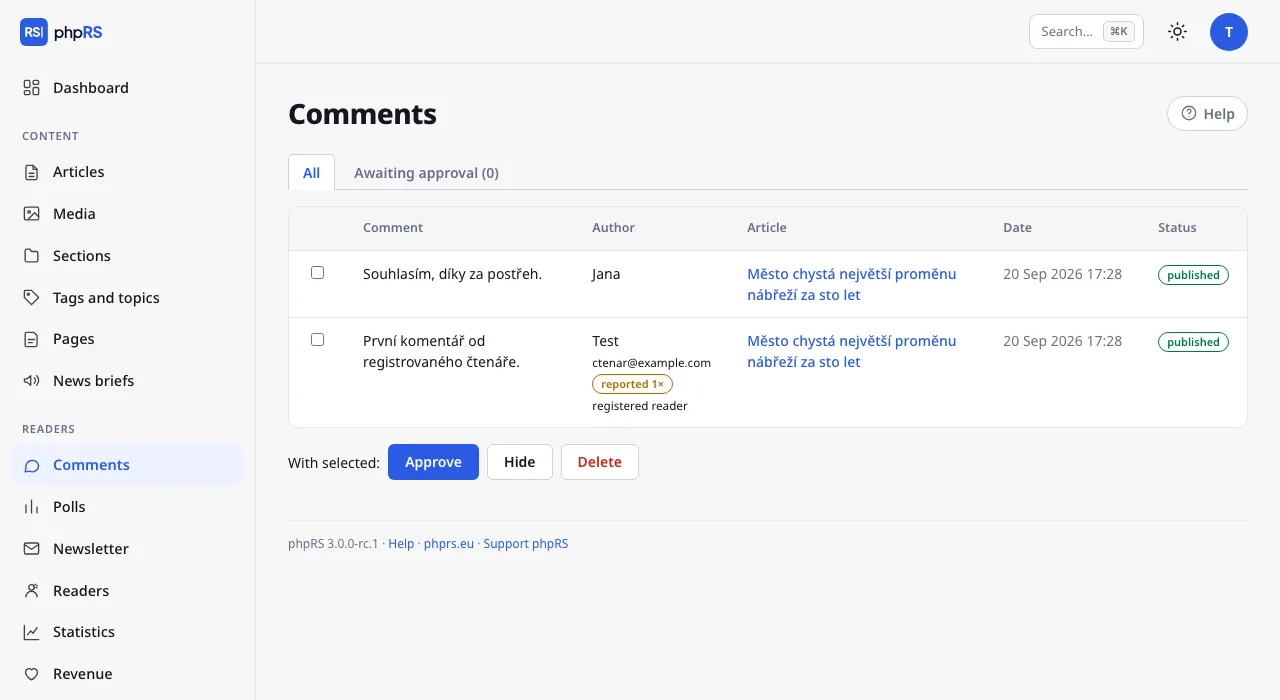
Readers → Comments has two tabs: All and Awaiting approval with a count. For every comment you see the text, the sender's name and e-mail, a short fingerprint of their address (the same fingerprint = the same sender; the IP address itself is not stored), the article, the date and the status (published or pending / hidden).
- Tick the comments.
- Below the table choose Approve, Hide or Delete.
- Approve publishes the comment and resets its reports.
- Hide takes it off the site but keeps it in the administration. It can be approved again later.
- Delete cannot be undone and also deletes the replies to the comment.
The text of a comment cannot be edited. The number of comments awaiting approval is also shown on the Dashboard.
A reader can reply to a comment with the Reply button. The reply is shown indented below it; threads have one level.
Whoever fills in an e-mail when commenting and ticks E-mail me when someone replies gets a message as soon as a reply to their comment is published – so for moderated comments only after approval. The e-mail contains a link to the discussion and a link that turns off further notifications for this comment. The message arrives in the language of the site version under whose article the reader commented.
Every comment has a report link. The reader uses it to alert the editorial team to an inappropriate post:
- from one address, a report of the same comment counts once a day,
- after three reports the comment hides itself and waits for the editorial team's assessment,
- in moderation a reported comment has the mark reported 2×.
Approving resets the number of reports and the comment returns to the site.
Settings → General → More options → E-mail the newsroom about comments:
- when a comment is waiting for approval (default),
- on every new comment,
- do not send.
The message goes to the Newsroom e-mail from Settings → General, at most once every 10 minutes. It contains the article, the author and the beginning of the comment, the number of comments waiting and a link to moderation.
The same extension adds star ratings (1–5) below articles. The system does not accept a repeated vote on the same article for 30 days. It is turned off in Settings → General → More options → Star ratings of articles.
- Roles and permissions
- Mail – so that notifications arrive
- Security
← Front page and calendar · Manual contents · Account and sign-in →
Generated from docs/prirucka/en/redakce/komentare.md for phpRS 3.0.0. Edit the source file, not this page.