Reader accounts
Manual › Readers and revenue · also on phprs.eu
Readers can register on the site. An account lets them save articles for later, read locked articles and – if you set it so – comment. Reader accounts are separate from the accounts of the editorial team: a reader never gets into the administration.
- Open Administration → Extensions, tick Readers and locked content and save.
- Add the Reader account block to the site (Appearance → Blocks and layout). It outputs the Sign in / My account button. Without the block a reader gets to the sign-in only from the prompt on a locked article, from the Save for later link below an article and directly at the address
/ctenar. - Check that the site sends e-mails – both registration and sign-in by link depend on them. See Mail.
In the administration the Readers → Readers area is added. The Settings → Readers and payments tab is always visible; with the extension turned off it only notes that the settings will apply once the extension is turned on. Only an administrator sees both.
On the /ctenar page, in the part I am new here, the reader fills in the E-mail and possibly the Name (optional) and clicks Register for free. If the Newsletter extension is turned on, they can tick I want to receive the newsletter.
No password is entered during registration. The reader receives an e-mail with a link where they set a password (at least 8 characters) – this completes the registration and signs them in straight away. The link is valid for 3 days. Someone who registers another person's address therefore does not get to the account. A newsletter subscription chosen during registration is confirmed by the same link.
If someone tries to register an e-mail that already has an account, the site answers the same way as for a new registration. The owner of the address receives an e-mail saying that they already have an account. This way the site does not reveal which addresses are registered.
You stop new registrations with the option Allow new registrations in Settings → Readers and payments. Existing readers keep signing in.
A reader has three options:
| Method | How it works |
|---|---|
| the Sign in form (E-mail and Password) | the usual sign-in |
| Sign in with an e-mail link | the reader fills in only the e-mail and receives a single-use link; valid for 20 minutes |
| Forgot your password? | the reader fills in the e-mail above, expands this row and clicks Send link; the link for setting a new password is valid for 2 hours |
The link from the e-mail does not sign the reader in immediately – it shows a Sign in button. This is intentional: some mail programs open links in advance and would use up the single-use link.
After ten wrong passwords within 15 minutes, signing in with a password is temporarily blocked for the given e-mail. Signing in with an e-mail link keeps working.
The sign-in is held by the phprs_ctenar cookie for 60 days. It is a technical cookie necessary for signing in. Pages are not served from the cache to a signed-in reader.
After signing in, the /ctenar page shows:
- the e-mail and, where applicable, the date until which the subscription is valid (or the Get a subscription button),
- with payments through Stripe turned on, the Subscription section: the buttons Subscribe monthly and Subscribe yearly, and for a paying reader Manage subscription,
- Saved articles – a list (at most the 100 most recent) with the × button for removing,
- changing the name and the password (Change password requires the current password),
- Sign out,
- Delete account – the reader expands the row, enters the password and clicks Delete my account; this deletes the account and all data about it; this cannot be undone. A reader with a running subscription through Stripe must cancel it first (Manage subscription), otherwise payments would keep being taken from them.
Below every article there is the link ☆ Save for later. It takes a reader who is not signed in to the sign-in and brings them back to the article. With a saved article the button changes to ★ Saved – remove and the link My saved articles is added. One reader can save at most 500 articles.
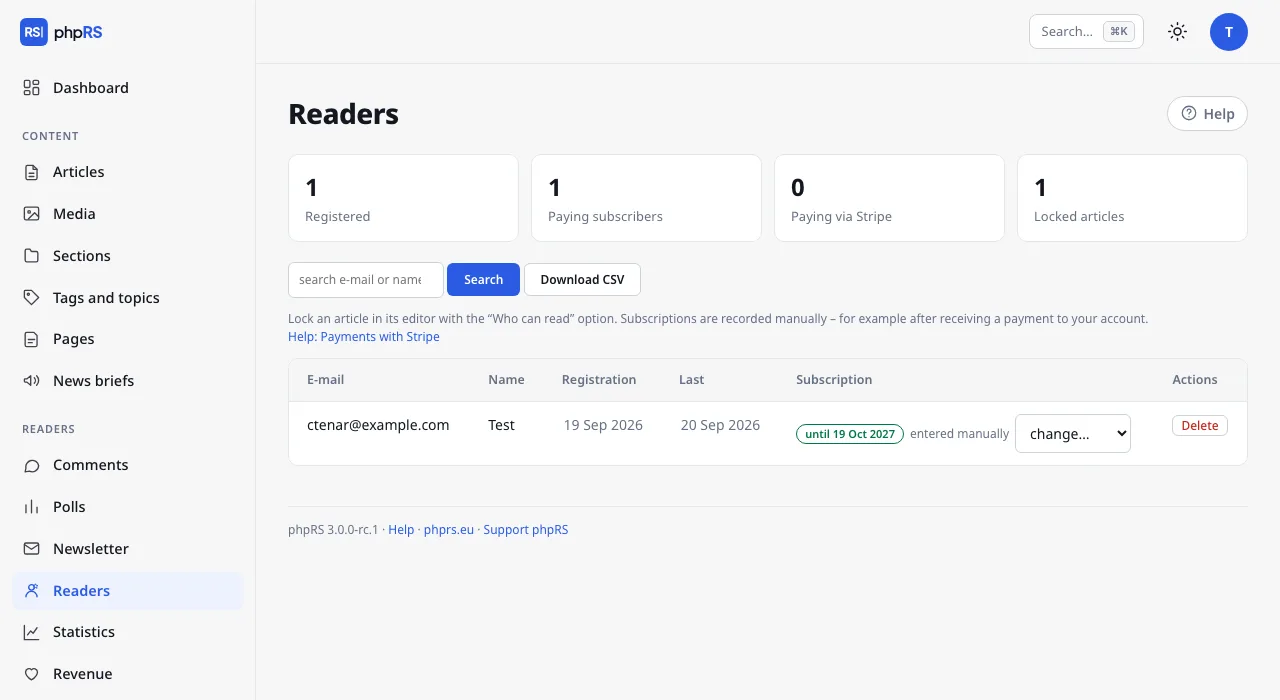
The Readers → Readers area shows four counts at the top: Registered, Paying subscribers, Paying via Stripe and Locked articles. Below them there is a search by e-mail or name and a table of the last 300 accounts:
| Column | Content |
|---|---|
| with the label “e-mail not confirmed” for an unfinished registration | |
| Name | if the reader filled it in |
| Registration | the date of registration |
| Last | the date of the last sign-in |
| Subscription | the status and the change… menu – see Locked content |
| Actions | Delete – deletes the account after confirmation |
Download CSV saves the file ctenari.csv with all confirmed accounts: e-mail, name, date of registration and end of subscription. It contains neither passwords nor saved articles.
An administrator does not see a reader's password and cannot change it. The reader sets a new one themselves through the link from the e-mail.
The option Only signed-in readers may comment (Settings → Readers and payments) restricts the discussion to registered readers. A reader then comments under their account. More on the page Comments.
A reader deletes their account themselves. When they ask you (GDPR), use Settings → Privacy and cookies, the section Reader's personal data request:
- Enter their address in the Reader's e-mail field.
-
Download their data saves the file
osobni-udaje.jsonwith their comments, newsletter subscription and reader account. - Delete their data, after confirmation, irreversibly deletes their comments, newsletter subscription and reader account. The message after deletion lists what was removed.
← Custom template · Manual contents · Locked content and subscriptions →
Generated from docs/prirucka/en/ctenari-a-prijmy/ucty-ctenaru.md for phpRS 3.0.0. Edit the source file, not this page.