Hi,
Versions: Potree 1.5 / PotreeConverter_1.5_windows_64.
Please could someone point me in the right direction. I have checked online resources but to no success thus far.
I am experimenting with Potree, and must admit it is easily the best library out there IMO. I have taken existing compressed LiDAR data, as LAZ format, and converted this using the PotreeConverter. The output is displayed smoothly when loading in a browser.
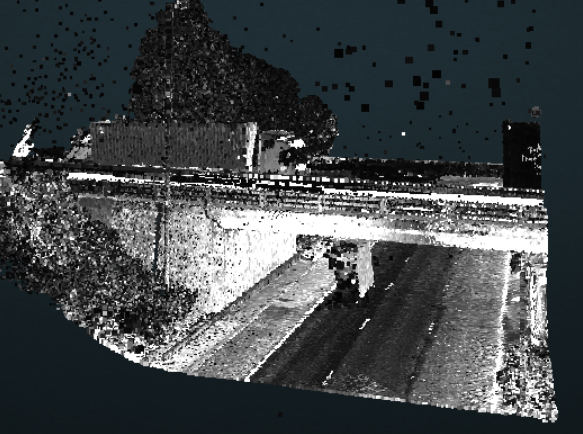
The issue I have is that the LAZ data does not contain RGB values. From reading online (as per Markus Schütz recommendation) I believe an alternative is to use Intensity, especially as the LAZ data contains an intensity value per point. When I display the LAZ tile in the broswer, I am getting what appears to be just black/grey/white color shades - there is no rainbow color shades (such as blue, green etc).
When checking one of the LAZ files, there were 2266 unique intensity values, with the lowest value being 2 and the highest value being 7908. When converting the source LAZ using PotreeConverter (Windows version) from a command line, I have tried each of the following:
-
PotreeConverter.exe sourcefile.laz -o C:/IBI/xampp/htdocs/potree/converted -p example1 - -output-format LAZ
-
PotreeConverter.exe sourcefile.laz -o C:/IBI/xampp/htdocs/potree/converted -p example2 -r 7908 -output-format LAZ -a INTENSITY
I am attempting to display the data using a PointColorType of INTENSITY. Snippet of code from the generated HTML file is below:
window.viewer = new Potree.Viewer(document.getElementById("potree_render_area"));

viewer.setEDLEnabled(true);
viewer.setFOV(60);
viewer.setPointBudget(1*1000*1000);
document.title = "";
viewer.setEDLEnabled(false);
viewer.setBackground("gradient"); // ["skybox", "gradient", "black", "white"];
viewer.setDescription(``);
viewer.loadSettingsFromURL();

viewer.loadGUI(() => {
	viewer.setLanguage('en');
	$("#menu_tools").next().show();
	//viewer.toggleSidebar();
});

Potree.loadPointCloud("pointclouds/example1/cloud.js", "example1", e => {
	let pointcloud = e.pointcloud;
	let material = pointcloud.material;
	viewer.scene.addPointCloud(pointcloud);
	material.pointColorType = Potree.PointColorType.INTENSITY;
	material.size = 1;
	material.pointSizeType = Potree.PointSizeType.ADAPTIVE;
	material.shape = Potree.PointShape.SQUARE;
	viewer.fitToScreen();
});
Questions
-
How can I configure Potree so that the intensity colors are rainbow colors as opposed to black/grey/white? I know I can change the Classficiation colors by declaring my own THREE.Color custom collection and calling pointcloud.material.classification = customCollection. Is there something similar for intensities?
-
Is this relevant? Can I upscale the RGB colours using las2las.exe even when there are no RGB colors in the source LAZ (I would think this is not possible). The command I used was: las2las -i sourcefile.laz -o upscaled.laz -scale_rgb_up
Many thanks in advance, and apologies for asking anything obvious.
Hi,
Versions: Potree 1.5 / PotreeConverter_1.5_windows_64.
Please could someone point me in the right direction. I have checked online resources but to no success thus far.
I am experimenting with Potree, and must admit it is easily the best library out there IMO. I have taken existing compressed LiDAR data, as LAZ format, and converted this using the PotreeConverter. The output is displayed smoothly when loading in a browser.
The issue I have is that the LAZ data does not contain RGB values. From reading online (as per Markus Schütz recommendation) I believe an alternative is to use Intensity, especially as the LAZ data contains an intensity value per point. When I display the LAZ tile in the broswer, I am getting what appears to be just black/grey/white color shades - there is no rainbow color shades (such as blue, green etc).
When checking one of the LAZ files, there were 2266 unique intensity values, with the lowest value being 2 and the highest value being 7908. When converting the source LAZ using PotreeConverter (Windows version) from a command line, I have tried each of the following:
PotreeConverter.exe sourcefile.laz -o C:/IBI/xampp/htdocs/potree/converted -p example1 - -output-format LAZPotreeConverter.exe sourcefile.laz -o C:/IBI/xampp/htdocs/potree/converted -p example2 -r 7908 -output-format LAZ -a INTENSITYI am attempting to display the data using a PointColorType of INTENSITY. Snippet of code from the generated HTML file is below:
Questions
How can I configure Potree so that the intensity colors are rainbow colors as opposed to black/grey/white? I know I can change the Classficiation colors by declaring my own THREE.Color custom collection and calling pointcloud.material.classification = customCollection. Is there something similar for intensities?
Is this relevant? Can I upscale the RGB colours using las2las.exe even when there are no RGB colors in the source LAZ (I would think this is not possible). The command I used was: las2las -i sourcefile.laz -o upscaled.laz -scale_rgb_up
Many thanks in advance, and apologies for asking anything obvious.