A Bluetooth-only glucose monitor for M5Stack — no Wi-Fi, no web server, no cloud. The phone connects directly to the device over BLE and pushes each reading.
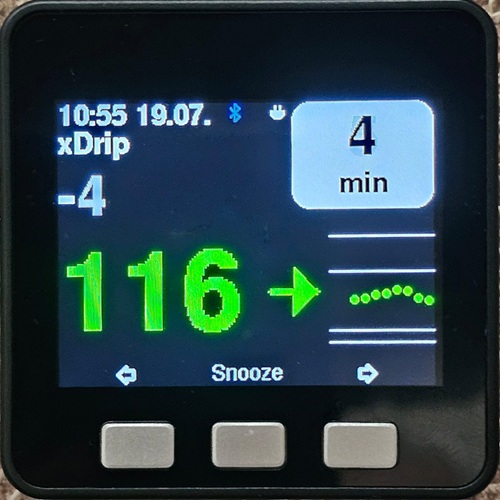
- Interface modeled on M5_NightscoutMon: main page with big value, trend arrow and mini-graph; big-glucose page; analog clock page; log page.
- High/low alarms with yellow/red thresholds, warning and alarm sounds, snooze on the middle button.
- Fully configurable on the device (hold the middle button for the menu) — no web configuration needed.
- Bluetooth icon shows the link state: blinking red = not connected, blinking blue = connecting/authenticating, steady blue = authenticated.
- Optional RGB LED strip (or the Fire's built-in LED bars): flash with the alarm sounds, light up on warnings/alarms, or follow the glucose colour permanently (see LED strip below).
Chosen on first boot (button A = xDrip Android, C = xDrip4iOS) and changeable any time in the menu:
- xDrip (Android) — in xDrip enable:
Settings > Smart Watch Features > Mi Band > Use Mi Band(leave the auth key empty) and enable sending the reading as a notification. xDrip finds the device, authenticates and pushes each reading. This mode has no time sync — set the clock in the device menu (see Time & clock below). - xDrip4iOS / xdripswift (iOS) — add a Bluetooth device of type M5Stack in the app; pairing, readings, trend and time are set automatically (the app pushes the current time on connect).
Whether the clock survives a reset depends on the core and the data source:
- Core2 — has a battery-backed RTC, so the clock is kept across resets and power cycles in either mode.
- Basic / Fire — no RTC, so the clock is lost on every reset. Recovery
depends on the data source:
- xDrip4iOS — the time re-syncs automatically once the phone reconnects.
- xDrip (Android) — no time sync at all; re-enter the clock in the device menu after each reset.
16 MB-flash ESP32 M5Stack cores: Basic 2.6/2.7, Fire, Core2 — one binary
for all (Binaries/ESP32_16MB, layout compatible with M5_NightscoutMon
flashing tools). See TESTING.md for the esptool command and test guide.
An external WS2812/NeoPixel strip — or the Fire's built-in 10-LED side bars — can mirror the glucose state. Everything is configured on the device in Menu → LED strip:
- Mode —
off(default),sound(flash red/amber in sync with the alarm and warning tones),alerts(steady red/amber while a warning or alarm is active, dark otherwise; snooze turns it off),always on(alerts, plus the glucose colour when in range: green / amber / red following the colour thresholds, dim grey when the data is stale). - Pin —
15 internal(Fire's built-in bars; Fire only),21 Port A(32 Port Aon Core2),26 Port Bor17 Port Cfor an external strip. Port A is the only Grove port on a Basic without an M5GO bottom; on Basic/Fire it shares GPIO 21 with the internal I2C bus, which is fine for the strip but rules out using an I2C unit on Port A at the same time. - LED count — 10 for the Fire bars; typical strips: 15 = 10 cm, 29 = 20 cm, 72 = 50 cm, 144 = 100 cm.
- Brightness — 5–100 %. Keep 5–10 % for more than 10 LEDs or power the strip externally: at high brightness the load current can brown out the M5Stack.
- Test — plays the boot animation (red/amber/green/blue sweep, also shown at power-on whenever the mode is not off).
Wiring an external strip: GND and 5 V from the Grove port, data to the port's signal pin (Port A = GPIO 21, or 32 on Core2; Port B = GPIO 26; Port C = GPIO 17).
Arduino IDE or arduino-cli with:
- board package M5Stack 2.1.1 (targets M5Core / M5Fire / M5Core2)
- libraries M5Unified (with M5GFX), NimBLE-Arduino 2.x and Adafruit NeoPixel
v1 emulated a LeFun band and was abandoned due to Bluedroid Bluetooth-stack issues (readings only every 10 minutes). v2 is a complete rewrite on NimBLE with a different xDrip transport. (The v1 sources remain in git history.)
Copyright © 2023-2026 Patrick Sonnerat, released under the GNU GPL v3. Not a medical device — never rely on it for treatment decisions.
This firmware reuses and derives from other free-software projects:
- M5_NightscoutMon (Martin Lukasek, GPL v3) — the on-screen interface (main, big-glucose, analog-clock and log pages), the RGB LED strip handling and the alarm tone patterns are ported from it; its xDrip4iOS fork (Johan Degraeve) is the source of the "M5Stack" BLE protocol implementation. The analog clock face originates from Bodmer's TFT_eSPI TFT_Clock example, via NightscoutMon.
- xDrip+ (Nightscout Foundation, GPL v3) — the Mi Band 2 emulation (service/characteristic UUIDs, authentication flow, time message layout — itself based on Gadgetbridge), the slope-arrow character mapping and the settings-QR payload format.
- xdripswift / xDrip4iOS (Johan Degraeve, GPL v3) — counterpart reference for the M5Stack protocol opcodes.
iot_iconset_16x16.c— "IoT Icon Set 16x16" by Artur Funk, GPL v3 (original license header kept in the file).Free_Fonts.h— from Bodmer's TFT_eSPI examples (via M5_NightscoutMon); the GFX FreeFonts it references derive from the GNU FreeFont project.
Libraries used (installed separately, not bundled): M5Unified / M5GFX (MIT), NimBLE-Arduino (Apache-2.0), Adafruit NeoPixel (LGPL-3.0), mbedTLS via ESP-IDF (Apache-2.0).