Home
A Bluetooth-only glucose monitor for the M5Stack. Your phone connects directly to the device over BLE and pushes each reading. Once setup, there is no Wi-Fi, no web server and no cloud involved.
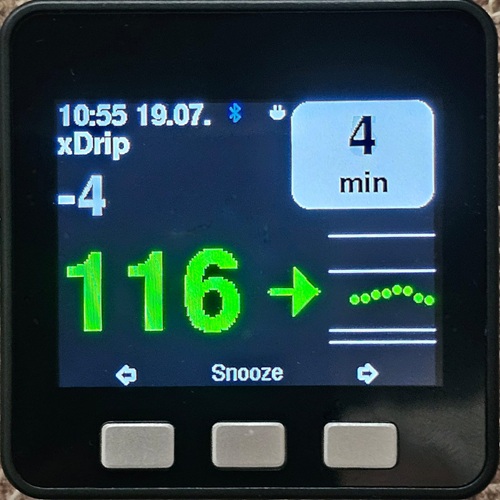
Based on M5_NightscoutMon by Martin Lukasek. The on-screen interface (main page, big-glucose page, analog clock, log) is ported from that project. xDripMon replaces its Wi-Fi / Nightscout data path with a direct Bluetooth link, so the Wi-Fi setup from the original wiki does not apply here.
- Main page — big value, trend arrow, mini-graph and a "minutes ago" box.
- Big-glucose page, analog-clock page and a log page.
- High/low alarms with yellow/red thresholds, warning and alarm sounds, and snooze on the middle button.
- Fully configured on the device — hold the middle button (on the log page) for the menu. No web configuration.
- Bluetooth icon shows the link state: blinking red = not connected, blinking blue = connecting/authenticating, steady blue = authenticated.
Chosen on first boot and changeable any time from the menu:
- xDrip (Android) — the device emulates a Mi Band 2; xDrip finds it, authenticates and pushes each reading.
- xDrip4iOS / xdripswift (iOS) — add a Bluetooth device of type M5Stack in the app.
- An M5Stack Core with 16 MB flash — Basic 2.6 / 2.7, Fire, or Core2. One firmware binary covers all three.
- To flash it, either:
- an Android phone with the M5Stack Loader app — the easiest route, no computer needed — see Install with an Android phone, or
- a computer with the M5Burner utility — see Flashing from a computer.
- A phone running xDrip (Android) or xDrip4iOS (iOS).
- Any of the supported cores costs under $100. The M5Stack Basic is the cheapest.
- The included USB cable is short; a longer data cable is handy for programming and for use as a bedside monitor.
- Core2 keeps the clock across resets (battery-backed RTC); Basic / Fire do not — see Device setup → Time & clock.
- Install with an Android phone
- Flashing from a computer
- Device setup (first boot, pages, menu)
- xDrip (Android) setup
- xDrip4iOS (iOS) setup
Copyright © 2023-2026 Patrick Sonnerat, released under the GNU GPL v3 (full text). Not a medical device — never rely on it for treatment decisions.
xDripMon builds on other free software:
- M5_NightscoutMon by Martin Lukasek (GPL v3) — the on-screen interface, the LED strip handling and the alarm tone patterns are ported from it, and its xDrip4iOS fork by Johan Degraeve provided the "M5Stack" Bluetooth protocol. The analog clock face originates from Bodmer's TFT_eSPI TFT_Clock example.
- xDrip+ (Nightscout Foundation, GPL v3) — the Mi Band 2 emulation is derived from its Mi Band support (itself based on Gadgetbridge), as are the trend-arrow characters and the settings-QR format.
- xdripswift / xDrip4iOS by Johan Degraeve (GPL v3) — reference for the M5Stack protocol opcodes.
- IoT Icon Set 16x16 by Artur Funk (GPL v3) — status-bar icons.
- Free_Fonts.h from Bodmer's TFT_eSPI examples; the GFX FreeFonts derive from the GNU FreeFont project.
Libraries: M5Unified / M5GFX (MIT), NimBLE-Arduino (Apache-2.0), Adafruit NeoPixel (LGPL-3.0), mbedTLS via ESP-IDF (Apache-2.0).
The full source code is available at github.com/psonnera/M5Stack_xDripMon.