Repository navigation
Banks and memory
A bank is what the sampler holds at once: a sample in each of its slots, and its 32 programs. The app can have any number of banks, so it can keep several of the sampler's setups: one for each song, for example.
The BANK view shows the current bank:
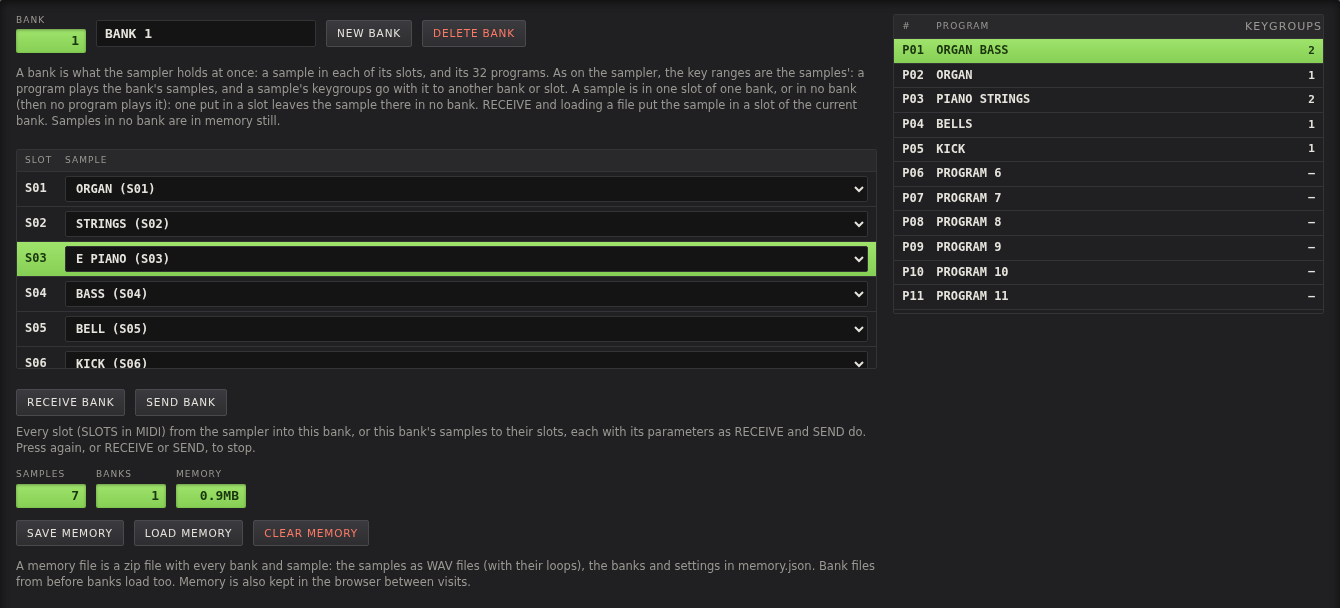
- BANK picks the bank, and the field next to it is its name. NEW BANK adds an empty one, DELETE BANK deletes the current one with its program names. Its samples stay in memory, in no bank.
-
The slots, S01 to S06 here (as many as SLOTS in the MIDI view), are the sampler's slots: which sample is in each.
Pick a sample for a slot from its list, where each sample shows where it is now (
(B2 S01),(NO BANK, S03)). Click a slot's number to make it the slot RECEIVE gets; it is highlighted. - The programs, P01 to P32, are on the right, with how many keygroups each has. Click one to make it the current program.
Two banks can be SM-87's, made with INIT SM-87 BANKS in the BANK view's SM-87 section: their samples and drum kit go into SM-87's firmware.
Other ways to change banks are BANK ◀ / BANK ▶ on the panel, BANK in the PROGRAM view, and MIDI bank select (controller 0).
With more than one bank, the display shows the bank before the program: B2 P01.
As on the sampler, the key ranges belong to the samples: each sample has its own key range in the programs it is in, and a bank's program is the keygroups of the samples in the bank's slots. So:
- A sample is in one slot of one bank, or in no bank. In no bank it is still in memory, with its keygroups, but no program plays it.
- A slot holds one sample. A sample put in a slot that has one already takes it, and the sample that was there is put in no bank. It keeps its slot number and its keygroups, and plays in its programs again when it is put in a bank.
- A sample's keygroups go with it. Moved to another bank or slot, it plays in the same program numbers there.
A sample is put in a slot by:
- RECEIVE and RECEIVE BANK: in the slot it came from, in the current bank, with the key ranges the sampler has for it. See Receiving samples.
- Loading a file: in a slot of the current bank, as the sampler loads a disk. See Loading samples.
- BANK and SLOT in the SAMPLE view's SAMPLER box, for the selected sample. See Loading samples.
- Picking a sample for a slot in the BANK view. Picking NONE empties the slot: its sample is in no bank after.
To use a sample in two banks, load it twice (or SAVE WAV and load the file), and put each in its own bank.
RECEIVE BANK receives every slot of the sampler into the current bank, each as RECEIVE does it, with its settings and key ranges. A slot whose sample is in no program on the sampler isn't received, and is emptied in the bank: the sample that was in it here is put in no bank. An empty slot on the sampler is like that: it has a short test tone in no program.

The MIDI log says what happened with each slot:

SEND BANK sends the bank's samples to their slots on the sampler, each as SEND does it, with its settings and key ranges. It asks first, as it replaces what is on the sampler. Slots with no sample in the bank are left as they are on the sampler.
A slot that fails is logged and passed over, and the rest go on. Press the button again, or RECEIVE or SEND, to stop. Each slot takes about 30 seconds, so 16 slots take about 8 minutes.
- NEW BANK, and give it a name.
- RECEIVE BANK.
- SAVE MEMORY, to keep it in a file as well.
To put it back on the sampler later, select the bank and press SEND BANK.
Everything you load or receive is kept in the browser between visits: the samples, the banks and the settings. The SAMPLES, BANKS and MEMORY figures in the BANK view show how much there is, as does the plate to the left of the keyboard.
Browser storage isn't a backup. Clearing the browser's site data deletes it, and a private window doesn't keep it. Save memory files to keep your work, and to move it to another computer or browser.
-
SAVE MEMORY (or SAVE on the panel) saves everything as one zip file,
axs7-memory-<date and time>.zip. - LOAD MEMORY (or LOAD on the panel) loads a memory file. It replaces what is in memory. A memory file keeps SLOTS (MIDI view) as it was when saved: one saved for a sampler with 16 slots sets SLOTS to 16 if it is lower, so its samples in slots 7 to 16 work. One saved with fewer slots leaves SLOTS as it is.
- CLEAR MEMORY deletes all samples and banks from memory, after asking. Save first to keep them.
A memory file has:
-
memory.json: the banks and their programs' names, and each sample's settings, edits, bank, slot and keygroups - every sample as a WAV file with its loop, as it sounds
-
originals/: the original of each edited sample, so editing goes on from it after loading (see Editing samples)
Since the samples are plain WAV files, other programs can use them too.
Memory files and browser memory from versions before samples had their bank and slot load as well, moved over to how
it is now: each sample in the first bank and slot it was in, with the keygroups that played it there. A sample that
was in programs but in no slot goes in a free slot. What can't be kept, such as a sample that was in two banks, is
written to the MIDI log. Bank files from versions before banks (bank.json) load too, their programs put into banks
32 at a time.
To save a single sample, use SAVE WAV or SAVE QD in the SAMPLE view, see Editing samples.
Receiving sets START and END on the sampler for the transfer and puts them back after. Closing or reloading the page in the middle would leave them changed on the sampler, so the browser asks first while a transfer is running.