Repository navigation
Connecting the sampler
The app talks to the sampler (an Akai S700 or X7000) over MIDI. It sends and receives samples with the sampler's sample dump messages, and reads and sets each slot's settings with its sample parameter messages.
- A MIDI interface on the computer, with both directions connected: the interface's MIDI OUT to the sampler's MIDI IN, and the sampler's MIDI OUT to the interface's MIDI IN. The sampler answers every block of a transfer, and the app reads the sampler's settings, so one cable isn't enough.
-
Chrome or Edge. Web MIDI only works on a secure page. The published app at https://rogerkl.github.io/Axs7/ is
one, and so is
http://localhost. - No other program using the MIDI ports, such as the Java Axs7Sds tool or a DAW. On Windows a MIDI port can usually only be used by one program at a time.
Nothing needs to be set up on the sampler for a transfer: the app picks the slot.
Open the MIDI view. The first time, it shows CONNECT MIDI:

Press it, and allow the browser to use MIDI devices when it asks. The app needs permission for system exclusive messages, which carry the samples. After that the browser remembers it, and the app connects by itself on the next visit.
Then choose the INPUT and OUTPUT your sampler is connected to. With only one of each, they are chosen for you. The app remembers them by name, and chooses them again on the next visit or when the interface is plugged back in.
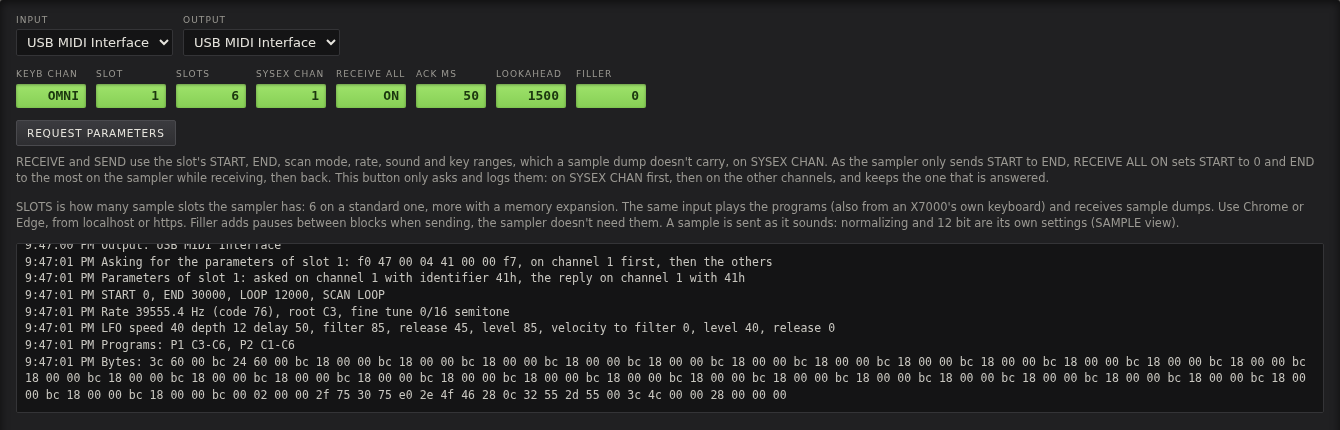
| Setting | What it is |
|---|---|
| KEYB CHAN | The MIDI channel the app plays from: OMNI for all, or 1–16. |
| SLOT | The sampler slot RECEIVE and SEND use, the same as SLOT ▲▼ on the panel. |
| SLOTS | How many sample slots the sampler has: 6 on a standard sampler, 16 with the ASK70 memory expansion. RECEIVE BANK and SEND BANK go through all of them. |
| SYSEX CHAN | The MIDI channel for the sample parameter messages. Usually channel 1. REQUEST PARAMETERS finds the right one if it isn't. |
| RECEIVE ALL | ON (the default) gets the whole of a slot's memory when receiving, not only START to END. See Receiving samples. |
| ACK MS | How often the app answers the sampler while receiving. The default 50 ms works on the sampler. |
| LOOKAHEAD | How far ahead (in ms) those answers are scheduled. |
| FILLER | Pauses between blocks when sending. The sampler doesn't need them, leave it at 0. |
REQUEST PARAMETERS asks the sampler for the settings of the slot in SLOT, and writes the answer to the MIDI log below. It asks on SYSEX CHAN first, then on the other channels, and keeps the channel the sampler answers on. It changes nothing on the sampler or in the app, so it is a safe way to see that both MIDI directions work.
The answer shows what a sample dump doesn't carry:
Parameters of slot 1: asked on channel 1 with identifier 41h, the reply on channel 1 with 41h
START 0, END 30000, LOOP 12000, SCAN LOOP
Rate 39555.4 Hz (code 76), root C3, fine tune 0/16 semitone
LFO speed 40 depth 12 delay 50, filter 85, release 45, level 85, velocity to filter 0, level 40, release 0
Programs: P1 C3-C6, P2 C1-C6
That is the slot's START, END and loop point, scan mode, sample rate and root note, its sound (OUT and LFO), and its key range in each program it is in. RECEIVE and SEND use these, so a sample keeps all of it when it moves between the app and the sampler.
If nothing comes back, check the MIDI cables in both directions and the ports chosen, and that no other program is using them.
The log at the bottom of the MIDI view records everything that goes on: connections, every transfer and the
settings that came with it, where loaded files went, and warnings. When something goes wrong, the display says
SEE MIDI, and the log says what happened.
SM-87, a firmware for the M-VAVE FM-1, answers as the sampler does, with 16 slots, on channel 1. Connect the FM-1 by USB, choose its port as INPUT and OUTPUT, and set SLOTS to 16. Receiving and sending then work as with the sampler.