Repository navigation
SM 87
SM-87 is a firmware for the M-VAVE FM-1 that makes it a small 1987 studio: a sequencer in the style of the Alesis MMT-8, a sampler in the style of the Akai S700/X7000, and a drum machine in the style of the Alesis HR-16. Its sampler talks to Axs7 as the sampler does. Axs7 can also build samples and a drum kit of your own into SM-87's firmware, and install it on the FM-1.
SM-87 keeps samples in two places:
| Room | Filled by | |
|---|---|---|
| The sample pool | About 292 KB | Sending samples over USB at any time, as to the sampler: SEND and SEND BANK, see Connecting the sampler |
| Built into the firmware | About 370 KB | This page: two banks of Axs7's, put into SM-87's firmware package and installed |
The two share SM-87's 16 slots: set SLOTS to 16 in the MIDI view. Built-in samples are there from the start, with no computer to send them. The drum machine can only get a kit of your own this way.
In the BANK view, the SM-87 section's INIT SM-87 BANKS makes two banks:
- SAMPLES is a bank as any other. Its samples go in SM-87's slots, each in the slot it has in the bank, with its settings and key ranges, as SEND would put them on the sampler.
- DRUMS has the HR-16's 16 drums as programs P1 to P16. Each drum plays its keygroup's sample, and together they make a drum kit that replaces SM-87's own. P17 to P32 aren't used. With no drum, SM-87 plays the kit it comes with.

GO TO DRUMS and GO TO SAMPLES select them. Their names can be changed: they stay SM-87's. If you delete one, INIT SM-87 BANKS makes it again.
The drums are the HR-16's, in its order. SM-87 plays each on a pad, a white key of the FM-1 from the lowest, and on a MIDI note on the drum channel:
| Drum | Pad | Note | Drum | Pad | Note | |
|---|---|---|---|---|---|---|
| KICK | 1 | 36 | TOM1 | 9 | 50 | |
| SNARE | 2 | 38 | TOM2 | 10 | 48 | |
| CLS HAT | 3 | 42 | TOM3 | 11 | 45 | |
| MID HAT | 7 | 44 | TOM4 | 12 | 41 | |
| OPN HAT | 4 | 46 | RIDE | 6 | 51 | |
| CLAPS | 8 | 39 | CRASH | 5 | 49 | |
| PERC3 | 15 | 62 | PERC1 | 13 | 56 | |
| PERC4 | 16 | 64 | PERC2 | 14 | 54 |
The three hats cut each other off, and RIDE and CRASH ring over themselves (two voices each).
In the DRUMS bank, the PROGRAM view edits the programs as drums:
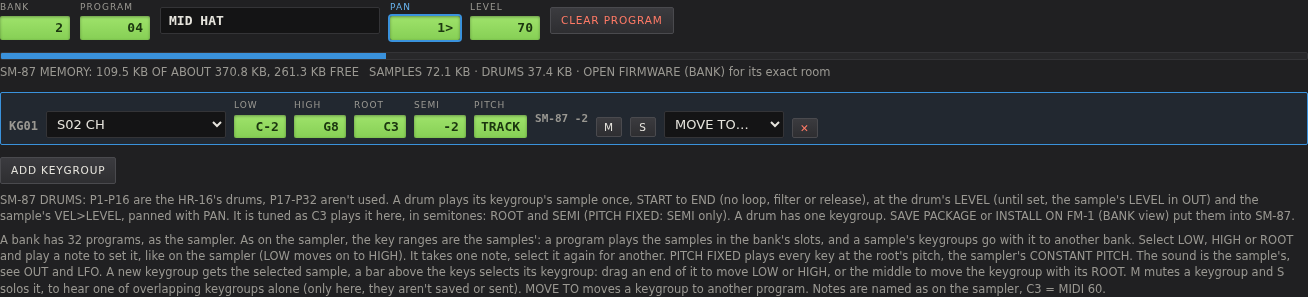
- One keygroup a drum. ADD KEYGROUP adds none to a drum that has one, and MOVE TO skips them.
- Tuning in whole semitones. SM-87 plays a drum's sample as C3 plays it here, so ROOT and SEMI tune it, and a new keygroup (ROOT C3) plays the sample at its own pitch. With PITCH FIXED, SEMI alone tunes it. There's no FINE. The row shows what SM-87 makes of it: SM-87 −2 above. A drum goes 24 semitones either way, and the row says so in orange if it is set further.
-
LEVEL is the drum's own, 0 to 99. Until you change it, it is the sample's LEVEL (OUT), and the display says
THE SAMPLE'S. It is on the same curve as LEVEL, and the drum plays at it here too. Two drums can play one sample at two levels. -
PAN places the drum, from
<3(left) through<>to3>. - A drum plays once, from START to END, as the HR-16's sounds do: the sample's loop, filter, release and LFO don't apply. A looped sample ends at its loop end. Its VEL>LEVEL does apply.
One sample can be several drums: in the picture MID HAT is the closed hat, two semitones down, at LEVEL 70 and a little to the right. RIDE and CRASH can be one cymbal. It is stored once.
A drum's sound is named after the first drum that plays it (KICK, CLHAT, CRASH...). When SM-87 takes an HR-16's memory dump, it finds the kit's sounds by those names.
Select a drum (PROG ◀ / PROG ▶, or PROGRAM in the PROGRAM view) and press LOAD FILE. A sample put in an empty program gets a keygroup there, so it goes on that drum.
A WAV file saved from Axs7 brings its own keygroups, in the programs it was in. Set LOAD PROG to NONE first (SAMPLE view, see Loading samples), and it goes on the drum you selected instead.
The meter under the banks, also shown in the PROGRAM view of either bank, shows what they take of the room the firmware leaves:
SM-87 MEMORY: 109.5 KB OF 370.8 KB, 261.3 KB FREE SAMPLES 72.1 KB · DRUMS 37.4 KB
It follows every change: a sample loaded, START or END moved, a keygroup added. Until a firmware is opened it uses
today's firmware's room, and says ABOUT. A later firmware may leave a little less. With too much, the bar turns
orange and says how much is too much.
What goes into the firmware:
- A sample in SAMPLES, as the sampler keeps it: at one of its rates, 12 bit, up to END (a looped one to its loop end), plus about 190 bytes for its settings.
- A drum's sample from START to END, once however many drums play it, plus 16 bytes. A kit adds 256 bytes for its pads.
To fit more:
- A lower rate makes a sample smaller: a sample takes 1.5 bytes a word at any rate, so at half the rate it takes half the room. A bass, a pad or a kick loses little. See Editing samples.
- Move START and END in, or TRIM, and loop a sound that holds instead of keeping all of it.
- Let one sample be several drums, or play over many keys in SAMPLES' programs.
OPEN FIRMWARE takes SM-87's firmware package (a .fwsc file), a release's or one you built. The section then
shows its version, the room it leaves, and what it holds already. The file itself is never changed.
-
SAVE PACKAGE puts both banks, as they are now, into the firmware, and saves it as a new package:
sm87-axs7.fwscfromsm87.fwsc. Install it with fm1-base's installer page, orfm1_install.py. - INSTALL ON FM-1 puts them in and installs it on the FM-1 connected by USB, after asking:
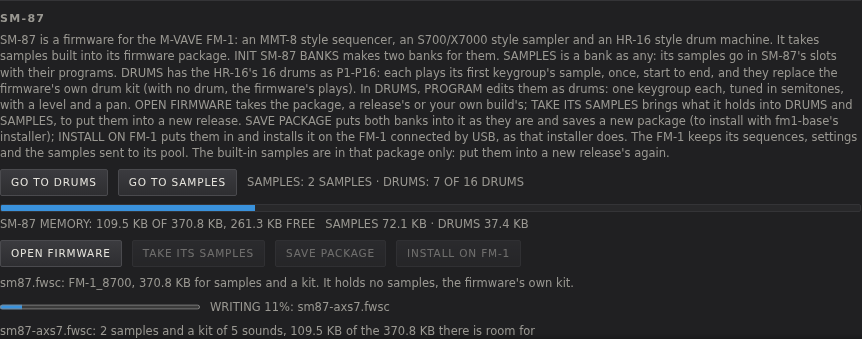
The FM-1 reads the package from the page. Its running firmware checks it and switches to its update mode, which writes it, and it then restarts with the new firmware. The bar and the display say how far it is: STARTING, VERIFYING, TO UPDATE MODE, WRITING, RESTARTING, and DONE. Leave the FM-1 connected and the page open until it says INSTALLED.
- It needs Chrome or Edge with MIDI allowed, as for the sampler (see Connecting the sampler). Close other programs that use the FM-1's MIDI port.
- Only the firmware's part of the FM-1 is written: it keeps its sequences, its settings and the samples sent to its pool.
- If an install stops, because the cable came out for example, the FM-1 waits in update mode. Press INSTALL ON FM-1 again, and the install is finished.
- When something goes wrong, the line by the bar says what and what to do, and the MIDI log has each step.
What had to be changed or left out on the way (a second keygroup on a drum, a FINE, a tuning past 24) is written to the MIDI log too.
Built-in samples are in that one package only: a new release of SM-87 comes with none of yours. To move them:
- OPEN FIRMWARE with the package you installed (or saved) before.
- TAKE ITS SAMPLES: after asking, DRUMS and SAMPLES get what it holds. Its samples go back in their slots with their settings and programs. Each drum gets its sample, tuning, LEVEL and PAN. What the two banks held before goes to no bank, and stays in memory.
- OPEN FIRMWARE with the new release's package.
- INSTALL ON FM-1, or SAVE PACKAGE.
Taken back and put into a package again, Axs7's samples come out the same, byte for byte. What doesn't fit Axs7's drums is left out and written to the MIDI log: a pad that plays one of SM-87's sampler slots, a kit sound no drum plays, and a pad with a name, note or group of its own.
- Banks and memory: banks, slots and saving everything
- Programs and keygroups: key ranges, ROOT and SEMI