Marks and Search
Two marks are all the typed markup there is — ## for a chapter, [square brackets] for a stage direction. Everything else you want a presenter to notice is painted, not typed.
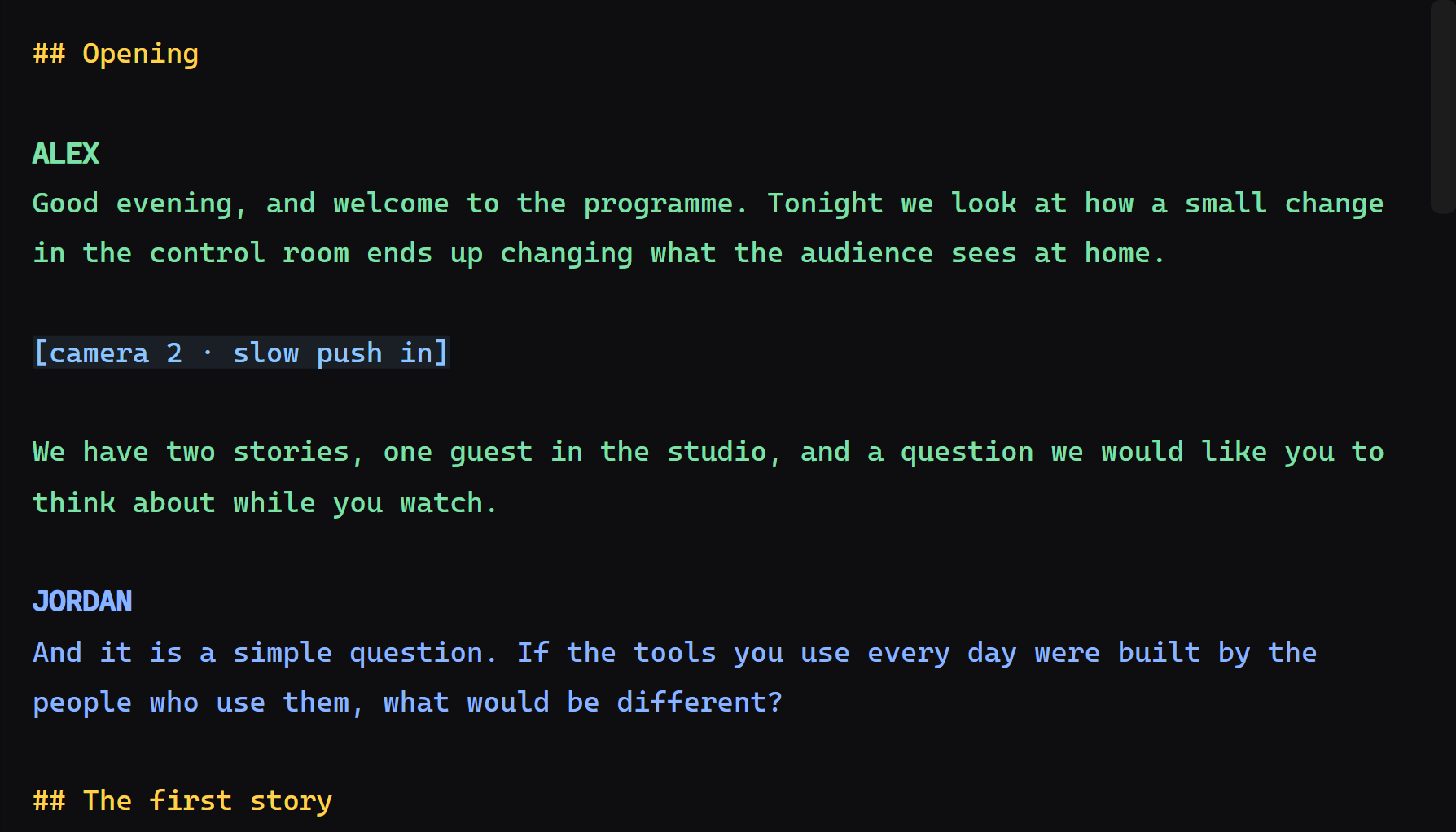
Select a passage and make it bold, italic, underlined or coloured. It reaches the presenter's screen looking exactly like that, on the network page too.
This is the part that took the work, and it is worth knowing because it explains a design that looks odd up close.
The editor is two layers stacked exactly: a transparent text box you type into, and a coloured <pre> behind it that draws what you typed. They must wrap at the same place, to the pixel — a caret that lands next to the letter instead of on it is the kind of thing that ends a live edit.
So nothing that paints is allowed to change how wide a glyph is:
- Bold is drawn with a stroke around the letter and a shadow, not with a heavier weight. A 700 weight is wider than a 400 in every proportional face.
- Italic and underline do not slant or underline with the font either; they are drawn.
-
Ligatures are off in both layers. Not because the two would disagree — they would agree — but because measuring a single character inside a
ficluster returns the box of the whole cluster, and the reading mark and the search boxes are measured that way.
The presenter's screen has no such constraint, so there the marks are drawn the normal way.
Ctrl+F. The bar has three blocks, and they read left to right as a sentence: find this, change these things, apply.
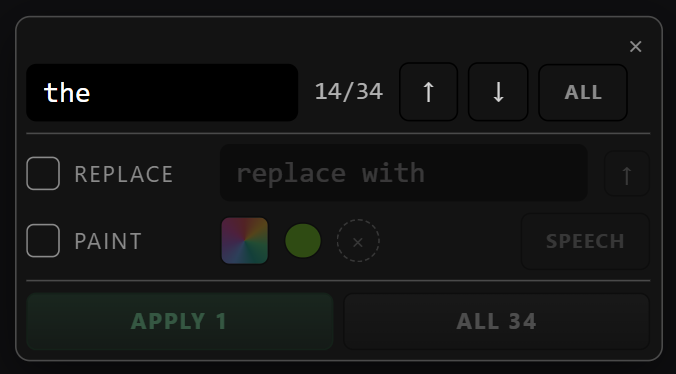
The middle block is what makes it more than a search. Choose bold, or a colour, or both, and Apply to all paints every occurrence at once. The guest's name in one colour and the sponsor's in another, across a forty-minute rundown, in one gesture.
- ALL shows every match boxed in the script at the same time, so you can see the spread before committing.
- Overwrite decides whether a passage that already carries a mark is repainted or left alone.
- The Apply key stays dark until something is actually selected to apply. A key that is always available and sometimes does nothing teaches you to stop trusting it.
- Replacing text and painting are the same pass: change the word and colour it in one go.
The same picker serves script marks, presenter colours and screen cards.
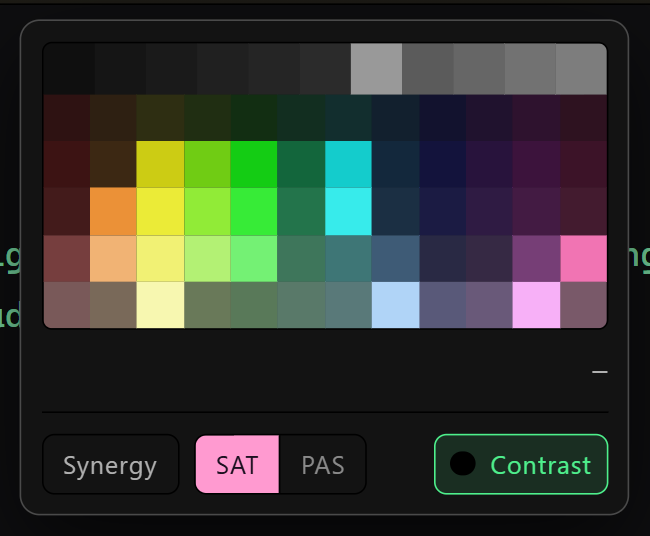
SAT | PAS switches the grid between saturated and pastel — pastel is less saturation and more lightness, for matching a channel's artwork or for a mark that should not shout. The grey row does not change with the tone: grey has no saturation to remove, and pure black and pure white have to stay reachable in both.
The contrast filter hides anything that would not read against the output's own background. Colours that fail are not offered, rather than offered and regretted at three metres.
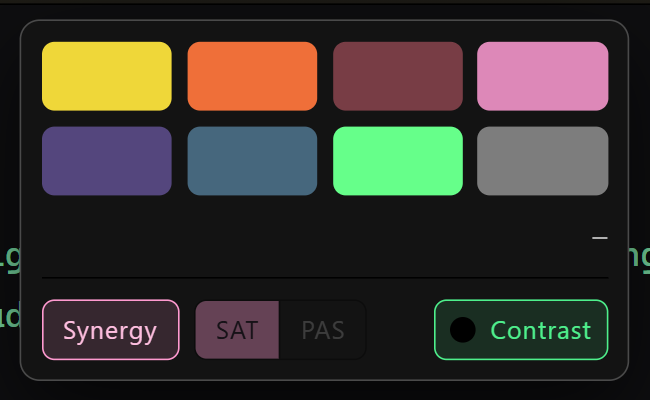
Eight colours chosen by a search that maximises how far apart they stay from one another. Not "more colours" — fewer, and that is the point: two presenters must never end up in shades nobody can separate on glass.
The tone switch does not apply to these eight, and it dims rather than disappearing when Synergy is on. Desaturated, the worst pair among them falls from 27.4 apart to 11.8 — below the threshold at which the app starts flagging a conflict. They would begin flagging each other, and the palette whose whole claim is "these never get confused" would start saying they do. The switch stays in place, dimmed, because a control that vanishes teaches you less than one that says "not here".
Both the tone and the filter are remembered per machine, so sending a project to a colleague never changes the grid they see.
A mark is stored on the block it belongs to, as a range of characters — not as markers inserted into the text. Export the script to txt or docx and you get the words, not a soup of symbols.
The range is remapped on every edit. Fixing a comma in the first paragraph shifts everything after it, and a mark kept as "characters 118 to 122" would start painting the wrong word at the first correction. It is the same arithmetic as the reading anchor, only in quantity: one anchor there, as many marks as you make here.
Strip formatting (Ctrl+Shift+L) offers two scopes: the selection, or the whole script. The wider one says how many lines it is about to touch before it does anything — a sweep that repaints the entire script without naming the size of the damage is a button you press once and never again.
- Presenters — colours per speaker, which use the same picker
- Themes and Appearance — the typefaces, and how the editor's paper changes what a colour looks like
- Keyboard Shortcuts — every binding