Repository navigation
Commands and Options
Home · Install & quick start · Commands & options · Treasure hunt · Troubleshooting · Discoveries & privacy
| Command | Action |
|---|---|
/wp |
Open or close the window |
/way 42 65 |
Set a waypoint in your current zone |
/way Westfall 56 47 Sentinel Hill |
Set a named waypoint in another zone |
/way hogger |
Go to a unique exact-name match, or open Find with that search |
/wp find [name] |
Open Find and optionally search |
/wp here [name] |
Mark where you stand |
/wp share |
Prepare your current location in chat |
/wp share Westfall 56 47 [name] |
Prepare a spot in chat without setting a waypoint |
/wp list |
List waypoints and distances |
/wp closest |
Select the closest waypoint |
/wp clear |
Remove the current waypoint |
/wp clear all |
Remove all waypoints |
/wp arrow |
Show or hide the arrow |
/wp treasure |
Turn treasure hunt on or off |
/wp treasure status |
What treasure hunt sees right now and what it found recently |
/wp help |
Show the command list in game |
Zone names follow your game client's language. Partial zone names work. If another addon already uses /way, Waypoint Tracker leaves it to that addon and tells you once. /wp does the same things.
Open Esc → Edit Mode, select the arrow's blue box, and drag or resize it. Each Edit Mode layout keeps its own placement. You can also use Move Arrow in /wp. Reset restores the arrow's default position, size and visibility.
The text has its own size and visibility settings. Enable Move the text separately to position it independently. The arrow does not catch mouse clicks during normal play.
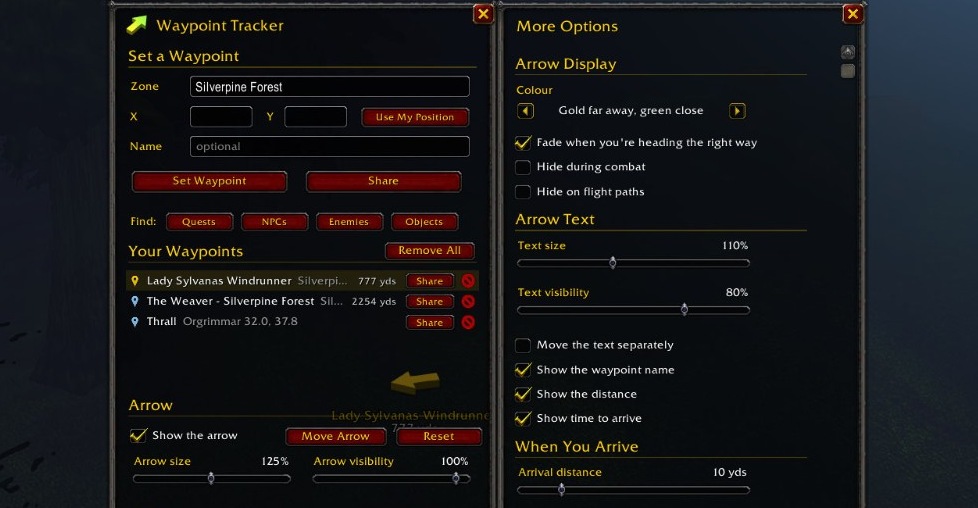
In the game: coordinate fields, Find buttons and Share buttons beside saved waypoints. More Options is open alongside the window, showing arrow display, text and arrival settings. Open the image for a full-size view.
The basic window has arrow visibility, size, movement and reset. Show more options opens the rest:
| Section | Controls |
|---|---|
| Arrow Display | Gold far away, green when facing it, or one colour you pick; fade when heading the right way; hide during combat or on flight paths |
| Arrow Text | Text size and visibility; show the name, distance and time to arrive; move the text separately |
| When You Arrive | Arrival distance, remove the waypoint, play a sound, then point to the next closest waypoint |
| Maps | World map and minimap pins, the minimap edge, coordinates on the world map, Ctrl + Right-click, a box with your coordinates, following the game's map pins |
| Treasure Hunt | Treasure hunt; chests and treasure; rare spawns; events and other markers; lead me to known chest spots; ping me when something appears; point the arrow at it right away |
| General | Point to the quest you're tracking, point to your corpse, always point to the closest waypoint, remember waypoints, minimap button, chat messages, start shared spots with [Waypoint Tracker], metres, let other addons set waypoints, also show the game's own map pin, and Learn NPCs, quests and objects as I play |
Reset All Settings restores settings while keeping your waypoints. Options also appear under Options → AddOns → Waypoint Tracker. In Key Bindings → AddOns, bind actions such as opening Find, sharing your location or turning treasure hunt on or off.
The addon follows your client language automatically: English, German, French, Spanish, Portuguese, Russian, Korean, Simplified Chinese or Traditional Chinese.