Repository navigation
OAuth Configuration
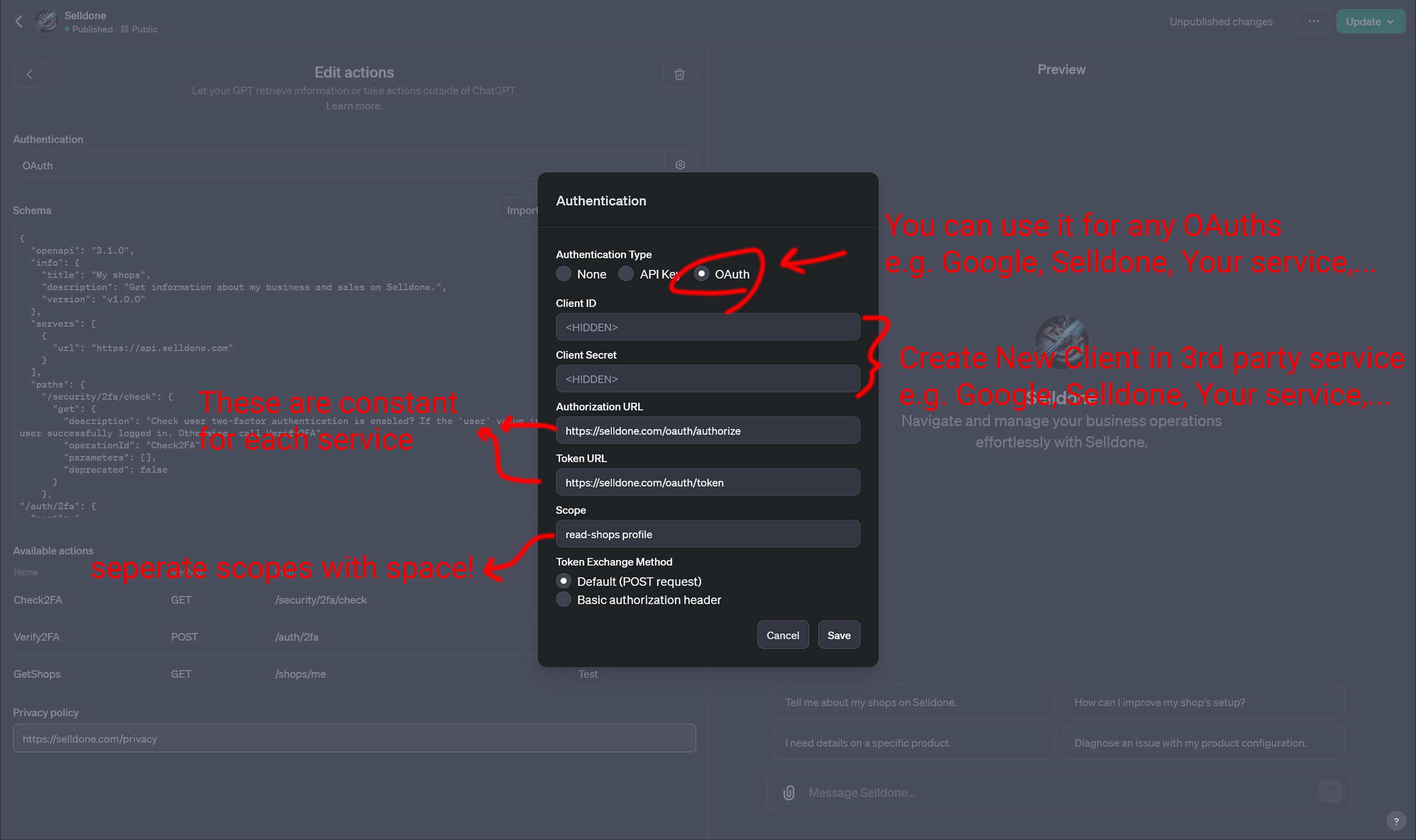
The Selldone GPT signs users in with OAuth 2.0, so every user authorizes the GPT with their own Selldone account and the GPT only gets the permissions (scopes) you request. This page lists the exact values to use, explains the flow and shows how to use the same setup with your own OAuth server.
| Setting | Value |
|---|---|
| Authentication type | OAuth |
| Client ID | From the OAuth client you created for the GPT |
| Client Secret | From the OAuth client you created for the GPT |
| Authorization URL | https://selldone.com/oauth/authorize |
| Token URL | https://selldone.com/oauth/token |
| Scope | read-shops profile backoffice-read-products |
| Token exchange method | Default (POST request) |
| Privacy policy | https://selldone.com/privacy |
Notes:
- Separate scopes with a space, not a comma.
- The authorization URL and token URL are constant for a given provider. Only the client ID, client secret and scopes change from one GPT to another.
- The OAuth dialog in the GPT editor works with any provider, for example Google, Selldone or your own service.
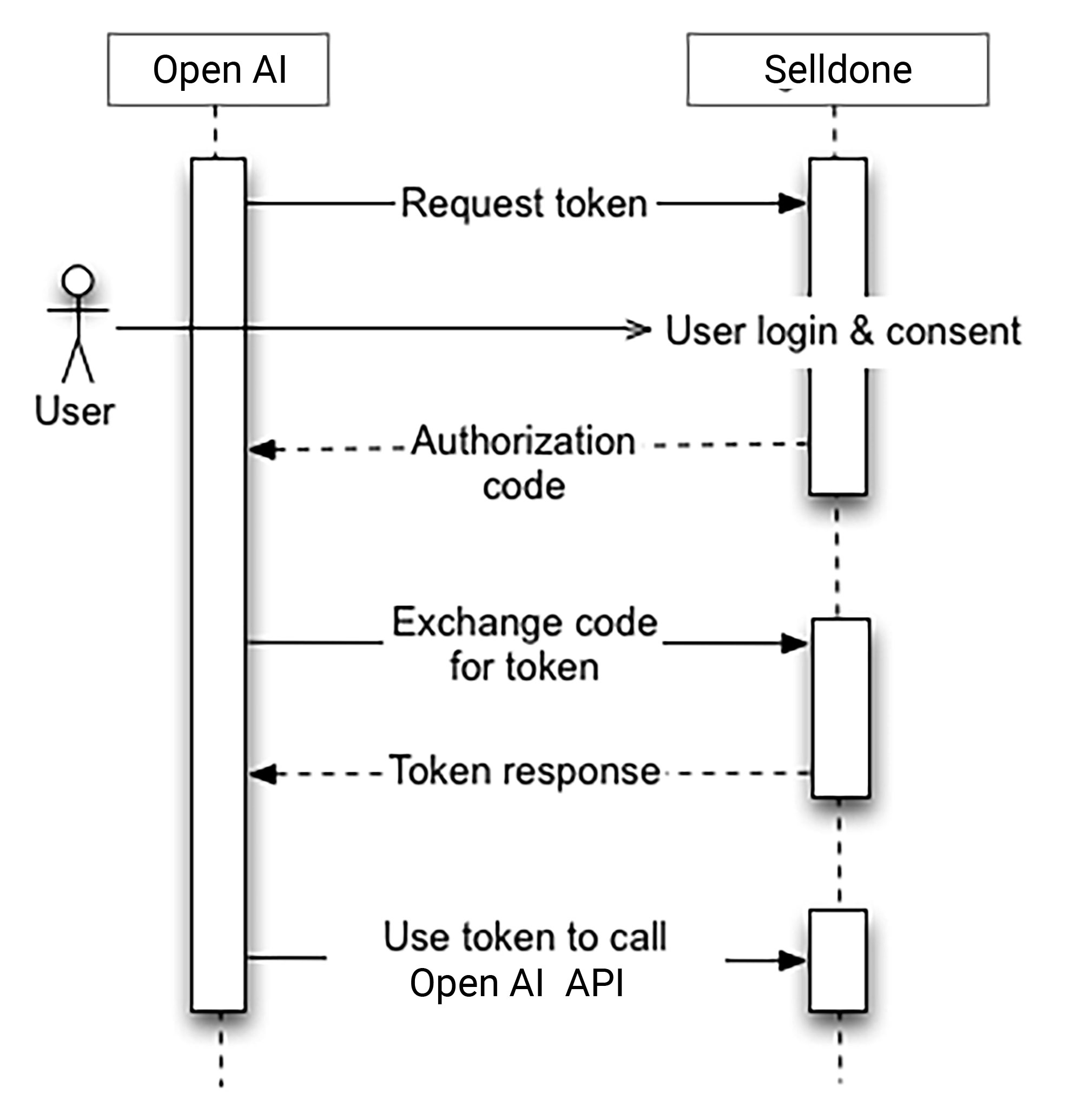
The GPT uses the OAuth 2.0 authorization-code flow:
- ChatGPT requests a token and redirects the user to the Selldone authorization URL.
- The user signs in to Selldone and gives consent.
- Selldone redirects back to the GPT's callback URL with an authorization code.
- ChatGPT exchanges the code for an access token at the token URL.
- ChatGPT sends the token with every action call to
https://api.selldone.com.
After sign-in, the GPT calls Check2FA. If the account has two-factor authentication and the response has no user, the GPT asks for the 6-digit code and calls Verify2FA. See the Schema Reference.
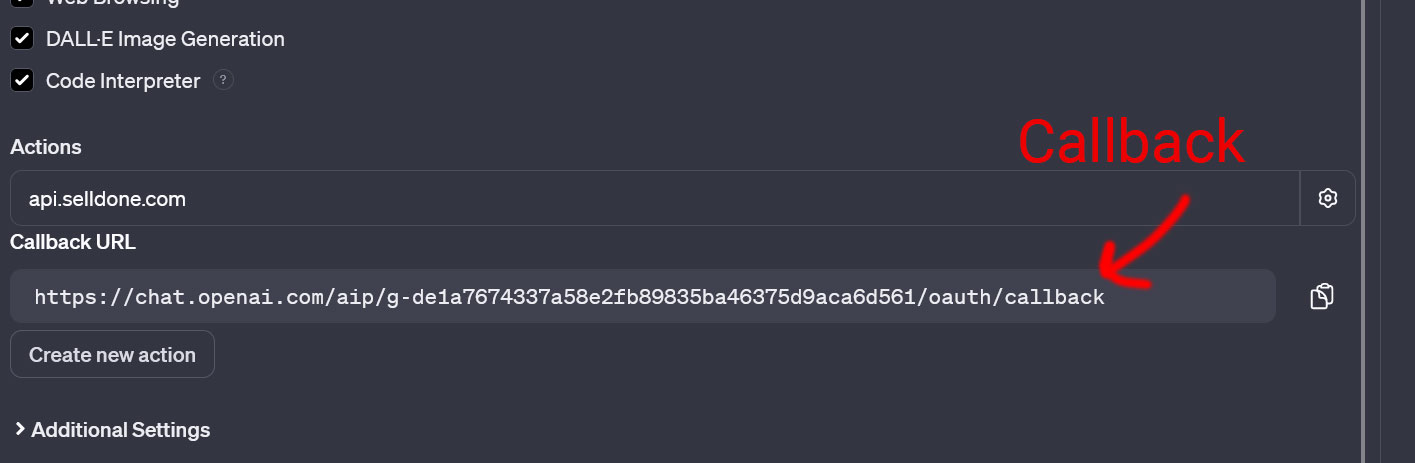
ChatGPT generates a callback (redirect) URL for each GPT. Your OAuth client must allow it, or sign-in fails.
- Find it on the Configure tab under Actions, after the authentication settings are saved. It has the form
https://chat.openai.com/aip/g-<id>/oauth/callback. - You can also find it by signing in through your GPT and checking the URL that ChatGPT requests.
- Changing the OAuth configuration in ChatGPT changes the callback URL. Update the redirect URL in your OAuth client every time.
| Scope | Used for |
|---|---|
profile |
The signed-in user's profile (the user object returned by Check2FA and Verify2FA). |
read-shops |
Listing the user's shops with GetShops. |
backoffice-read-products |
Reading product details and statistics with GetProductInfo. |
Request only the scopes your GPT needs. If you add new operations to the schema, check which scope they require in the Selldone API documentation.
The same pattern works when your GPT calls your own API instead of Selldone:
-
Laravel: enable Passport and run the command below to create an OAuth client. Use the callback URL from the GPT editor as its redirect URL.
php artisan passport:client
-
Other frameworks: most back-end frameworks provide an official OAuth server implementation. Configure an authorization-code client and enter its authorization URL, token URL, client ID, client secret and scopes in the GPT editor.
- Redirect or callback mismatch. The redirect URL in your OAuth client must match the GPT's callback URL exactly. Copy it again after any change to the OAuth settings.
- Scopes rejected. Make sure scopes are separated by spaces and that the client is allowed to request them.
- Token exchange fails. Keep the token exchange method on Default (POST request) unless your OAuth server requires a basic authorization header.
- Editor changed. OpenAI may update the GPT editor; field names can move or change.