Repository navigation
Authentication Flow
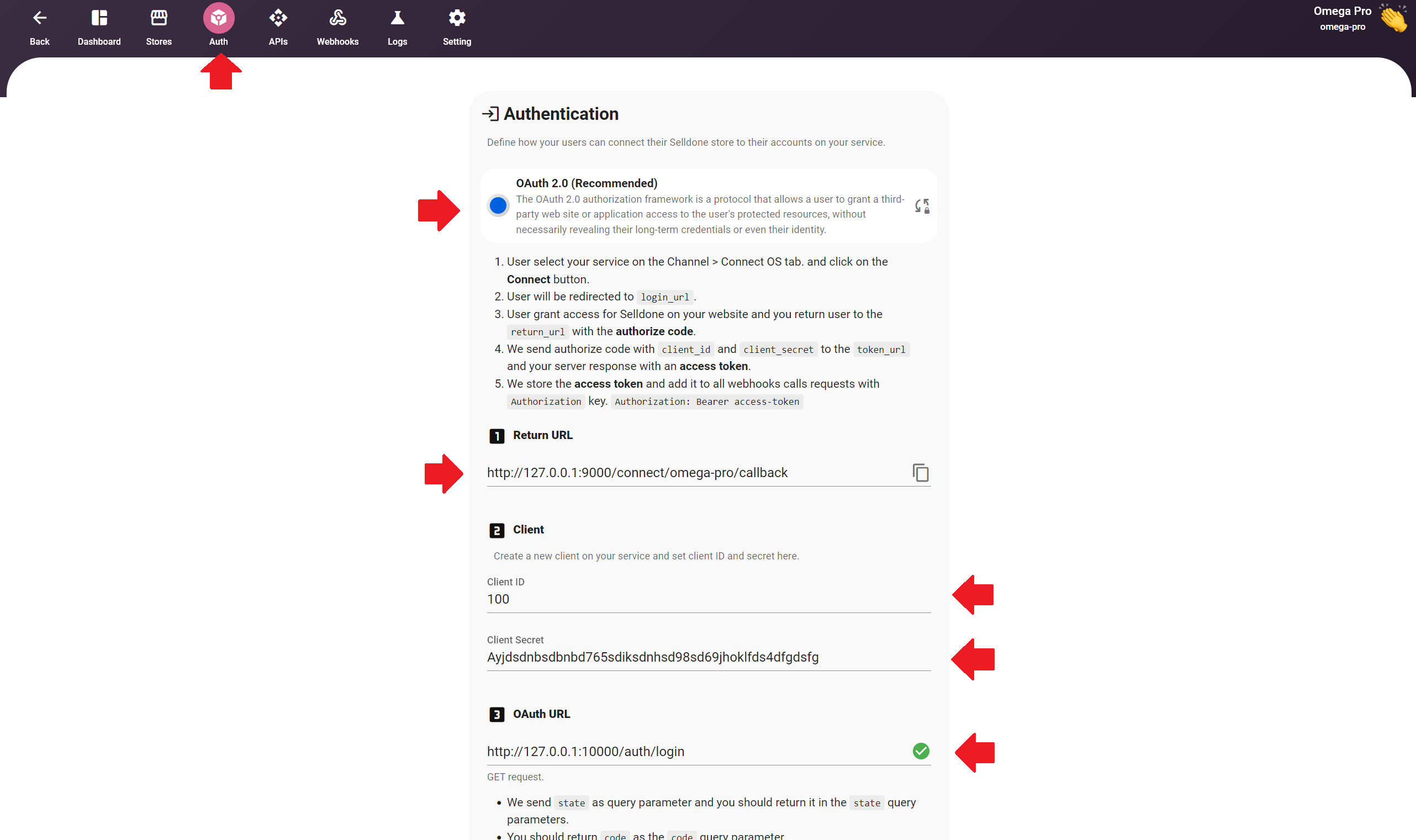
When a merchant connects their Selldone shop to your service, Selldone needs an access token that identifies the merchant's account on your side. The sample implements the recommended OAuth 2.0 authorization-code flow with four routes in routes/web.php.
- The merchant selects your service on the Channel > Connect OS tab and clicks Connect.
- Selldone redirects the merchant to your OAuth URL (
login_url) with astatequery parameter. - The merchant grants access on your website, and you redirect them to the Return URL (
return_url) with the samestateand an authorization code. - Selldone sends the authorization code with
client_idandclient_secretto your Token Generation API (token_url), and your server responds with an access token. - Selldone stores the access token and adds it to every webhook call in the
Authorizationheader:Authorization: Bearer <access-token>.
| Route | Controller | What it does |
|---|---|---|
GET /auth/login |
AuthorizationController@login |
Requires state. Shows the Grant Access / Reject page (resources/views/login.blade.php). Without state it returns 401 with an error page. |
GET /auth/login/accept |
AuthorizationController@accept |
Redirects to SD_PROVIDER_RETURN_URL?state={state}&code={SAMPLE_AUTHENTICATION_CODE}. |
GET /auth/login/reject |
AuthorizationController@reject |
Redirects to SD_PROVIDER_RETURN_URL?state={state} without a code. |
POST /auth/token |
see note below | Exchanges the code for an access token. Excluded from CSRF verification. |
All four routes send Cache-Control: private, max-age=0.
Note
routes/web.php maps POST /auth/token to [Controller::class, 'token'], but the token() method is implemented in AuthorizationController. If the token exchange fails with a "method does not exist" error, point the route to AuthorizationController::class in your copy of the project.
Selldone opens:
https://yourdomain.com/auth/login?state=<state generated by Selldone>
Your page must authenticate the user on your service (the sample skips this) and keep the state value so you can return it.
After the user decides, redirect back to the Return URL from the Auth tab:
# Granted
https://<return-url>?state=<state>&code=<authorization code>

# Rejected
https://<return-url>?state=<state>
Selldone posts these fields:
| Field | Expected value in the sample |
|---|---|
grant_type |
authorization_code |
client_id |
Controller::CLIENT_ID |
client_secret |
Controller::CLIENT_SECRET |
code |
Controller::SAMPLE_AUTHENTICATION_CODE |
Successful response:
{
  "access_token": "sample-access-token-...",
  "refresh_token": null,
  "expires_at": "<now + 1 year>",
  "token_type": "Bearer"
}
Error responses use status 401:
{ "error": true, "error_msg": "Invalid grant type!" }
{ "error": true, "error_msg": "Invalid client!" }
{ "error": true, "error_msg": "Invalid authorization code!" }Every webhook handler reads the Authorization header and, in the sample, compares it with Bearer {SAMPLE_ACCESS_TOKEN}. If it does not match, the handler returns 403 Invalid access token!. In a real bridge, look up the merchant account that owns the token.
Selldone also supports a Username / Password authentication mode, where the header is Authorization: Basic <credentials> (Base64 of id:password). The sample only implements OAuth 2.0.
The sample hard-codes one client, one code and one token. A real implementation should:
- Authenticate the user on the login page and ask for consent.
- Issue a unique, short-lived authorization code per request and bind it to the user.
- Issue a unique access token per connected shop and store it.
- Validate
client_id/client_secretfrom secure configuration, not source code.