Repository navigation
Releases: syntensa/libre-panel
Release list
Libre Panel v0.6.3

Weather symbols and a moon with much more to them; and the Linux download starts on older
distributions again.
New
- Vivid weather symbols and moon, the new look: the sun glows in a corona that breathes, a
bolt lights its cloud from within, snow falls as crystals that turn, fog drifts in soft
bands, and the symbols are sharper. The moon looks like the moon: its seas and craters, the
earthshine on its dark side and a halo that breathes. A big symbol has more still: rain
falls near and far and splashes where it lands, a storm pours, and on a clear night a
shooting star crosses now and then - The first look stays one click away: Settings → Weather and place → Weather symbols and
moon, Classic or Vivid, each tile with a picture of it (symbolsin config.toml). A
theme may give a symbol or the moon a look of its own - The TURZX 8.8" (USB) is marked supported: its owners report it runs
Fixes
- The Linux AppImage did not start on older distributions (Ubuntu 22.04 and others of its
age): it was built on a newer system and asked for a newer C library (glibc 2.38) than
they have. It is built on the oldest Ubuntu still supported now, and each release is
checked for it - Start could take an update for a first start: it read its note of what is new while that
was being written, and found it empty - A config.toml fixed right after the panel said it does not load was taken only half a minute
later
Which file? Windows: …-setup.exe, Linux: ….AppImage; see Install.
Libre Panel v0.6.2
Libre Panel in six languages; keyboard shortcuts for the whole PC; the history of your PC under
Live; notices from your own scripts and a Stream Deck; and the time on the game screen.
New
- The app, the tray menu and the panel speak French, Spanish, Polish and Portuguese (Brazil)
besides English and German: Settings → Start and system → Language, or System to follow
Windows or Linux. Dates are joined as each language does it ("27 de septiembre", "27
września") - Keyboard shortcuts for the whole PC, whatever window is in front: pause or resume the
panel, its brightness up or down, open Libre Panel. Set in Settings → Start and system by
pressing the keys; Use the shortcuts switches them all off and keeps them for later
(Windows; Linux with X11, as Wayland lets no program take keys) - History under Live: with the memory on, the temperatures, load and power of the last
day, week or month, with the peaks, the time in games, the games played most and the last
rounds - Notices from other programs: a script, a Stream Deck button or
libre-panel notify "Render done"shows a short notice on the panel, with a title, an icon and how long it
stays if you like. Off until you allow it in Settings → Services; taken only from this PC
and only with the key Libre Panel makes - New versions: Start asks once whether Libre Panel may look for a newer version, and if
so says when one is out, with the right download for how it was installed. One request a
day to GitHub, carrying the version you have and nothing else (check_updates) - The game screen tells the time, small and dim in the corner of the game's card
Which file? Windows: …-setup.exe, Linux: ….AppImage; see Install.
Libre Panel v0.6.1
The volume over every screen, switched on from Start and in one of four new looks; and game
mode shows the frame rate of games that start through a launcher.
New
- Show the volume: turning the volume shows on every screen, switched on with one click on
Start (More for your panel), in Look → Notices → Volume or with Ctrl+K. The music
page's screen shows the volume itself and leaves it out - Four looks for the volume, the same on every screen: Bar (a slim bar along the bottom
edge), Levels (bars that rise as on a mixer), Ring (a ring that fills, the number in
it) and Large (a large number in the middle). Each is tried on the picture before a click
keeps it; As the notices keeps the theme's notice style (volume_lookin
[services.notices]). The bar glides to each new value, and muted shows the crossed speaker
Fixes
- Game mode: with some games the game screen opened and then said "No game running" while the
game ran. Of a Steam game, a program in the game's folder that stays in the background (a
launcher, or the starter of an anti-cheat) was taken as the game, and only its frames
counted. The program of the game whose window is in front counts now, and where the program
found draws nothing for half a minute, the one with the most frames does - The game screen says "No game running" only where no game was found: while the frame rate
of a game has not come (yet), it names the game and says so - Settings: a choice clicked right as a section opened (how the panel is mounted, say) could
jump back to the old one on a busy PC, and a click on it then did nothing. The section's
reading of the settings no longer undoes a change made meanwhile
Which file? Windows: …-setup.exe, Linux: ….AppImage; see Install.
Libre Panel v0.6.0
New
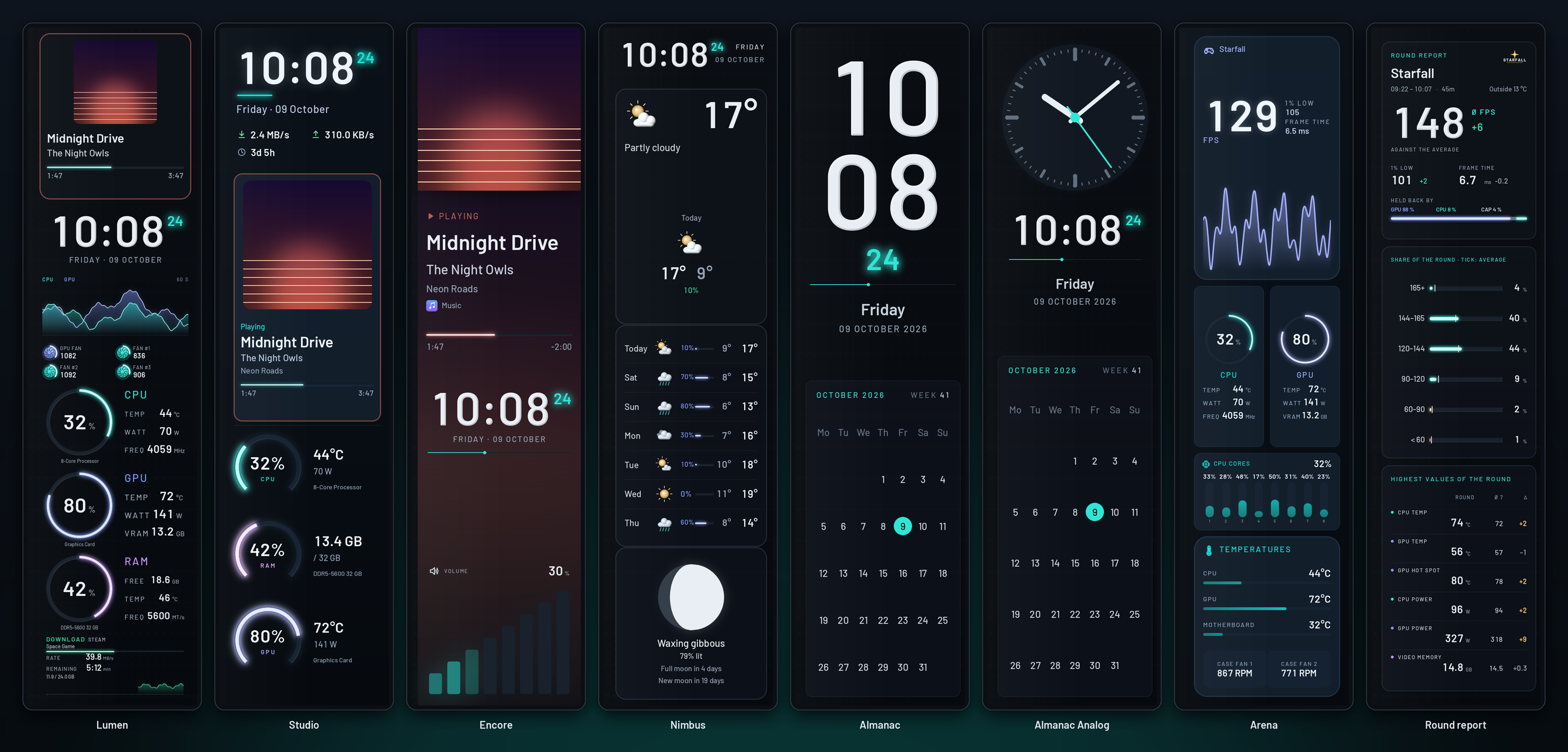
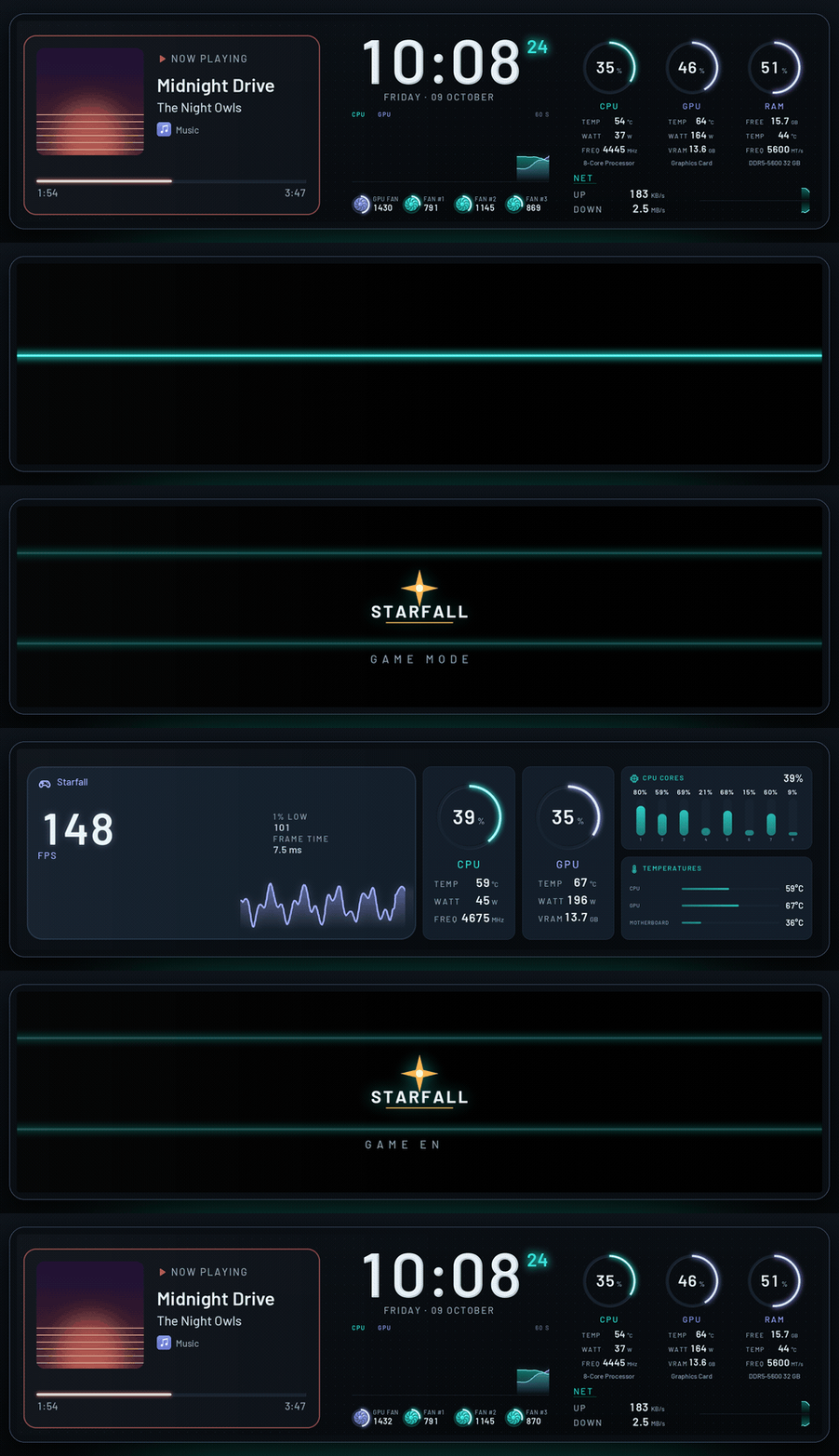
- Arena, Libre Panel's own screen for game mode on 8.8" and 9.2" bars: the game's frame
rate large with its 1% low, frame time and course, the CPU and the GPU as instruments, every
core's load and the temperatures. It is the first screen game mode's page offers; until now
only SPUR II's were ready-made - Bars on end. Say how the panel is mounted, upright or on its side: on a first start,
on Start or in Settings → Panel (device.orientation). Upright, every screen shows in
its version for a bar on end, for the normal theme, the pages and the screens in turn alike;
the lists show each screen once, with the picture of the version the panel shows, and
Design opens that version. Lumen, Studio, Encore, Nimbus, Almanac, Almanac Analog, Arena
and the round report have one each (480 × 1920), laid out anew, clear of the strip the 9.2"
bar's frame hides; a theme of your own gets one as<id>-vertical. The panel's own boot
logo and standby clip (Settings → Panel → Start screen) are drawn upright too - Start: the panel's own default (Lumen on a bar) stays in the quick list, right after the
theme on the panel
Easier to find, easier to use
Start
- Start leads with the panel: what it shows now, with its picture and controls; above it, in
short, what keeps it from all it can do, each with the click that mends it; under it the
next step (smooth motion, the first steps) and What the panel shows when: the normal
theme, game mode, music, idle and the round report, each with its screen and its switch.
The tiles that repeated the tabs are gone; Screens in turn and the Start screen (the
panel's own boot logo and standby clip) are under More for your panel - A first start goes step by step: how the panel is mounted (only on a bar, where it changes
something), then the theme, which goes on the panel; Start goes on from there instead of
opening Design. First steps (game mode, the music page, the notices, the weather's
place) are one click each and ticked off when done - What's new on Start, once, for who updated: bars on end, Arena for game mode and the new
overview, each to be done right there - The gallery says what a click does: Edit is a button on every card, Show on the panel
shows over the picture, and the quick list marks the theme On the panel. Game mode
switched on from Start gets its game screen (Arena on a bar) - The question about smooth motion says what it gives and asks plainly: Turn on or Not now
- Screens in turn lists the themes made for the panel first, starts a new screen with the
theme on the panel, and says when one screen changes nothing and when changes are not saved
Design and Look
- Design's first visit shows three steps: click or drag a block, click something to change it,
To the panel keeps it. Tips on the rail name what is not in sight (selecting several and
aligning them, the right-click menu, locking, Alt, the arrow keys) and lead to every key - Blocks are added with a click as well as by dragging, and a removal can be taken back from
its message. An empty theme says how to fill it - To the panel reads On the panel ✓ when the panel shows the theme as edited; opening
another theme over unsaved work offers Save first - The theme's settings keep to the theme (name, colour world, background, font), the rest is
under Fine-tuning. With a background picture the colour is Colour under the picture,
and Remove the picture is beside it - Look says in a line what each part does, and tries a choice on before a click keeps it: rest
the pointer on a colour world, a finish, the light, the grid, the dust or a notice style - Design's pages read as Start's What the panel shows when; over the canvas it is + Page.
View and snapping says what each choice does - On a bar on end Design opens the upright version, says which version is open, and follows
when the panel is turned; a copy of Lumen Vertical goes with a copy of Lumen
Settings and Live
- Settings open on an Overview: what needs attention, in plain words and the worst first,
each with the click that mends it (use the panel that is plugged in, resume, turn on smooth
motion, unlock all sensors, read games' frame rates, turn on the weather, restart a service),
then each part at a glance - Every section says in a line what it holds and speaks plainly: Smooth motion, Game mode
and more (game mode and its round report first), Where the readings come from; the
technical rest (where the pictures go, a serial panel's port, the video program, the reading
interval) is under Advanced. Weather and place starts with the place - Smooth motion asks for the standby clip's name where it is set: Use this name takes the
one the panel's own app gives it, and nothing is written before the click - Report a panel in three steps: the app lists what is connected itself (by USB ids, never
serial numbers), says how to run the check, and opens the form with the list filled in - Live says in a sentence how the panel runs ("Runs smoothly at 50 fps", or slower than
planned and what helps), with the numbers under it. Nowhere does the app ask for a command
Everywhere
- Ctrl+K finds every feature by the words people use, in English and German ("hochkant",
"Bootlogo", "kopfüber", "Fehler melden", "flüssig"); an empty search suggests what most
people come for. Help (? or F1) has the questions and answers, the issue form and every
view's keys - One header in every view: the search field after the tabs, each tab says what it is for,
Settings is a button with its name, and it or Escape leads back to where you were - The tray menu shows the themes by name, those made for the panel first, with the most used
at the top - Errors say what happened in plain words (a file another program holds, a full disk), never
an exception's name. German calls each thing by one name, and every header button has a
name for screen readers
Fixes
- Linux, with a tray of X11: Quit now and then took 15 s and ended the app the hard way,
as the tray's loop missed the call to stop; Quit no longer waits for it - On a bar on end, Design opened Lumen lying on its side at start while the panel showed
Lumen Vertical - Settings: a link to Advanced opens it, instead of landing on a closed card
- Start screen: writing the boot logo or the standby clip stopped with "command 99: unexpected
reply 00 00 …". Before writing, the panel's folder is listed for the log, and the 9.2" sends
that listing without the command's number in front; it is now read as it comes, and a panel
that does not list its files no longer keeps either from being written - Design → Pages and game mode's card in Settings: the list of screens for a page was one list
from A to Z, Libre Panel's own mixed with SPUR II's and with screens for other panels (a
0.96" one for a bar), and two themes of one name (a copy of yours, a plugin's) looked the
same. The screens made for the page come first, then Libre Panel's, yours, each collection,
a plugin's and those for other panels, each in its group; two of one name show their ids
Which file? Windows: …-setup.exe, Linux: ….AppImage; see Install.
Libre Panel v0.5.6
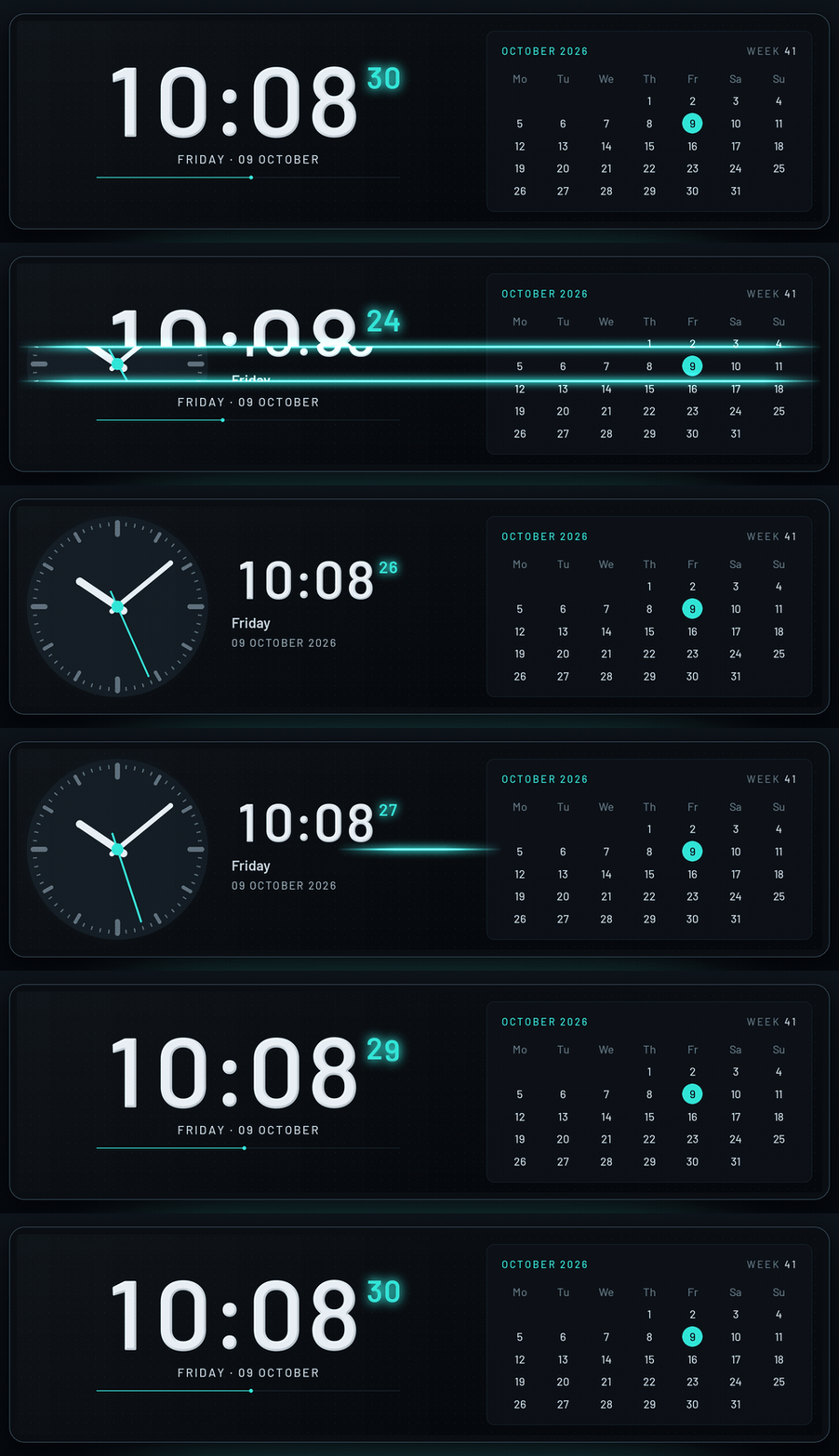
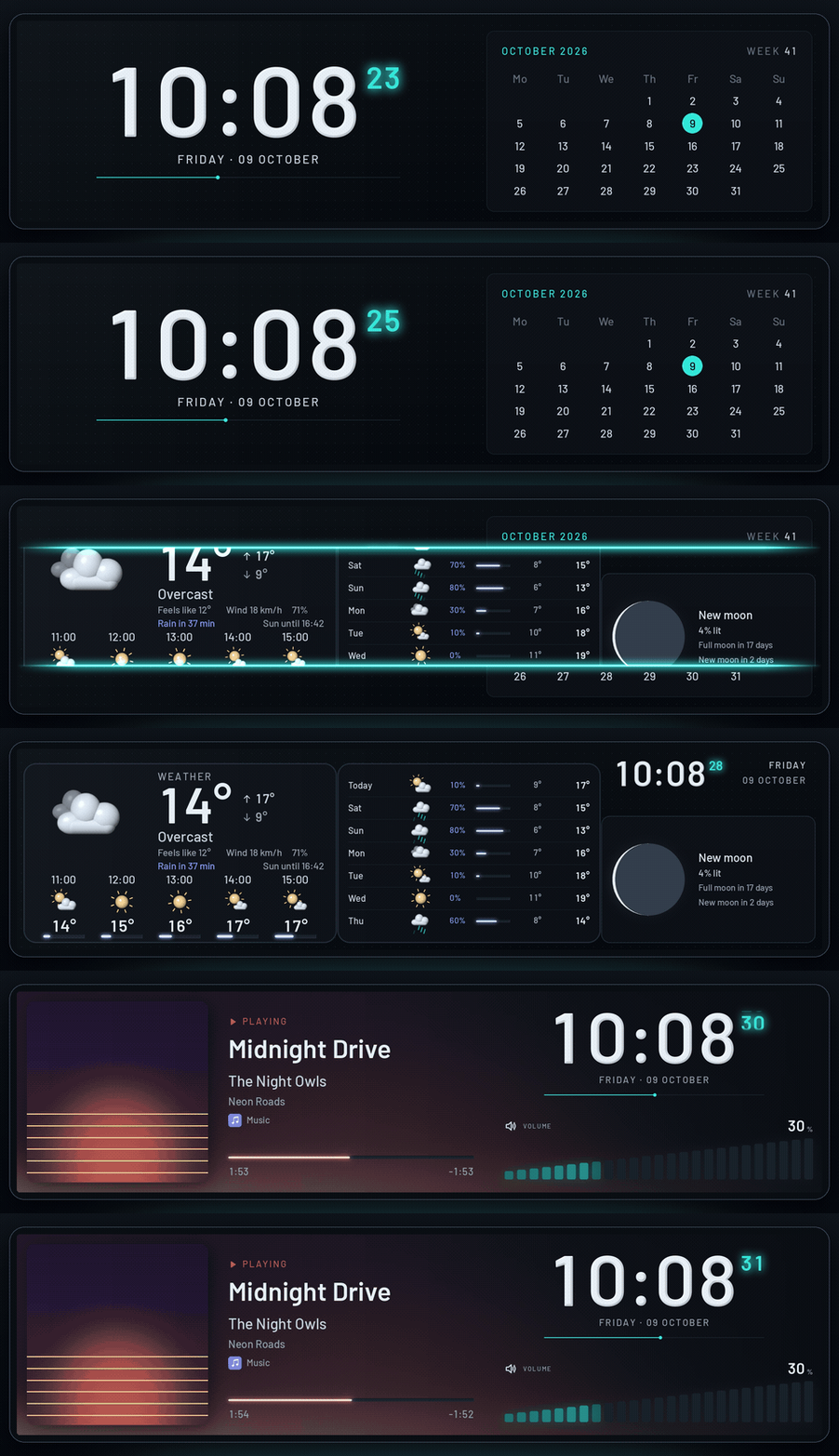
Three new screens for the bars: one for music, one for the weather and one clock with the
month, in digits or on a face; screens in turn; pages the panel switches to by itself, for
music and when the PC is idle; the panel's own boot logo and standby clip, the round report
and a redrawn logo in Libre Panel's look; and what plays and the volume without delay.
New
- Screens in turn: themes one after another, each for its seconds, minutes or hours, then
from the top again (Start → Screens in turn,[sequence]in config.toml). A game's theme
and the autopilot go first; choosing one theme stops them and keeps their steps - Start screen (Settings → Panel): the TURZX USB panels' own boot logo and standby clip in
Libre Panel's look, made for each panel's size, shown as they will look and put on the
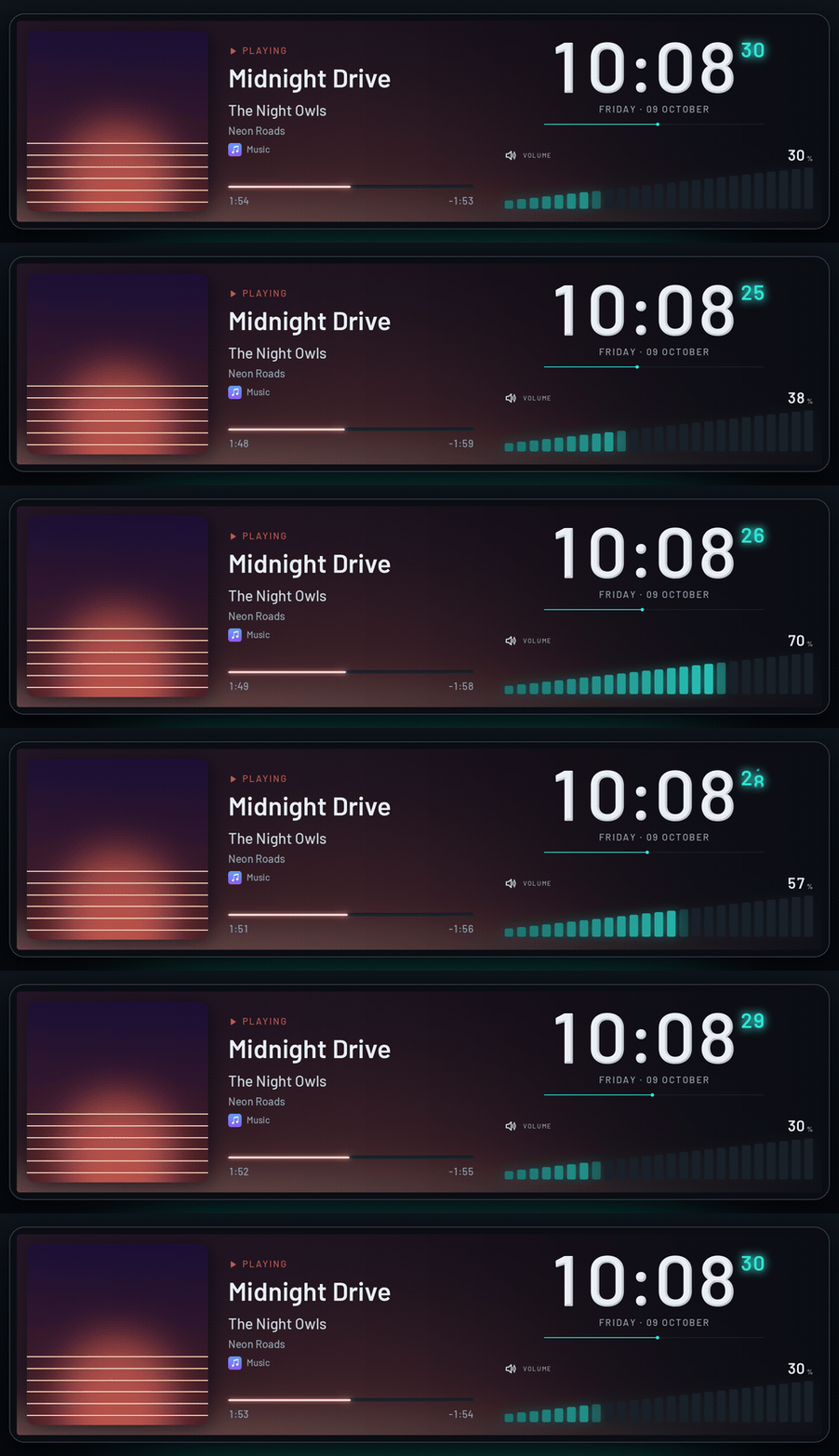
panel on a click (after a question; the factory logo can always come back), or downloaded - Encore: what plays with its cover large and the cover's colours blurred behind the whole
screen, the state in the panel's language, the time with rolling digits, its seconds and a
line through the minute, and the volume as levels that rise as on a mixer (a crossed
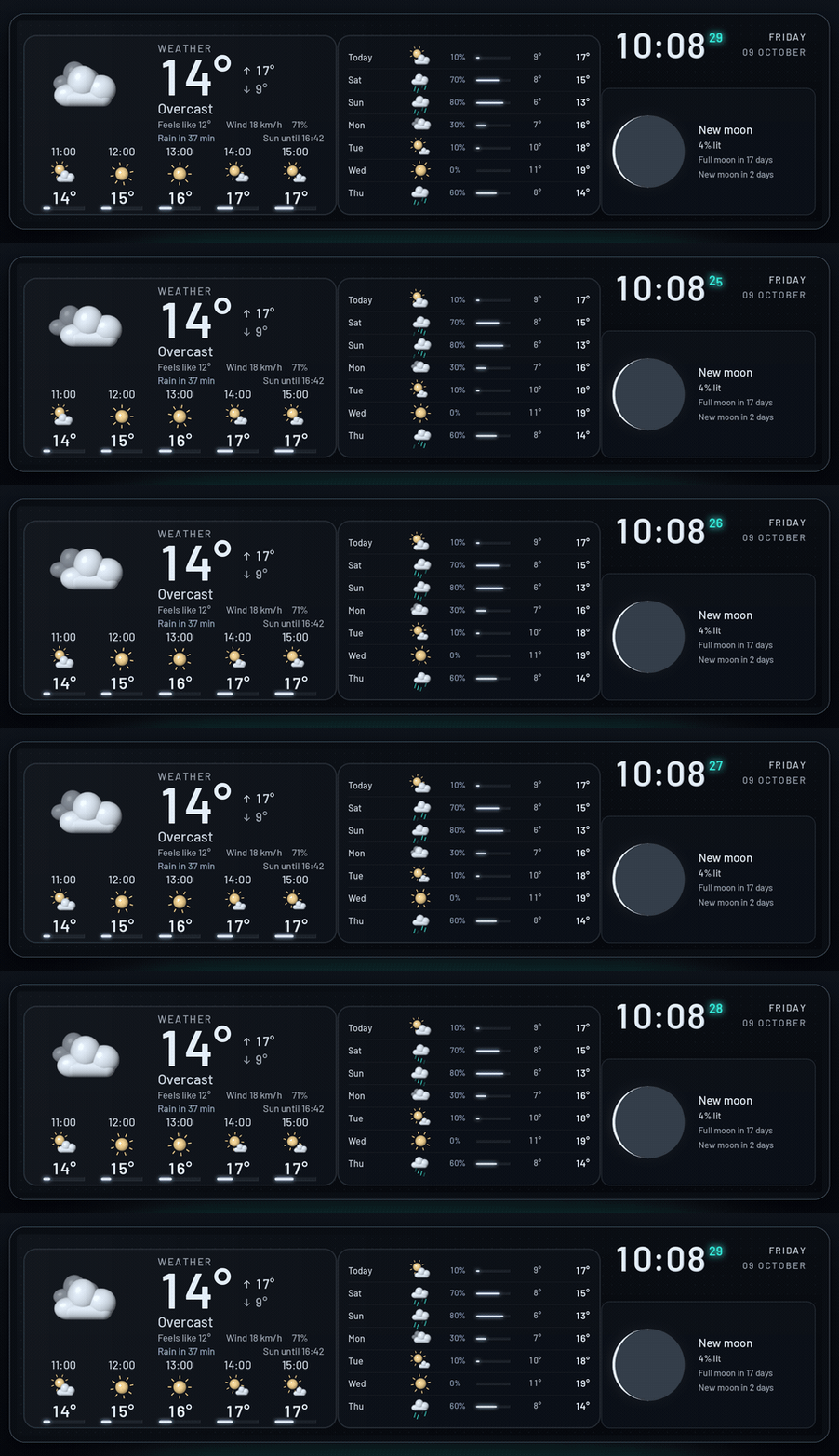
speaker while muted; no volume notice covers it) - Nimbus: the weather now and the next hours, the next days with their moving symbols, rain,
low and high, the moon as it is lit tonight with the days until the next full and new moon,
and a small clock. Without a place, a calendar sheet with the month and a line that says
where the weather is set - Almanac: the time large beside the month with today marked and the week; Almanac Analog has
a clock face whose second hand glides to each second instead - Pages the panel switches to by itself: Music shows Encore while a track plays, and
Idle shows Almanac (or Almanac Analog) when nobody has touched the PC for some minutes
(5 by default). Design → Pages has a switch on every page but the normal one (game mode's
page is the game service switching by itself, the round report's the memory service's
report), and each page's theme is chosen from a list with the screens made for it first; the
round report's screens are offered for its page alone. A game goes first, then its report,
then music, then the idle clock; both new pages are off until switched on
([modes.media],[modes.idle]) - Game mode's screen is chosen from a list: on game mode's card in Settings → Services,
and on the page cards of Design → Pages (a mode's page could only take the theme open in
Design, with the + over the canvas, and was hard to find) - Modules: Volume (a speaker, the level and levels that rise; upright in a tall module),
Moon (large, with its phase and the days until the next full and new moon) and Next
days (side by side when long, one under the other when tall or big) - Themes: a clock face's second hand may glide to the second (
"hand": "glide", as a clock's
rolling digits) or go round ("sweep"), for a millisecond or two a frame; the clock faces of
the analog and world clock modules glide. Bars may rise as levels (rising), pictures be
blurred into a backdrop of their colours (blur), and a text may be one of Libre Panel's own
words in the panel's language (translate) and in capitals (uppercase); iconsvolumeand
mute. A smooth bar, ring or number may glide at its own pace (glide_ms) instead of the
theme'ssmoothing_ms(the volume's do so by themselves)
Changes
- The round report after a game is in Libre Panel's look now: three cards (the round, its
share at each frame rate, its highest values against the earlier rounds) in the colours
and lettering of Lumen and Encore, without SPUR II's header of fans and clock. SPUR II's
report stays asspur-round-reportwith the other SPUR II screens - The logo, redrawn: its bars stand clear of the ring (the tallest cut into it), and the dark
end of the ring is rounded like the lit one. It is one mark everywhere now, drawn from the
same code: the app's icon and the tray, the app's header and the website (which showed
another sign), the panel's start screen, the README and the repository's social preview
Fixes
- What plays reaches the panel without delay: the "now playing" notice comes in the frame the
track changes (it waited for the next reading, up to a second), the new cover comes with its
title (it followed up to a second later), and a seek in the player shows at once (after up
to 5 s before; only the timeline is read for it) - The volume, on every screen as on SPUR II's Studio: its number follows each step of the
wheel at once (it lagged a third of a second behind), its bars, rings and levels glide behind
it in a third of a second instead of stepping, and a number of it says MUTE (STUMM) at once
while muted, in the warning colour. A screen that shows the volume or what plays itself gets
no band of it rolling over it - The log says at the start whether the volume comes in by events or by polling, and with
--verboseone line for each change of what plays: what it was, the event that brought it
and how many milliseconds after it the source had it - Windows: starting Libre Panel a second time froze its open window ("not responding"). The
window was set "on top" for a moment from another thread, which on Windows locked it up; it
is now brought to the front the way Windows allows, by the start the user just clicked. A
second start while the window is still opening no longer opens a second one, and a click
while Libre Panel itself is still starting waits for it instead of doing nothing - Design: a panel on end (portrait, a 9.2" bar at 480 × 1920) sat at the left of a frame as
wide as the line under it, so the frame and its grid looked out of place. The frame now holds
the panel in the middle, as it does on its side
Which file? Windows: …-setup.exe, Linux: ….AppImage; see Install.
Libre Panel v0.5.5
Fans in the look of your own fans, graphs as fluid as SPUR II's everywhere, and modules that
are easier to place.
New
- Fans: the rotor a fan widget turns may now look like Noctua's first NF-A12x25 (nine broad
blades swept forward), the first 140 mm NF-A14 (seven blades) or Libre Panel's own fan (six
round-tipped blades with a lit ridge round a hub with a ring of light), besides the nine
blades of Noctua's G2 it always had. Each in the theme's colour or its own (Noctua's brown
rotor in a beige frame with brown pads). Settings → Sensors → How the fans turn chooses
the look and the colours for all fans and for each, with a picture of every look; a theme
may setlookandpainton a fan of its own - Design: the module grid (View and snapping) moves and grows modules by whole cells
(coarse, as the pictures of the modules show them), half ones (medium, the default) or each
line of the theme's grid (fine, as before); Alt while dragging goes line by line
Fixes
- Graphs: every graph now moves 25 pixels a second, as SPUR II's (a step of half a pixel in
every frame at 50 fps), in every theme and as a module, unless it sets its ownseconds.
Lumen's moved 8 px a second, Studio's network graphs 2, and they stood between their steps
or blurred between them; Lumen's now show the last 19 seconds instead of a minute - Design: a module from the library on a theme with a fine grid (Lumen's) was one sliver of
it, hard to see or click. It now comes in whole cells, chosen, with its settings at once - Design: the "Fan with speed" block read the graphics card's fan in three parts and named it
with a fixed text. Several parts selected together that read one sensor now have one picker
for all of them, and the block shows the fan's own name. The ring instrument's fan shows
its sensor in the inspector, and its title is the fan's name too - Windows: a setting changed just as the panel read
config.toml(a service switched on or off
right after another change) could be refused with "access denied": Windows cannot replace a
file another reader holds open. The write now tries again a moment later
Which file? Windows: …-setup.exe, Linux: ….AppImage; see Install.
Libre Panel v0.5.4
The motion of the SPUR II mod: numbers that count, values in the next frame, graphs without
steps, and a clock whose digits roll.
New
- Clocks: a clock's
digitsmayrollon the second (the old digit moves up and out, the new
one comes in from below, soft at the edges; all that change roll together) orfade, for
digits_seconds(0.42) after it, as the SPUR II mod's clocks do. The rest of the second the
clock is its plain text, the same pixels as before. Finished lettering (facet, acrylic) rolls
as it is lettered. The SPUR II themes, Studio and Lumen roll their clocks; others jump as before - SPUR Studio: the seconds run under the clock fills its groove once a minute, without steps,
with a soft head.time.secondis the seconds of the minute at each frame's time, and a bar's
end_dotgives a bar such a head
Fixes
- The processor's, graphics card's, memory's and network's numbers and the fans'
speeds jumped once a second while the rings glided. Every number that shows an amount now
counts to a new reading with its bars and rings, in the modules and in the built-in themes
(smooth) - LibreHardwareMonitor's readings came up to three seconds late and now and then one was
skipped: the sensor service, its client and the panel's snapshot each kept their own second.
A new reading now shows in the next frame, and the service is asked twice in each of its rounds - Music: a new song, play and pause showed up to a second late; they now show in the next frame,
and the position moves on at each frame's time - Video mode: a slow graph (a minute across, as Lumen's) stood still for two or three frames and
then stepped half a pixel. Its steps are now cut into parts, drawn ahead in the helper thread,
so it moves on in every frame. Graphs that move a step a frame (SPUR II's) stay as they were
Which file? Windows: …-setup.exe, Linux: ….AppImage; see Install.
Libre Panel v0.5.3
Fans by their own names.
New
- Fan names: a mainboard wires its fan headers its own way, so a theme cannot know which fan is
the intake. Each fan now goes by its name: one of your own (Settings → Sensors → Fan names,
which shows each fan's speed now so that you can tell them apart;[[hardware.fans]]in
config.toml), else the name FanControl gives it, else the sensor's own ("Fan #1"). Lumen and
the SPUR II themes show it; the SPUR II themes no longer write "Intake", "CPU" and "Exhaust"
beside the first four headers of every board.GET /api/hardwarelists the fans,
POST /api/hardwaretakes{"fans": {"fan.lpc.fan_1": "Intake"}}
Which file? Windows: …-setup.exe, Linux: ….AppImage; see Install.
Libre Panel v0.5.2
The mainboard's fans on Windows, and values that follow as fast as in the SPUR II mod.
Fixes
- Windows: the mainboard's fans, and the temperatures and voltages of its Super I/O chip, did not
appear (only the GPU's fan did). LibreHardwareMonitor lists them only once an update has read
them, and Libre Panel took the list before the first update and never again. Each part is now
updated first, and sensors that appear later (a fan that starts turning, a graphics card's fan
after its zero-RPM mode) are found within a minute, through the sensor service and inside
Libre Panel alike - Video mode: values reach a new reading in about half a second and then hold, as in the SPUR II
mod, instead of gliding until the next reading (about a second): numbers, bars and rings follow
a change twice as fast. A theme'sanimation.smoothing_mssets it, as it does on still frames - The app: a sensor this PC does not have no longer shows a made-up value in the sensor picker and
the inspector. Sample values are greyed, marked, and/api/readingssayssamplefor each - The app: a module's resize handles stand at its new edges at once after a resize (they followed
a preview later, so a quick second drag could start at the old edge), and keys typed right after
Ctrl+K go into the palette, which gives the focus back where it was
Which file? Windows: …-setup.exe, Linux: ….AppImage; see Install.
Libre Panel v0.5.1
Fixes from the first installs of 0.5.0 on Windows, above all the app's window.
Fixes
- Windows: the app's window did not open. It died at once, before it showed, on every PC: it was
given a PNG as its icon, which .NET cannot use as one. It now takes the program's own icon. A
window that still cannot start (a broken WebView2) opens the app in the browser instead of
nothing, andlogs/window.logsays why. The release build opens a real window on Windows
before it is published (libre-panel window --check --open) - A theme that
config.tomlnames but that is not installed any more (removed, or one of a plugin
that is gone) no longer leaves the panel dark until the file is changed: the panel shows its
own theme (Lumen on the 8.8" and 9.2", Libre Default elsewhere), and the tray menu, its tooltip
and Start name the missing theme and say how to choose another.config.tomlstays as it is - Windows autostart: a task named "Libre Panel" in Task Scheduler that is switched off, or that
starts another program (a leftover of an older copy or of a mod), showed Start with Windows as
on and kept the normal start from being written. Only Libre Panel's own task, switched on,
counts now; another one is left alone, and Settings → System andlibre-panel autostart statussay how to remove it
Which file? Windows: …-setup.exe, Linux: ….AppImage; see Install.