Repository navigation
Repeating Sections
for_each repeats a template inside one card, and one card only
ever fills the slot it was given. A repeat over the rooms of the house therefore lands in a
single section: it never reflows on a narrow screen, and the rooms cannot have a heading or a
background of their own.
The card can also write a whole view. Give a view a strategy of
custom:decluttering-card-plus and its sections: and badges: can repeat: one section,
or one badge, per item. Home Assistant then lays the view out like any other sections view.
views:
  - title: Rooms
    path: rooms
    strategy:
      type: custom:decluttering-card-plus
      max_columns: 3
      badges:
        - for_each_from: { domain: light }
          badge:
            type: entity
            entity: '[[entity]]'
            show_name: true
      sections:
        - for_each_from: { areas: true }
          section:
            type: grid
            background: true
            cards:
              - type: heading
                heading: '[[area]]'
              - type: custom:decluttering-card-plus
                template: room_entities
with a template that tiles whatever the area holds:
decluttering_templates:
  room_entities:
    card:
      type: custom:decluttering-card-plus
      template: entity_tile
      for_each_from:
        area: '[[area_id]]'
  entity_tile:
    card:
      type: tile
      entity: '[[entity]]'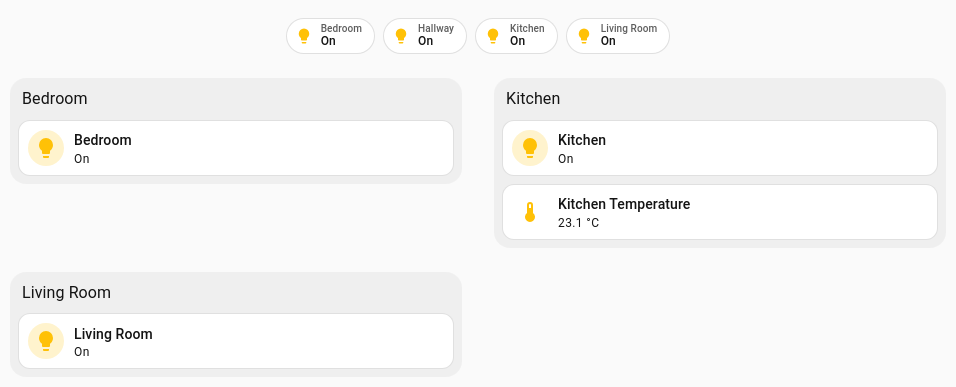
A section per area and a badge per light, from one view definition.
On a phone the same view drops to a single column, which a repeat inside one card cannot do:

Each entry of sections: or badges: is either a section or badge as you would normally
write it, or a repeat:
| Key | Description |
|---|---|
for_each |
A written-out list. Each item is that copy's values, exactly as in Repeating a Template |
for_each_from |
What Home Assistant knows: entities, areas, devices, floors, labels, with every filter, sort, limit and group_by the card's own repeat takes. See Repeating over what Home Assistant knows and Repeat Reference
|
section / badge
|
What each copy is, with [[placeholders]] filled from that copy's values. Required: a repeat entry without it produces nothing, and says nothing |
variables |
Values every copy of this entry gets. A copy's own values win |
empty |
A section or badge to show instead when the repeat matches nothing. It is used exactly as written, with no placeholders filled |
A for_each_from here also takes the v2.0.0 sources and filters: a
Jinja list,
the dashboard's views,
category:, unit: and state_class:.
A Jinja list is rendered once each time the view is written out.
An entry without for_each or for_each_from goes through exactly as written, so ordinary
sections and badges sit among the repeated ones in the order you list them. An entry with
one of them is a repeat, whatever else it holds, so it needs its section: or badge:: if
that key is missing or misspelt, the entry quietly disappears from the view.
Every copy also gets index, index0, count, first and last, so [[area]] ([[index]] of [[count]])' works as a heading.
When a copy, its entry and the strategy set the same name, the first of these wins:
- the copy's own values, such as an area copy's
areaandarea_id - the entry's
variables: - the strategy's
variables: - the position values,
indextolast
So, as on a card, an entry's variables: [{name: Lounge}] does not rename an area copy,
because the copy carries its own name; use the source's
overrides: for that.
Unlike a repeating card, there is no template here to declare required: true, so every
copy the source gives becomes a section or badge. Use the source's
require: to drop the ones
missing a value.
A custom:decluttering-card-plus card inside a repeated section is handed that copy's
values, after its own. In the example, room_entities uses [[area_id]] without the card
passing it: the area being repeated over supplies it. Anything the card sets in its own
variables still wins.
The health panel counts those values as set, so it does not report them as missing.
variables: at the top of the strategy go to every repeated entry, underneath each entry's
own. decluttering_defaults works too, written inside the strategy:
strategy:
  type: custom:decluttering-card-plus
  decluttering_defaults:
    colour: amber
sections: ...Any other key in the strategy (max_columns, dense_section_placement, background,
top_margin) is passed through to the view. Asking for sections: makes it a sections view
unless the strategy says otherwise.

The view strategy writes one view. The same strategy written on the dashboard writes the
whole dashboard, and its views: can repeat: one view per item, the way the view strategy
repeats sections. A dashboard of rooms is the same view over and over with a different area
in it, and now it is written once.
On a dashboard of your own, open the pencil, then ⋮ → Raw configuration editor, and replace what is there with a strategy:
strategy:
  type: custom:decluttering-card-plus
  decluttering_templates:
    entity_tile:
      card:
        type: tile
        entity: '[[entity]]'
  views:
    - title: Home
      path: home
      type: sections
      sections: ...                    # an ordinary view, passed through as written
    - for_each_from:
        areas: true
        with:
          domain: light
      view:
        title: '[[area]]'
        path: '[[area_id]]'
        type: sections
        sections:
          - type: grid
            cards:
              - type: heading
                heading: '[[area]]'
              - type: custom:decluttering-card-plus
                template: entity_tile
                for_each_from:
                  area: '[[area_id]]'
A repeat entry in views: takes the same keys as a repeated section, with view: in place
of section::
| Key | Description |
|---|---|
for_each / for_each_from
|
What to repeat over, as for a section, including categories and Jinja lists. A views: source gives nothing here, since the dashboard is still being written |
view |
What each copy is, with [[placeholders]] filled from that copy's values. Required, as section: is for a section |
variables |
Values every copy of this entry gets |
empty |
A view to show instead when the repeat matches nothing |
variables: at the top of the strategy go to every repeated view.
variables: at the top of the strategy now fill in the whole dashboard, not only the
repeated views: an ordinary view written beside them, and settings at the dashboard's own
level that another card reads, such as a wallpanel: block. One value switches a kiosk on
for every view at once.
strategy:
  type: custom:decluttering-card-plus
  variables:
    - kiosk: true
    - house: The Old Barn
  wallpanel:
    enabled: '[[kiosk|bool]]'
    hide_toolbar: true
  views:
    - title: '[[house]]'
      cards: ...
A placeholder nothing sets is left as written and nothing is said about it, so a
button-card's [[[ ... ]]] JavaScript and a [[name]] meant for a templated card further in
pass through untouched. The decluttering_* keys are copied as they are. A strategy without
variables: writes exactly what it wrote before.
Home Assistant only ever sees the dashboard this writes, so the cards in it look for their
templates there. decluttering_templates, decluttering_defaults,
decluttering_variables, decluttering_templates_from, and anything else the strategy
holds besides type, variables and views, are copied to the written dashboard's root.
A library dashboard is borrowed from as usual.
A view's path is part of its address, so a filled-in path is made fit for one: "Living Room"
becomes living-room, a path that comes out the same as another gets -2 on the end, and a
path of only digits gets view- in front, since Home Assistant would read a number as a
view's position. A path you write by hand on an ordinary view is kept as written, and a
generated one makes way for it.
A repeated view can carry a view strategy of its own. What that inner strategy repeats over
is filled in from the outer copy, so a view per area can repeat a section per light in that
area with area: '[[area_id]]'; what it repeats is left for its own items to fill.
The dashboard is written out again when the entity, device, area or floor registry changes, like a generated view. To change the strategy itself, edit the dashboard's raw configuration. If Home Assistant offers to take control of the dashboard, saying yes swaps the strategy for the views it last wrote, and those stop following the registry.
The view is written out again when Home Assistant's entity, device, area or floor registry changes. An area added in Settings appears as a new section within a couple of seconds, without a reload.
Labels and categories are not on that list. They are read when the view is written, so a
view repeating over labels:, or narrowing by label: names or category:, picks up a new
or renamed label or category only when the view is written again: after one of the four
registries above changes, or when the page is reloaded.
Like the card's own repeat, it does not follow live state. A section per light that is currently on is not something this does. See Where this card is going.
Home Assistant shows a generated view in edit mode, but the sections and badges in it are not individually editable. The + in a generated section does nothing. Edit the view itself: the pencil beside the view's name, then ⋮ → Edit in YAML.
A card repeating inside a section can be converted from its editor with Give each copy its own section. It moves the view into the strategy for you: the card's section is repeated once per copy, and everything else in the view goes along unchanged. Home Assistant's undo button reverts it.
| You want | Use |
|---|---|
| Copies side by side inside one card or section |
for_each on the card, with min_column_width so it narrows on a phone |
| A heading, a background or a reflowing block per copy | A repeated section, here |
| A badge per person, per light, per anything | A repeated badge, here. A badge template on its own cannot repeat |
| A whole view per room, per floor, per anything | The dashboard strategy |
→ Repeating a Template · Visual Editors → Configuration Reference