Visibility
Cards inside a template support Home Assistant's own visibility conditions, and those
conditions can use variables — so one template can carry its own show/hide logic and each
instance decides what triggers it.
decluttering_templates:
  motion_alert:
    card:
      type: tile
      entity: '[[sensor]]'
      name: '[[name]]'
      visibility:
        - condition: state
          entity: '[[sensor]]'
          state: '[[show_when]]'
    default:
      - show_when: 'on'
      - name: Motion
- type: custom:decluttering-card-plus
template: motion_alert
variables:
- sensor: binary_sensor.hallway_motion
- name: Hallway motion
- type: custom:decluttering-card-plus
template: motion_alert
variables:
- sensor: binary_sensor.front_door
- name: Front door
- type: custom:decluttering-card-plus
template: motion_alert
variables:
- sensor: binary_sensor.garage_door
- name: Garage door
- show_when: 'off'Three cards, one template. Only the ones whose condition is met render:
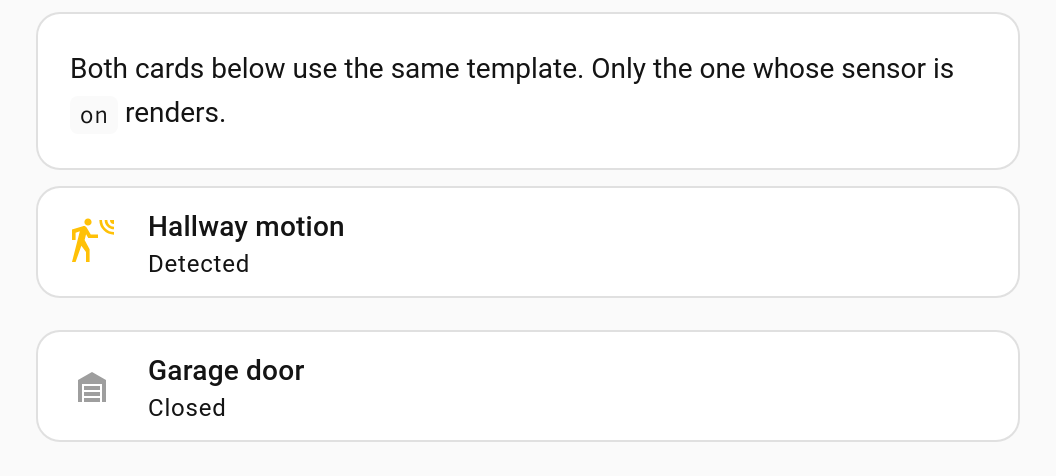
The hallway sensor is detecting, so it shows. The front door is closed, so its card is
hidden entirely. The garage door card overrides show_when to 'off', so it shows
because the door is closed.
When a card is hidden by its conditions, the wrapper collapses with it. There is no empty space where the card would have been, and no stray padding — the cards below simply move up.
This holds however the card hides itself, not just for visibility: a conditional card
with no matching condition, a card that sets display: none on itself, a stylesheet rule,
or the hidden attribute all collapse the wrapper the same way.
While the dashboard is in edit mode, templated cards render regardless of their conditions, so you can still see and click the thing you are editing. Leave edit mode and the conditions apply again.
The same is true of the preview inside the card editor dialog.
visibility also works on the custom:decluttering-card-plus card itself, where Home
Assistant applies it in the usual way, before the template is involved at all:
- type: custom:decluttering-card-plus
  template: room_light
  variables:
    - light: light.living_room
    - room: Living Room
  visibility:
    - condition: user
      users:
        - 581fbf6b1e0d4d0f9e2a0e0b0c0d0e0f
Use whichever fits:
Put visibility on… |
When |
|---|---|
| the template | Every instance hides for the same kind of reason, with the specifics passed as variables |
| the instance | This one card, for a reason unrelated to the template |
Both at once is fine — the card is shown only if both agree.
Anything Home Assistant supports: state, numeric_state, screen, user, and, or.
Variables can be used anywhere in them.
decluttering_templates:
  wide_only:
    card:
      type: tile
      entity: '[[entity]]'
      visibility:
        - condition: screen
          media_query: '[[breakpoint]]'
    default:
      - breakpoint: '(min-width: 768px)'