Repository navigation
Splat Workshop 0.5.1 – update notes, copy progress, mesh download and Blender

Turn your scenes into meshes – and stay up to date: 0.5.1 tells you when a new version is out, shows how far copying to the Frame is, and lets you download a mesh or open it in Blender. Most of it was asked for in #2 – thanks! 593 automated tests.
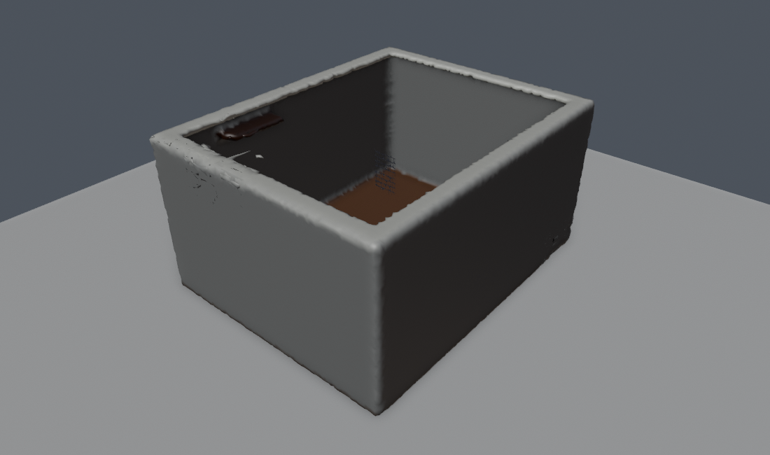
Example data – a synthetic room, rendered in Blender.
Highlights of 0.5
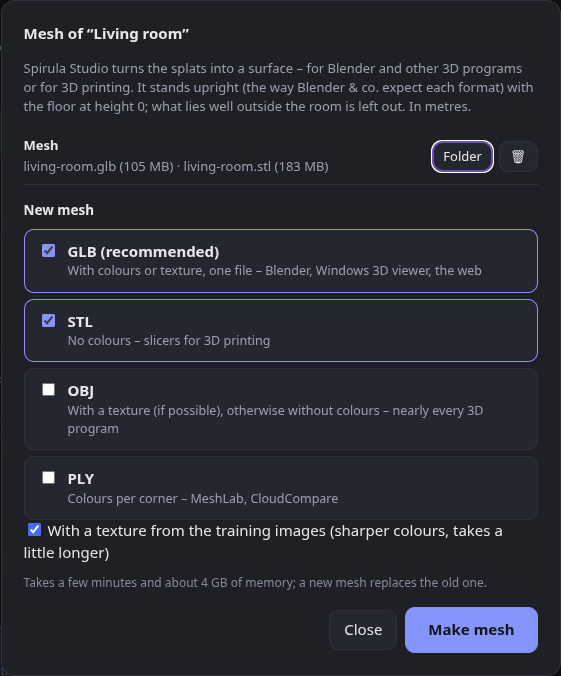
- 🧊 Mesh export – Mesh … on every scene and tour turns the splats into a surface with Spirula Studio (
spirula mesh). Suggested in #2 – thanks!- GLB (recommended: colours or texture in one file), STL (no colours, for slicers), OBJ (with a texture if possible) and PLY (colours per corner).
- Stands upright, floor at height 0 – the scenes have Y pointing down like the Steam Frame's tracking, so a mesh would lie on its side. Each format now gets the axis 3D programs expect (Z up for PLY and STL, Y up for GLB and OBJ), checked by importing every format in Blender. In metres.
- What lies well outside the room is left out before meshing, so blobs beyond the walls don't become lumps around the room.
- A texture from the training images when they are still there; otherwise colours per corner from the splats.
- The mesh lives in the scene's folder (
mesh/); Mesh ✓ shows which scenes have one. Also on the command line:scripts/mesh.sh,scripts/upright.py.
- 🐛 A versions job with one version no longer says "1 versions".
All details of 0.5: release 0.5.0
New in 0.5.1
- 🔔 A note when a newer version is out – once a day Splat Workshop asks GitHub for the newest release (one plain request in the background, nothing about you is sent) and shows it at the top of the page, with What's new and how to update. Later hides it until the next version;
check_updates = falseswitches it off. - 🔄 Check for updates by hand – in the tray icon's menu (the answer comes as a notification) and at the bottom of the page.
- ℹ️ Version and links at the bottom of the page – which Splat Workshop this is, GitHub, the releases.
- 📖 How to update in the README:
git pullin the folder you cloned, then restart – config and scenes stay. - 📶 Copying to the Frame shows how far it is – Copying to the Frame … 45 % (7 MB of 16 MB).
- ⬇️ After a mesh, what to do with it – download its files (also from a phone or laptop at home), Open in Blender (the mesh is imported right away) or open the folder.
Full changelog: v0.5.0...v0.5.1