Repository navigation
Releases: thunderheronight/splat-workshop
Release list
Splat Workshop 0.6.1 – pick the upright picture on import

Bring your own splats to the Frame – 0.6.1 shows a picture for each way up on import, so you simply pick the upright one; scenes made from photos in Spirula Studio no longer end up on their side. 615 automated tests.
Highlights of 0.6
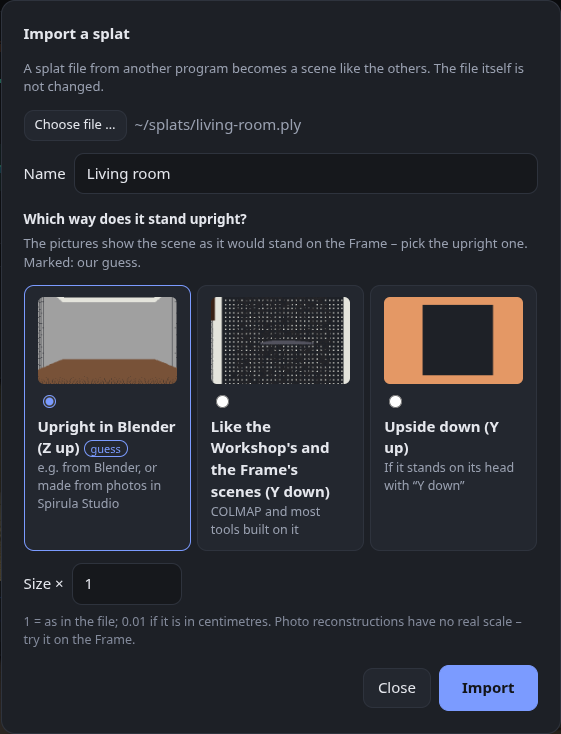
- 📥 Import your own splats – + Import a splat … above the finished scenes turns a splat file from another program into a scene like the others: copy it to the Frame, make versions, clean it up or make a mesh. Reads
.ply,.sog,.spz,.splatand.ksplat; the file itself is not changed. (Asked for in #2 – thanks!)- Which way is up: pick the picture in which the scene stands upright (since 0.6.1).
- Size: a factor, e.g. 0.01 for a file in centimetres – a reconstruction from photos has no real scale of its own.
- The preview in the Frame's gallery comes from the top view.
- 🐛 The page updates again – in 0.5.1 a finished job stayed on "Converting …" until you reloaded the page.
All details: 0.6.0
New in 0.6.1
- 🖼️ Pick the upright picture – the import dialog shows a small picture for each choice, the scene as it would stand on the Frame seen from its start. Our guess is preselected and marked. The choices say what you see: Upright in Blender (Z up), Like the Workshop's and the Frame's scenes (Y down), Upside down (Y up).
- 🐛 Photo scenes from Spirula Studio lay on their side – 0.6.0 said Spirula Studio files have Y down and preselected that. That only holds for the Frame's own scenes, which are aligned to its tracking; a scene Spirula Studio makes from photos alone has Z up. The dialog now says so, and the guess picks Z up for such files.
Full changelog: v0.6.0...v0.6.1
Splat Workshop 0.6.0 – import your own splats
Bring your own splats to the Frame – and an important fix: in 0.5.1 the page stopped updating after it was opened. Please update. 607 automated tests.
New in 0.6
- 📥 Import your own splats – + Import a splat … above the finished scenes turns a splat file from another program into a scene like the others: copy it to the Frame, make versions, clean it up or make a mesh. Reads
.ply,.sog,.spz,.splatand.ksplat; the file itself is not changed. (Asked for in #2 – thanks!)- Which way is up: Y down (Spirula Studio, COLMAP and the Frame's own scenes – the usual case), Y up or Z up for files from other tools.
- Size: a factor, e.g. 0.01 for a file in centimetres – a reconstruction from photos has no real scale of its own.
- The preview in the Frame's gallery comes from the top view.
Fixed
- 🐛 The page did not update any more in 0.5.1 – a finished job stayed on "Converting …" with its progress bar until you reloaded the page (and copy progress or the "done" note only showed after a reload, too). The new footer stood below the page's script, and setting it up stopped the script before the regular status updates started. A test now guards against it.
Full changelog: v0.5.1...v0.6.0
Splat Workshop 0.5.1 – update notes, copy progress, mesh download and Blender
Turn your scenes into meshes – and stay up to date: 0.5.1 tells you when a new version is out, shows how far copying to the Frame is, and lets you download a mesh or open it in Blender. Most of it was asked for in #2 – thanks! 593 automated tests.
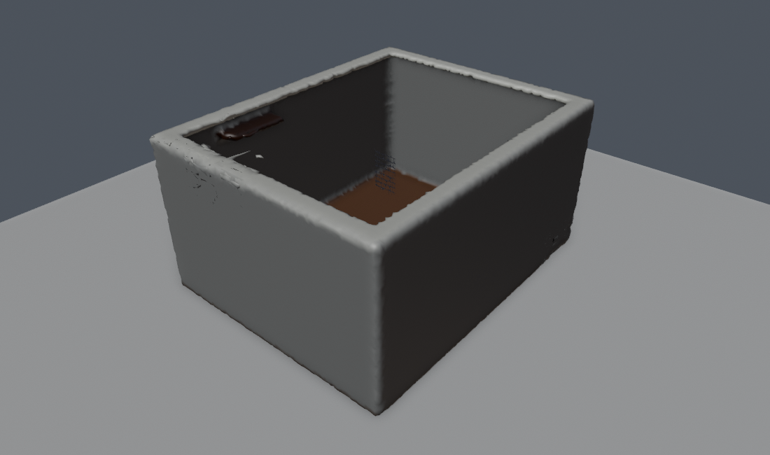
Example data – a synthetic room, rendered in Blender.
Highlights of 0.5
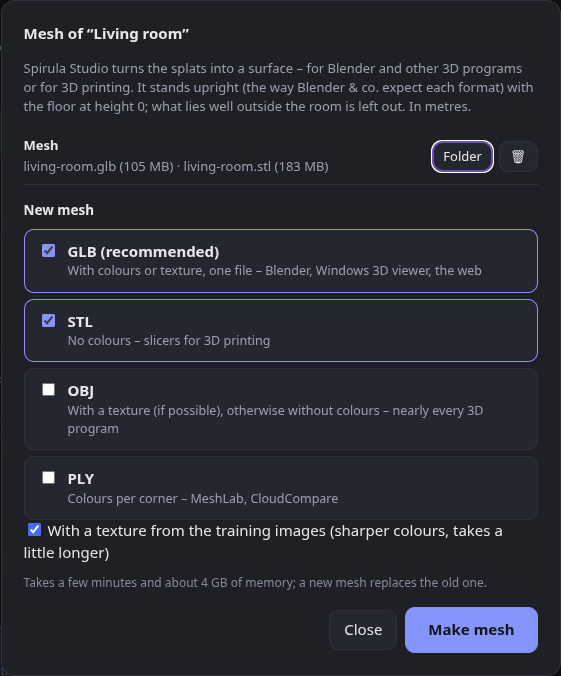
- 🧊 Mesh export – Mesh … on every scene and tour turns the splats into a surface with Spirula Studio (
spirula mesh). Suggested in #2 – thanks!- GLB (recommended: colours or texture in one file), STL (no colours, for slicers), OBJ (with a texture if possible) and PLY (colours per corner).
- Stands upright, floor at height 0 – the scenes have Y pointing down like the Steam Frame's tracking, so a mesh would lie on its side. Each format now gets the axis 3D programs expect (Z up for PLY and STL, Y up for GLB and OBJ), checked by importing every format in Blender. In metres.
- What lies well outside the room is left out before meshing, so blobs beyond the walls don't become lumps around the room.
- A texture from the training images when they are still there; otherwise colours per corner from the splats.
- The mesh lives in the scene's folder (
mesh/); Mesh ✓ shows which scenes have one. Also on the command line:scripts/mesh.sh,scripts/upright.py.
- 🐛 A versions job with one version no longer says "1 versions".
All details of 0.5: release 0.5.0
New in 0.5.1
- 🔔 A note when a newer version is out – once a day Splat Workshop asks GitHub for the newest release (one plain request in the background, nothing about you is sent) and shows it at the top of the page, with What's new and how to update. Later hides it until the next version;
check_updates = falseswitches it off. - 🔄 Check for updates by hand – in the tray icon's menu (the answer comes as a notification) and at the bottom of the page.
- ℹ️ Version and links at the bottom of the page – which Splat Workshop this is, GitHub, the releases.
- 📖 How to update in the README:
git pullin the folder you cloned, then restart – config and scenes stay. - 📶 Copying to the Frame shows how far it is – Copying to the Frame … 45 % (7 MB of 16 MB).
- ⬇️ After a mesh, what to do with it – download its files (also from a phone or laptop at home), Open in Blender (the mesh is imported right away) or open the folder.
Full changelog: v0.5.0...v0.5.1
Splat Workshop 0.5.0 – meshes for Blender and 3D printing
Turn your scenes into meshes – for Blender and other 3D programs, or for your 3D printer – 579 automated tests.
Example data – a synthetic room, rendered in Blender.
New in 0.5
- 🧊 Mesh export – Mesh … on every scene and tour turns the splats into a surface with Spirula Studio (
spirula mesh). Suggested in #2 – thanks!- GLB (recommended: colours or texture in one file), STL (no colours, for slicers), OBJ (with a texture if possible) and PLY (colours per corner).
- Stands upright, floor at height 0 – the scenes have Y pointing down like the Steam Frame's tracking, so a mesh would lie on its side. Each format now gets the axis 3D programs expect (Z up for PLY and STL, Y up for GLB and OBJ), checked by importing every format in Blender. In metres.
- What lies well outside the room is left out before meshing, so blobs beyond the walls don't become lumps around the room.
- A texture from the training images when they are still there; otherwise colours per corner from the splats.
- The mesh lives in the scene's folder (
mesh/); Mesh ✓ shows which scenes have one. Also on the command line:scripts/mesh.sh,scripts/upright.py.
- 🐛 A versions job with one version no longer says "1 versions".
Meshes made without training images are rough and have open edges – fine for a first look or a test print, a 3D program helps to clean them up.
Full changelog: v0.4.2...v0.5.0
Splat Workshop 0.4.2 – snappier lists
Clean up your scenes and pick versions by what they are for – 0.4.2 makes unfolding lists snappy again and greys out To the Frame on versions while the Frame is off. 566 automated tests.
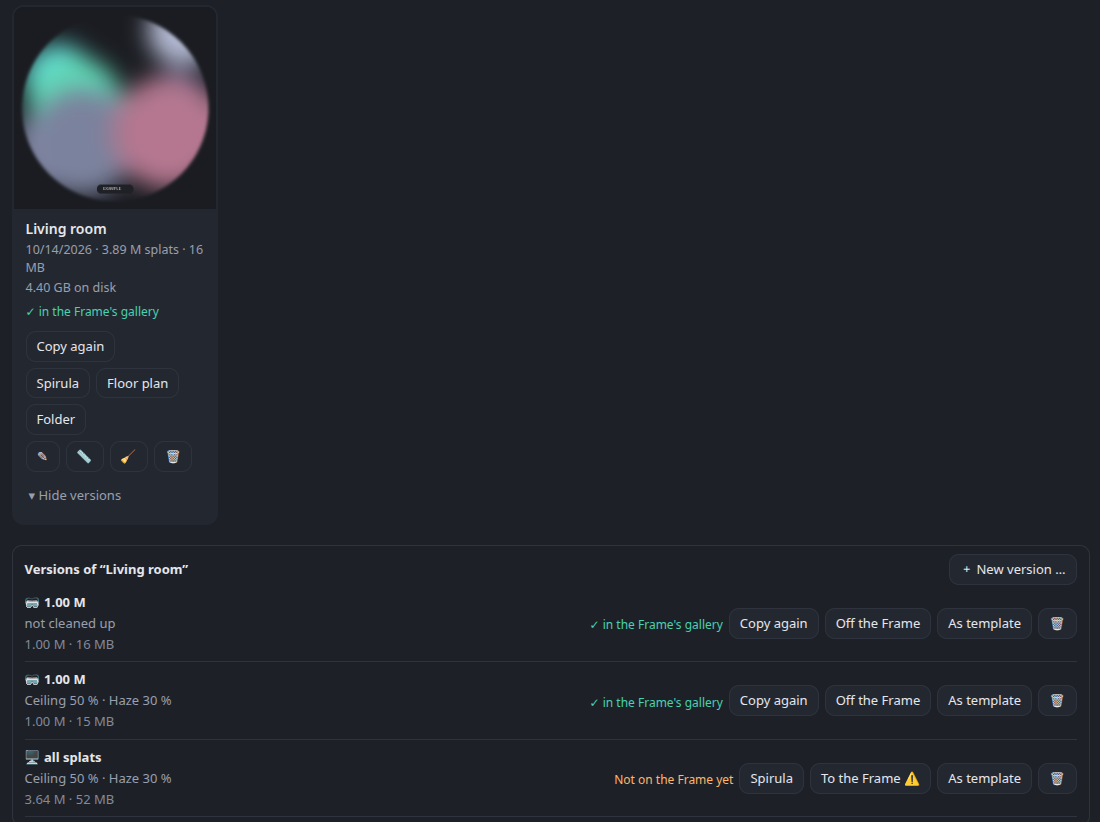
Example data – the scene and its preview are placeholders.
Highlights of 0.4
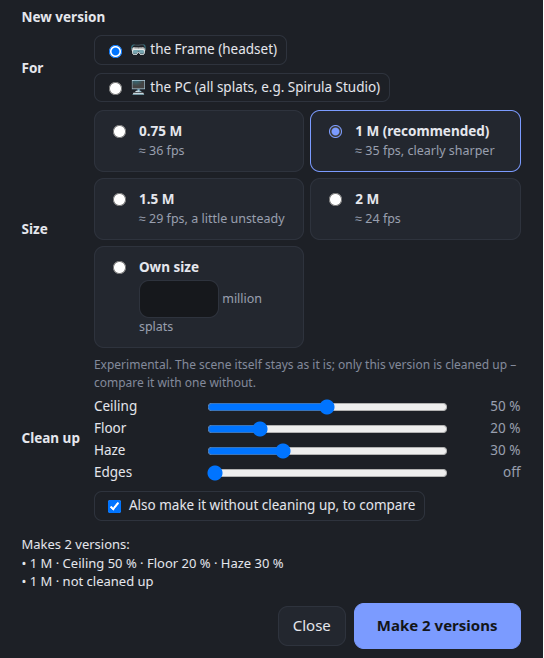
- 🧽 Clean up a version (experimental) – four sliders from off to 100 %. The scene itself stays as it is; only the new version is cleaned up, so you can compare it with one without.
- Ceiling: a white ceiling gives the reconstruction nothing to hold on to – it stays thin, with a dark veil hanging under it. The veil goes (dark things near a wall, like a cupboard top or a bird cage, stay), and the ceiling is closed in its own colour. In a real living room: a veil of about 210,000 splats gone, the ceiling closed with 72,000.
- Floor: holes filled in the colour of the floor around them.
- Haze: big, nearly transparent blobs floating in the room go – long thin things like the bars of a bird cage or cables stay.
- Edges: what lies well outside the room goes.
- 🎚️ Versions by purpose – for the Frame (one size, each with the frame rate measured on a Steam Frame: 0.75 M ≈ 36 fps, 1 M ≈ 35 fps and clearly sharper, 1.5 M ≈ 29 fps, 2 M ≈ 24 fps) or for the PC (all splats). Optionally the same without cleaning up next to it; a preview shows what will be made and what it replaces.
- Versions are named by their clean-up strengths (all splats · ceiling 50 % · haze 30 %), and As template takes a version's settings for the next try – one slider at a time.
- A version for the PC opens in Spirula Studio with one click.
- Versions unfold under their scene or tour (▸ 1 version).
- 🧭 Tidier action bars – what you do, what you look at, what you change; the unfolding lists on a line of their own.
- 🔬
scripts/freespace.py(experimental, command line) – takes out splats in space the cameras looked through. On a real room it found little (white walls give too few points), but it looked a little better; kept for trying.
All details of 0.4: release 0.4.0 · setup fixes: 0.4.1
New in 0.4.2
- 🖱️ Unfolding recordings or versions works at the first click – every click used to reload the whole scene list, which took about 3 seconds while the Frame was switched off; clicking again in that time folded it back. Now it opens and closes at once, and an expired listing of the Frame is renewed in the background instead of holding up the scene list (3.1 s → 0.02 s).
- 🥽 "To the Frame" on a version is greyed out while the Frame isn't reachable, like the one on the scene.
Full changelog: v0.4.1...v0.4.2
Splat Workshop 0.4.1 – clearer setup
Clean up your scenes and pick versions by what they are for – 0.4.1 makes the setup clearer, thanks to the first two issues from outside (#1, #2). 565 automated tests.
Example data – the scene and its preview are placeholders.
Highlights of 0.4
- 🧽 Clean up a version (experimental) – four sliders from off to 100 %. The scene itself stays as it is; only the new version is cleaned up, so you can compare it with one without.
- Ceiling: a white ceiling gives the reconstruction nothing to hold on to – it stays thin, with a dark veil hanging under it. The veil goes (dark things near a wall, like a cupboard top or a bird cage, stay), and the ceiling is closed in its own colour. In a real living room: a veil of about 210,000 splats gone, the ceiling closed with 72,000.
- Floor: holes filled in the colour of the floor around them.
- Haze: big, nearly transparent blobs floating in the room go – long thin things like the bars of a bird cage or cables stay.
- Edges: what lies well outside the room goes.
- 🎚️ Versions by purpose – for the Frame (one size, each with the frame rate measured on a Steam Frame: 0.75 M ≈ 36 fps, 1 M ≈ 35 fps and clearly sharper, 1.5 M ≈ 29 fps, 2 M ≈ 24 fps) or for the PC (all splats). Optionally the same without cleaning up next to it; a preview shows what will be made and what it replaces.
- Versions are named by their clean-up strengths (all splats · ceiling 50 % · haze 30 %), and As template takes a version's settings for the next try – one slider at a time.
- A version for the PC opens in Spirula Studio with one click.
- Versions unfold under their scene or tour (▸ 1 version).
- 🧭 Tidier action bars – what you do, what you look at, what you change; the unfolding lists on a line of their own.
- 🔬
scripts/freespace.py(experimental, command line) – takes out splats in space the cameras looked through. On a real room it found little (white walls give too few points), but it looked a little better; kept for trying.
All details of 0.4: release 0.4.0
New in 0.4.1
- 🔤 Typos in the config are pointed out – a setting Splat Workshop doesn't know, such as
splat-transform =instead ofsplat_transform =, used to be ignored silently. Now the setup hints andinstall.shname it, with the right spelling. (#1) - 🛤️ splat-transform only on your shell's PATH – started from the desktop or the tray, Splat Workshop doesn't read
.bashrc/.zshrc, so the installer said ✓ and the app said "not found".install.shnow writes the full path into a new config, or prints the line to add to an existing one. (#1) - 📖 Setup guide: installing splat-transform without root now uses a folder that matches the path it tells you to configure:
npm install -g --prefix ~/arcturus/node @playcanvas/splat-transform. (#1) - 🧩 The Arcturus pipeline and PyAV 19 (unexpected keyword argument 'metadata_errors'): Splat Workshop spots a pipeline that isn't pinned below PyAV 19 before you start, and names cause and fix when a conversion fails on it. (#2)
Full changelog: v0.4.0...v0.4.1
Splat Workshop 0.4.0 – clean up scenes, versions by purpose
Clean up your scenes – a closed ceiling instead of a dark veil, no haze, no holes in the floor – and versions sorted by what they are for – 560 automated tests.
Example data – the scene and its preview are placeholders.
New in 0.4
- 🧽 Clean up a version (experimental) – four sliders from off to 100 %. The scene itself stays as it is; only the new version is cleaned up, so you can compare it with one without.
- Ceiling: a white ceiling gives the reconstruction nothing to hold on to – it stays thin, with a dark veil hanging under it. The veil goes (dark things near a wall, like a cupboard top or a bird cage, stay), and the ceiling is closed in its own colour. In a real living room: a veil of about 210,000 splats gone, the ceiling closed with 72,000.
- Floor: holes filled in the colour of the floor around them.
- Haze: big, nearly transparent blobs floating in the room go – long thin things like the bars of a bird cage or cables stay.
- Edges: what lies well outside the room goes.
- 🎚️ Versions by purpose – for the Frame (one size, each with the frame rate measured on a Steam Frame: 0.75 M ≈ 36 fps, 1 M ≈ 35 fps and clearly sharper, 1.5 M ≈ 29 fps, 2 M ≈ 24 fps) or for the PC (all splats). Optionally the same without cleaning up next to it; a preview shows what will be made and what it replaces.
- Versions are named by their clean-up strengths (all splats · ceiling 50 % · haze 30 %), and As template takes a version's settings for the next try – one slider at a time.
- A version for the PC opens in Spirula Studio with one click.
- Versions unfold under their scene or tour (▸ 1 version).
- 🧭 Tidier action bars – what you do, what you look at, what you change; the unfolding lists on a line of their own.
- 🔬
scripts/freespace.py(experimental, command line) – takes out splats in space the cameras looked through. On a real room it found little (white walls give too few points), but it looked a little better; kept for trying.
Updating from 0.3: nothing to do – existing scenes, tours and versions stay as they are.
Full changelog: v0.3.1...v0.4.0
Splat Workshop 0.3.1 – folder names for every file system
Rooms from several recordings, long videos split into parts, and the PC goes to sleep when it is done – 0.3.1 adds a fix for folder names on Windows file systems. 544 automated tests.
Highlights of 0.3
- 🚪 Rooms made of several recordings – mark a group as one room made of several recordings, e.g. two short rounds through the living room. The Arcturus pipeline uses at most 500 image pairs per recording, so several short recordings give a room far more detail than one long one.
- ✂️ Split a long video – for a recording longer than its quality preset can use (100 s at High), Splat Workshop offers Split the video (full rate of image pairs, takes longer) or Convert in one piece, each with its pros and cons. Split, the parts are cut losslessly with their original time stamps, converted one after the other and put together into one room by themselves. The original recording is never changed.
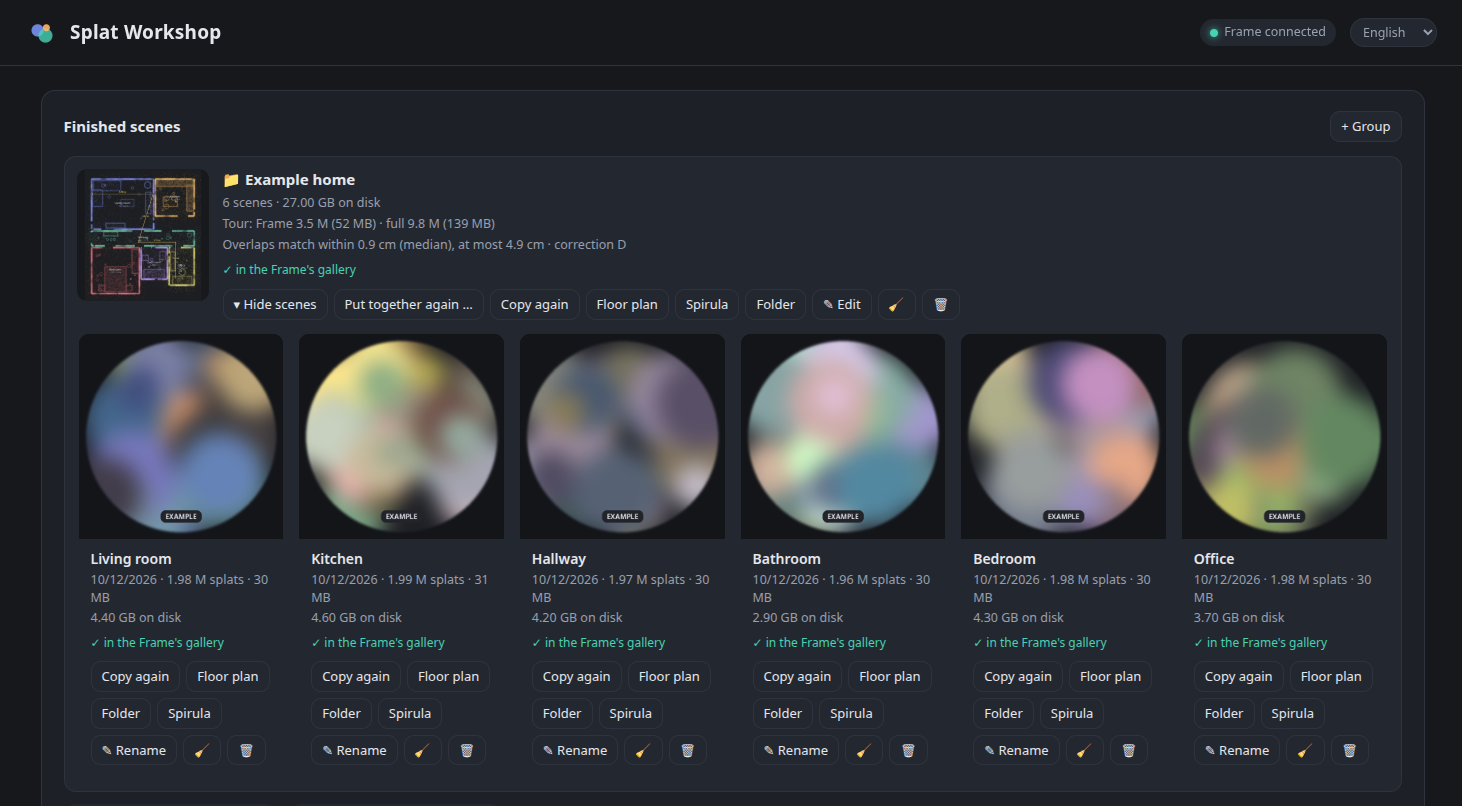
- 🏠 A home made of rooms – a group may hold rooms next to single scenes. It is put together from the original recordings in one go: within a room every place from the best recording, between rooms the borders run through the doors. Nothing is reduced twice; the floor plan names and measures rooms.
- 🧩 Better seams between recordings – a place only comes from a recording that really has something there (no more dark holes where a camera “looked at” a spot from behind the sofa), and all recordings are brought to one brightness – every training settles on its own, up to a third apart in the same room.
- 💤 Standby when done – tick it on the running job: when everything is finished (all parts, putting them together, copying to the Frame) the PC goes to standby after a minute's notice. Until then it is kept awake, also in the seconds between two jobs.
- 🎥 Filming tips: take the ceiling along now and then (a white ceiling that was hardly filmed becomes a dark veil), and keep the light the same.
All details of 0.3: release 0.3.0
New in 0.3.1
- 🗂️ Folder names without a dot at the end: a name like Tour 12.10. gave the folder
Tour-12.10., which Windows file systems (NTFS – e.g. a second disk the runs are moved to) refuse; a copy silently lacked that tour. New folders are now namedTour-12.10. Existing folders keep their names – if you move your runs to an NTFS disk, rename such a folder first.
Full changelog: v0.3.0...v0.3.1
Splat Workshop 0.3.0 – rooms from several recordings, long videos in parts
Rooms from several recordings, long videos split into parts, and the PC goes to sleep when it is done – 538 automated tests.
New in 0.3
- 🚪 Rooms made of several recordings – mark a group as one room made of several recordings, e.g. two short rounds through the living room. The Arcturus pipeline uses at most 500 image pairs per recording, so several short recordings give a room far more detail than one long one.
- ✂️ Split a long video – for a recording longer than its quality preset can use (100 s at High), Splat Workshop offers Split the video (full rate of image pairs, takes longer) or Convert in one piece, each with its pros and cons. Split, the parts are cut losslessly with their original time stamps, converted one after the other and put together into one room by themselves. The original recording is never changed.
- 🏠 A home made of rooms – a group may hold rooms next to single scenes. It is put together from the original recordings in one go: within a room every place from the best recording, between rooms the borders run through the doors. Nothing is reduced twice; the floor plan names and measures rooms.
- 🧩 Better seams between recordings – a place only comes from a recording that really has something there (no more dark holes where a camera “looked at” a spot from behind the sofa: in a real living room the thin places dropped from 8.5 % to 1.9 %), and all recordings are brought to one brightness – every training settles on its own, up to a third apart in the same room.
- 💤 Standby when done – tick it on the running job: when everything is finished (all parts, putting them together, copying to the Frame) the PC goes to standby after a minute's notice. Until then it is kept awake, also in the seconds between two jobs.
- 🎥 Filming tips: take the ceiling along now and then (a white ceiling that was hardly filmed becomes a dark veil), and keep the light the same.
- 🔍 Reviewed with mutation testing – 538 tests, among them a whole chain of parts through the server's watcher and real putting-together of synthetic rooms.
- 🐛 Fixed: recordings of the same room no longer count as “walking in” to each other; a renamed room gets its floor plan drawn again; deleting an unfinished part also deletes its piece of video.
All details: CHANGELOG
Full changelog: v0.2.3...v0.3.0
Splat Workshop 0.2.3 – model scale, Frame versions & gallery
Model railways in their original size, versions for the Frame side by side, and the Frame's gallery under control – 499 automated tests.
Highlights of 0.2
- 🏠 Your whole home as one scene – group rooms and put the tour together: the rooms of one recording session are fitted to each other and joined into one walkable scene, in a full version for the PC and a smaller one for the Frame.
- 🎯 Seamless transitions – four corrections to choose from; the group shows how well the rooms meet (typically within 1–2 cm).
- 📁 Groups keep the list tidy – suggested automatically for rooms recorded one after another.
- 🧹 Disk usage, clean-up, delete per scene or for a whole group, and a list of cancelled runs to resume or remove.
- 🛡️ Safer: Start over keeps the old scene until the new one is done; the PC no longer goes to sleep mid-conversion.
- 🔓 No root, no jailbreak on the Frame – only the official Developer Mode and SSH.
All details of 0.2: release 0.2.0
New in 0.2.3
- 🚂 Scale for models like a model railway (Z, N, TT, H0, S, 0, G or your own) for a scene or a whole group: floor plan, sizes and the measuring tool show the original's size – and optionally Gaussian XR shows the model in its original size (
worldScale). - 🎚️ Versions of a scene or tour side by side – 0.75 / 1 / 1.5 / 2 M splats for the Frame, all or 3 / 5 / 8 M for the PC, or your own size – each with its own place in the Frame's gallery, so you can compare what runs smoothly.
- ⚡ 1 M splats recommended for the Frame (preselected, still freely selectable). Measured on a Steam Frame with one tour: 0.75 M 36 fps, 1 M 35 fps, 1.5 M 29 fps, 2 M 24 fps, 5 M 14 fps – 1 M is clearly sharper than 0.75 M, 1.5 M is a little sharper but already slightly unsteady.
- 📂 Scenes go to Gaussian XR's folder for personal scenes (
Documents/GaussianXR), which Steam updates leave alone. Scenes copied by older versions move over when copied again, or all at once. - 🥽 "On the Frame" tab: everything in Gaussian XR's gallery with its preview – your scenes, tours, versions and the bundled examples – and Off the Frame for any of them. No more backup copies on the Frame.
- ⬇️ Fetch all recordings from the Frame, or tick the ones you want – one after the other, with one progress bar and a notification when you can switch the Frame off.
- 🗑️ Delete a recording, one at a time: on the Frame (with a clear warning if it is not on the PC yet) or on the PC (to the trash).
- 🔍 Reviewed again with mutation testing: 499 tests, including what stays locked while a scene is computed, checked, fetched or copied.
- 🐛 Fixed: the floor plan of a group now uses the group's scale; the floor plan no longer fails without walls; Move to own scenes waits for running copies.
Full changelog: v0.2.2...v0.2.3