Repository navigation

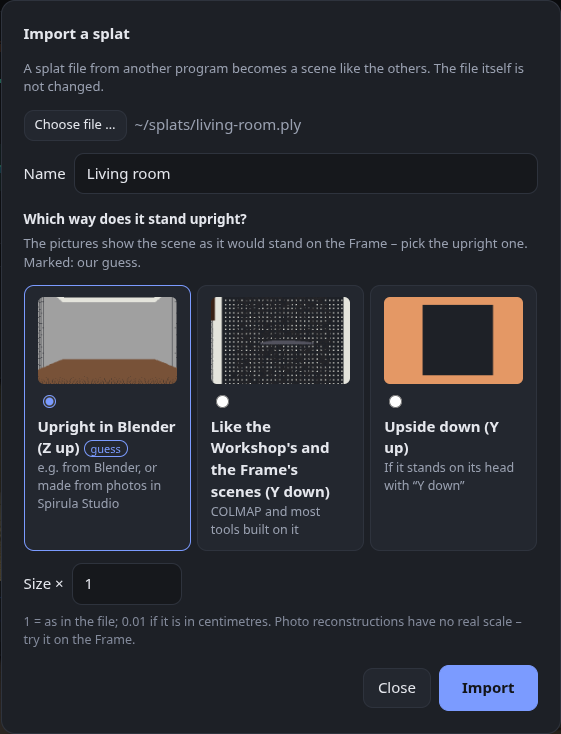
Bring your own splats to the Frame – 0.6.1 shows a picture for each way up on import, so you simply pick the upright one; scenes made from photos in Spirula Studio no longer end up on their side. 615 automated tests.
Highlights of 0.6
- 📥 Import your own splats – + Import a splat … above the finished scenes turns a splat file from another program into a scene like the others: copy it to the Frame, make versions, clean it up or make a mesh. Reads
.ply,.sog,.spz,.splatand.ksplat; the file itself is not changed. (Asked for in #2 – thanks!)- Which way is up: pick the picture in which the scene stands upright (since 0.6.1).
- Size: a factor, e.g. 0.01 for a file in centimetres – a reconstruction from photos has no real scale of its own.
- The preview in the Frame's gallery comes from the top view.
- 🐛 The page updates again – in 0.5.1 a finished job stayed on "Converting …" until you reloaded the page.
All details: 0.6.0
New in 0.6.1
- 🖼️ Pick the upright picture – the import dialog shows a small picture for each choice, the scene as it would stand on the Frame seen from its start. Our guess is preselected and marked. The choices say what you see: Upright in Blender (Z up), Like the Workshop's and the Frame's scenes (Y down), Upside down (Y up).
- 🐛 Photo scenes from Spirula Studio lay on their side – 0.6.0 said Spirula Studio files have Y down and preselected that. That only holds for the Frame's own scenes, which are aligned to its tracking; a scene Spirula Studio makes from photos alone has Z up. The dialog now says so, and the guess picks Z up for such files.
Full changelog: v0.6.0...v0.6.1