FS_Process_WinTerm
The directory winterm exists as a sub-directory in each WindowsTerminal.exe process directory in an x64 Windows 11 memory capture.
The Windows Terminal module recovers the text retained in the active screen and scrollback buffer of each detected terminal. Multiple terminal buffers, such as buffers belonging to different tabs or panes, are exposed separately and are also combined into a single text file. The separate console module handles traditional conhost.exe console windows.
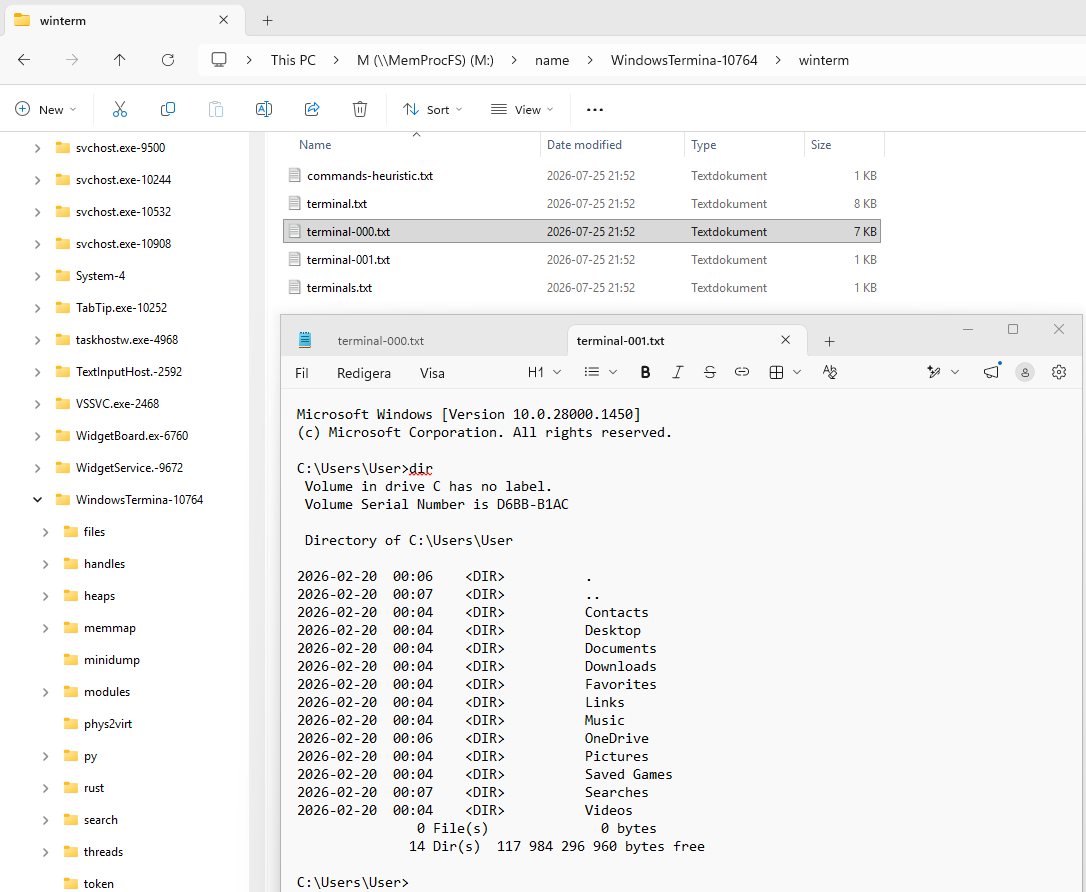
The files in the winterm directory are listed in the table below:
| File | Description |
|---|---|
| terminal.txt | Recovered text from all detected terminal buffers, with numbered headings when more than one buffer is present. |
| terminal-NNN.txt | Recovered text from one detected terminal buffer. |
| terminals.txt | Buffer index containing virtual addresses, dimensions, cursor positions, recovered byte counts and heuristic command counts. |
| commands-heuristic.txt | Candidate commands extracted from recognizable PowerShell and cmd.exe prompts. |
Facts in short:
- Supports Windows 11. Windows 10 is not supported.
- Supports Windows Terminal on x64 Windows when info.db contains a matching layout.
- The directory may be empty if the layout or terminal buffers cannot be validated against the captured memory.
- Only text still retained in the active screen and scrollback buffers is recovered. This is not persisted command history.
- Paged-out, cleared or overwritten memory may result in incomplete or missing text.
- Each recovered buffer is exposed as terminal-NNN.txt; terminal.txt combines all recovered buffers.
- commands-heuristic.txt is heuristic data. It may be empty, miss commands or contain false positives and should not be treated as authoritative command history.
Files in the winterm directory are read-only.
The example below shows terminal.txt recovered from a Windows 11 memory capture. The file is selected in Explorer and its recovered PowerShell screen and scrollback text is shown in the preview pane.
The winterm sub-directory is implemented as a built-in native C-code plugin. The plugin source is located in the file modules/m_proc_winterm.c in the vmm project. Version-specific Windows Terminal layouts are loaded from the wt module in info.db and are validated against the captured memory before text is exposed.