Repository navigation
Commands
Beatra has 22 slash commands. They work in servers only (not in direct messages). Command descriptions are translated into the user's Discord language when a translation exists.
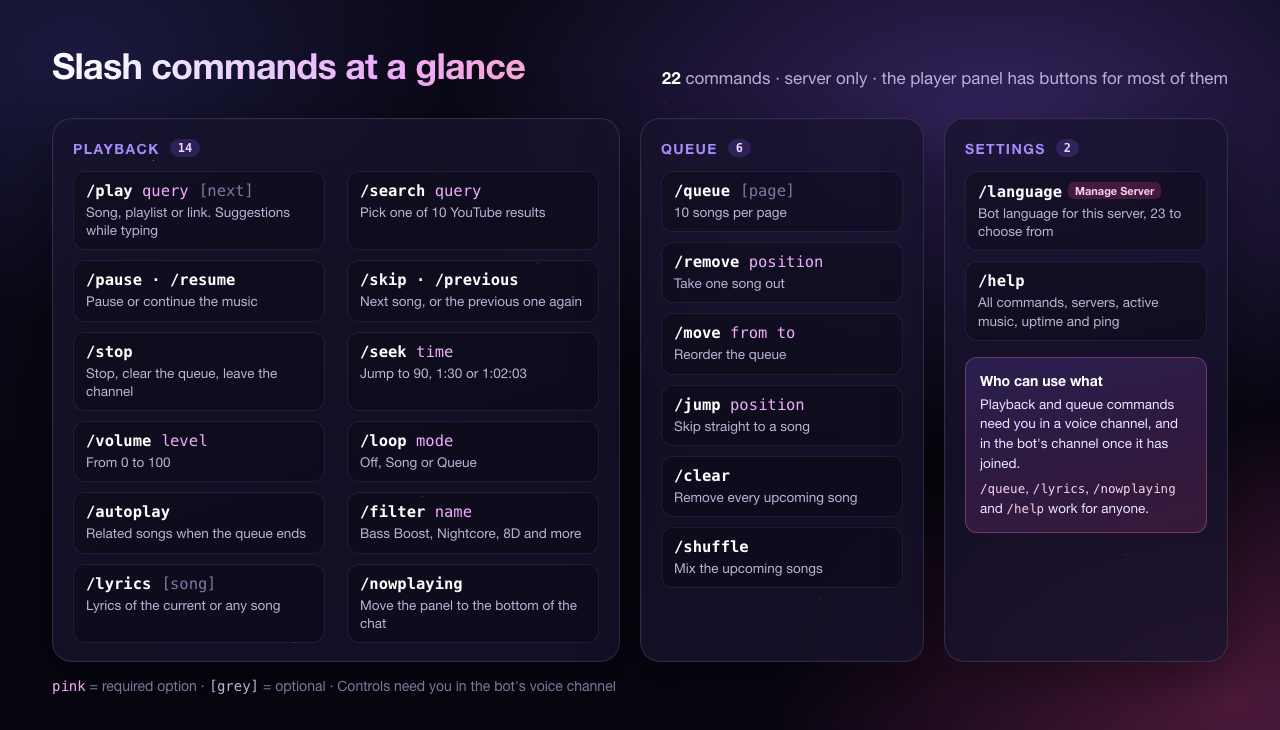
| Rule | Applies to |
|---|---|
| You must be in a voice channel, and in the bot's channel once it has joined one |
/play, /search and every command that controls playback or edits the queue |
| There must be music playing | Every playback and queue command except /play, /search and /lyrics with a song name |
| Anyone can use it |
/queue, /nowplaying, /lyrics, /help
|
| Needs the Manage Server permission | /language |
Typical answers when a rule is not met: "You must be in a voice channel!", "You must be in the same voice channel as the bot!", "No music is currently playing!".
Most replies are only visible to you (ephemeral), so commands do not flood the chat. The player panel and messages about errors during playback are posted in the channel for everyone.
| Command | Options | What it does |
|---|---|---|
/play |
query (required, up to 1000 characters), next (optional, true/false) |
Plays a song, playlist or link from YouTube, Spotify, SoundCloud, a direct audio link or any site yt-dlp supports. While you type a song name, YouTube search suggestions appear. With next: True the song is put right after the current one. |
/search |
query (required, up to 200 characters) |
Searches YouTube and shows 10 results. Pick one from the menu to play it. Only the person who searched can pick, and the results expire after 10 minutes. |
/nowplaying |
Posts the player panel again at the bottom of the chat (the old panel is removed). | |
/pause |
Pauses the music. | |
/resume |
Continues paused music. | |
/skip |
Skips the current song. With nothing left in the queue it only works when autoplay is on. | |
/previous |
Plays the previous song again. | |
/stop |
Stops the music, clears the queue and leaves the voice channel. | |
/seek |
time (required) |
Jumps to a time in the current song. Accepts 90, 1:30 or 1:02:03. Not possible in live streams. |
/volume |
level (required, 0-100) |
Changes the volume. |
/loop |
mode (required): Off, Song, Queue
|
Repeats nothing, the current song, or the whole queue. |
/autoplay |
Turns autoplay on or off. When the queue ends, related songs keep playing (see Features). | |
/filter |
name (required) |
Applies an audio filter: None, Bass Boost, Nightcore, Vaporwave, 8D, Karaoke, Echo, Surround, Tremolo. One filter is active at a time; None removes it. |
/lyrics |
song (optional, up to 200 characters) |
Shows the lyrics of the current song, or of any song you type. Long lyrics get Back / Next buttons. Lyrics come from LRCLIB. |
/play query: never gonna give you up
/play query: https://www.youtube.com/playlist?list=...
/play query: https://open.spotify.com/album/... next: True
/search query: lofi hip hop
/seek time: 1:30
/volume level: 60
/loop mode: Queue
/filter name: Nightcore
/lyrics song: bohemian rhapsody
Positions count the upcoming songs: position 1 is the next song, the same numbers /queue shows.
| Command | Options | What it does |
|---|---|---|
/queue |
page (optional, from 1) |
Shows the current song and the upcoming songs, 10 per page, with Back / Next buttons, the number of songs and the total length. |
/remove |
position (required) |
Removes one song from the queue. |
/move |
from, to (both required) |
Moves a song to another position. |
/jump |
position (required) |
Skips straight to that song. |
/clear |
Removes every upcoming song (the current song keeps playing). | |
/shuffle |
Shuffles the upcoming songs. Needs at least 2 upcoming songs. |
| Command | Who | What it does |
|---|---|---|
/language |
Members with Manage Server | Shows the current language and a menu of all 23 languages. The choice is saved for the whole server. |
/help |
Everyone | Lists all commands (clickable), and shows the number of servers, servers with active music, uptime and ping. Buttons: Support (if SUPPORT_SERVER is set), Website (if WEBSITE is set) and Invite. |
Note: When no language was chosen with
/language, replies use each user's Discord language (English if it is not one of the 23). Details in Features.

When music starts, the bot posts a player panel in the channel where /play was used. For every new song the panel moves to the bottom of the chat (it is edited in place if it is already the last message). When playback ends, the panel turns into a small card without buttons, such as "Queue Completed" or "Music Stopped".
| Control | What it does |
|---|---|
| Previous | Previous song |
| Pause / Resume | Toggles pause |
| Skip | Next song |
| Stop | Stop, clear the queue and leave |
| Volume | Opens a small form where you type a volume from 0 to 100 |
| Shuffle | Shuffles the queue (greyed out with fewer than 2 upcoming songs) |
| Loop: Off / Track / Queue | Each press moves to the next loop mode |
| Autoplay: On / Off | Toggles autoplay |
| Queue | Shows the queue, only to you |
| Lyrics | Shows the lyrics of the current song, only to you |
| Audio filter menu | Shows the active filter. Pick one of the 8 filters, or No filter to turn it off |
Only people in the bot's voice channel can use the playback buttons. Queue and Lyrics work for anyone. Buttons on an old panel (from an earlier session, or one that was replaced) do nothing except turn that panel into a "Music Ended" card.
| Situation | What happens | Setting |
|---|---|---|
| Everyone leaves the voice channel (bots do not count) | The music pauses at once. If someone comes back, it continues. If not, the bot stops and leaves after 60 seconds. | LEAVE_ON_EMPTY |
| The queue has finished | The panel shows "Queue Completed" and the bot stays 120 seconds before leaving. | LEAVE_ON_FINISH |
Both times can be changed or turned off in Configuration.
Next: Features · Troubleshooting