Repository navigation
Home
Beatra is a fast, open-source Discord music bot. It plays music from YouTube, Spotify, SoundCloud, direct audio links and every other site that yt-dlp supports, and controls everything from one clean button panel in your server.
This repository (umutxyp/MusicBot, version 17) is the public, self-hostable version of Beatra. It is built on discord.js v14 and DisTube v5, and it is released under the MIT License.
Note: Just want to listen? The public Beatra bot and its web dashboard live at beatra.app, and you can invite the public bot without hosting anything. This wiki is for people who want to run their own copy.
| Two things to bring | You only need Node.js and a bot token. yt-dlp and ffmpeg are downloaded for your computer automatically, and Python is not needed. |
| A startup check that helps | Every start runs a checklist. It fixes what it can (npm packages, .env, yt-dlp, ffmpeg) and stops with clear, numbered instructions for everything else. |
| Fast start | Songs are streamed, never saved to disk. One yt-dlp call finds a song and its audio, the bot joins the voice channel at the same time, and the next song is prepared while the current one plays. |
| Reliable audio | yt-dlp downloads the audio and hands it to ffmpeg through a local relay, so YouTube's "403 Forbidden" on direct links does not happen. If YouTube still refuses a song, it is played from SoundCloud and the listener is told. |
| One player panel | Cover art, a live progress bar, a queue preview, text buttons and an audio filter menu, built with Discord Components V2. |
| 22 slash commands | Play, search, queue editing, seek, loop, autoplay, 8 audio filters, lyrics, language and help. |
| Sharding always on | One shard for small bots, as many as Discord recommends for big ones. A crashed shard restarts by itself. |
| Resumes after a restart | Queues, position, volume, loop mode and filters are saved and restored. |
| 23 languages | Replies follow the server language, or each user's Discord language. |
| Light on requirements | No privileged gateway intents, no database: settings are small JSON files in data/. |
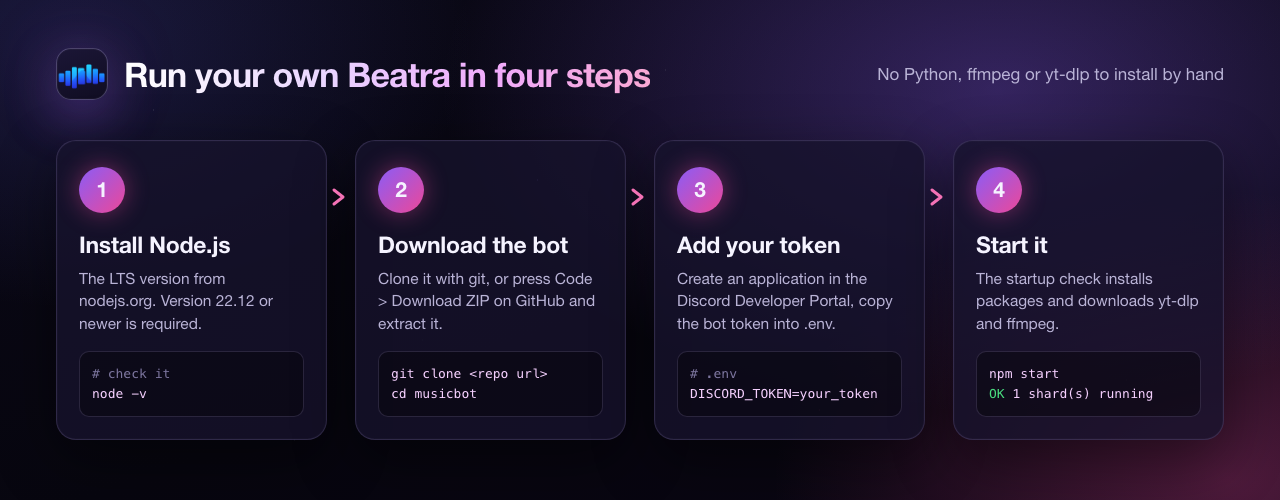
- Install Node.js 22.12 or newer (the LTS version from nodejs.org).
-
Download the bot:
No git? Press Code > Download ZIP on GitHub and extract it.
git clone https://github.com/umutxyp/musicbot.git cd musicbot -
Create a Discord application at the Developer Portal, copy the bot token and invite the bot with the
botandapplications.commandsscopes. See Installation for the exact permissions. -
Put the token into
.env(copy.env.exampleto.env, or let the first start create it):DISCORD_TOKEN=paste_your_token_here
-
Start it:
On Windows you can double-click
npm start
start.batinstead. When the console says1 shard(s) running, type/playin your server.
Tip: The first start takes a little longer, because it installs the npm packages and downloads yt-dlp and ffmpeg once.
| Page | What you will find |
|---|---|
| Installation | Requirements, every way to start the bot, per-OS notes, the startup check, updating |
| Configuration | Every .env setting with its default, in tables, plus ready-made examples |
| Commands | All 22 slash commands, their options, who may use them, and the player panel buttons |
| Features | How playback works: sources, audio pipeline, fallback, autoplay, lyrics, sessions, languages |
| YouTube Access | Fixing "Sign in to confirm you're not a bot": cookies, PO token, proxies |
| Deployment | Running it around the clock: VPS, hosting panels, sharding, logs, backups |
| Troubleshooting | Real error messages and how to fix them, plus an FAQ |
| Contributing | Tests, code style, adding commands and languages, reporting bugs and security issues |
- Repository: github.com/umutxyp/MusicBot
- Public bot and web dashboard: beatra.app
- Codeshare: codeshare.me
- Legal: Privacy Policy · Terms of Service
Beatra is created and maintained by Umut Bayraktar (@umutxyp) and published by Codeshare.
It stands on the shoulders of great open-source projects: discord.js, DisTube, yt-dlp, ffmpeg and LRCLIB for lyrics.
Released under the MIT License.