Repository navigation
Stable Release v4.8.4
中文 · Home · Download v4.8.4
History: the current release is 4.8.7.
4.8.4 was the current release of the 4.8 series when this page was written. It follows 4.8.3 and changes only the Online page; for the rest of the 4.8 series, see Stable 4.8.3. Original notes: 4.8.4.
Users said the Online page's filter state and buttons were hard to read, and the category bar needed a better layout. This release reworks those parts of the Online page (#151).
-
Active filters at a glance:
- Whenever something narrows the list, a row appears under the search box. It shows the match count on the page ("This page: 1/2 matches"), then one chip for each filter: a category other than the default, character, author, search, the Show filter, and any sort other than hotness.
- The ✕ on a chip removes only that filter.
- Clear all goes back to the default list: search, category, character, author, the Show filter and the sort are all reset.
- The row is hidden when nothing is filtered.
-
Buttons say what they do:
- The filter button reads "Show: All on page ▾" and turns to the accent colour while it filters.
- The ☆ and ⚙ buttons read Authors & saved and Download options where there is room, and show only their icons in a narrow window.
- The sort box shows a dot when it isn't sorting by hotness.
- Every toolbar and paging button has a tooltip and an accessible name.
-
A tidier category bar:
- Subcategories sit under the top-level tabs as a row of filled chips, with All first.
- ‹ › arrows appear only when the row doesn't fit, and the mouse wheel scrolls it.
- In a narrow window the top-level categories fold into a Category: X ▾ drop-down in the toolbar.
- The new texts are in Chinese, English and Russian. The app, launcher, updater and Developer Tools use version 4.8.4.
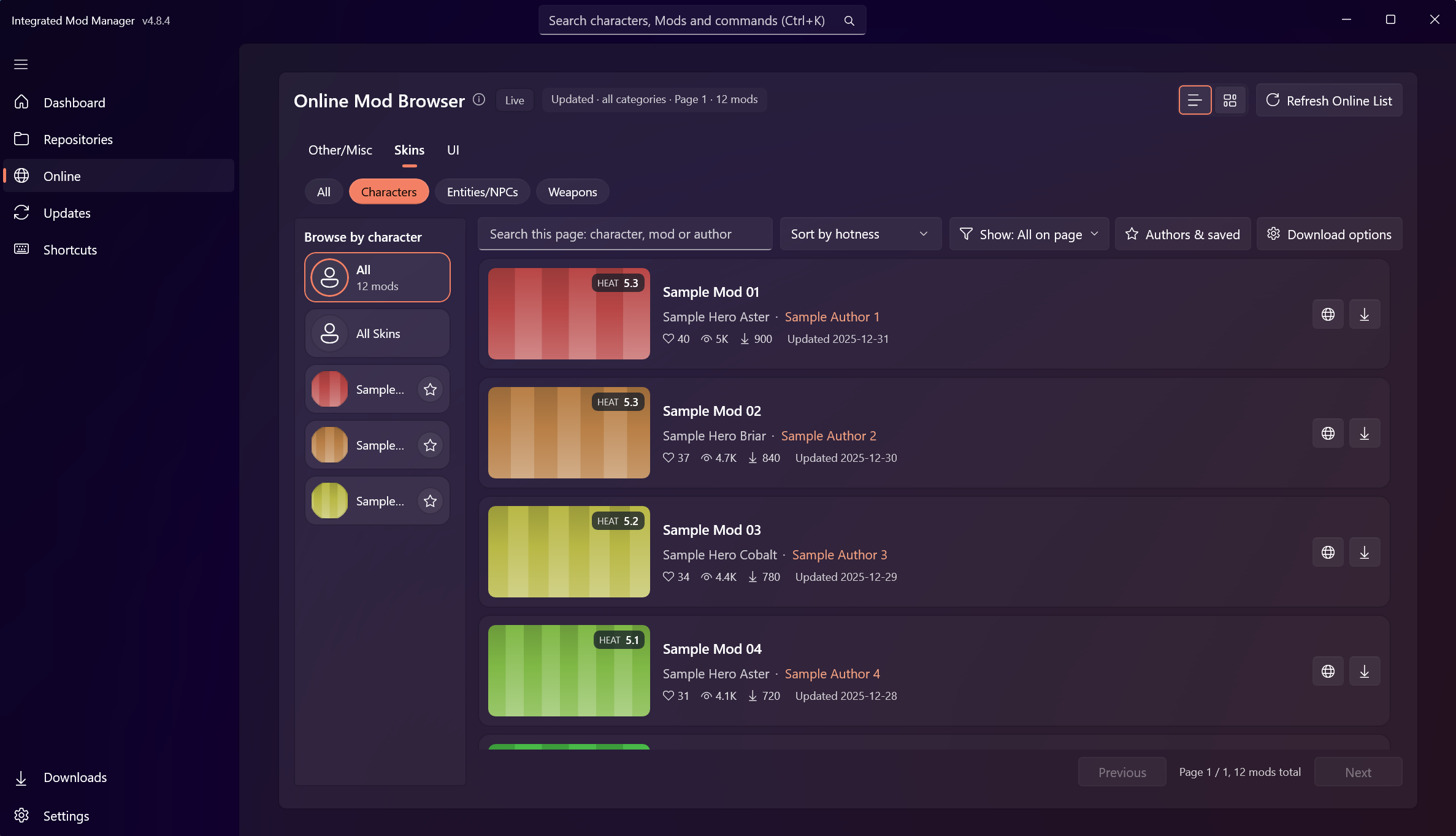
The screenshot uses the Online page's offline sample mode with synthetic data.
- Download
Integrated_Mod_Manager-v4.8.4.zipand the matching.sha256from the release page. - Fully extract it, keep the
WinUI3folder, and runIntegratedModManager.exefrom the root folder. - It requires Windows 10 1809 or later, x64 and the .NET 8 x64 runtime.
- 4.x stable releases update in the app (Settings → app updates). Or extract the new release to a new folder and copy
WinUI3/config.iniandWinUI3/beta-shell.jsoninto it. - Before you update, back up:
- the app folder;
- the target Mods folder;
- the loader's active
d3dx_user.ini.
- After the update, the What's New dialog shows once.
- The matching Developer Tools are
Integrated_Mod_Manager_Developer_Tools-v4.8.4.zipon the same release page. The app's updater does not install them; see Developer Tools.
-
The new Online page was not checked with screenshots in a high-contrast theme. The page uses only theme resources.
-
The Russian interface was checked through its texts only, without screenshots.
-
In the narrowest English window, the sort box still cuts off at "Sort by", as before.
-
The open checks from 4.8.3 still apply. These were checked only with a test window, synthetic data or offline sample pages:
- the overlay sending F10 in a real game (saving a preset, switching state slots), and character follow;
- the tray icon's own right-click menu and double-click;
- Run launcher with a real launcher;
- signing in, liking and unliking on the GameBanana page with a real account.
See Stable 4.8.3.
Verification record · Changelog
The package as a whole is AGPL-3.0-only; see Licensing.