Repository navigation
Stable Release v4.8.6
中文 · Home · Download v4.8.6
History: the current release is 4.8.7.
4.8.6 was the current release of the 4.8 series when this page was written. It follows 4.8.5; for the rest of the 4.8 series, see Stable 4.8.5. Original notes: 4.8.6.
Users said guidance was unclear and many features were hard to find because they sat in second-level or right-click menus. This release addresses that (#157) without a step-by-step popup at first start.
-
Visible buttons for actions that were only in right-click menus (the menus stay as shortcuts):
- Repositories: select a character and the Mod card heading has its avatar, rename, open folder and a Several at once toggle; the state slot list has Update and Rename beside it.
- Online: every card has a save-for-later button (a clock), and so does the bottom of the details drawer; under the author in the details, Save author and All works by ….
- Updates: every row has an open-folder button, and the empty download history leads to the Online page.
-
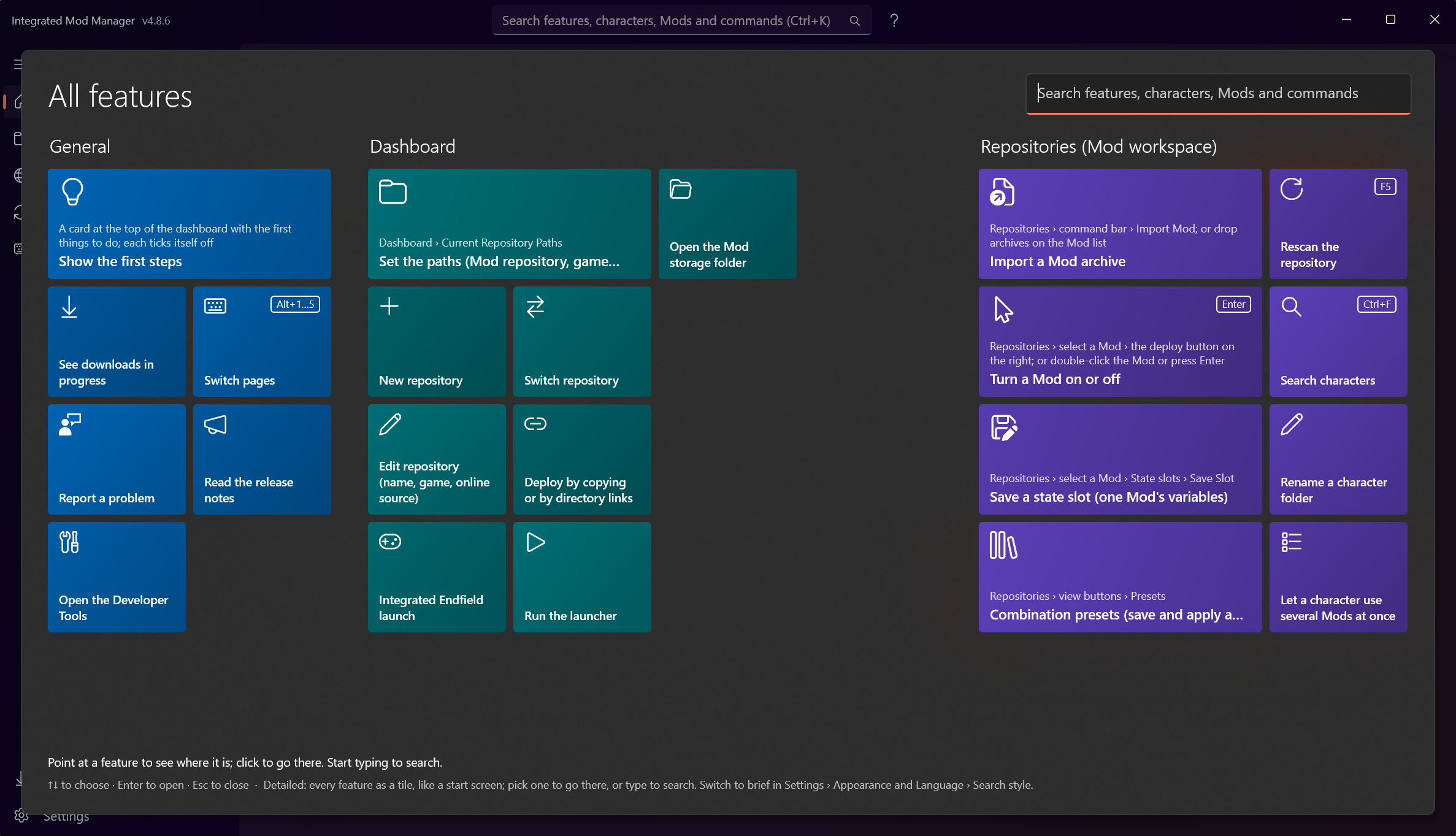
A search that finds every feature:
- Press Ctrl+K or click the search box in the title bar. All 82 features say where they are and their shortcut, and are found by their name, their place or another word for them (for example "rollback" or "d3dx_user").
- Picking one opens its page, unfolds the group it is in, scrolls to it and outlines it in the accent colour. A feature that needs a selected character or Mod first says where it is at the bottom of the window.
- Settings › Appearance and Language › Search style:
- Detailed (the default): like a start screen, it fills the window with a tile for every feature, grouped by page and scrolling sideways; the main features are wide tiles that also say where they are. Pointing at a tile or moving to it with the arrow keys shows where it is at the bottom, and typing turns it into search results. Settings have no tiles and are found by typing.
- Brief: as before, pages and commands, with features shown as you type.
-
Guidance that does not interrupt:
- After a first install, the dashboard has a First steps card: set the game and paths, add a first Mod, turn a Mod on, find features with the search, and look at shortcuts and the overlay. Each task ticks itself off when you do it anywhere, and its button takes you to the place. Hide closes it; the search can show it again (Show the first steps). It replaces the three-step tips popup; upgrades do not get it.
- Repositories, Online, Updates and Shortcuts each show one tip the first time; its ✕ closes it for good.
- The ? button beside the search box in the title bar opens the guide for the page on screen.
- The What's New dialog links to the full feature list.
- The new texts are in Chinese, English and Russian. The app, launcher, updater and Developer Tools use version 4.8.6. The Quick Start and User Guide are updated.
- Download
Integrated_Mod_Manager-v4.8.6.zipand the matching.sha256from the release page. - Fully extract it, keep the
WinUI3folder, and runIntegratedModManager.exefrom the root folder. - It requires Windows 10 1809 or later, x64 and the .NET 8 x64 runtime.
- 4.x stable releases update in the app (Settings → app updates). Or extract the new release to a new folder and copy
WinUI3/config.iniandWinUI3/beta-shell.jsoninto it. - Before you update, back up:
- the app folder;
- the target Mods folder;
- the loader's active
d3dx_user.ini.
- After the update, the What's New dialog shows once.
- The matching Developer Tools are
Integrated_Mod_Manager_Developer_Tools-v4.8.6.zipon the same release page. The app's updater does not install them; see Developer Tools.
- The new tile search, First steps card and page tips were not checked with screenshots in a high-contrast theme, because that needs a system setting changed; in high contrast the tiles use system colours.
- The Russian interface was checked through its texts only, without screenshots, and has not been reviewed by a native speaker.
- In a short window the start screen fits only two or three rows of tiles, and long feature names are cut off; the full place is in the line at the bottom and in the tooltip.
- The known issues from 4.8.5 still apply: the junction fix has not been checked in a real game with the EFMI loader, and the checks listed for 4.8.4 and 4.8.3 remain open (the overlay sending F10 in a real game, the tray icon's own menu, Run launcher with a real launcher, and likes with a real account). See Stable 4.8.5.
Verification record · Changelog
The package as a whole is AGPL-3.0-only; see Licensing.