Repository navigation
Stable Release v4.8.7
中文 · Home · Download v4.8.7
4.8.7 is the current release of the 4.8 series. It follows 4.8.6; for the rest of the 4.8 series, see Stable 4.8.6. Original notes: 4.8.7.
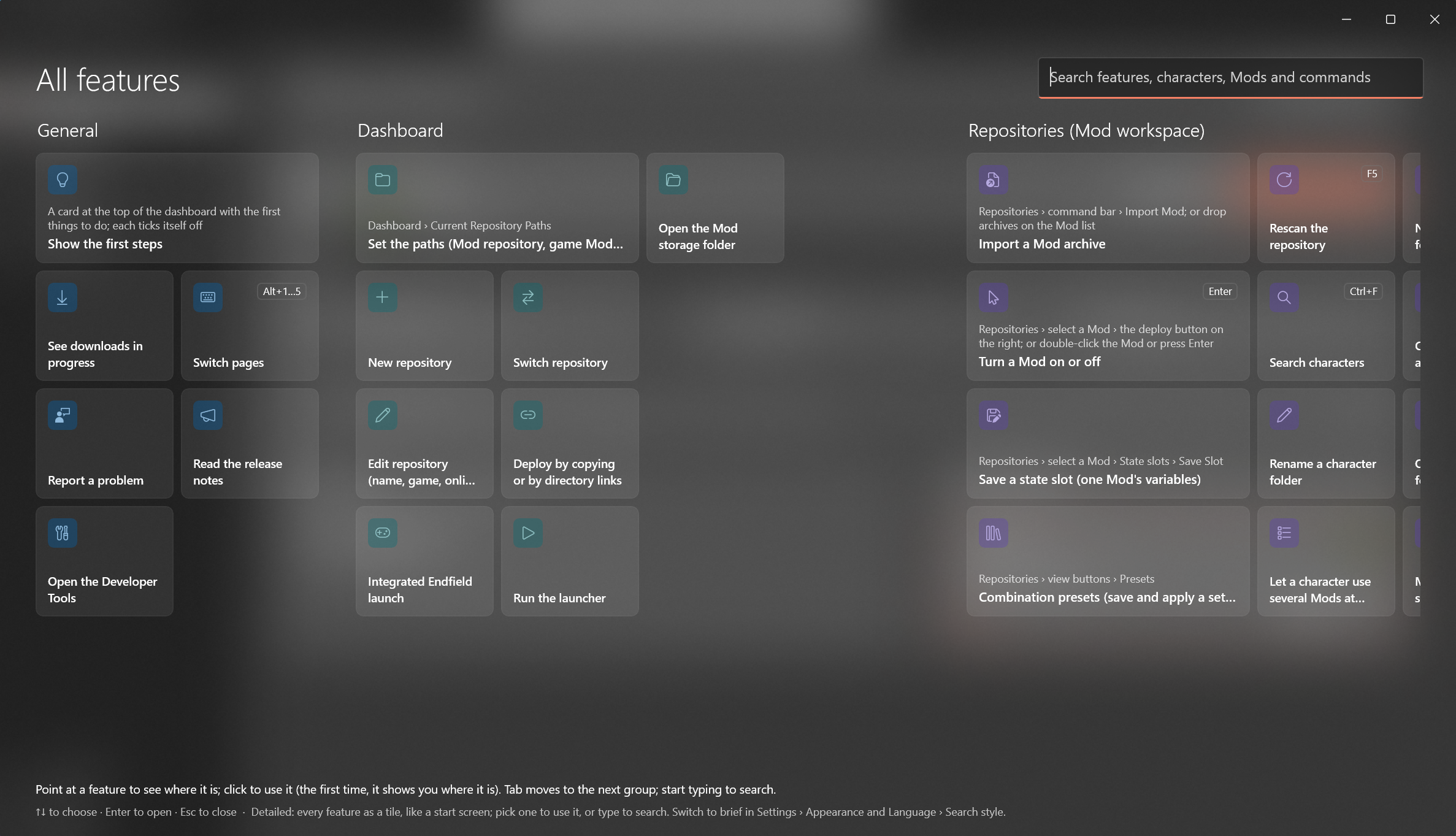
Following feedback on 4.8.6's feature search (#160): it keeps the full-window layout of tiles like the Windows 8 start screen, the tiles themselves look like Windows 11, and the tiles can now be used directly.
-
Windows 11 tiles:
- Translucent cards with a hairline border and rounded corners, and the feature's icon on a small square tinted in its page's colour; they light up when pointed at and sink a little when pressed.
- The backdrop is a thin acrylic over the whole window, so the page shows through blurred.
- High contrast uses the system colours.
-
Opening from the bottom-left:
- After Ctrl+K the backdrop spreads from the window's bottom-left corner as a growing circle, and the tiles slide and fade in column by column from the left, in about 0.4 seconds.
- The animation runs on the system's composition thread, with no layout work per frame; the tiles are built ahead of time while the window is idle after start-up, so the first opening does not wait either.
- With reduced motion it simply appears.
-
Tiles you can use:
- The first time a feature is picked it still takes you to its place and outlines it; after that, picking it uses it: it presses the button, opens the group or the drop-down, or switches the view (for example Presets or Covers).
- Features that change data or flip a switch (turning a Mod on, deleting, Several at once, saving a slot, restoring to the loader, applying a preset, undoing, restarting as administrator, clearing the sign-in, exporting diagnostics and the like) only get the keyboard focus, so you press them yourself.
- Features picked once are remembered, also after a restart.
- Tab between groups: on a tile, Tab moves to the first tile of the next group and Shift+Tab back; Tab or Down in the search box enters the first tile.
-
Guide ring fixes (same look):
- When the place is inside a folded group, the ring waits until the group has opened and the page has stopped moving, so it no longer lands in the wrong spot.
- The ring follows the place while the page scrolls, a group opens or the window is resized, and goes away when the place does (for example on another page).
- The ring fades in.
- Other: The new texts are in Chinese, English and Russian. The app, launcher, updater and Developer Tools use version 4.8.7. The What's New dialog describes 4.8.7 and shows once after upgrading. The Quick Start and User Guide are updated.
- Download
Integrated_Mod_Manager-v4.8.7.zipand the matching.sha256from the release page. - Fully extract it, keep the
WinUI3folder, and runIntegratedModManager.exefrom the root folder. - It requires Windows 10 1809 or later, x64 and the .NET 8 x64 runtime.
- 4.x stable releases update in the app (Settings → app updates). Or extract the new release to a new folder and copy
WinUI3/config.iniandWinUI3/beta-shell.jsoninto it. - Before you update, back up:
- the app folder;
- the target Mods folder;
- the loader's active
d3dx_user.ini.
- After the update, the What's New dialog shows once.
- The matching Developer Tools are
Integrated_Mod_Manager_Developer_Tools-v4.8.7.zipon the same release page. The app's updater does not install them; see Developer Tools.
- The new tiles were not checked with screenshots in the light theme, a high-contrast theme (that needs a system setting changed) or Russian; the Russian texts have not been reviewed by a native speaker.
- "Using" a feature directly was not checked one by one in real use for all 82 features; features that need a selected character or Mod first still only say where they are at the bottom.
- The known issues listed for 4.8.6 still apply: a short window fits only two or three rows of tiles and cuts off long feature names; the junction fix has not been checked in a real game with the EFMI loader; and the checks listed for 4.8.4 and 4.8.3. See the v4.8.6 notes.
- See the v4.8.0 notes for the scope of other game and loader verification.
Verification record · Changelog
The package as a whole is AGPL-3.0-only; see Licensing.