Releases: vwillcox/HomeCanvas
Release list
HomeCanvas 1.0.1 — videos, thirteen languages and fourteen new widgets

Videos on the panel, the panel in thirteen languages, and fourteen new
widgets: 52 in all, up from 38.
On a still dashboard the kiosk now uses about 2% of one CPU core, down from
66%, and the whole Pi is 3–4% busy, down from 22%.
Breaking changes
These may need something doing after you update:
- The editor only answers on the home network. Opening it by a public
domain name, or through a reverse proxy, is now refused. Use the Pi's IP
address, its name (homecanvas.local), or another home-network name
(.lan,.home.arpa). This closes a DNS-rebinding hole. - Scripts that call the editor's API must send an
Originheader.
Saving the layout, and the sender-token pages, now answer only the editor's
own pages. Fromcurl, add the editor's own address, for example
-H "Origin: http://127.0.0.1:8090". - The local control port (8766) refuses requests from web pages.
curl
and scripts on the Pi are unaffected. config.jsonand the other secrets are readable only by the kiosk's
user. That includes the share keys, site cookies and TV tokens. A tool
running as another user can no longer read them.- News tiles lost the "Headlines to show" setting. They scroll through
every headline instead. - The panel's language defaults to British English. For American
spelling and MM/DD/YYYY dates, choose English (US) under
Settings → System → Language, or from the language picker in the
editor. - YouTube needs a current yt-dlp, not the distribution's package. The
packaged yt-dlp no longer works with YouTube. Install it from
Settings → Music → Videos (see below).
Updating, and changes to the install instructions
-
Update by running the installer again, as before:
curl -fsSL https://raw.githubusercontent.com/vwillcox/HomeCanvas/main/install.sh | bashIt now also restarts the screen controller (
screen-control.service),
if you set it up, so the panel can rest while the screen is dark. -
Updating by hand? After
git pulland the build, also run
systemctl --user restart screen-control. -
For videos: Settings → Music → Videos → Install yt-dlp. This
fetches yt-dlp and deno into~/.local/share/homecanvas/bin, needs no
sudo, and yt-dlp then updates itself daily. -
New, optional: boot straight into the kiosk. Run
bash scripts/kiosk-session.sh, then reboot, for a session with only the
kiosk instead of the full desktop. The desktop's taskbar alone uses about
370 MB.bash scripts/kiosk-session.sh removegoes back. -
New, optional keys. Every new widget works without a key. Two can use
one:- a free CoinGecko Demo key for Crypto, which is recommended because
CoinGecko's keyless allowance is small and shared by everyone at your
address; - an ElevenLabs key, to have News articles read in an ElevenLabs voice
rather than piper.
- a free CoinGecko Demo key for Crypto, which is recommended because
-
New sections in INSTALL.md: YouTube, Floatplane, Nebula,
booting straight into the kiosk, and ElevenLabs for the news reader.
New
Videos on the panel: YouTube, Floatplane and Nebula
- Play links shared from the phone app, tapped in the News widget, or sent to
the control port (POST 127.0.0.1:8766/youtube?url=…). - Watch full screen, or picture-in-picture over any screen. Drag it, pinch
it, or pull its corner to resize it. - YouTube, Floatplane and Nebula widgets show the latest from
your subscriptions. - Signing in is optional for YouTube and required for the other two. Sign in
on the panel, or from a computer at the editor's address plus/youtube,
/floatplaneor/nebula. - Up to 1080p60 on a Pi 5. Nebula's HEVC uses the Pi's hardware decoder.
Thirteen languages
- Every on-screen string can be translated: the panel, Settings and the
editor's web pages. - British English is the base, with an American English pack.
- AI-created packs, marked as such in the picker:
- complete: Spanish, Italian, Dutch, Polish, Swedish and Norwegian
(Bokmål); - partial: French, German, Portuguese and Irish, which fall back to English
where a string isn't translated yet.
- complete: Spanish, Italian, Dutch, Polish, Swedish and Norwegian
- Dates follow the language: 28/09/2026 in British English, 09/28/2026 in
American English, 28.9.2026 in German.
New widgets
- Stocks and Crypto:
- a list, cards, or one card filling the tile, with daily to yearly charts;
- what you paid shown as a line on the chart, with holdings, gain or loss,
and time held; - Crypto falls back to Coinbase's public prices when CoinGecko refuses.
- GitHub: stars, issues, pull requests, releases and a weekly commit
chart for your repositories, with a tab each, and with a token, who has
been visiting. - Reminders: send "Remind me to put the bins out at 7pm" from the phone
app. When a reminder is due, the panel says it aloud and shows its page. - Getting out:
- London lines and London arrivals, from TfL;
- Fuel prices: the cheapest petrol or diesel near home, from the UK's
open fuel-price scheme; - Departures: trains, trams, subways and buses across Europe and
North America, live where the operator shares it, from Transitous; - Planes overhead: flights around home, with where each is from and
going to, and which way to look; - Traffic cameras: TfL's 900 JamCams, or any camera image address;
- Tides: high and low times, and the sea's height through the day.
- YouTube, Floatplane and Nebula, above.
News
- Tiles scroll, and pulling down from the top refreshes them.
- Each headline shows its site's icon.
- An optional layout with a tab for each feed.
- The article reader can use ElevenLabs. Piper stays the default, and reads
whenever ElevenLabs can't.
The editor
- Rows in any list setting (stocks, coins, feeds, cameras…) can be dragged
into a new order, or moved with the arrow keys. - Folded panels and rows stay as you left them, in every browser.
- Links to the panel's other pages (notes, list, senders…), and a way back
from each. - UniFi widgets have a group of their own.
- Dates are entered in the panel's language's order.
Smaller additions
- A Locked Folder left alone for 10 minutes locks itself.
- Shared photos and videos are deleted once they've been seen.
POST 127.0.0.1:8766/screen?lit=true|falsetells the kiosk when the
screen goes dark or lights up.
Security fixes
- Any web page on the home network could read or create share tokens. Now
only the editor's senders page can. - Any web page could overwrite the dashboard layout. Now only the editor can.
- Sites that point their own domain name at the panel (DNS rebinding) are
refused. - Links are opened only if they're
httporhttps. Afile://link in a
feed could have shown the config on screen. - The control port refuses commands from web pages.
- Secrets on disk are readable by the kiosk's user only, and are saved in
one piece. A power cut mid-save could leave an empty config. - Share tokens are compared in constant time.
- Size limits on editor requests, feeds, calendars and article pages.
Bug fixes
- The correct Locked Folder PIN was refused after Immich's session expired.
- The TV showed its pairing code on every restart.
- Days the clocks change: fixes to bins, meals, scheduled tiles and chores.
- Every shared photo and video was kept on disk forever.
- A few video-site errors: a crash on a video with no formats, and uploaded
cookies being discarded when the site couldn't be reached.
Power and speed
- While the screen is dark, animations stop and tiles that poll skip their
checks. They catch up the moment it lights again. - A still dashboard no longer redraws itself 60 times a second.
- Less background work: Spotify progress, the servers tile and the TV-remote
button are all checked less often. - Feeds, calendars and articles are parsed off the UI thread, so video
doesn't stutter.
Known issues
- The screen stays at full brightness whenever the dashboard is up. Night
hours are planned. - The UniFi console's certificate isn't checked yet.
- The French, German, Portuguese and Irish translations are partial, and
Danish and Welsh aren't started. - New York subway times from Transitous are timetabled, not live.
- Tide heights are modelled, not measured: fine for the beach, not for
navigation.
The full list of changes is in CHANGELOG.md. Guides and every widget: the Wiki. Questions and ideas: Discussions.
HomeCanvas 1.0 — a wall display for your home
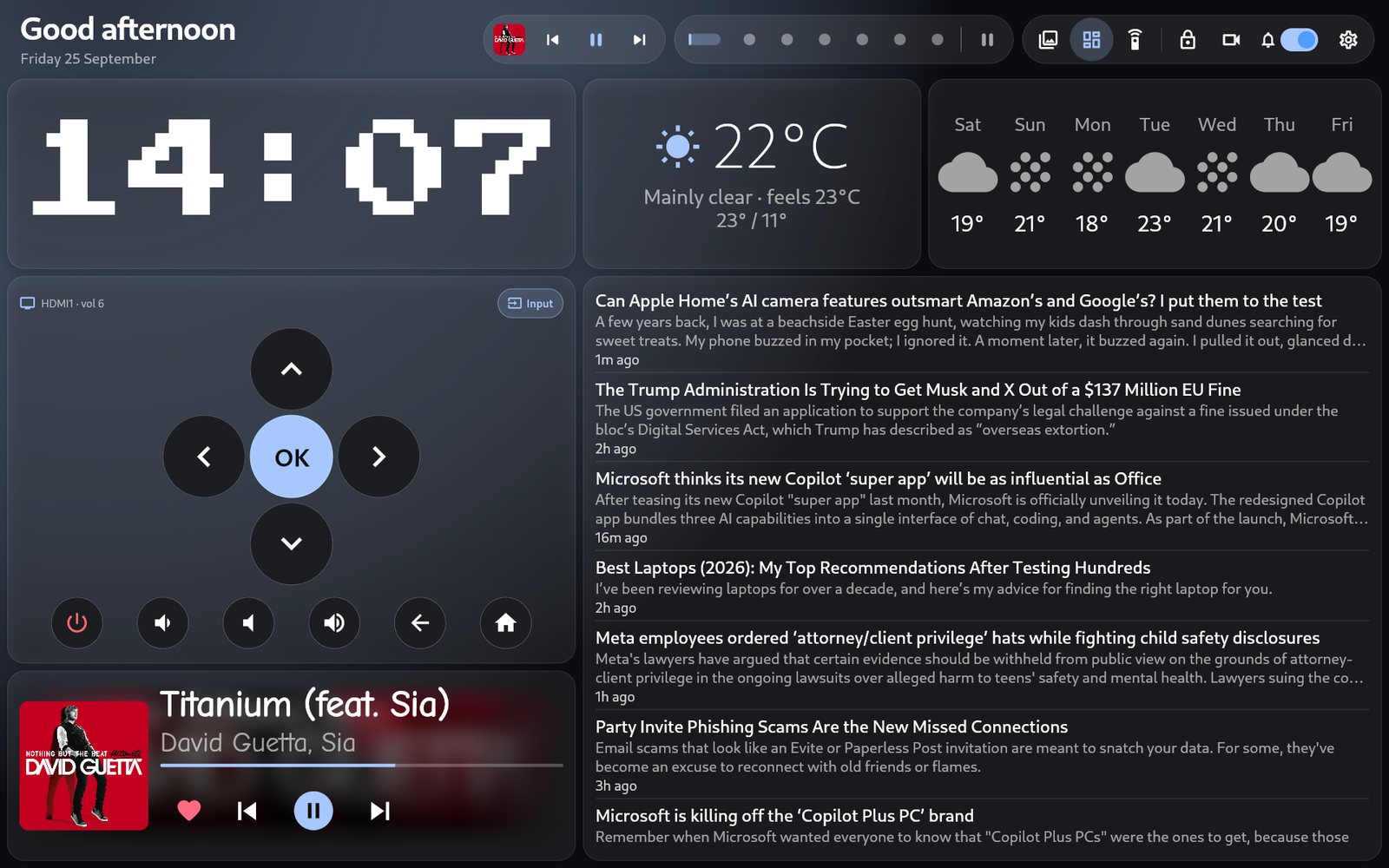
The first release of HomeCanvas: a wall display for your home, running on a Raspberry Pi with a touchscreen. It's a photo frame for your own Immich library, a dashboard you arrange from your phone, and a speaker for Spotify.
Install
On the Pi, in a terminal:
curl -fsSL https://raw.githubusercontent.com/vwillcox/HomeCanvas/main/install.sh | bashThe installer walks you through the rest:
- installs what's needed and builds HomeCanvas;
- connects it to Immich;
- names it
homecanvas.localon your network; - starts it on boot and sets up the touchscreen.
Run the same command again later to update. It works on Raspberry Pi OS, Debian, Ubuntu, Fedora, Arch and openSUSE, on 64-bit ARM or Intel/AMD. INSTALL.md has the steps done by hand, and the optional extras.
What's in it
- Photos and video from every Immich album. A full-screen viewer with pinch-zoom and swipe, and video playback.
- A slideshow photo frame with fade, slide, Ken Burns or page-turn transitions. The weather and what's playing sit in the corners, drifting slowly so nothing burns in.
- A dashboard of 38 widgets you arrange from any browser at home: clock, weather, calendar, timers, news, trains, bin day, notes, shopping list, Home Assistant, lights, TV remote, your network and home lab, and more. It has sixteen themes and a choice of fonts.
- Music. Pair a phone over Bluetooth, or play Spotify on it as a Connect device, with a full-screen player and a visualiser.
- Sharing from your phone. A companion Android app sends photos, links and notes to the panel, end-to-end encrypted. Notes can be read aloud by a voice that runs on the Pi itself.
- Kitchen timers with a sound when done: built-in sounds or your own MP3s, and the voice saying which timer finished.
- Volumes and Do Not Disturb. Separate volumes for notifications, speech, the news reader and timers, and one switch that mutes them all.
- Built for a wall. It turns the screen off when idle and wakes on touch (or by voice, through Alexa), starts on boot and restarts itself if it crashes.
Privacy
Your photos stay on your own server. No account, no analytics, no cloud of ours. A widget contacts a public service only when you add one that needs it (the weather, trains). Details.
Needs
- A Raspberry Pi 5 or 4 with a touchscreen (or another 64-bit Linux machine with a display).
- An Immich server on your network.
Guides, every widget, the FAQ and troubleshooting: the Wiki.
Questions, ideas or photos of your setup: Discussions.