feat: add "active" state to highlight on PdfViewer - #259
Conversation


 fukudasjp
changed the title
fukudasjp
changed the title
fukudasjp
changed the title
fukudasjp
changed the title
fukudasjp
changed the title
fukudasjp
changed the title

|
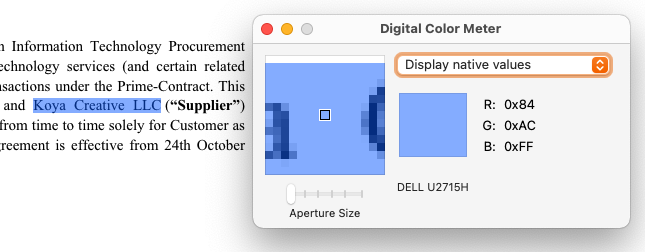
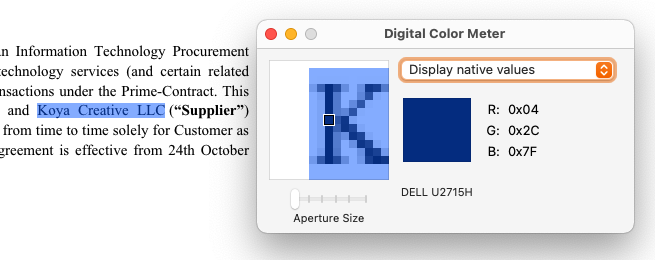
Functionality is good, but I'm concerned about the "active" color not meeting accessibility standards. It's hard to gauge since it's an overlay with opacity, but I used the Digital Color Meter app from the MacOS Developer Tools to measure both the overlay color and the text color (since the overlay changes the color of the underlying text):
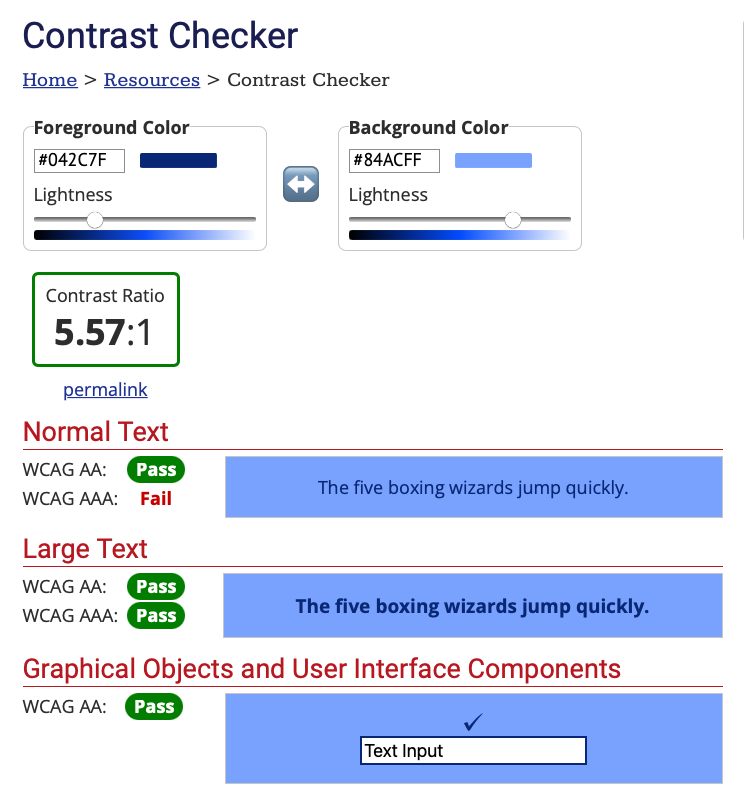
I then ran those numbers through the Contrast Checker:
If this were true system-level text highlighting, then the text would be true black, which easily passes all of the contrast checks. But since the overlay changes the text color, one test fails. We'll need to find a different color to use. Or we can find a different way to denote "active"; for example, with a "focus" rectangle around it. |
|
If using the "Active highlight index" knob, should setting it to Update: Oh, after refreshing Storybook, it worked. But then going back to |

 jhpedemonte
left a comment
jhpedemonte
left a comment
jhpedemonte
left a comment
There was a problem hiding this comment.
I keep getting confused between PdfViewerHighlight.tsx and PdfViewerWithHighlight.tsx. I think one of those should be renamed, at least, to make things clearer.
| const active = shape?.highlightId ? activeIds?.includes(shape.highlightId) : false; | ||
| return ( | ||
| <Highlight | ||
| key={shape?.highlightId || `highlight_${hlIndex}`} |
There was a problem hiding this comment.
How often will the "else" case resolve here? We shouldn't use array index for the React key -- that can easily lead to bugs.
There was a problem hiding this comment.
The shape.highlightId is currently optional, but I refactor the code to make the highlightId required.
| function getPositionStyle(bbox: Bbox, scale: number, padding: number = 0) { | ||
| const [left, top, right, bottom] = bbox; | ||
| return { | ||
| left: `${(left - padding) * scale}px`, | ||
| top: `${(top - padding) * scale}px`, | ||
| width: `${(right - left + padding) * scale}px`, | ||
| height: `${(bottom - top + padding) * scale}px` | ||
| }; | ||
| } |
There was a problem hiding this comment.
Move this function outside of the component, since it's standalone. No sense in redefining it each time the component renders.
| return ( | ||
| <div className={cx(`${settings.prefix}--document-preview-pdf-viewer-highlight`, className)}> | ||
| {highlightBoxes.map((hl, hlIndex) => { | ||
| <div key={highlightId} data-highlight-id={highlightId}> |
| })} | ||
| </React.Fragment> | ||
| <div | ||
| key={`hlId_${index}`} |
|
|
||
| function useScrollIntoActiveHighlight( | ||
| highlightDivRef: React.MutableRefObject<HTMLDivElement | null>, | ||
| shapes: (HighlightShape | undefined)[], |
There was a problem hiding this comment.
shapes can be an array of undefined?
There was a problem hiding this comment.
no. I fixed the code
| `[data-highlight-id=${activeShape.highlightId}]` | ||
| ); | ||
| highlightElm?.firstElementChild?.scrollIntoView({ block: 'nearest', inline: 'nearest' }); | ||
| }, 50); |
There was a problem hiding this comment.
Why 50 for the timeout? I don't like having arbitrary timeout values, since they may work on your computer, but may fail on a slower computer.
Using zero is fine since that's useful to make some code asynchronous. But it would be better to key off of something else rather than a random timeout, if possible.
There was a problem hiding this comment.
The intention was to push a new task to the javascript runtime. So I use the value 0.
| ); | ||
| highlightElm?.firstElementChild?.scrollIntoView({ block: 'nearest', inline: 'nearest' }); | ||
| }, 50); | ||
| return () => clearTimeout(timer); |
There was a problem hiding this comment.
If I'm reading this right, this is meant to be the cleanup function for the useEffect, right? If so, please comment.
Or better yet, do it like they show in the docs:
return function cleanup() {
  clearTimeout(timer);
}
| const [highlightPage, setHighlightPage] = useState<number | undefined>(); | ||
|
|
||
| useEffect(() => { | ||
| const pages = activeHighlightPages.filter(nonEmpty); |
There was a problem hiding this comment.
Wouldn't it make more sense to move this into useActiveHighlightPages?
| setHighlightPage(newPage); | ||
| }, [page, activeHighlightPages]); | ||
|
|
||
| const [currentPage, setCurrentPage] = useState(page); |
There was a problem hiding this comment.
I think this function would read better if this were moved to the top and it referenced currentPage instead of page in the rest of the code.
There was a problem hiding this comment.
Moved the currentPage useState to the top, revised the code and added comments.
| fieldText = documentFieldArray?.[index ?? 0]; | ||
| } | ||
| if (!fieldText || !span) { | ||
| if (typeof fieldText?.['table_text'] === 'string') { |
There was a problem hiding this comment.
Highlighting went wrong when there is table field in a document because it contains an object instead of text. Also, there is text_mappings for between bboxes and text in table fields. That code is to specially handles the table field to get field text referred in the text_mappings.
As the code is not clear, I updated the code and added a comment.

|
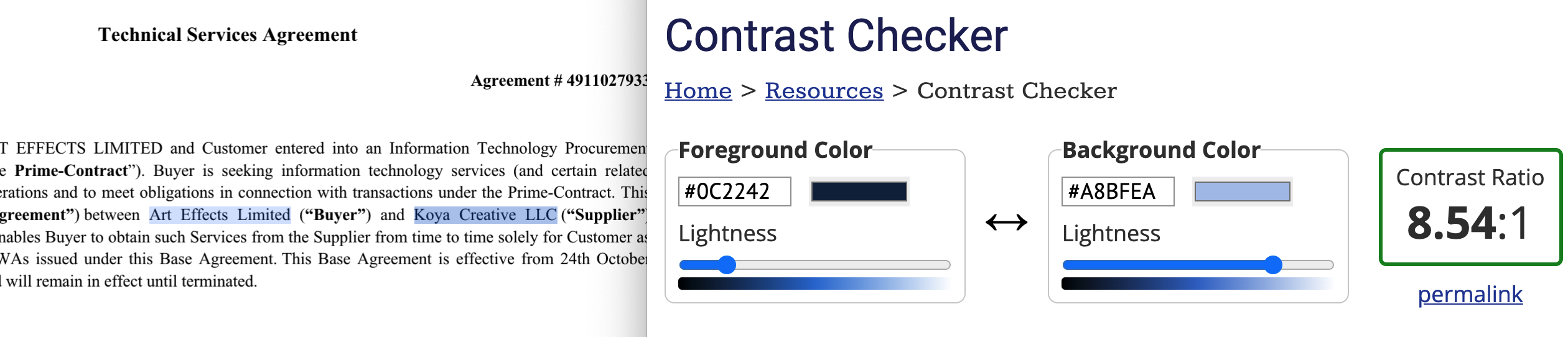
@jhpedemonte thanks for heading up the contrast issue! I updated the highlight style (8cb9c3f) to use smaller opacity value for the style not to affect the original text color. That passes the test.
|
This issue came from the Storybook code and fixed it. |

|
This pull request introduces 1 alert when merging 01d4ff7 into 5026722 - view on LGTM.com new alerts:
|
I agree. Just renaming PdfViewerHighlight to PdfHighlight makes the situation much better and it's the first step, I think. I drafted #275 on top of this PR. |

* origin/master:
  fix: add missing prop to doc provider interface (#283)
  chore: publish v1.5.0-beta.15 [ci skip]
  fix: fix PDFViewer rendering issue (#267)
  chore: publish v1.5.0-beta.14 [ci skip]
  feat: update preview toolbar design for PDF viewer (#251)
  chore: publish v1.5.0-beta.13 [ci skip]
  fix: Fix PdfView alignment in DocumentPreview (#256)
  chore: publish v1.5.0-beta.12 [ci skip]
  refactor: rename PdfViewerHighlight to PdfHighlight (#275)
  chore: publish v1.5.0-beta.11 [ci skip]
  feat: add "active" state to highlight on PdfViewer (#259)
  chore: update lockfile
  chore: update CODEOWNERS
2 participants


What do these changes do/fix?
Add "active" state to highlights on PdfViewer. When you set a highlight as active,
How do you test/verify these changes?
We can use Storybook (DocumentPreview > components > PdfViewerWithHighlight > default). In the story's Knobs tab, you can set Highlights and Active highlight index to the component.
Have you documented your changes (if necessary)?
Are there any breaking changes included in this pull request?
no