Repository navigation
Home
The Climate Suite consists of three applications and one shared library.
Together they provide a complete workflow for importing, validating, querying, analyzing, and visualizing United States Historical Climatology Network (USHCN) data.
Type: Command-line program
Purpose: Imports all USHCN station and temperature data and builds the relational database ClimateUSHCN.db.
- ushcn-v2.5-stations.txt — Metadata for all 1218 stations
- 1218 × .tmax files — Maximum monthly temperatures
- 1218 × .tmin files — Minimum monthly temperatures
- 1218 × .tavg files — Average monthly temperatures
| Column | Description |
|---|---|
| StationID | USHCN station identifier |
| GUID | Internal unique identifier |
| Latitude | GPS latitude |
| Longitude | GPS longitude |
| Elevation | Elevation in meters |
| State | Two-letter state code |
| Location | City or locality |
| Component1 | Metadata component |
| Component2 | Metadata component |
| Component3 | Metadata component |
| UTCOffset | Time zone offset |
| Column | Description |
|---|---|
| StationID | Station identifier |
| Year | Year of reading |
| Month | Month of reading |
| MeasurementType | tmax / tmin / tavg |
| CentigradeRaw | Raw temperature (°C) |
| DMFlag | Data measurement flag |
| QCFlag | Quality control flag |
| DSFlag | Data source flag |
| Column | Description |
|---|---|
| StationID | Station identifier |
| Year | Year of reading |
| MeasurementType | tmax / tmin / tavg |
| MaxValue | Annual maximum |
| MinValue | Annual minimum |
| AvgValue | Annual average |
| ValidReadings | Count of valid monthly readings |
| Column | Description |
|---|---|
| StationID | Station identifier |
| Year | Year of reading |
| MeasurementType | tmax / tmin / tavg |
| ThresholdF | Threshold in °F |
| Count | Number of months exceeding threshold |
| Column | Description |
|---|---|
| Key | Metadata key |
| Value | Metadata value |
Type: Command-line program
Purpose: Natural-language query engine for the ClimateUSHCN.db database.
-
/help— Show help -
/all— List all query examples -
/station— Station queries -
/statistics— Statistical queries -
/state— State-specific queries -
/month— Monthly queries -
/year— Annual queries -
/count— Threshold-count queries -
/db— Database queries -
/QC— Quality-control queries
QueryUSHCN List all stations.QueryUSHCN Show active stations in Colorado.QueryUSHCN Minimum monthly temperatures for station USH00419532.
QueryUSHCN Monthly temperatures in Texas units degF.QueryUSHCN Annual averages in Colorado.QueryUSHCN Temperature trend in Texas.
QueryUSHCN Monthly temperatures in Utah including estimated values.QueryUSHCN Maximum monthly temperatures for station USH00419532.
QueryUSHCN Annual maximums in Texas from 1900 through 2025.QueryUSHCN Annual minimums in Montana.
QueryUSHCN Show the percent of months above 100 from 1977 to 1987.
QueryUSHCN List your table schemas.QueryUSHCN What version of the data is in the database?
QueryUSHCN Reproduce decade 1 for station USH00419532 minimums.QueryUSHCN Compare Kansas annual maximum temperatures QC vs non QC.
QueryUSHCN Verify annual averages for station USH00419532 from 1900 to 1920.
Type: Windows desktop application
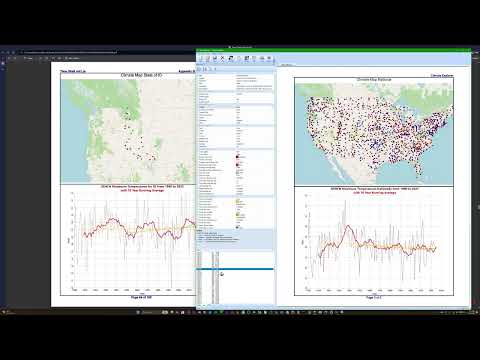
Purpose: Visualization, analysis, mapping, and publishing tool for climate data.
- Graph climate data nationally, by state, or by station
- Import images and Markdown into documents
- Save documents as:
- XML (.CEx)
- Zip (.CE)
- Export:
- All pages as JPG (scanner-friendly)
- Individual images
- Full document as PDF
- Print to any Windows-supported printer
- Layout formatted as a letter-size book, compatible with Kindle publishing
Climate Explorer includes a full map-rendering engine based on station GPS coordinates.
- National Map — Displays all USHCN stations
- State Map — Displays stations within a selected state
- Station Map — Displays a single station with surrounding geographic context
-
Right-click on any map
- Option to open the same location in Google Maps or Bing Maps
-
Click on any station
- Displays station name
- Shows latitude and longitude
- Allows immediate generation of a new Climate Explorer output centered on that station
These features make Climate Explorer both a visualization tool and a geographic navigation interface for climate data.
A short YouTube video provides a quick walkthrough of Climate Explorer, showing how to navigate the database, view maps, generate graphs, and create documents. It’s the fastest way to see the core features in action before exploring on your own.
Type: Shared codebase
Purpose: Provides all applications with unified data structures, XML parsing, utilities, and climate logic.
- XML parsing for USHCN data
- Shared climate data structures
- Database access helpers
- Graphing and rendering utilities
- Shared math and statistical routines
- Consistent behavior across all Climate Suite applications
The Climate Suite provides a complete pipeline:
- ImportUSHCN — Build the climate database
- QueryUSHCN — Validate and explore the data
- Climate Explorer — Visualize, map, and publish climate documents
- Common — Shared library powering all components
This architecture ensures consistency, reliability, and reproducibility across all climate analysis workflows.